Outlook Calendars; Importing events from one to another.

Chedmeister

New member
Member
Local time
5:33 AM
Messages
37
Hi All

I've been working with Outlook for years but never really mastered the manipulating of calendars. I just feel like I'm missing something obvious here :o

I just want to take the data from one calendar and move it to a new empty one.

My issue is that I'm migrating a guy's email from POP to IMAP in 2016. Email can be dragged and dropped into the new .ost and Contacts can be exported/imported - easy-peasy!

Then I export the Calendar from the old .pst and import it into the .ost but it adds itself below the default calendar with "(This Computer Only)" written next to it and Outlook doesn't seem to want to accept it as the default and throws warning up when it's used for meeting setups and stuff.

I just feel like it should be a simple thing to ctrl+A the contents of the imported calendar and then copy+paste it into the default one.

Or is there a way of making the imported one the default?

Surely I don't have to ditch the imported one and start anew with the new default?!?!

Many thanks in advance!!
 

My Computer My Computer

At a glance

Windows 7 64x
OS
Windows 7 64x
You have not mentioned what version of Outlook you are using, but in Outlook 2013 you can copy a calendar in one of the current email accounts & paste it into another email account.

To do that open Outlook, select Calendar & Rick Click on the top section of the calendar where it lists the email account details & from the drop down menu select Copy Calendar, it will then give you a selection of places where you can copy it to.
 

My Computer My Computer

At a glance

Windows 7 Home Premium 64 bit sp1Intel i5 3570 3.4Ghz Ivy Bridge SKT 1155 quad...G-Skill Rip Jaws 16Gb (8x2) DDR3 -1600 PC3 12...Gigabyte NVIDIA GT610 1Gb DDR3 810/1200 PCI-E...
Computer type
PC/Desktop
Computer Manufacturer/Model Number
Self built using existing case
OS
Windows 7 Home Premium 64 bit sp1
CPU
Intel i5 3570 3.4Ghz Ivy Bridge SKT 1155 quad core
Motherboard
Gigabyte Z77-HD3 SKT 1155 2xSata 3, 4x USB 3.0
Memory
G-Skill Rip Jaws 16Gb (8x2) DDR3 -1600 PC3 12800 CL 10 red
Graphics Card(s)
Gigabyte NVIDIA GT610 1Gb DDR3 810/1200 PCI-E 2.0 Silent
Sound Card
NVIDIA High Definition & Realtech High Definition Audio
Monitor(s) Displays
2 x Philips 226V4L 16:9 aspect ratio
Screen Resolution
1920 x 1080 HD
Hard Drives
Samsung 840 Pro 256gb SSD, SATA 3.
Hitachi Touro Portable 1tb, USB 3.0 HDD used for image b/ups.
PSU
Corsair VS450
Case
Codeng
Cooling
PSU fan & CPU fan
Keyboard
Logitech
Mouse
Logitech Wireless trackball M570
Internet Speed
Wireless 3G. 3mg down & 550kb up.
Antivirus
Bitdefender Internet Security 2020
Browser
Opera (Current Version) & Firefox
Other Info
MS Office 2013 Pro. Davis weather station software. MGE Nova 600 avr UPS.
Thanks for the response! :)

I did mention it was 2016 but I admit that could have been clearer :o

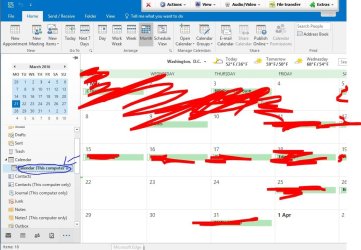
I can't see where you mean though. I've got the calendar I want selected and open but I can't see anywhere in the "top section" that lists the email account details apart from the actual top of the window above the toolbars. I thought you meant down the left hand side where the calendars are listed. If I right click there I get an option to copy but when I do it lets me select the account I want and then simply duplicates the calendar (so I just get two) but doesn't paste it's events into the default calendar.

If I could then tell that duplicate calendar to be the default one then that would be fine but I can neither do that nor delete the default (with the view of allowing mine to become the default).

I included an attachment to hopefully explain myself better. I simply want to copy the contents of the blue highlighted calendar into the Outlook default one just above it. Copying wont let me do this.

Sorry if I'm not grasping this!
 

Attachments

  • Calendar.JPG
    Calendar.JPG
    101 KB · Views: 1

My Computer My Computer

At a glance

Windows 7 64x
OS
Windows 7 64x
So anyone got any more pointers for me? I'd be really grateful, even if it is just to point out how easy this is!
 

My Computer My Computer

At a glance

Windows 7 64x
OS
Windows 7 64x
Yes, actually you did mention it was Outlook 2016, but I missed it. :o

Looking at your screen shot where you have the arrow drawn at Calendar, Right Click on that & a drop down menu should show Copy Calendar.

If you have another email account set up you should then be able to copy that calendar into it. The default email account will also be the default calendar as it is associated with that email account.
 

My Computer My Computer

At a glance

Windows 7 Home Premium 64 bit sp1Intel i5 3570 3.4Ghz Ivy Bridge SKT 1155 quad...G-Skill Rip Jaws 16Gb (8x2) DDR3 -1600 PC3 12...Gigabyte NVIDIA GT610 1Gb DDR3 810/1200 PCI-E...
Computer type
PC/Desktop
Computer Manufacturer/Model Number
Self built using existing case
OS
Windows 7 Home Premium 64 bit sp1
CPU
Intel i5 3570 3.4Ghz Ivy Bridge SKT 1155 quad core
Motherboard
Gigabyte Z77-HD3 SKT 1155 2xSata 3, 4x USB 3.0
Memory
G-Skill Rip Jaws 16Gb (8x2) DDR3 -1600 PC3 12800 CL 10 red
Graphics Card(s)
Gigabyte NVIDIA GT610 1Gb DDR3 810/1200 PCI-E 2.0 Silent
Sound Card
NVIDIA High Definition & Realtech High Definition Audio
Monitor(s) Displays
2 x Philips 226V4L 16:9 aspect ratio
Screen Resolution
1920 x 1080 HD
Hard Drives
Samsung 840 Pro 256gb SSD, SATA 3.
Hitachi Touro Portable 1tb, USB 3.0 HDD used for image b/ups.
PSU
Corsair VS450
Case
Codeng
Cooling
PSU fan & CPU fan
Keyboard
Logitech
Mouse
Logitech Wireless trackball M570
Internet Speed
Wireless 3G. 3mg down & 550kb up.
Antivirus
Bitdefender Internet Security 2020
Browser
Opera (Current Version) & Firefox
Other Info
MS Office 2013 Pro. Davis weather station software. MGE Nova 600 avr UPS.
Right, so will this only work if I have the original account to copy from? Like, the copy function ONLY works if you're going from one set of folders to another?

...Because if I try and:
- RC > Copy my highlighted calendar
- Click the account I want/calendar I want my copied calendar to become
- Click OK and then find I get the calendar but it hasn't replaced the default calendar, it's just provided me with another optional calendar that does not behave as the default. GRRR!

Surely I have to tell outlook which of my calendars is to be the default one, I don't get why this isn't more intuitive?!
 

My Computer My Computer

At a glance

Windows 7 64x
OS
Windows 7 64x
Ha! Found a way to do it.

With the calendar I want to copy selected, I clicked the 'view' category then 'Change view' then 'List'.

I could then Ctrl+a then Ctrl+c (or just RC > copy) all the events to the clipboard.

Then select the default calendar from the left hand panel and Ctrl+v them all into that.

Finally I just deleted the old calendar I imported from the previous machine.

Thanks for your help though!! :)
 

My Computer My Computer

At a glance

Windows 7 64x
OS
Windows 7 64x
Glad to hear you have it working & thanks for getting back.
 

My Computer My Computer

At a glance

Windows 7 Home Premium 64 bit sp1Intel i5 3570 3.4Ghz Ivy Bridge SKT 1155 quad...G-Skill Rip Jaws 16Gb (8x2) DDR3 -1600 PC3 12...Gigabyte NVIDIA GT610 1Gb DDR3 810/1200 PCI-E...
Computer type
PC/Desktop
Computer Manufacturer/Model Number
Self built using existing case
OS
Windows 7 Home Premium 64 bit sp1
CPU
Intel i5 3570 3.4Ghz Ivy Bridge SKT 1155 quad core
Motherboard
Gigabyte Z77-HD3 SKT 1155 2xSata 3, 4x USB 3.0
Memory
G-Skill Rip Jaws 16Gb (8x2) DDR3 -1600 PC3 12800 CL 10 red
Graphics Card(s)
Gigabyte NVIDIA GT610 1Gb DDR3 810/1200 PCI-E 2.0 Silent
Sound Card
NVIDIA High Definition & Realtech High Definition Audio
Monitor(s) Displays
2 x Philips 226V4L 16:9 aspect ratio
Screen Resolution
1920 x 1080 HD
Hard Drives
Samsung 840 Pro 256gb SSD, SATA 3.
Hitachi Touro Portable 1tb, USB 3.0 HDD used for image b/ups.
PSU
Corsair VS450
Case
Codeng
Cooling
PSU fan & CPU fan
Keyboard
Logitech
Mouse
Logitech Wireless trackball M570
Internet Speed
Wireless 3G. 3mg down & 550kb up.
Antivirus
Bitdefender Internet Security 2020
Browser
Opera (Current Version) & Firefox
Other Info
MS Office 2013 Pro. Davis weather station software. MGE Nova 600 avr UPS.
Back
Top