
- Local time
- 7:49 AM
- Messages
- 661
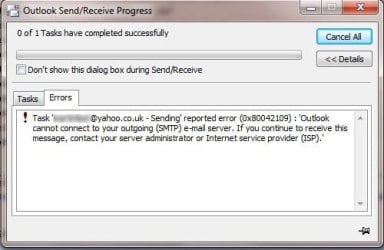
I still use my Windows 7 PC for email (Outlook 2007) and have had this message bugging me for a very long time. The thing is, if I open the message in the 'Outbox' that refuses to go, and click on 'Send' again,
then, when I try to send the message again via Outlook's 'Send All' button, it invariably goes just fine. I sometimes have to close down Outlook and restart it, but usually the simple fact of opening the message again and reselecting to send it does the trick.
So if it works the second time, why not the first? My account settings must be OK (I have double checked I have them correct many times) or my emails would not be sent at all. I have a number of email accounts set up in Outlook in any case, Yahoo and BT, and this problem can occur with any of them. Seems like a generic Outlook issue.
Anyone any ideas? Thank you.
then, when I try to send the message again via Outlook's 'Send All' button, it invariably goes just fine. I sometimes have to close down Outlook and restart it, but usually the simple fact of opening the message again and reselecting to send it does the trick.
So if it works the second time, why not the first? My account settings must be OK (I have double checked I have them correct many times) or my emails would not be sent at all. I have a number of email accounts set up in Outlook in any case, Yahoo and BT, and this problem can occur with any of them. Seems like a generic Outlook issue.
Anyone any ideas? Thank you.
Attachments
My Computer
At a glance
Windows 7 Home Premium SP1 64-bitIntel Core i7-4790K CPU @ 4.5GHz16GB KINGSTON HYPER-X FURY DUAL-DDR3 1600MHz8GB NVIDIA GEFORCE GTX 1070
- Computer type
- PC/Desktop
- Computer Manufacturer/Model Number
- Custom Build
- OS
- Windows 7 Home Premium SP1 64-bit
- CPU
- Intel Core i7-4790K CPU @ 4.5GHz
- Motherboard
- Asus H97I-PLUS
- Memory
- 16GB KINGSTON HYPER-X FURY DUAL-DDR3 1600MHz
- Graphics Card(s)
- 8GB NVIDIA GEFORCE GTX 1070
- Monitor(s) Displays
- HannsG 28" & Dell 24"
- Screen Resolution
- 1920x1200
- Hard Drives
- 1 x 2TB Samsung Evo 860 SSD
2 x 500GB Samsung Evo 850 SSD
- PSU
- CORSAIR 650W CS SERIES
- Case
- Thermaltake Core V1 Mini ITX Cube
- Cooling
- NOCTUA NH-L12
- Browser
- Firefox
- Other Info
- Custom PC used for X-Plane 11


