
Hi
I am desperate to resolve this issue, as I have been getting this 0x800ccc0e error from Outlook on my laptop, regarding failure to connect to my virtual server (apache tomcat running windows server 2008)
I tried to connect to my email via Webmail on Plesk, and received a failed login. The same for all accounts.
The problem arose when just minutes after sending through an email okay, I tried a follow up email to the same person and received this 0x800ccc0e error message.
I check on the server and noted that Mailenable Professional was not running IMAP properly, as I have exceed my trial period, so I spoke to them and installed Mailenable Enterprise on over the top to keep the trial running.
It kept the same settings, and IMAP and all the other services on the same accounts worked.
Having gone back to Outlook on my laptop, and tried to send. I got the same error.
Since then, I have disabled all anti-virus (KASPERSKY PURE / SPY WARE DOCTOR / MALWARE) on my laptop and server (SYMANTEC END POINT), disabling the firewalls to no avail.
I tried setting up an account with POP as opposed to IMAP, and test fails. I have also verified the account details to be the same, as had worked previously for a long time.
I've tinkered with some port changes via other forums, and its not worked either. Plus did a run of registry cleaners on both systems, as well as resetting machines etc.
Tel net command prompts actions do not work or bring up anything.
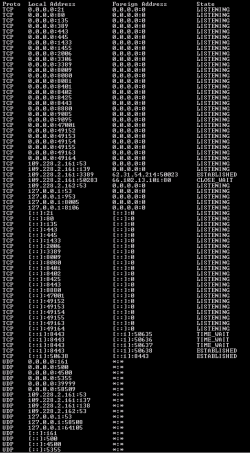
Having run NETSTAT -AN command, see attached screenshot, it does not bring up the 143 (imap) or 25 ports which should be used.
I really cannot see what more I can do, and cannot afford to pay for a technician at my hosts to look at this privately.
Can anyone help, I am pulling my hair out and have sore eyes!
Your assistance is appreciated.
Best regards
A*
I am desperate to resolve this issue, as I have been getting this 0x800ccc0e error from Outlook on my laptop, regarding failure to connect to my virtual server (apache tomcat running windows server 2008)
I tried to connect to my email via Webmail on Plesk, and received a failed login. The same for all accounts.
The problem arose when just minutes after sending through an email okay, I tried a follow up email to the same person and received this 0x800ccc0e error message.
I check on the server and noted that Mailenable Professional was not running IMAP properly, as I have exceed my trial period, so I spoke to them and installed Mailenable Enterprise on over the top to keep the trial running.
It kept the same settings, and IMAP and all the other services on the same accounts worked.
Having gone back to Outlook on my laptop, and tried to send. I got the same error.
Since then, I have disabled all anti-virus (KASPERSKY PURE / SPY WARE DOCTOR / MALWARE) on my laptop and server (SYMANTEC END POINT), disabling the firewalls to no avail.
I tried setting up an account with POP as opposed to IMAP, and test fails. I have also verified the account details to be the same, as had worked previously for a long time.
I've tinkered with some port changes via other forums, and its not worked either. Plus did a run of registry cleaners on both systems, as well as resetting machines etc.
Tel net command prompts actions do not work or bring up anything.
Having run NETSTAT -AN command, see attached screenshot, it does not bring up the 143 (imap) or 25 ports which should be used.
I really cannot see what more I can do, and cannot afford to pay for a technician at my hosts to look at this privately.
Can anyone help, I am pulling my hair out and have sore eyes!
Your assistance is appreciated.
Best regards
A*
Attachments
My Computer
- Computer Manufacturer/Model Number
- sony vaio VGN-FW41 M/H
- OS
- windows 7 ultimate


