I decided to give your launcher a go, as a learning exercise

I was initially going to do a batch file for you, but I've knocked something together in C#:
The code, should you want to inspect it:
Code:
using System;
using System.Collections.Generic;
using System.Linq;
using System.Text;

namespace ConsoleApplication2
{
    class Program
    {
        static void Main(string[] args)
        {
            Console.Title = "tom982 URL Launcher ©";
            Console.ForegroundColor = ConsoleColor.White;
            Console.Clear();

            bool exit = false;

            Console.WriteLine("---------------------");
            Console.WriteLine("| Choose an option: |");
            Console.WriteLine("|                   |");
            Console.WriteLine("|      1: Hotmail   |");
            Console.WriteLine("|      2: GMail     |");
            Console.WriteLine("|                   |");
            Console.WriteLine("|     tom982 ©      |");
            Console.WriteLine("---------------------");
            Console.WriteLine(" ");

            Console.ForegroundColor = ConsoleColor.Gray;

            while (!exit)
            {
                Console.WriteLine("Please enter your selected Option:");
                string options = Console.In.ReadLine();
                switch (options)
                {
                    case "1":
                        Console.WriteLine("You've select Option 1.");
                        System.Diagnostics.Process.Start("http://www.hotmail.com");
                        exit = true;
                        break;

                    case "2":
                        Console.WriteLine("You've select Option 2.");
                        System.Diagnostics.Process.Start("http://www.gmail.com");
                        exit = true;
                        break;

                    default:
                        Console.WriteLine("Error! Please select a valid option.");
                        Console.WriteLine(" ");
                        exit = false;
                        break;
                }
            }
        }
    }
}
This is what it looks like:
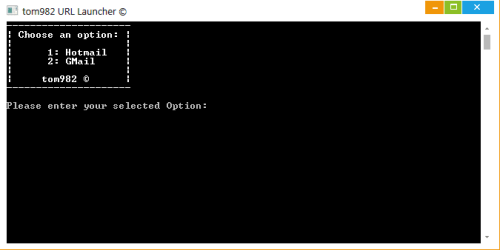
As far as I'm aware, this is bug free. If you enter a number that isn't 1 or 2, it'll ask for another. I've attached a copy of it, named OUTLOOK.exe, so that my solution (well, workaround) is here should the above suggestions not work.
Here are the locations of the real OUTLOOK.exe:
Office 2003
C:\Program Files\Microsoft Office\Office11\OUTLOOK.exe
Office 2007
C:\Program Files\Microsoft Office\Office12\OUTLOOK.EXE
Office 2010
C:\Program Files\Microsoft Office\Office14\OUTLOOK.exe
Note
In x64 (64 bit) computers, the program files folder will be Program Files (x86). E.g. "C:\Program Files (x86)\Microsoft Office\Office14\OUTLOOK.exe"
You will need to download the attached OUTLOOK.exe file, and copy and paste it into one of the above locations. I don't know which location this keyboard button is launching, so you may have to try all 3.
If you find any bugs or problems in this program, please let me know!
Tom



 Do you use Outlook? If not, we can create a program that launches another program, call it Outlook.exe and put it in the Outlook directory.


