Outlook properties - strange change

metaguy

Always Appreciative
Member
VIP
Local time
8:14 PM
Messages
140
Location
California
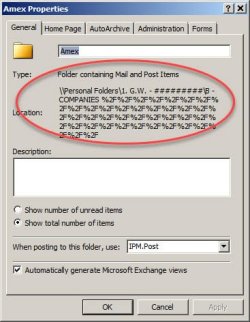
Win 7, Outlook 2007 - Personal folders... Click properties and get (#1). Close properties and the folder becomes bold with number of emails listed (2). Some will have Chinese characters in description (3).
 

Attachments

  • 2022_12_25_05_14_111.png
    2022_12_25_05_14_111.png
    9.7 KB · Views: 0
  • #1.jpg
    #1.jpg
    72.9 KB · Views: 4
  • #2.jpg
    #2.jpg
    2 KB · Views: 4
  • 3.jpg
    3.jpg
    6.9 KB · Views: 4

My Computer

Computer type
Laptop
Computer Manufacturer/Model Number
Dell E6420 Laptop 64 bit
OS
Win 7 Ultimate
CPU
Intel i5-2520M CPU 2.50 Ghz
Memory
8 GB
Graphics Card(s)
Intel(R) HD Graphics 3000
Sound Card
Intel(R) Display Audio
Monitor(s) Displays
Samsung 32" and Dell 23"
Screen Resolution
1920 x 1080 and 1366 x 768
Hard Drives
Hitachi HTS545032B9A300
Fantom G-Force 2GB
Antivirus
Bitdefender
Browser
Firefox, primary
2nd posting. Same as first. However, the location %F% I thought might be a Drive, but I don't have any external F: drive.
Also noticed there's no drive letter in front of \Personal Folders\. Is that a clue? PST files are on C: and G: ,external HDD.
Does anyone have a suggestion before I uninstall and reinstall Outlook 2007 from CD? Thanks.
 

My Computer

Computer type
Laptop
Computer Manufacturer/Model Number
Dell E6420 Laptop 64 bit
OS
Win 7 Ultimate
CPU
Intel i5-2520M CPU 2.50 Ghz
Memory
8 GB
Graphics Card(s)
Intel(R) HD Graphics 3000
Sound Card
Intel(R) Display Audio
Monitor(s) Displays
Samsung 32" and Dell 23"
Screen Resolution
1920 x 1080 and 1366 x 768
Hard Drives
Hitachi HTS545032B9A300
Fantom G-Force 2GB
Antivirus
Bitdefender
Browser
Firefox, primary
Back
Top