Overclocking. I know how to do it but results are odd?

dannyboy2005

New member
Member
VIP
Local time
12:53 PM
Messages
177
I have asked on a few computer forums on how to overclock.

I now know how to do it but seemed to have a issue.

I have a ASUS A8N-SLI DELUXE with AMD ATHLON 4800+ X2 (2.4ghz) SKT 939 and 4GB Ram

i can only get my processor to OC to 2.6Ghz BEFORE the blue screen hits and have to down grade.

Now, i've asked on a few forums but no one wants to help cos your a 'n00b' with not many post counts (The fact i've got many many other forums to visit other then theirs makes me a n00b?)

You guys on here seem knowledgeable and very helpful to say the least.

I want to know IF it is POSSIBLE to go any more then 2.6Ghz before it bottles out? If so how to do it?

I forgot to mention, i'm running a Artic Cool CPU cooler and have several cooling fans. Iirc (From memory) the CPU atm, now at 2.6Ghz (O/c) runs at around 50*C ?

Thanks
 

Attachments
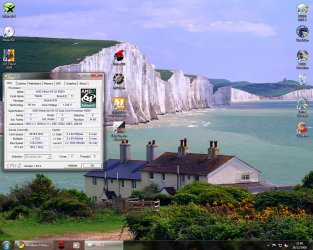
  • CPUz.jpg
    CPUz.jpg
    219.7 KB · Views: 54

My Computer My Computer

At a glance

Windows 7 Pro X64Intel i7, 930 2.8Ghz - O/c to 4Ghz @ 1.29v3x2GB = 6GB Mushkin Redline 998805Nvidia Geforce 8800GTX
Computer Manufacturer/Model Number
Home Grown
OS
Windows 7 Pro X64
CPU
Intel i7, 930 2.8Ghz - O/c to 4Ghz @ 1.29v
Motherboard
ASUS Rampage II Gene
Memory
3x2GB = 6GB Mushkin Redline 998805
Graphics Card(s)
Nvidia Geforce 8800GTX
Sound Card
Audigy Soundblaster 24 Bit Extreme
Monitor(s) Displays
Samsung SyncMaster 913N
Screen Resolution
1280 x 1024
Hard Drives
1x Western Digital 500GB, 16MB Crèche, 7,200RPM
1x Western Digital 150GB, 2MB Crèche, 7,200RPM
1x Seagate 250GB, 16MB Crèche, 7,200RPM
PSU
Thermaltake 850W PSU
Case
A butchered case with holes cut out for extra cooling lol
Cooling
CPU = Corsair H50 with 2x 120mm Noctua NF-S12B fans on rad
Keyboard
QWERTY
Mouse
Micky
Internet Speed
Not fast enough
I think you'll get more help at Anandtech, Overclockers or Extreme since this a software forum.

In a nutshell; there is lots more to o/c ing than just cooling. RAM timings and tweaks, BIOS settings, individual cpu's and motherboard characteristics all combine to produce exceptional overclocks.

So if you aren't getting the answers you hope for, it may be that your question is too broad. Do a bit more digging into your specifics and refine the questions and you may find others more willing to invest in your solutions.


My Computer My Computer

At a glance

7 x64 UltimateAMD Ryzen 516GB DDR4Radeon R7 360
Computer type
PC/Desktop
Computer Manufacturer/Model Number
Custom
OS
7 x64 Ultimate
CPU
AMD Ryzen 5
Motherboard
Gigabyte GA-AB350-Gaming
Memory
16GB DDR4
Graphics Card(s)
Radeon R7 360
Monitor(s) Displays
2 x Dell U2518D
Screen Resolution
2560x1440 2560x1440
Hard Drives
WD 500GB x2
Samsung SSD 128MB (OS)
XPG SX8200 Pro M.2 2280 1TB
PSU
Antec 500
Cooling
Hyper 212 EVO
Keyboard
Logitech cordless K800
Mouse
Logitech M510
Antivirus
Avira
I want to know IF it is POSSIBLE to go any more then 2.6Ghz before it bottles out? If so how to do it?

No, you reached the limit of your hardware once you get a BSOD. Going any higher is not going to happen.
 

My Computer My Computer

At a glance

Windows 10 Pro (x64)Intel Core i7-3930K (3.2GHz - 4.5GHz)4x Samsung 4GB PC3-12800 DDR3 (16GB 1600MHz)Nvidia Geforce GTX 690
Computer type
PC/Desktop
Computer Manufacturer/Model Number
Alienware Aurora ALX R4
OS
Windows 10 Pro (x64)
CPU
Intel Core i7-3930K (3.2GHz - 4.5GHz)
Motherboard
Alienware Aurora-R4 x79
Memory
4x Samsung 4GB PC3-12800 DDR3 (16GB 1600MHz)
Graphics Card(s)
Nvidia Geforce GTX 690
Sound Card
SteelSeries Siberia Elite
Monitor(s) Displays
Dell UltraSharp U3011
Screen Resolution
2560x1600
Hard Drives
Samsung 850 Pro 256 GB, Seagate 1TB Desktop Hybrid HDD, 2x Western Digital 4TB Green HDD
PSU
875W Some Dell PSU <.<
Case
Alienware Aurora ALX
Cooling
Custom Liquid Cooling (EK CPU & GPU blocks) dual EK 480RAD
Keyboard
Logitech G710+ Mechanical
Mouse
Logitech G700s
Internet Speed
Verizon Fios (50 mbps average)
Other Info
Server: Intel NUC D54250WYK: i5-4250U, 16GB, 256 GB mSATA, Windows Server 2012 R2
Unfortunately I have zero experience Overclocking AMD chips so I can't really help you apart from suggesting you either need more vcore or loosen your RAM timings/speed.

But it appears you are close to your max vcore as it is.

I honestly couldn't say whether you at your 'wall' or not :(
 

My Computer My Computer

At a glance

8 Pro x64i7 3770K 4.6GHz16GB G.Skill Trident X 2666mhzx2 EVGA 780 Ti Superclocked SLI
Computer type
PC/Desktop
Computer Manufacturer/Model Number
Systems by SmartEyeball
OS
8 Pro x64
CPU
i7 3770K 4.6GHz
Motherboard
ASUS P8Z77 WS
Memory
16GB G.Skill Trident X 2666mhz
Graphics Card(s)
x2 EVGA 780 Ti Superclocked SLI
Sound Card
SB X-FI Surround 5.1 PRO USB / ATH-AD900 Headphones
Monitor(s) Displays
x3 Dell U2410 / 58" Samsung
Screen Resolution
5760*1200/ 1920*1200
Hard Drives
2x Intel 520 240GB (RAID 0) * 2x WD Caviar Blacks 2TB (RAID 0) * 2TB WD Caviar Black * Sony Optirac DVD
PSU
Silverstone Strider Evolution 1200W
Case
Thermaltake Level 10 GT Snow Edition
Cooling
Noctua NH-D14
Keyboard
Topre Realforce // Ducky Shine MX Black // Filco Ninja TKL
Mouse
Thermaltake Theron (Highly Recommended) + Razer Imperator
Antivirus
MSE
Browser
IE, FF, WaterFox
Other Info
GT Extreme V2 Sim Racing Cockpit + 40" LCD and K/B Mouse stand ▼
Fanatec CSR Elite Wheel + Clubsport V1 Pedals + CSR shifter/7G-H ▼Saitek X52 Pro ▼ TrackIR 5 Pro
Buttkicker v2 Seat Rumbler with Dedicated 5.1 and Sub Woofer attached to frame ▼
=
Bloody Big Grin
Since you have an asus board there should be the over clock setting in the bios correct?
What options do you have?
 

My Computer My Computer

At a glance

Windows 7 x86/x64, Server 2008r2, Web Server ...i7 v2 3930K Steping stone 2G.SKILL Ripjaws Z Series 32GBAMD HD 5770
Computer Manufacturer/Model Number
SMN-Productions
OS
Windows 7 x86/x64, Server 2008r2, Web Server 2008
CPU
i7 v2 3930K Steping stone 2
Motherboard
ASUS Rampage IV Extreme
Memory
G.SKILL Ripjaws Z Series 32GB
Graphics Card(s)
AMD HD 5770
Monitor(s) Displays
Acer 21" and Samsung 20"
Hard Drives
Patriot Pyro 80GB
PSU
1000 Watt
Case
HAF-X
Cooling
4 Fans
Keyboard
Black Widow Ultimate
Overclocking is really all about voltages. If you reached that speed at stock volts, give the board, the CPU and the ram more volts. And make sure you cool it well.
 

My Computer My Computer

At a glance

7 ProfQ95502x2 Mushkin Ascent 85004870X2
Computer Manufacturer/Model Number
SevenForums
OS
7 Prof
CPU
Q9550
Motherboard
Maximus II Formula
Memory
2x2 Mushkin Ascent 8500
Graphics Card(s)
4870X2
Sound Card
X-Fi Xtreme Gamer
Monitor(s) Displays
LN32A550
Screen Resolution
1920x1080
Hard Drives
Intel G2 80GB
5x1TB
PSU
Corsair 1000
Case
Cosmos
Cooling
Yates^13
Keyboard
G15v1
Mouse
MX518
Internet Speed
6Mbps
Overclocking

To gain better overclock results for AMD CPU

it's important before you start to overclock that you make sure you are starting out with the correct minimum voltages for your hardware.

now in the bios:

take the hyperthreading off of auto and set it to X 3 then lower the ram speed below it's rated max aka memory divider you may have to play with this but don't worry your overclock will more than make up for lowering the ram speed because as you overclock the ram runs faster.

Now you can raise your front side buss slowly a few mhz at a time and reboot each time till your computer does not post all the way then go back in and lower the front side buss a notch or two until it will post now you know your max FSB

Now this is where you can bump up the voltage if you want to try to get a little more speed just be careful here you don't want to increase the voltage to much and proper cooling is a must but bump your ram and cpu voltages just a tad then try to raise the FSB a few more notches and see if it will post if it will keep trying to raise the FSB untill it won't post again then you can try another voltage bump but BE CAREFUL! not to much voltage it helps to know the max rated voltage on your ram and cpu I try not to exceed it you usually have some room between minimum and maximum voltages I never recommend going over max unless you water cool good luck and have fun
 
Last edited:

My Computer My Computer

At a glance

Windows 7 Ultimate 32 bitAMD Athlon 64 X2 4200+ Overclocked to 3.0Ghz2 Gigs of G.Skill DDR2 800HIS ATI Radeon HD 2600 Pro With IceQ cooler
Computer Manufacturer/Model Number
Custom Built
OS
Windows 7 Ultimate 32 bit
CPU
AMD Athlon 64 X2 4200+ Overclocked to 3.0Ghz
Motherboard
Biostar TF560 A2+
Memory
2 Gigs of G.Skill DDR2 800
Graphics Card(s)
HIS ATI Radeon HD 2600 Pro With IceQ cooler
Sound Card
6.1 Channel Sound Blaster Live 24 Bit
Monitor(s) Displays
Dual 20.5 " LG Flatrons W2052TO
Screen Resolution
1152x864
Hard Drives
Dual 36 Gig 10,000 RPM Raptors
PSU
430 watt Seasonic 80%+ Dual 12v Rails 2x80mm fans
Case
CHIEFMAX YA-5X
Cooling
4-80mm case fans 1-140mm case fan freezer 64 Pro CPU cooler
Keyboard
Saitek Eclipse II
Mouse
A4Tech wireless battery free optical scroll mouse
Internet Speed
1.5 meg down 384 up
Other Info
Logisys LED fan/light controller and dual 16" LED sticks mounted inside top of case all fans are LED all lighting is blue
DVD RW and CD RW both and Memory card reader
Overclocking

You can also relax your ram timings and various other ram settings to achieve better overclocks as well depends on what settings your board gives you for ram settings it helps to have an overclocker friendly board and some good ram
 

My Computer My Computer

At a glance

Windows 7 Ultimate 32 bitAMD Athlon 64 X2 4200+ Overclocked to 3.0Ghz2 Gigs of G.Skill DDR2 800HIS ATI Radeon HD 2600 Pro With IceQ cooler
Computer Manufacturer/Model Number
Custom Built
OS
Windows 7 Ultimate 32 bit
CPU
AMD Athlon 64 X2 4200+ Overclocked to 3.0Ghz
Motherboard
Biostar TF560 A2+
Memory
2 Gigs of G.Skill DDR2 800
Graphics Card(s)
HIS ATI Radeon HD 2600 Pro With IceQ cooler
Sound Card
6.1 Channel Sound Blaster Live 24 Bit
Monitor(s) Displays
Dual 20.5 " LG Flatrons W2052TO
Screen Resolution
1152x864
Hard Drives
Dual 36 Gig 10,000 RPM Raptors
PSU
430 watt Seasonic 80%+ Dual 12v Rails 2x80mm fans
Case
CHIEFMAX YA-5X
Cooling
4-80mm case fans 1-140mm case fan freezer 64 Pro CPU cooler
Keyboard
Saitek Eclipse II
Mouse
A4Tech wireless battery free optical scroll mouse
Internet Speed
1.5 meg down 384 up
Other Info
Logisys LED fan/light controller and dual 16" LED sticks mounted inside top of case all fans are LED all lighting is blue
DVD RW and CD RW both and Memory card reader
Those old S939 X2 are not big overclockers. I have one in my workshop PC and the most I could get out from it was 2.9GHz but it wasn't stable enough for 24/7 use and it needed a significant increase in Vcore: CPU-Z Validator 3.1

I would keep it at stock speeds just to avoid damage to the CPU.
 

My Computer My Computer

At a glance

Windows 7 Ultimate 64bitQ6600 @ 3.2GHz 24/76Gb PC6400XFX Radeon HD 5850
Computer Manufacturer/Model Number
QuadFather 6600
OS
Windows 7 Ultimate 64bit
CPU
Q6600 @ 3.2GHz 24/7
Motherboard
Abit IP35-E
Memory
6Gb PC6400
Graphics Card(s)
XFX Radeon HD 5850
Sound Card
Creative XtremeMusic
Monitor(s) Displays
Acer AL2216W
Screen Resolution
1680x1050
Hard Drives
2x 500GB Hitachi 16MB Cache
PSU
PC Power & Cooling 610
Case
Thermaltake Armor
Cooling
Thermaltake V1
Keyboard
Logitech G15
Mouse
Logitech G5
First off, i know little about overclocking AMD's so others can offer better advice there.

However, some general rules of thumb that i think applies to both AMD and Intel:

1. Research and make sure you know the MIN-MAX VCore voltages for your CPU, RAM, before you make any voltage adjustments. Exceed MAX recommended at your own risk. This is very important and the 1st thing you should know before doing anything.

2. Know your thermal limits of the chip, and keep a close eye on temperatures at all times.

3. have a goal in mind, but nothing to excessive. Generally speaking a 20% OC is good goal to start with. (this may be a bit lower with earlier AMDs Im unsure)

4.Also, when trying to find a good stable OC for CPU, it helps to underclock certain hardware.
I/E while looking for CPU OC, youll want the RAm underclocked so its not a issue.
When adjusting the RAm & timings, youll want to lower the CPU muliti until your sure the RAM is stable.

You'll need to work with 1 thing at a time so you'll know exactly what part the instability/BSOD is occuring in.
Many new overclockers, or those just learning want to start turning up CPU clock then ask why is it BSODing, or what to change.
By tuning one thing at a time, youll know what the culprit is.

And finally, Overclocking takes time, and a lot of trial and error.
Be patient and be careful, and watch the temps and voltage.

hopefully some of this will be a little help. Sorry i couldn't offer anything more.
 

My Computer My Computer

At a glance

Windows 7 Home Premium 64bitIntel Core i7 2700k8GB Mushkin Redline Ridgebacks @1866EVGA GTX570 SC
Computer Manufacturer/Model Number
Custom (Self Build)
OS
Windows 7 Home Premium 64bit
CPU
Intel Core i7 2700k
Motherboard
eVGA P67 SLI
Memory
8GB Mushkin Redline Ridgebacks @1866
Graphics Card(s)
EVGA GTX570 SC
Sound Card
XiFi Titanium HD
Monitor(s) Displays
LG W2453V
Screen Resolution
1920x1080
Hard Drives
Intel 320 80GB -- Intel X25-V 40GB --WD Black 1TB x2 -- WD Blue 640GB
PSU
Seasonic x750
Case
Corsair 600T SE White
Cooling
eVGA Superclocked CPU Cooler
Keyboard
Saitek Cyborg
Antivirus
Kaspersky
Browser
IE
Other Info
LG BD/DVD
I think you'll get more help at Anandtech, Overclockers or Extreme since this a software forum.

In a nutshell; there is lots more to o/c ing than just cooling. RAM timings and tweaks, BIOS settings, individual cpu's and motherboard characteristics all combine to produce exceptional overclocks.

So if you aren't getting the answers you hope for, it may be that your question is too broad. Do a bit more digging into your specifics and refine the questions and you may find others more willing to invest in your solutions.


This isn't just a software forum, what is the sub-category that this thread is in? Performance and maintenance. I know that that are a lot of people here who know how to overclock. Just look at this thread : http://www.sevenforums.com/performance-maintenance/2309-post-your-overclock.html. Just my point of view,

Dom
 

My Computer My Computer

At a glance

Windows Seven UltimateAMD Piledriver FX 8320 @ 3.5GHzCrucial Ballistix 8GB 1600 MHz DDR3ASUS GeForce GTX 970 Strix Edition @ 1.114 GHz
Computer type
PC/Desktop
Computer Manufacturer/Model Number
The Dominator?
OS
Windows Seven Ultimate
CPU
AMD Piledriver FX 8320 @ 3.5GHz
Motherboard
ASUS M5A97 EVO R2.0
Memory
Crucial Ballistix 8GB 1600 MHz DDR3
Graphics Card(s)
ASUS GeForce GTX 970 Strix Edition @ 1.114 GHz
Sound Card
Integrated
Monitor(s) Displays
LG 23EA63V 23" IPS 1080p Monitor
Screen Resolution
1920x1080
Hard Drives
Samsung SSD 840 EVO 120 GB
1x WD GreenPower 500GB 7200RPM
1 External HDD 1TB
PSU
Corsair CX500
Case
Zalman Z9 Plus
Cooling
CPU - Corsair Hydro H80i, Case - 3x Aerocool Shark Edition
Keyboard
Xenta Backlit Keyboard (Not very good!)
Mouse
Logitech G400
Internet Speed
Download: 7 mb/s Upload: 0.76 mb/s
Antivirus
Microsoft Security Essentials
Browser
Google Chrome
Other Info
Overclockers UK Desk Pad 89 x 45 cm
1200x730x600mm Desk
Using Virtual Audio Cable to split stereo sound into Audio Technica ATH-M50 headphones and Logitech X-530 speakers.
If you're serious about it here is a little light reading on overclocking for socket 939,

A64 Overclocking (Socket 754, 939) Intro Icrontic Tech

P.S. Did you remember to lower both the HTT and the memory divider? You need to lower both, then work on finding the max CPU overclock, then you can work the meory divider back up. Keep the HTT to less than 1000 (HT Link in CPU-Z).

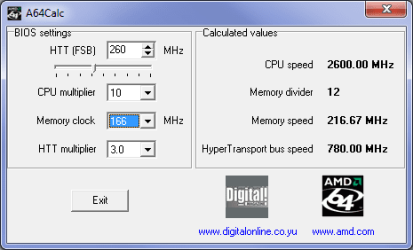
This little tool,

Download A64Calc.rar

will help with figuring out the numbers. Just to give you an idea I ran an old x2 3800+ at the following,

a64calc.png

for close to two years.
 

My Computer My Computer

At a glance

Win 7 Ultimate x64FX-8350 @ 4.6 GHz so farADATA XPG V1 Series Black 8GB DDR3 1600Sapphire R9 270x Dual-X
Computer type
PC/Desktop
Computer Manufacturer/Model Number
Me
OS
Win 7 Ultimate x64
CPU
FX-8350 @ 4.6 GHz so far
Motherboard
Asus M5A97 EVO
Memory
ADATA XPG V1 Series Black 8GB DDR3 1600
Graphics Card(s)
Sapphire R9 270x Dual-X
Sound Card
Xonar DGX w/ Corsair Vengence 1300
Monitor(s) Displays
Acer S232HL Abid
Screen Resolution
1920x1080
Hard Drives
120 GB OCZ Vertex 3
500 GB Seagate 7200.12
PSU
Antec Earthwatts 650W Green
Case
Antec Three Hundred
Cooling
Cooler Master 212 EVO
Keyboard
Logitech G510
Mouse
Logitech G500s
Internet Speed
35000/3000
take the hyperthreading off

Soz computersplus I don't like to correct peeps but I'm sure you meant "Hyper Transport" AMD X2 don't do "HyperThreading" --- just 2 avoid confusion ;)

But I agree the X2's weren't very stable when Oc'ing :p
 

My Computer My Computer

At a glance

Windows 7 Ultimate 64bitAMD Phenom Quad core 9950 black edition16Gb2x XFX Radeon 5850
Computer type
PC/Desktop
Computer Manufacturer/Model Number
Self Built
OS
Windows 7 Ultimate 64bit
CPU
AMD Phenom Quad core 9950 black edition
Motherboard
Gigabyte
Memory
16Gb
Graphics Card(s)
2x XFX Radeon 5850
Sound Card
PCI Express X-Fi Titanium / Logitech G35
Monitor(s) Displays
2x HP 2410i
Screen Resolution
1920x1080
Hard Drives
2x 500Gb Seagate
1x 300Gb Seagate
1x 1Tb Seagate
2x 1Tb Hitatchi
PSU
Jean Tech Storm 700W
Case
Cooler Master COSMOS S
Cooling
Akasa Evo Blue Pro
Keyboard
Logitech G15
Mouse
Mad Catz M.M.O. 7
Internet Speed
12mb
take the hyperthreading off

Soz computersplus I don't like to correct peeps but I'm sure you meant "Hyper Transport" AMD X2 don't do "HyperThreading" --- just 2 avoid confusion ;)

But I agree the X2's weren't very stable when Oc'ing :p

Thanks your are right my mistake see what happens when you only sleep for a few hours each night lol....
 

My Computer My Computer

At a glance

Windows 7 Ultimate 32 bitAMD Athlon 64 X2 4200+ Overclocked to 3.0Ghz2 Gigs of G.Skill DDR2 800HIS ATI Radeon HD 2600 Pro With IceQ cooler
Computer Manufacturer/Model Number
Custom Built
OS
Windows 7 Ultimate 32 bit
CPU
AMD Athlon 64 X2 4200+ Overclocked to 3.0Ghz
Motherboard
Biostar TF560 A2+
Memory
2 Gigs of G.Skill DDR2 800
Graphics Card(s)
HIS ATI Radeon HD 2600 Pro With IceQ cooler
Sound Card
6.1 Channel Sound Blaster Live 24 Bit
Monitor(s) Displays
Dual 20.5 " LG Flatrons W2052TO
Screen Resolution
1152x864
Hard Drives
Dual 36 Gig 10,000 RPM Raptors
PSU
430 watt Seasonic 80%+ Dual 12v Rails 2x80mm fans
Case
CHIEFMAX YA-5X
Cooling
4-80mm case fans 1-140mm case fan freezer 64 Pro CPU cooler
Keyboard
Saitek Eclipse II
Mouse
A4Tech wireless battery free optical scroll mouse
Internet Speed
1.5 meg down 384 up
Other Info
Logisys LED fan/light controller and dual 16" LED sticks mounted inside top of case all fans are LED all lighting is blue
DVD RW and CD RW both and Memory card reader
when you increase the bus speed, the ram and ht link goes up too. so, along with downclocking your ram, you might need to tune the ht link down to x4. whenever you get the ht link above its 1ghz freq, you're prone to bsods. some boards are more finnicky than others.
(just saw that i repeated the same thing as stormy13)
 

My Computer My Computer

At a glance

Windows 7 Ultimate x64AMD Phenom II X4 940 Black Edition @ 3.4GHz (...Corsair CM2X4096-8500C5 (4 X 2GB)XFX Radeon HD 5770 / Diamond Radeon HD 5770 C...
Computer Manufacturer/Model Number
Rig 1
OS
Windows 7 Ultimate x64
CPU
AMD Phenom II X4 940 Black Edition @ 3.4GHz (AM2+)
Motherboard
Gigabyte GA-MA790X-UD4P (AM2+)
Memory
Corsair CM2X4096-8500C5 (4 X 2GB)
Graphics Card(s)
XFX Radeon HD 5770 / Diamond Radeon HD 5770 CrossFireX
Sound Card
Asus Xonar DS (PCI)
Monitor(s) Displays
Samsung SyncMaster 932bw+ (3)
Screen Resolution
4320x900
Hard Drives
OCZ Vertex 2 80 GB - Windows 7 System --
WD Caviar Black 1TB - Music, Movies, Vids, Pics --
WD Caviar Black 640GB - User Profiles & Games --
WD My Book 320GB external
PSU
Corsair CMPSU-750TX
Case
Cooler Master HAF 932
Cooling
Corsair Hydro Series H50
Keyboard
Logitech Desktop Wave
Mouse
Logitech LX8 Laser
Internet Speed
20 down / 2 up
Other Info
LG GGC-H20L Blu-Ray / HDDVD combo --
Hauppauge HVR-1250 --
Silverstone MFP-51 --
Logitech Webcam C600
Back
Top