Solved Overheating after new hard drive and clean install

hazel123

New member
Power User
VIP
Local time
8:40 PM
Messages
403
Location
Uk
I've done a clean install on a new hard drive on a Sony Vaio VPCC and am having overheating problems (the laptop keeps turning off when it gets too hot, so I haven't even completed Windows updates).

Just wondered if anyone had any suggestions. It's happened twice now with the new drive installed - once when I had cloned the old drive onto it, and now with the clean install. When I put the old drive back in, it doesn't overheat. Everything is clean as well.

The original drive was 320GB 5400rpm 8mb cache, the new one is 500GB 5400rpm 16mb cache. I'm just wondering if Sony put some piece of firmware on the original hard drive or something.

What's installed at the moment is - Windows 7 Service Pack 1, I let Windows install the drivers (although later installed the Nvidia driver as the VGA one stretched the screen - to see if that helped with the overheating, but it didn't).

The original factory install had Intel Matrix Storage Manager, which I don't have now - would that make a difference?
 

My Computer My Computer

At a glance

W7 HP 64 bitCore i3 1st gen8gbNvidia 330M
Computer type
Laptop
Computer Manufacturer/Model Number
Sony Vaio VPCCW2S1E
OS
W7 HP 64 bit
CPU
Core i3 1st gen
Memory
8gb
Graphics Card(s)
Nvidia 330M
Internet Speed
8 mbps
Browser
Firefox
Hello hazel123,

Is the laptop clean and you can feel hot air coming out of the exhaust vent ?
 

My Computer My Computer

At a glance

Multi-Boot W7_Pro_x64 W8.1_Pro_x64 W10_Pro_x6...AMD Athlon II x4 6206GB GSkill DDR2 800AMD 4670 GPU + AMD 4200 IGP
Computer type
PC/Desktop
Computer Manufacturer/Model Number
home built
OS
Multi-Boot W7_Pro_x64 W8.1_Pro_x64 W10_Pro_x64 +Linux_VMs +Chromium_VM
CPU
AMD Athlon II x4 620
Motherboard
Gigabyte GA-MA785G-UD3H
Memory
6GB GSkill DDR2 800
Graphics Card(s)
AMD 4670 GPU + AMD 4200 IGP
Sound Card
on board Realtek ALC889A
Monitor(s) Displays
RCA 40" LCD TV, Insignia 32" LCD TV, HP 15" LCD monitor
Screen Resolution
1680 x 1050
Hard Drives
OCZ Vertex 3 120GB,
Samsung F3 1TB (3),
Several others - WD, Seagate, Hitachi, ...
PSU
Corsair 500 W
Case
Rosewill mid tower
Cooling
CM 90mm rifle
Keyboard
Gyration wireless, Logitech wireless, Dell USB wired
Mouse
Gyration wireless, Logitech wireless, V7 USB wired
Internet Speed
Spectrum - 100Mbps D / 10Mbps U
Antivirus
Avast, MBAM3, EMET, WinPatrol
Browser
Pale Moon, Firefox, IE
Other Info
2 multi-boot PC's
Mainly HTPC/Office/Gen purpose (no gaming).
Trendnet USB KVM.
LG DVD burner/Blue Ray Player.
Tray system for removable SATA backup drives.

Not currently OCd, under-volted.
I use Hybrid sleep, rarely re-boot or shutdown.

Hauppauge HD-PVR, Avermedia PCIe TV Tuner, Hauppauge PCI TV Tuner.
Hi again David. Yes I cleaned dust out recently with blown air and you can feel the hot air coming out.

I'm wondering if there is some compatibility thing with the drive and Sony. It gets really hot but when I put the old drive back in, it didn't do that.
 

My Computer My Computer

At a glance

W7 HP 64 bitCore i3 1st gen8gbNvidia 330M
Computer type
Laptop
Computer Manufacturer/Model Number
Sony Vaio VPCCW2S1E
OS
W7 HP 64 bit
CPU
Core i3 1st gen
Memory
8gb
Graphics Card(s)
Nvidia 330M
Internet Speed
8 mbps
Browser
Firefox
I've read some people have issues with Windows Update where it's uses a lot of CPU.
Open Task Manager and see what your CPU usage is with the new HD when WU is running.
Just guessing here, but maybe the CPU is causing the overheating because of WU.

You can also download and run the portable version of HWMonitor from here:
DOWNLOADING HWMONITOR_1.28.ZIP | CPUID

Then you could compare temps with the old HD and new HD.
 

My Computer My Computer

At a glance

Multi-Boot W7_Pro_x64 W8.1_Pro_x64 W10_Pro_x6...AMD Athlon II x4 6206GB GSkill DDR2 800AMD 4670 GPU + AMD 4200 IGP
Computer type
PC/Desktop
Computer Manufacturer/Model Number
home built
OS
Multi-Boot W7_Pro_x64 W8.1_Pro_x64 W10_Pro_x64 +Linux_VMs +Chromium_VM
CPU
AMD Athlon II x4 620
Motherboard
Gigabyte GA-MA785G-UD3H
Memory
6GB GSkill DDR2 800
Graphics Card(s)
AMD 4670 GPU + AMD 4200 IGP
Sound Card
on board Realtek ALC889A
Monitor(s) Displays
RCA 40" LCD TV, Insignia 32" LCD TV, HP 15" LCD monitor
Screen Resolution
1680 x 1050
Hard Drives
OCZ Vertex 3 120GB,
Samsung F3 1TB (3),
Several others - WD, Seagate, Hitachi, ...
PSU
Corsair 500 W
Case
Rosewill mid tower
Cooling
CM 90mm rifle
Keyboard
Gyration wireless, Logitech wireless, Dell USB wired
Mouse
Gyration wireless, Logitech wireless, V7 USB wired
Internet Speed
Spectrum - 100Mbps D / 10Mbps U
Antivirus
Avast, MBAM3, EMET, WinPatrol
Browser
Pale Moon, Firefox, IE
Other Info
2 multi-boot PC's
Mainly HTPC/Office/Gen purpose (no gaming).
Trendnet USB KVM.
LG DVD burner/Blue Ray Player.
Tray system for removable SATA backup drives.

Not currently OCd, under-volted.
I use Hybrid sleep, rarely re-boot or shutdown.

Hauppauge HD-PVR, Avermedia PCIe TV Tuner, Hauppauge PCI TV Tuner.
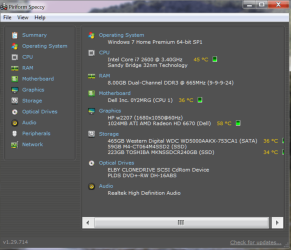
I wouldrun Speccy. It gives you this kind of information. Then you might know who the culprit is.

Speccy - Builds
 

Attachments

  • 2016-03-13_1741.png
    2016-03-13_1741.png
    82.3 KB · Views: 1

My Computer My Computer

At a glance

Vista, Windows7, Mint Mate, Zorin, Windows 8from 1.6GHz Duo to i7
Computer Manufacturer/Model Number
HP, Dell, Gateway, Toshiba - 4 laptops and 2 desktops
OS
Vista, Windows7, Mint Mate, Zorin, Windows 8
CPU
from 1.6GHz Duo to i7
Monitor(s) Displays
2x HP w2207
Hard Drives
5x HDD, 7x SSD, 12x Externals
Keyboard
with trackball - no mices
Mouse
Trackball mice
Internet Speed
DSL 6000
whs, your link for Speccy is bad.
I agree, Speccy is a good tool, the portable version and installer are available here:
Speccy - Builds
 

My Computer My Computer

At a glance

Multi-Boot W7_Pro_x64 W8.1_Pro_x64 W10_Pro_x6...AMD Athlon II x4 6206GB GSkill DDR2 800AMD 4670 GPU + AMD 4200 IGP
Computer type
PC/Desktop
Computer Manufacturer/Model Number
home built
OS
Multi-Boot W7_Pro_x64 W8.1_Pro_x64 W10_Pro_x64 +Linux_VMs +Chromium_VM
CPU
AMD Athlon II x4 620
Motherboard
Gigabyte GA-MA785G-UD3H
Memory
6GB GSkill DDR2 800
Graphics Card(s)
AMD 4670 GPU + AMD 4200 IGP
Sound Card
on board Realtek ALC889A
Monitor(s) Displays
RCA 40" LCD TV, Insignia 32" LCD TV, HP 15" LCD monitor
Screen Resolution
1680 x 1050
Hard Drives
OCZ Vertex 3 120GB,
Samsung F3 1TB (3),
Several others - WD, Seagate, Hitachi, ...
PSU
Corsair 500 W
Case
Rosewill mid tower
Cooling
CM 90mm rifle
Keyboard
Gyration wireless, Logitech wireless, Dell USB wired
Mouse
Gyration wireless, Logitech wireless, V7 USB wired
Internet Speed
Spectrum - 100Mbps D / 10Mbps U
Antivirus
Avast, MBAM3, EMET, WinPatrol
Browser
Pale Moon, Firefox, IE
Other Info
2 multi-boot PC's
Mainly HTPC/Office/Gen purpose (no gaming).
Trendnet USB KVM.
LG DVD burner/Blue Ray Player.
Tray system for removable SATA backup drives.

Not currently OCd, under-volted.
I use Hybrid sleep, rarely re-boot or shutdown.

Hauppauge HD-PVR, Avermedia PCIe TV Tuner, Hauppauge PCI TV Tuner.
Thanks David for fixing that.
 

My Computer My Computer

At a glance

Vista, Windows7, Mint Mate, Zorin, Windows 8from 1.6GHz Duo to i7
Computer Manufacturer/Model Number
HP, Dell, Gateway, Toshiba - 4 laptops and 2 desktops
OS
Vista, Windows7, Mint Mate, Zorin, Windows 8
CPU
from 1.6GHz Duo to i7
Monitor(s) Displays
2x HP w2207
Hard Drives
5x HDD, 7x SSD, 12x Externals
Keyboard
with trackball - no mices
Mouse
Trackball mice
Internet Speed
DSL 6000
Thanks - I hadn't thought of that. I had Speccy on the old drive. I've put the old drive back in again now. Nice and cool again.

If I get chance tomorrow I'll swap them round again and see what's causing the heat. I had something similar happen on another Sony laptop - an older Vista one - it got very hot with Windows 7 64 bit on but seemed to be ok with 32 bit on it. But don't want to put 32 bit on my main laptop as I have 8GB ram I want to use.

I've been reading round Sony forums and there is mention of using a "Standard Format" hard drive rather than an "Advanced Format" drive - but I think that was so recovery discs would work. It seems there are limitations on what drives are compatible with some Sony laptops. I've given up on it for now. I had the new drive in a 10" netbook for a month and it worked perfectly well in there so I'll put it back in there and try and find a more compatible drive.

The overheating was all the time, not just when running Windows Update, so it seemed to be just running too hot generally. Could have fried steak on it.
 

My Computer My Computer

At a glance

W7 HP 64 bitCore i3 1st gen8gbNvidia 330M
Computer type
Laptop
Computer Manufacturer/Model Number
Sony Vaio VPCCW2S1E
OS
W7 HP 64 bit
CPU
Core i3 1st gen
Memory
8gb
Graphics Card(s)
Nvidia 330M
Internet Speed
8 mbps
Browser
Firefox
Buy a solid state drive, they don`t get hot.
 

My Computer My Computer

At a glance

Windows 10 Pro x64Intel Core i7 6700KGSkill TridentZ RGB 16GB 3600 16-16-16-36EVGA GTX 980 Ti SC x2
Computer type
PC/Desktop
Computer Manufacturer/Model Number
Skylake Special #666
OS
Windows 10 Pro x64
CPU
Intel Core i7 6700K
Motherboard
Asus Sabertooth Z170 Mark 1
Memory
GSkill TridentZ RGB 16GB 3600 16-16-16-36
Graphics Card(s)
EVGA GTX 980 Ti SC x2
Sound Card
Realtek High Definition
Monitor(s) Displays
AOC G2460PG
Screen Resolution
1920 x 1080 144Hz
Hard Drives
Samsung 860 Pro 256GB, Seagate Barracuda 4TB x2
PSU
EVGA 1000 P2, EVGA White Custom Braided Cables
Case
Corsair Vengeance C70 Gunmetal Black
Cooling
Corsair H100i v2, Corsair ML120 x2, Thermal Grizzly Kryonaut
Keyboard
Logitech G910 Orion Spectrum
Mouse
Logitech G700s
Internet Speed
Verizon Fios Quantum Gateway 75/75
Antivirus
Windows Defender, Malwarebytes Free 3.8.3
Browser
Chrome
Other Info
Corsair SP120 x4, LG Blu-ray Drive, Durabrand HT-395 100 Watt Dolby Digital Amp, Corsair H2100 Wireless 7.1 Headset
Buy a solid state drive, they don`t get hot.
Yeah that's amazing how heat problems can be solved with SSDs.

I have a HP laptop that used to run very hot. I changed the HDD for a SSD and the problem went away.
 

My Computer My Computer

At a glance

Vista, Windows7, Mint Mate, Zorin, Windows 8from 1.6GHz Duo to i7
Computer Manufacturer/Model Number
HP, Dell, Gateway, Toshiba - 4 laptops and 2 desktops
OS
Vista, Windows7, Mint Mate, Zorin, Windows 8
CPU
from 1.6GHz Duo to i7
Monitor(s) Displays
2x HP w2207
Hard Drives
5x HDD, 7x SSD, 12x Externals
Keyboard
with trackball - no mices
Mouse
Trackball mice
Internet Speed
DSL 6000
Hmm that's interesting! Didn't know SSD's ran cooler. It'd be quite expensive for a 500GB SSD though I guess. Anyway I ran speccy on the old drive when it was back in. It runs fairly hot with the old drive in, but I can tell it's not as hot as when the new drive was in and it doesn't get so hot that it shuts down.

On the old (original drive) the hard drive temperature was 35 degrees and the CPU and Motherboard 56 degrees. Haven't put the new one back in to run Speccy and not sure I'll bother now - it was hot enough to make it keep shutting down.

So if I put an SSD in do you think I'd have any of the Sony compatibility issues? Or does that just apply to standard drives. Should be ok with a clean install I guess, as long as the overheating issue is sorted.
 

My Computer My Computer

At a glance

W7 HP 64 bitCore i3 1st gen8gbNvidia 330M
Computer type
Laptop
Computer Manufacturer/Model Number
Sony Vaio VPCCW2S1E
OS
W7 HP 64 bit
CPU
Core i3 1st gen
Memory
8gb
Graphics Card(s)
Nvidia 330M
Internet Speed
8 mbps
Browser
Firefox
For a 500GB SSD you are looking at $150.

500GB ssd - Newegg.com

And there should be no problem installing and using it.
 

My Computer My Computer

At a glance

Vista, Windows7, Mint Mate, Zorin, Windows 8from 1.6GHz Duo to i7
Computer Manufacturer/Model Number
HP, Dell, Gateway, Toshiba - 4 laptops and 2 desktops
OS
Vista, Windows7, Mint Mate, Zorin, Windows 8
CPU
from 1.6GHz Duo to i7
Monitor(s) Displays
2x HP w2207
Hard Drives
5x HDD, 7x SSD, 12x Externals
Keyboard
with trackball - no mices
Mouse
Trackball mice
Internet Speed
DSL 6000
Hard drive cause more heat than a ssd for a simple reason.
SSD have no moving parts.

Another thought. Laptops use 5400 rpm hard drives because they create less heat than a 7200 hard drive.
That is how sensitive laptops are to heat. Laptops do not dissipate heat well.
Why one 5400 rpm hard drive will cause more heat than another 5400 rpm hard drive could just be the way it is manufactured.

A ssd installed in a laptop would be wise move in my opinion. Many times faster than a hard drive and very little heat produced.

SSD = Solid State Drive = No moving parts = fast = cooler. It's a win win.

Compared to what a quality ssd cost just a couple of years ago, they are priced right.
 

My Computer My Computer

At a glance

Windows 10 Pro. 64/ version 1709 Windows 7 Pr...Intel i7-6800K @ 4.3Corsair Platinum 16 gig @2400EVGA GTX 1070 OC
Computer type
PC/Desktop
Computer Manufacturer/Model Number
Home made Desktop
OS
Windows 10 Pro. 64/ version 1709 Windows 7 Pro/64
CPU
Intel i7-6800K @ 4.3
Motherboard
ASUS X-99 Deluxe II
Memory
Corsair Platinum 16 gig @2400
Graphics Card(s)
EVGA GTX 1070 OC
Monitor(s) Displays
Asus 27" LED LCD/VE278Q
Screen Resolution
1920-1080 or 1280-720 HDMI
Hard Drives
INTEL SSD 730-240 Gb Sata 3.0/
PSU
EVGA Platium 1200W
Case
Phanteks Luxe Tempered Glass 8 fans/ one radiator
Cooling
XSPC/ Water Cooled CPU
Keyboard
Das 4 Professional
Mouse
Logitech M705/MX Anywhere 2-S
Internet Speed
100 mbits
Antivirus
Microsoft Security Essentials/ Malwarebytes Premium 3.0/ SAS
Browser
I.E. 11 default/Firefox/ ISP Time Warner Cable/Spectrum
Other Info
LG BluRay Burner/
Sound system-KLipsch-THX/
Icy Dock ssd Hot Swap bays.
Thank You Jack :)

hazel, there are 3 major components that make it hot, #1 being the cpu, #2 and #3 are a tossup, but I`d have to say the video card 2 and the hard drive 3, and as they all heatup, the laptop just gets hotter and hotter. You need a chill pad if you don`t have one.

Laptop hard drives are the worst and only spin at 5400 rpm, do your self a favor and get that ssd.

I personally hate laptops and would only use one if the company gave it to me.

Even today I still do all my on site paperwork, signoff sheets, pictures etc with my iPhone.
 

My Computer My Computer

At a glance

Windows 10 Pro x64Intel Core i7 6700KGSkill TridentZ RGB 16GB 3600 16-16-16-36EVGA GTX 980 Ti SC x2
Computer type
PC/Desktop
Computer Manufacturer/Model Number
Skylake Special #666
OS
Windows 10 Pro x64
CPU
Intel Core i7 6700K
Motherboard
Asus Sabertooth Z170 Mark 1
Memory
GSkill TridentZ RGB 16GB 3600 16-16-16-36
Graphics Card(s)
EVGA GTX 980 Ti SC x2
Sound Card
Realtek High Definition
Monitor(s) Displays
AOC G2460PG
Screen Resolution
1920 x 1080 144Hz
Hard Drives
Samsung 860 Pro 256GB, Seagate Barracuda 4TB x2
PSU
EVGA 1000 P2, EVGA White Custom Braided Cables
Case
Corsair Vengeance C70 Gunmetal Black
Cooling
Corsair H100i v2, Corsair ML120 x2, Thermal Grizzly Kryonaut
Keyboard
Logitech G910 Orion Spectrum
Mouse
Logitech G700s
Internet Speed
Verizon Fios Quantum Gateway 75/75
Antivirus
Windows Defender, Malwarebytes Free 3.8.3
Browser
Chrome
Other Info
Corsair SP120 x4, LG Blu-ray Drive, Durabrand HT-395 100 Watt Dolby Digital Amp, Corsair H2100 Wireless 7.1 Headset
Thanks for all the info. I can try it out because there is a smaller samsung evo in our son's laptop which he has ignored since he got an ipod - I'll back it up and try that in mine. If all is ok I'll get the bigger one. Have to say my little Eee PC was a lot easier to upgrade than this Sony!
 

My Computer My Computer

At a glance

W7 HP 64 bitCore i3 1st gen8gbNvidia 330M
Computer type
Laptop
Computer Manufacturer/Model Number
Sony Vaio VPCCW2S1E
OS
W7 HP 64 bit
CPU
Core i3 1st gen
Memory
8gb
Graphics Card(s)
Nvidia 330M
Internet Speed
8 mbps
Browser
Firefox
Yeah, Sonys are difficult. I had to RMA a Sony because there was quasi nothing I could do with it. Their BIOS is very minimal and has no functions you need for upgrades.
 

My Computer My Computer

At a glance

Vista, Windows7, Mint Mate, Zorin, Windows 8from 1.6GHz Duo to i7
Computer Manufacturer/Model Number
HP, Dell, Gateway, Toshiba - 4 laptops and 2 desktops
OS
Vista, Windows7, Mint Mate, Zorin, Windows 8
CPU
from 1.6GHz Duo to i7
Monitor(s) Displays
2x HP w2207
Hard Drives
5x HDD, 7x SSD, 12x Externals
Keyboard
with trackball - no mices
Mouse
Trackball mice
Internet Speed
DSL 6000
Minimal is the right word for the bios! It's been a good laptop though and I like the keyboard and it runs my video editing software, so I'll keep persevering. The info I had from Sony last year just said you had to replace it with an identical hard drive of the same size for it to work - but I think that was just to be able to use the recovery discs.

If i have a go at Cloning with macrium again, can someone tell me about the sata to usb cables please. I have one that has both a usb2 and a usb3 cable - I only have usb 2 on the laptop but the usb2 cable doesn't seem to do anything so I had used the usb3 cable last time, which seemed to work - so does that mean a usb3 cable will work on a usb 2 port? Or could it be the reason why the cloned drive had faults.
 

My Computer My Computer

At a glance

W7 HP 64 bitCore i3 1st gen8gbNvidia 330M
Computer type
Laptop
Computer Manufacturer/Model Number
Sony Vaio VPCCW2S1E
OS
W7 HP 64 bit
CPU
Core i3 1st gen
Memory
8gb
Graphics Card(s)
Nvidia 330M
Internet Speed
8 mbps
Browser
Firefox
hazel, that's a difficu;t question. Who knows what this particular cable does. Only the manufacturer may be able to give you correct information. I use external enclosures since they were only minimally more expensive than the cable. And my enclosures work perfectly.
 

My Computer My Computer

At a glance

Vista, Windows7, Mint Mate, Zorin, Windows 8from 1.6GHz Duo to i7
Computer Manufacturer/Model Number
HP, Dell, Gateway, Toshiba - 4 laptops and 2 desktops
OS
Vista, Windows7, Mint Mate, Zorin, Windows 8
CPU
from 1.6GHz Duo to i7
Monitor(s) Displays
2x HP w2207
Hard Drives
5x HDD, 7x SSD, 12x Externals
Keyboard
with trackball - no mices
Mouse
Trackball mice
Internet Speed
DSL 6000
Re Sony laptops - the one thing I also remember was that I could not run Linux on it. And Sony said that they were designed to run with Windows only. What a poor story. Since then Sony products are on my blacklist.
 

My Computer My Computer

At a glance

Vista, Windows7, Mint Mate, Zorin, Windows 8from 1.6GHz Duo to i7
Computer Manufacturer/Model Number
HP, Dell, Gateway, Toshiba - 4 laptops and 2 desktops
OS
Vista, Windows7, Mint Mate, Zorin, Windows 8
CPU
from 1.6GHz Duo to i7
Monitor(s) Displays
2x HP w2207
Hard Drives
5x HDD, 7x SSD, 12x Externals
Keyboard
with trackball - no mices
Mouse
Trackball mice
Internet Speed
DSL 6000
hazel, that's a difficu;t question. Who knows what this particular cable does. Only the manufacturer may be able to give you correct information. I use external enclosures since they were only minimally more expensive than the cable. And my enclosures work perfectly.

So if I get an enclosure I don't need a cable? I'm quite good at taking things to bits and installing things, but anything to do with cables does my head in ha ha.
 

My Computer My Computer

At a glance

W7 HP 64 bitCore i3 1st gen8gbNvidia 330M
Computer type
Laptop
Computer Manufacturer/Model Number
Sony Vaio VPCCW2S1E
OS
W7 HP 64 bit
CPU
Core i3 1st gen
Memory
8gb
Graphics Card(s)
Nvidia 330M
Internet Speed
8 mbps
Browser
Firefox
Back
Top