
Overinstalled Fonts... By about 18,000... give or take

Boosted7

New member
Local time
6:50 PM
Messages
2
I've searched...

So my all too thoughtful girlfriend decided that my way of using a font viewer to preview then install was just too much extra work, getting in the way of her valuable learning (read: random clicking without actually paying attention making the same mistakes stumbling onto the same tools only to forget to save, and all...). A quick search for "*.ttf" files, hit Ctrl-A, then did a right click > Install and... the joy of 18,000 fonts. And I thought she wasn't paying attention. She then noticed a very notable decrease in performance, most notably Photoshop (Oh the irony! ), and proceeded to delete as many of them as possible (Ctrl-A, delete, yes-to-all... yes-to-all, and all). This compounded the problem because she managed to delete almost all of the fonts and now there's widespread fallout...

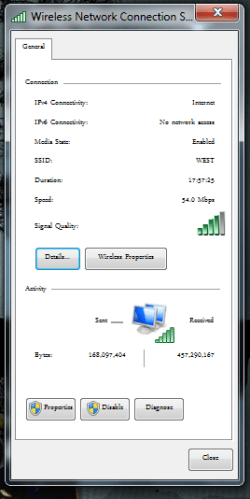
It's as far reaching as the Autoplay pop-up and the WAN Status popup (see pic) appearing with substitute fonts as well as changed point sizes, and various other small noticed changes. Photoshop went from not even loading to crashing almost instantly. I'm not sure what caused more damage, the install or hasty deletion.

It all seems cosmetic at this point, start-up and Photoshop CS4(re-install, but the initial blue page is in some random-micro-font and the menus are still different fonts) are fine again, so I'm looking for a cheat so I don't have to go Reg sniping.

So now I'm here (great site BTW!) hoping there's something new I can learn (OEM Font Pack, Restore OEM Font Utility, Specific Registry changes??) other than just doing a fresh install, which I'm not object to...

I'm certainly not a Pro, but a fairly experienced user dating back to 286/MS-DOS (Got 1.44 BootDisk?)

7600 Ultimate x86, Single User Account

Dell Inspiron e1705 Laptop

T2250 Core Duo 1.73GHz, 533MHz FSB, 2Mb L2 (T7300 on the way...)

2Gb RAM

320Gb Fujitsu 5400rpm
 

Attachments
  • WiFiStatus.PNG
    WiFiStatus.PNG
    16.9 KB · Views: 72

My Computer My Computer

At a glance

7600T2250 Core Duo 1.73, 533, 2Mb L2 Yonah2Gb DDR2 DualGMA950
Computer Manufacturer/Model Number
Dell 9400/e1705 Laptop
OS
7600
CPU
T2250 Core Duo 1.73, 533, 2Mb L2 Yonah
Motherboard
Dell 0ff049 i945GM ICH7-M/U
Memory
2Gb DDR2 Dual
Graphics Card(s)
GMA950
Sound Card
Sigmatel
Monitor(s) Displays
1440x900
Hard Drives
Fujitsu 320Gb 5400rpm
Hi Boosted7 & welcome to Seven Forums :party:

You may consider a repair install to rectify this problem.
 

My Computer My Computer

At a glance

Windows 7 Ultimate x64AMD Turion(tm) 64 X2 Mobile Technology TL-563GB Nanya PC2-6400 DDR2-SDRAM SO-DIM (400MHz)NVIDIA GeForce Go 7600 256MB GDDR3 SDRAM
Computer Manufacturer/Model Number
HP Touchsmart IQ771.uk
OS
Windows 7 Ultimate x64
CPU
AMD Turion(tm) 64 X2 Mobile Technology TL-56
Motherboard
ASUS Pheonix
Memory
3GB Nanya PC2-6400 DDR2-SDRAM SO-DIM (400MHz)
Graphics Card(s)
NVIDIA GeForce Go 7600 256MB GDDR3 SDRAM
Sound Card
High Definition Intergrated NVIDIA MCP51
Monitor(s) Displays
46" Sony Bravia HDTV
Screen Resolution
1600x1200
Hard Drives
1.5TB Samsug
320GB Seagate ST3320820AS - SATA 3Gb/s 8MB
500GB Maxtor Basics STM305003EHD301-RK
Internet Speed
↓6.32 Mb/s ↑0.35 Mb/s ↔26ms
Other Info
BIOS - American Megatrends Inc. 5.07
Ethernet Port - NVIDIA nForce 10/100/1000 Mbps
DVD Drive - TSSTcorp DVDR/RW TS-T632L
I would try a sfc /scannow in the elevated command line and see if that didn't fix the problem.
 

My Computer My Computer

At a glance

Windows 7 Home Premium 64 bitAthlon 64 x2 Dual Core 5200+Corsair 2 X 2048 DDR2NVIDIA GEForce 8400 GS
OS
Windows 7 Home Premium 64 bit
CPU
Athlon 64 x2 Dual Core 5200+
Motherboard
Gigabyte M61PME S2P
Memory
Corsair 2 X 2048 DDR2
Graphics Card(s)
NVIDIA GEForce 8400 GS
Screen Resolution
1080 x 1024
Hard Drives
WD Caviar Black Sata2 1TB - Internal
ITB-External
SOLVED

I tried both methods mentioned, thank you for the replies!

Repair was easily executed (I've got 7600 on a USB ;)) but that only works for failed start up issues, memtest and the likes. 7 boots just dandy. (OT FYI - You can go through repair to a command prompt, run notepad, select open *.* files, right click almost any *.exe and run programs, or just use it as a mini-GUI file finder)
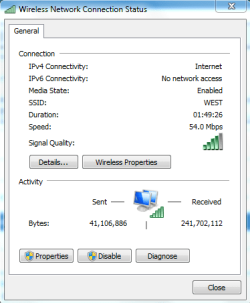
sfc /scannow did a few things, namely changing some services stuff, but no dice on the font stuffs.

After getting lost in the MS:shock:Technet for a while to no avail I came up with an idea.

start > regedit (run as admin) > edit > find (Ctrl-f) > *type* font > *click* Find Next > *press* F3 (Find Next)

Keep pressing F3 (lots of times) until you start seeing text entry font names, then when you start coming across them cross-reference them with the Control Panel > Fonts (I had it open and keyed into the search). I came to the MIME reg entries and discovered I was missing Courier New and Arial, both I happened to have in my personal font library.

I re-installed them and both, checked my WiFi Status and my peril wasn't too perilous of a peril!

Once embarked on this particular idea the time to fix was under 5 min.

But there should seriously be some kind of warning or install limit about degraded performance when you hit a certain number of installed fonts in the folder. Coding that vs some kind of "Restore Default Installed Fonts" or the likes.

if file count > 1000
then print "HELP I'M CHOKING!!!"

GOT BASIC?

Thanks to all that looked and didn't reply, but put some time into it nonetheless. It's not a shiny jewel, that's what google is for...

And how do you change something already posted to prefix "Solved"? That option is only available when you first post from what I can see...
 

Attachments

  • New Status.PNG
    New Status.PNG
    12.1 KB · Views: 12

My Computer My Computer

At a glance

7600T2250 Core Duo 1.73, 533, 2Mb L2 Yonah2Gb DDR2 DualGMA950
Computer Manufacturer/Model Number
Dell 9400/e1705 Laptop
OS
7600
CPU
T2250 Core Duo 1.73, 533, 2Mb L2 Yonah
Motherboard
Dell 0ff049 i945GM ICH7-M/U
Memory
2Gb DDR2 Dual
Graphics Card(s)
GMA950
Sound Card
Sigmatel
Monitor(s) Displays
1440x900
Hard Drives
Fujitsu 320Gb 5400rpm
I know in my old XP I had created a font folder in My Documents and moved a whack of fonts from control panel font folder into it.I had heard way back that too many fonts in that ctl font folder could slow things down.I had been in a font feeding frenzy and finally had to cull them.

Learned my lesson,only used a couple out of many,,so now in Win 7 I just have the default although I did have a free font of the day in my rss reader,but finally unsubscribed from it.

I heard that the trick is not to have so many load on startup,which means taking them out of cpl font folder and putting them,all not being used regularly, in a folder labeled Fonts somewhere else,My Documents in my case.I guess your results show that too many fonts in Win 7 can slow it down also.

Yes, How do you marked solved ? I looked but can't see an easy way,that sort of thing should be in your face so threads will get marked solved.I stopped looking.
 

My Computer My Computer

At a glance

Windows 7 Home Premium 64 bitAthlon 64 x2 Dual Core 5200+Corsair 2 X 2048 DDR2NVIDIA GEForce 8400 GS
OS
Windows 7 Home Premium 64 bit
CPU
Athlon 64 x2 Dual Core 5200+
Motherboard
Gigabyte M61PME S2P
Memory
Corsair 2 X 2048 DDR2
Graphics Card(s)
NVIDIA GEForce 8400 GS
Screen Resolution
1080 x 1024
Hard Drives
WD Caviar Black Sata2 1TB - Internal
ITB-External
Its great you solved the issue, you should also look to prevention.

Create a new account on the machine for her use and make it a restricted user that can not install or delete programs or system files.

or download, install and execute the latest version of Girlfrienddelete.exe version 2.0 64 bit. :sick:
 

My Computer My Computer

At a glance

Win 7 64 Ultimate- Win 7 Home premium 64- XP-...Intel I7 920 OC'd 3.812 gigs Dominator 16002ea Nvidia 280's SLI superclocked version
Computer Manufacturer/Model Number
HomeBuilt
OS
Win 7 64 Ultimate- Win 7 Home premium 64- XP- Adndroid 3.1 and 2.3 Ubantu- Vista Ultimate 64
CPU
Intel I7 920 OC'd 3.8
Motherboard
Asus Rampage Extreme 11
Memory
12 gigs Dominator 1600
Graphics Card(s)
2ea Nvidia 280's SLI superclocked version
Sound Card
XFI
Monitor(s) Displays
Twin HP 2745's
Hard Drives
2ea 1 TB internal Drives - 6 TB External NAS
PSU
Thermaltake toughpower 1200 watt
Case
Lain Li A70b
Cooling
Air Cooled
Internet Speed
15 down 3 up Comcast
ouch.
mass delete of anything that is used by the OS to run is never a good idea.
 

My Computer My Computer

At a glance

Windows 8 Pro (32-bit)1.83GHz Intel Core Duo2GB 667MHz DDR2 SDRAM (PC2-5300) (upgrade)ATI Radeon X1600 with 128MB GDDR3 memory
Computer type
PC/Desktop
Computer Manufacturer/Model Number
Apple 17" iMac MA199LL (Early 2006)
OS
Windows 8 Pro (32-bit)
CPU
1.83GHz Intel Core Duo
Memory
2GB 667MHz DDR2 SDRAM (PC2-5300) (upgrade)
Graphics Card(s)
ATI Radeon X1600 with 128MB GDDR3 memory
Monitor(s) Displays
17-inch TFT active-matrix LCD, millions of colors
Screen Resolution
1440 x 900
Hard Drives
Hitachi 320GB HDT721032SLA360 7200RPM SATA II (upgrade)
Keyboard
Microsoft Wired Keyboard 600
Mouse
Microsoft Basic Optical Mouse v2.0
Internet Speed
4 Mbps
Antivirus
Microsoft Security Essentials
Browser
Google Chrome
Other Info
WEI:
Base Score: 3.9 Processor: 4.4 Memory 4.7
Graphics: 3.9 Gaming Graphics: 4.1 Primary HD: 5.9
Learned my lesson,only used a couple out of many,,so now in Win 7 I just have the default although I did have a free font of the day in my rss reader,but finally unsubscribed from it.

I heard that the trick is not to have so many load on startup,which means taking them out of cpl font folder and putting them,all not being used regularly, in a folder labeled Fonts somewhere else,My Documents in my case.I guess your results show that too many fonts in Win 7 can slow it down also.
Anyone know why Win 7 has installed all these foreign(to me) fonts? Are they needed for anything and can they be removed safely? I have 134 fonts listed in fonts folder and counted only 32 that are readable in the english language.
 

My Computer My Computer

At a glance

Windows 7 Professional 32-bit (6.1, Build 7600)Intel(R) Pentium(R) 4 3.00 GHz HT2.0 GBATI Mobility Radeon 9600 64MB
Computer Manufacturer/Model Number
Averatec 6130HS-20
OS
Windows 7 Professional 32-bit (6.1, Build 7600)
CPU
Intel(R) Pentium(R) 4 3.00 GHz HT
Memory
2.0 GB
Graphics Card(s)
ATI Mobility Radeon 9600 64MB
Sound Card
Realtek AC'97 Audio
Screen Resolution
1280 x 800
Hard Drives
Seagate 96023A 60GB 7200RPM -
Seagate FreeAgentDesktop 250GB
Cooling
20 Inch Box Fan
Mouse
Targus PAWM10 Wireless Optical Laptop Mouse
Anyone know why Win 7 has installed all these foreign(to me) fonts? Are they needed for anything and can they be removed safely? I have 134 fonts listed in fonts folder and counted only 32 that are readable in the english language.

You could delete them if you want. However, that won't be required. Windows 7 actually introduces some better font management then previous versions. Fonts that are dimmed are disabled.
 

My Computer My Computer

At a glance

Windows 10 Pro (x64)Intel Core i7-3930K (3.2GHz - 4.5GHz)4x Samsung 4GB PC3-12800 DDR3 (16GB 1600MHz)Nvidia Geforce GTX 690
Computer type
PC/Desktop
Computer Manufacturer/Model Number
Alienware Aurora ALX R4
OS
Windows 10 Pro (x64)
CPU
Intel Core i7-3930K (3.2GHz - 4.5GHz)
Motherboard
Alienware Aurora-R4 x79
Memory
4x Samsung 4GB PC3-12800 DDR3 (16GB 1600MHz)
Graphics Card(s)
Nvidia Geforce GTX 690
Sound Card
SteelSeries Siberia Elite
Monitor(s) Displays
Dell UltraSharp U3011
Screen Resolution
2560x1600
Hard Drives
Samsung 850 Pro 256 GB, Seagate 1TB Desktop Hybrid HDD, 2x Western Digital 4TB Green HDD
PSU
875W Some Dell PSU <.<
Case
Alienware Aurora ALX
Cooling
Custom Liquid Cooling (EK CPU & GPU blocks) dual EK 480RAD
Keyboard
Logitech G710+ Mechanical
Mouse
Logitech G700s
Internet Speed
Verizon Fios (50 mbps average)
Other Info
Server: Intel NUC D54250WYK: i5-4250U, 16GB, 256 GB mSATA, Windows Server 2012 R2
Back
Top