Ownership problems

Shalbriri

New member
Local time
9:22 AM
Messages
5
Im haveing some very very very wierd ownership problems, i have tried to take over the folder numerouse times, but still i get an error. (error in attachement)
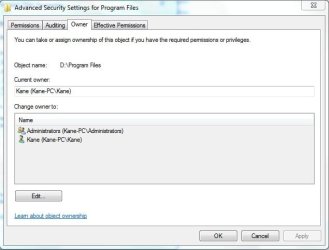
im even the owner of that file system... see owner.jpg

what should i do ?
 

Attachments

  • ownershit.jpg
    ownershit.jpg
    19.9 KB · Views: 9
  • owner.jpg
    owner.jpg
    28.9 KB · Views: 10

My Computer

Computer Manufacturer/Model Number
AsusZ96S
OS
Windows 7 Ultimate 32bit
CPU
Mobile DualCore Intel Core 2 Duo T5900, 2200 MHz
Motherboard
Intel AGTL+
Memory
4GB DDR2 - 800Mhz
Graphics Card(s)
8600GTS 256MB
Im haveing some very very very wierd ownership problems, i have tried to take over the folder numerouse times, but still i get an error. (error in attachement)
im even the owner of that file system... see owner.jpg

what should i do ?


Program files is locked for a reason in win 7. It is just a junction point with no editable files within. Left for legacy apps that must be installed there.

Why would you want to take over an empty folder?
 

My Computer

Computer Manufacturer/Model Number
HP Pavillion dv-7 1005 Tx
OS
Win 8 Release candidate 8400
CPU
[email protected]
Memory
4 gigs
Graphics Card(s)
Nvidia 9600M
Sound Card
HD built-in
Monitor(s) Displays
17" Wxga
Screen Resolution
1440x900
Cooling
none
Internet Speed
45Mb down 5Mb up
Hi, welcome to the forums :)

You could try the following...

1, Open Command Prompt (right-click, run as administrator)
2, Type in net user administrator /active:yes then press enter
3, Restart the machine and log on as the Administrator
4, Try changing the Owner of the files/folder again

If it works, follow steps 1 & 2, changing /active:yes to /active:no then in step 3 log in as your normal user account.

Hope it helps.


OS
 

My Computer

Computer Manufacturer/Model Number
Compaq Desktop
OS
Windows 7 Ultimate x64
CPU
AMD Sempron Dual Core
Memory
3GB
Graphics Card(s)
NVIDIA GeForce 6150SE nForce 430
Screen Resolution
1024x768
Hard Drives
150GB Sata
I need to replace a .dll there and i wouldn't let me.
Once i had the full/special premission over my whole System and then i had to format, and now i can't do it anymore.
 

My Computer

Computer Manufacturer/Model Number
AsusZ96S
OS
Windows 7 Ultimate 32bit
CPU
Mobile DualCore Intel Core 2 Duo T5900, 2200 MHz
Motherboard
Intel AGTL+
Memory
4GB DDR2 - 800Mhz
Graphics Card(s)
8600GTS 256MB
the enablement of administrator didnt help me at all.
i have tried every possible way that there is and nothing.
 

My Computer

Computer Manufacturer/Model Number
AsusZ96S
OS
Windows 7 Ultimate 32bit
CPU
Mobile DualCore Intel Core 2 Duo T5900, 2200 MHz
Motherboard
Intel AGTL+
Memory
4GB DDR2 - 800Mhz
Graphics Card(s)
8600GTS 256MB
seems that the real problem is in the file it self, Windows somehow doesn't want to let me replace this *.dll file, even if the folder that its going into isn't under Program files !
 

My Computer

Computer Manufacturer/Model Number
AsusZ96S
OS
Windows 7 Ultimate 32bit
CPU
Mobile DualCore Intel Core 2 Duo T5900, 2200 MHz
Motherboard
Intel AGTL+
Memory
4GB DDR2 - 800Mhz
Graphics Card(s)
8600GTS 256MB
Apperantly Kaspersky thought the dll was a virus, and co-op'd with Windows on not letting it be copied onto the harddrive ... problem solved. Disable virus-prot, copy, enable Virus - prot.
 

My Computer

Computer Manufacturer/Model Number
AsusZ96S
OS
Windows 7 Ultimate 32bit
CPU
Mobile DualCore Intel Core 2 Duo T5900, 2200 MHz
Motherboard
Intel AGTL+
Memory
4GB DDR2 - 800Mhz
Graphics Card(s)
8600GTS 256MB
Back
Top