Ownership problems

Shalbriri

New member
Local time
3:35 AM
Messages
5
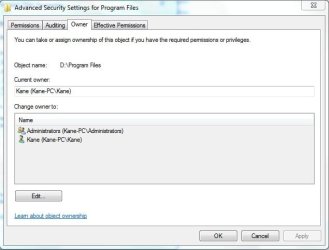
Im haveing some very very very wierd ownership problems, i have tried to take over the folder numerouse times, but still i get an error. (error in attachement)
im even the owner of that file system... see owner.jpg

what should i do ?
 

Attachments

  • ownershit.jpg
    ownershit.jpg
    19.9 KB · Views: 9
  • owner.jpg
    owner.jpg
    28.9 KB · Views: 10

My Computer My Computer

Computer Manufacturer/Model Number
AsusZ96S
OS
Windows 7 Ultimate 32bit
CPU
Mobile DualCore Intel Core 2 Duo T5900, 2200 MHz
Motherboard
Intel AGTL+
Memory
4GB DDR2 - 800Mhz
Graphics Card(s)
8600GTS 256MB
Im haveing some very very very wierd ownership problems, i have tried to take over the folder numerouse times, but still i get an error. (error in attachement)
im even the owner of that file system... see owner.jpg

what should i do ?


Program files is locked for a reason in win 7. It is just a junction point with no editable files within. Left for legacy apps that must be installed there.

Why would you want to take over an empty folder?
 

My Computer My Computer

Computer Manufacturer/Model Number
HP Pavillion dv-7 1005 Tx
OS
Win 8 Release candidate 8400
CPU
[email protected]
Memory
4 gigs
Graphics Card(s)
Nvidia 9600M
Sound Card
HD built-in
Monitor(s) Displays
17" Wxga
Screen Resolution
1440x900
Cooling
none
Internet Speed
45Mb down 5Mb up
Hi, welcome to the forums :)

You could try the following...

1, Open Command Prompt (right-click, run as administrator)
2, Type in net user administrator /active:yes then press enter
3, Restart the machine and log on as the Administrator
4, Try changing the Owner of the files/folder again

If it works, follow steps 1 & 2, changing /active:yes to /active:no then in step 3 log in as your normal user account.

Hope it helps.


OS
 

My Computer My Computer

Computer Manufacturer/Model Number
Compaq Desktop
OS
Windows 7 Ultimate x64
CPU
AMD Sempron Dual Core
Memory
3GB
Graphics Card(s)
NVIDIA GeForce 6150SE nForce 430
Screen Resolution
1024x768
Hard Drives
150GB Sata
I need to replace a .dll there and i wouldn't let me.
Once i had the full/special premission over my whole System and then i had to format, and now i can't do it anymore.
 

My Computer My Computer

Computer Manufacturer/Model Number
AsusZ96S
OS
Windows 7 Ultimate 32bit
CPU
Mobile DualCore Intel Core 2 Duo T5900, 2200 MHz
Motherboard
Intel AGTL+
Memory
4GB DDR2 - 800Mhz
Graphics Card(s)
8600GTS 256MB
the enablement of administrator didnt help me at all.
i have tried every possible way that there is and nothing.
 

My Computer My Computer

Computer Manufacturer/Model Number
AsusZ96S
OS
Windows 7 Ultimate 32bit
CPU
Mobile DualCore Intel Core 2 Duo T5900, 2200 MHz
Motherboard
Intel AGTL+
Memory
4GB DDR2 - 800Mhz
Graphics Card(s)
8600GTS 256MB
seems that the real problem is in the file it self, Windows somehow doesn't want to let me replace this *.dll file, even if the folder that its going into isn't under Program files !
 

My Computer My Computer

Computer Manufacturer/Model Number
AsusZ96S
OS
Windows 7 Ultimate 32bit
CPU
Mobile DualCore Intel Core 2 Duo T5900, 2200 MHz
Motherboard
Intel AGTL+
Memory
4GB DDR2 - 800Mhz
Graphics Card(s)
8600GTS 256MB
Apperantly Kaspersky thought the dll was a virus, and co-op'd with Windows on not letting it be copied onto the harddrive ... problem solved. Disable virus-prot, copy, enable Virus - prot.
 

My Computer My Computer

Computer Manufacturer/Model Number
AsusZ96S
OS
Windows 7 Ultimate 32bit
CPU
Mobile DualCore Intel Core 2 Duo T5900, 2200 MHz
Motherboard
Intel AGTL+
Memory
4GB DDR2 - 800Mhz
Graphics Card(s)
8600GTS 256MB
Back
Top