Solved P2P - limits?

metaguy

Always Appreciative
Member
VIP
Local time
2:23 PM
Messages
140
Location
California
I can see the libraries on a P2P, but how can I access ALL of the other pc's files, folders and desktop?
 

My Computer

Computer type
Laptop
Computer Manufacturer/Model Number
Dell E6420 Laptop 64 bit
OS
Win 7 Ultimate
CPU
Intel i5-2520M CPU 2.50 Ghz
Memory
8 GB
Graphics Card(s)
Intel(R) HD Graphics 3000
Sound Card
Intel(R) Display Audio
Monitor(s) Displays
Samsung 32" and Dell 23"
Screen Resolution
1920 x 1080 and 1366 x 768
Hard Drives
Hitachi HTS545032B9A300
Fantom G-Force 2GB
Antivirus
Bitdefender
Browser
Firefox, primary
You need to share folders then you can connect to them
 

My Computer

Computer type
PC/Desktop
OS
win 8 32 bit
Can you be a bit more specific? What kind of service are you refering to as "P2P" (which is a method of network connection). What specific things do you want to access?
 

My Computer

Computer type
Laptop
Computer Manufacturer/Model Number
Toshiba Sattelite A665-S6092
OS
Windows 7 Ultimate x64
CPU
Intel Core i7-740QM
Memory
8 GB DDR3
Graphics Card(s)
NVIDIA GeForce 330GT
Screen Resolution
1366x768
Hard Drives
Samsung 840 SSD 500GB
1TB USB3 external HD
Cooling
Coolermaster Notepal U3 notebook cooling pad
Internet Speed
3mbps ASDL
Antivirus
ClamWin 0.98.7
Browser
Opera 12.17 x86 (main), Firefox 38 (sec), IE11 (last resort)
Unable to share folders...To make sure I'm right so far... Each pc uses a Homegroup. I want PC1 to have access to ALL of PC2.


The Homegroup houses only the 4 Libraries. I'm not allowed to add the PC2 Desktop - which would be ideal. I've gotten both Program Files over as shortcuts- and that's fine. Some folders will not allow paste, etc.


I'm using Ethernet via modem, both win7.
Isn't there a button for screen shots? Thanks.
 

My Computer

Computer type
Laptop
Computer Manufacturer/Model Number
Dell E6420 Laptop 64 bit
OS
Win 7 Ultimate
CPU
Intel i5-2520M CPU 2.50 Ghz
Memory
8 GB
Graphics Card(s)
Intel(R) HD Graphics 3000
Sound Card
Intel(R) Display Audio
Monitor(s) Displays
Samsung 32" and Dell 23"
Screen Resolution
1920 x 1080 and 1366 x 768
Hard Drives
Hitachi HTS545032B9A300
Fantom G-Force 2GB
Antivirus
Bitdefender
Browser
Firefox, primary
Even if you login to the PC with a different account by default you won't be able to access anything in another users profile because of NTFS permissions some other folders will be owned by system and be out of bounds. You can map a drive to the hidden admin share c$ if you enter a admin password
 

My Computer

Computer type
PC/Desktop
OS
win 8 32 bit
Thanks. I'll learn about mapping and give it a try. Will check back later.
 

My Computer

Computer type
Laptop
Computer Manufacturer/Model Number
Dell E6420 Laptop 64 bit
OS
Win 7 Ultimate
CPU
Intel i5-2520M CPU 2.50 Ghz
Memory
8 GB
Graphics Card(s)
Intel(R) HD Graphics 3000
Sound Card
Intel(R) Display Audio
Monitor(s) Displays
Samsung 32" and Dell 23"
Screen Resolution
1920 x 1080 and 1366 x 768
Hard Drives
Hitachi HTS545032B9A300
Fantom G-Force 2GB
Antivirus
Bitdefender
Browser
Firefox, primary
It allows mapping, but only to the shared folder Homegroup which is basically the same. Suggestion as to having access to pc "A"s desktop or C drive?
 

My Computer

Computer type
Laptop
Computer Manufacturer/Model Number
Dell E6420 Laptop 64 bit
OS
Win 7 Ultimate
CPU
Intel i5-2520M CPU 2.50 Ghz
Memory
8 GB
Graphics Card(s)
Intel(R) HD Graphics 3000
Sound Card
Intel(R) Display Audio
Monitor(s) Displays
Samsung 32" and Dell 23"
Screen Resolution
1920 x 1080 and 1366 x 768
Hard Drives
Hitachi HTS545032B9A300
Fantom G-Force 2GB
Antivirus
Bitdefender
Browser
Firefox, primary
Connecting to the hidden share c$ gives you all c drive but you still won't get to anything in a users profile like desktop unless you change NTFS permissions which has a risk of knackering the system the only other way is connect as the user and password
 

My Computer

Computer type
PC/Desktop
OS
win 8 32 bit
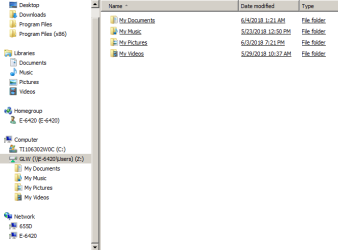
I'm not sure what you mean by... hidden share c$. As it shows in the attached capture of "B" pc tree, there is no C drive to see on "A". Does this help to understand?
 

Attachments

  • Capture.PNG
    Capture.PNG
    34.6 KB · Views: 10

My Computer

Computer type
Laptop
Computer Manufacturer/Model Number
Dell E6420 Laptop 64 bit
OS
Win 7 Ultimate
CPU
Intel i5-2520M CPU 2.50 Ghz
Memory
8 GB
Graphics Card(s)
Intel(R) HD Graphics 3000
Sound Card
Intel(R) Display Audio
Monitor(s) Displays
Samsung 32" and Dell 23"
Screen Resolution
1920 x 1080 and 1366 x 768
Hard Drives
Hitachi HTS545032B9A300
Fantom G-Force 2GB
Antivirus
Bitdefender
Browser
Firefox, primary
To map a drive to a non-library folder:
  • Open File Explorer on PC2.
  • Scroll to a folder that you want to be able to see from PC1.
  • Right click on that folder and choose "Sharing". Follow that process to make the folder shareable.
  • Single-click on the folder you just shared. This will put it into the File Explorer address window at the top of the display.
  • Click once in the File Explorer address window. This converts the folder path into a standard file path. Highlight and copy that standard file path.
  • Click Map a Drive. Select a drive letter, and paste what you just copied into the target field in the drive mapping window. Click Apply then OK.
Basically, the above procedure gives you the exact path to get to the folder you want to share. You then map a drive to that exact path. In this way, you aren't limited to just the libraries when you map a drive. Of course, you could add the desired folder to the library list if you wanted to.
 

My Computer

Computer type
PC/Desktop
Computer Manufacturer/Model Number
Dell
OS
Linux Mint 18.2 xfce 64-bit (VMWare host) / Windows 8.1 Pro 32-bit (VMWare guest)
CPU
Haswell
Memory
4 GB
Monitor(s) Displays
Acer 23"
Screen Resolution
1920 x 1080
Hard Drives
Two hard drives, 1TB each: One for Linux, one for my data.
Keyboard
IBM Model M
Antivirus
Sophos (Linux), Trend Micro (Windows)
Browser
Firefox, Opera
Other Info
I use Samba to share my data drive with the other computers at my house and with my guest session in VMWare Workstation Player.
Thanks to everyone. I still can't make it work, but letting it go. I appreciate your help.
 

My Computer

Computer type
Laptop
Computer Manufacturer/Model Number
Dell E6420 Laptop 64 bit
OS
Win 7 Ultimate
CPU
Intel i5-2520M CPU 2.50 Ghz
Memory
8 GB
Graphics Card(s)
Intel(R) HD Graphics 3000
Sound Card
Intel(R) Display Audio
Monitor(s) Displays
Samsung 32" and Dell 23"
Screen Resolution
1920 x 1080 and 1366 x 768
Hard Drives
Hitachi HTS545032B9A300
Fantom G-Force 2GB
Antivirus
Bitdefender
Browser
Firefox, primary
If you open a cmd prompt then type


net share you will see all the shares as well as the hidden ones for admin only
 

My Computer

Computer type
PC/Desktop
OS
win 8 32 bit
Thanks, but this did not lead to a positive result. Think I'll use TeamViewer. You've been great.
 

My Computer

Computer type
Laptop
Computer Manufacturer/Model Number
Dell E6420 Laptop 64 bit
OS
Win 7 Ultimate
CPU
Intel i5-2520M CPU 2.50 Ghz
Memory
8 GB
Graphics Card(s)
Intel(R) HD Graphics 3000
Sound Card
Intel(R) Display Audio
Monitor(s) Displays
Samsung 32" and Dell 23"
Screen Resolution
1920 x 1080 and 1366 x 768
Hard Drives
Hitachi HTS545032B9A300
Fantom G-Force 2GB
Antivirus
Bitdefender
Browser
Firefox, primary
Back
Top