P2P programs

Gilbertpwns

New member
Local time
12:35 AM
Messages
70
Location
CA
P2P software particularly torrent software loses download speed dramatically after logged in for more than 10 min.

FIXED
------------------------------------
Turns out I didnt forward my port. But W7 may be picky so if you never have it may go this way on you.
 
Last edited:

My Computer

OS
Windows 7 64bit/Windows Vista Ultimate 64bit
CPU
E4400
Memory
4 gigs
Graphics Card(s)
8800GT
Screen Resolution
1680x1050
Hard Drives
WD 500G WD 320G
Cooling
Zalman CNPS 9700LED
Keyboard
G15
Mouse
G5
Who is your ISP? Are you using a firewall? If so, have you opened the ports necessary for the particular P2P program you're using? What torrent client are you using? Details!!
 

My Computer

Computer Manufacturer/Model Number
Dell 8400
OS
Windows 7 Beta 1 b7000
CPU
Intel Pentium 4
Memory
4GB
Graphics Card(s)
ATI Radeon HD3450
Sound Card
Creative SoundBlaster Audigy 2
Monitor(s) Displays
Acer AL2016W
Screen Resolution
1680x1050
Hard Drives
1x500GB
1x100GB
Case
Dell 8400
Cooling
Standard
Keyboard
Dell Multimedia Keyboard
Mouse
Logitech MediaPlay
Internet Speed
Comcastic!
uTorrent works perfectly fine for me, I can get full speeds for both UL and DL for long periods of time. What's your ISP?

edit: you beat me by a split second renthor =P.
 

My Computer

Computer Manufacturer/Model Number
HP
OS
Windows 7
CPU
Intel Core 2 Quad CPU Q6700 2.67 GHz
Memory
4.00GB
Ok I am using Utorrent. And I have enabled encryption, thus the high speeds during the first min or 2 of use. Then it drops down to a trickling 10kb. I have also noticed during reboot all my progress of any downloaded torrent will be gone. I have ruled out the possibility of any one tracker because I have tried several torrents, all with the same results. I also have installed vista on a seperate parition and have normal speeds using the exact same torrents.
 

My Computer

OS
Windows 7 64bit/Windows Vista Ultimate 64bit
CPU
E4400
Memory
4 gigs
Graphics Card(s)
8800GT
Screen Resolution
1680x1050
Hard Drives
WD 500G WD 320G
Cooling
Zalman CNPS 9700LED
Keyboard
G15
Mouse
G5
switch to vuze (formerly azureus) no problems with it
 

My Computer

Computer Manufacturer/Model Number
Custom Built
OS
Windows 7 Beta x64
CPU
Core 2 Duo E4500 @2.20 Ghz
Motherboard
Inter 945GCPE
Memory
2048 MB
Graphics Card(s)
Intel GMA950 (945G)
Sound Card
Realtek HD
Monitor(s) Displays
Samsung Sync Master 540n
Screen Resolution
1024x768
Hard Drives
Western Digital 250 GB SATA
Case
Xenitis
Keyboard
Microsoft Wireless
Mouse
Microsoft Wireless
Internet Speed
256 Kbps
i dont like vuze because of its high resource use
 

My Computer

OS
Windows 7 64bit/Windows Vista Ultimate 64bit
CPU
E4400
Memory
4 gigs
Graphics Card(s)
8800GT
Screen Resolution
1680x1050
Hard Drives
WD 500G WD 320G
Cooling
Zalman CNPS 9700LED
Keyboard
G15
Mouse
G5
Have you allowed uTorrent through 7's firewall? Try turning on the following options under the Connections tab in your settings in uTorrent.

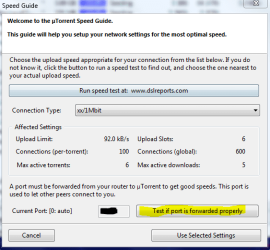
And if those are on, or you turn them on and it still doesn't work, try running the speed test shortcut (either from the menu, or press ctrl-g) and click the port testing button. That should open a window in your browser and let you know if traffic is able to go through whatever port you have chosen.
 

Attachments

  • uTorrent.PNG
    uTorrent.PNG
    3.3 KB · Views: 34
  • uTorrent1.PNG
    uTorrent1.PNG
    17.3 KB · Views: 54

My Computer

Computer Manufacturer/Model Number
Dell 8400
OS
Windows 7 Beta 1 b7000
CPU
Intel Pentium 4
Memory
4GB
Graphics Card(s)
ATI Radeon HD3450
Sound Card
Creative SoundBlaster Audigy 2
Monitor(s) Displays
Acer AL2016W
Screen Resolution
1680x1050
Hard Drives
1x500GB
1x100GB
Case
Dell 8400
Cooling
Standard
Keyboard
Dell Multimedia Keyboard
Mouse
Logitech MediaPlay
Internet Speed
Comcastic!
Never really relied on that. Always says error for me. I am currently getting 180kb average on vista with the exact same torrent I was trying on W7. The same torrent would run high speeds for a minute and then go all the way down to 10kb tops and would stay that way unless you rebooted. THen it would do the same thing.
 

My Computer

OS
Windows 7 64bit/Windows Vista Ultimate 64bit
CPU
E4400
Memory
4 gigs
Graphics Card(s)
8800GT
Screen Resolution
1680x1050
Hard Drives
WD 500G WD 320G
Cooling
Zalman CNPS 9700LED
Keyboard
G15
Mouse
G5
I use Bitcomet with no issues, I used it yesterday to download a Realteck driver and I had 400-600 kbps and using a normal browser like Firefox I get about 50-60 kbps, I've tried Utorrent but I think Bitcomet is best.
 

My Computer

Computer Manufacturer/Model Number
Home Brew
OS
Windows 7 Ultimate Vista Ultimate x64
CPU
Core 2 Duo E8500 3.16Ghz @ 3.8Ghz
Motherboard
eVGA 750i FTW
Memory
2x2Gigs Patriot PC2-6400 LL
Graphics Card(s)
Inno3D GeForce GTX260 216 SP
Monitor(s) Displays
ASUS VW222U 22" 2ms Response time
Screen Resolution
1680x1050
Hard Drives
SATA 150GB
SATA II 250GB
USB IDE 750GB Ext.
PSU
HYTEC 600W & Thermaltake 650W Toughpower Power Exp
Case
Thermaltake Armor LCS (Liquid Cooling System)
Cooling
Liquid Cooling System
Keyboard
Logitech G15 Gaming Keyboard
Mouse
Logitech G9 Gaming Mouse
I use µTorrent and it works 100% for me :\.
 

My Computer

OS
Windows Vista Ultimate x86
CPU
Q6600
Motherboard
X38
Memory
4gb
Graphics Card(s)
nVidia 8800
Sound Card
Integrated
Monitor(s) Displays
2x 22"
Screen Resolution
3360x1050 (2x 1680x1050)
Hard Drives
1x 320gb,
1x 160gb,
1x 1tb
Cooling
Air
Internet Speed
3mbp/s down 1mbp/s up
and you guys didnt have to change anything? on W7?
 

My Computer

OS
Windows 7 64bit/Windows Vista Ultimate 64bit
CPU
E4400
Memory
4 gigs
Graphics Card(s)
8800GT
Screen Resolution
1680x1050
Hard Drives
WD 500G WD 320G
Cooling
Zalman CNPS 9700LED
Keyboard
G15
Mouse
G5
Utorrent works perfect for me.
 

My Computer

Computer Manufacturer/Model Number
HP Compaq Presario/SR5113WM
OS
Windows 7 Ultimate x64/ Windows Vista Ultimate x64
CPU
AMD Athlon 64 X2 3600+ 1.9Ghz
Motherboard
Asus M2N68-LA
Memory
PNY Optima Memory DDR2 2GB 2x1 kit
Graphics Card(s)
PNY Nvidia 8400 GS 256MB
Sound Card
On board RealTek
Monitor(s) Displays
Acer X163W LCD
Screen Resolution
1366x768
Hard Drives
Western Digital 160 GB SATA 3G (3.0Gb/sec)
7200 rpm
Western Digital 160 GB IDE
PSU
Dynex 400w
Case
Nothin Special
Cooling
Stock
Keyboard
Standard 102 key with volume and sleep buttons
Mouse
Wireless Logitech LX7
Internet Speed
Comcrap 10mb cable
Other Info
Insignia 2.1 speakers, wireless Xbox 360 controller w/plug n play charger, Belkin wireless G + mimo usb network adapter.
Definetely not my Antivirus software. Installed it both in Vista and W7. Even disabled it in W7. Still doesnt work.

By the way, the red/yellow/green icon on the bottom of utorrent means NOTHING. Mine is red right now for some reason and its STILL getting 200kb and up.
 
Last edited:

My Computer

OS
Windows 7 64bit/Windows Vista Ultimate 64bit
CPU
E4400
Memory
4 gigs
Graphics Card(s)
8800GT
Screen Resolution
1680x1050
Hard Drives
WD 500G WD 320G
Cooling
Zalman CNPS 9700LED
Keyboard
G15
Mouse
G5
That icon actually does mean something. It means uTorrent thinks you're behind a firewall, and it's not properly configured. I would really suggest making sure your port settings are correct, it is a hassle, yes, but it REALLY does matter, as it effects how many connections you're getting. It might allow one connection through, and you got lucky that one time and that user had a high speed connection, hence your high download rate.

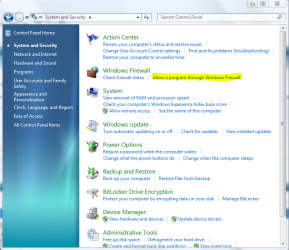
If you do not want to rely on UPnP and whatnot, then set it manually yourself. I would really suggest reading this and this if you need help with that. Again, it is annoying at first, but you really only have to do it once. And I've been using UPnP etc with no problem, it should automatically setup Windows Firewall for you and you can check this by clicking the highlighted link in the attached picture (found in Control Panel...System and Security). You might see a few uTorrents listed, it makes a new entry for UDP, TCP, and the program/ports themselves.

Also, it couldn't hurt to check your router's settings, if you have one. It sounds like it should not be in your router as Vista is working fine, but it could also be that uTorrent in Vista is using a different port than uTorrent in 7. When you install uTorrent, it picks a random port. If you need assistance with that, we'll need to know what type of router you have.
 

Attachments

  • uTorrent2.PNG
    uTorrent2.PNG
    66.6 KB · Views: 28

My Computer

Computer Manufacturer/Model Number
Dell 8400
OS
Windows 7 Beta 1 b7000
CPU
Intel Pentium 4
Memory
4GB
Graphics Card(s)
ATI Radeon HD3450
Sound Card
Creative SoundBlaster Audigy 2
Monitor(s) Displays
Acer AL2016W
Screen Resolution
1680x1050
Hard Drives
1x500GB
1x100GB
Case
Dell 8400
Cooling
Standard
Keyboard
Dell Multimedia Keyboard
Mouse
Logitech MediaPlay
Internet Speed
Comcastic!
After a while it turned green :P. And yes its allowed through the firewall, on both OS.
I admit, networking is not my forte so yes I will need help with that, and almost everything else.

I have a Belkin N1 router.

These are my port settings

ports.png
 

My Computer

OS
Windows 7 64bit/Windows Vista Ultimate 64bit
CPU
E4400
Memory
4 gigs
Graphics Card(s)
8800GT
Screen Resolution
1680x1050
Hard Drives
WD 500G WD 320G
Cooling
Zalman CNPS 9700LED
Keyboard
G15
Mouse
G5
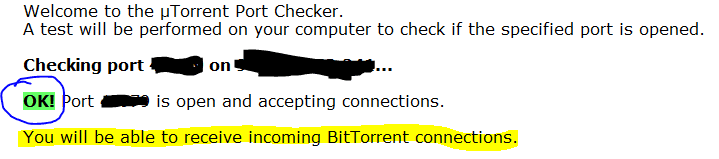
And what happens when you test if the port is forwarded properly? Do you get this (see attached image)?

Also, it appears you've completely limited your upload to 0. The nature of torrents requires some sort of upload. So, if you don't upload, you're download will be severely limited. This is probably contributing to the problem, if not outright causing it. Try running the speed test, and then select your upload speed result (from the test) in that "Connection Type" drop down box.

Note: I do know that setting the upload to 0 in the advanced settings in uTorrent will set your upload rate as unlimited - I'm just not sure if it would display as 0.0 in this screen, or as "unlimited". This would also effect your download speed, as you're effectively devoting your entire connection to upload. Definitely set your upload speed result in that drop down box, uTorrent is pretty smart about configuring everything else from there. I wouldn't mess with the custom settings unless you know what you are doing.

No matter which way it's going, that 0.0 is a bad number.
 

Attachments

  • ports.PNG
    ports.PNG
    5.8 KB · Views: 6

My Computer

Computer Manufacturer/Model Number
Dell 8400
OS
Windows 7 Beta 1 b7000
CPU
Intel Pentium 4
Memory
4GB
Graphics Card(s)
ATI Radeon HD3450
Sound Card
Creative SoundBlaster Audigy 2
Monitor(s) Displays
Acer AL2016W
Screen Resolution
1680x1050
Hard Drives
1x500GB
1x100GB
Case
Dell 8400
Cooling
Standard
Keyboard
Dell Multimedia Keyboard
Mouse
Logitech MediaPlay
Internet Speed
Comcastic!
You need to put your port number into your router in the firewall virtual servers and enter the last ip address the router has issued your computer.
 

My Computer

Computer Manufacturer/Model Number
HP Compaq Presario/SR5113WM
OS
Windows 7 Ultimate x64/ Windows Vista Ultimate x64
CPU
AMD Athlon 64 X2 3600+ 1.9Ghz
Motherboard
Asus M2N68-LA
Memory
PNY Optima Memory DDR2 2GB 2x1 kit
Graphics Card(s)
PNY Nvidia 8400 GS 256MB
Sound Card
On board RealTek
Monitor(s) Displays
Acer X163W LCD
Screen Resolution
1366x768
Hard Drives
Western Digital 160 GB SATA 3G (3.0Gb/sec)
7200 rpm
Western Digital 160 GB IDE
PSU
Dynex 400w
Case
Nothin Special
Cooling
Stock
Keyboard
Standard 102 key with volume and sleep buttons
Mouse
Wireless Logitech LX7
Internet Speed
Comcrap 10mb cable
Other Info
Insignia 2.1 speakers, wireless Xbox 360 controller w/plug n play charger, Belkin wireless G + mimo usb network adapter.
I'm pretty sure at this point that your problem is related to your upload/connection settings. Try my instructions and if that doesn't work, then we'll start messing with your ports and router/firewall. Though please, still let me know what the port test result is.
 

My Computer

Computer Manufacturer/Model Number
Dell 8400
OS
Windows 7 Beta 1 b7000
CPU
Intel Pentium 4
Memory
4GB
Graphics Card(s)
ATI Radeon HD3450
Sound Card
Creative SoundBlaster Audigy 2
Monitor(s) Displays
Acer AL2016W
Screen Resolution
1680x1050
Hard Drives
1x500GB
1x100GB
Case
Dell 8400
Cooling
Standard
Keyboard
Dell Multimedia Keyboard
Mouse
Logitech MediaPlay
Internet Speed
Comcastic!
this is the result

portforwarderr.png


And yes I typically have my upload set at unlimited because I do seed back....
 

My Computer

OS
Windows 7 64bit/Windows Vista Ultimate 64bit
CPU
E4400
Memory
4 gigs
Graphics Card(s)
8800GT
Screen Resolution
1680x1050
Hard Drives
WD 500G WD 320G
Cooling
Zalman CNPS 9700LED
Keyboard
G15
Mouse
G5
Your router is blocking the port that is why your getting that error. Open IE or what ever browser your using and type in 192.168.2.1 then under firewall click on virtual servers enter your password if you have one then enter the port number in all of the inbound and outbound areas for type select both and enter the last digits of your ip address then click apply and then recheck to see if your port is opened.
 

My Computer

Computer Manufacturer/Model Number
HP Compaq Presario/SR5113WM
OS
Windows 7 Ultimate x64/ Windows Vista Ultimate x64
CPU
AMD Athlon 64 X2 3600+ 1.9Ghz
Motherboard
Asus M2N68-LA
Memory
PNY Optima Memory DDR2 2GB 2x1 kit
Graphics Card(s)
PNY Nvidia 8400 GS 256MB
Sound Card
On board RealTek
Monitor(s) Displays
Acer X163W LCD
Screen Resolution
1366x768
Hard Drives
Western Digital 160 GB SATA 3G (3.0Gb/sec)
7200 rpm
Western Digital 160 GB IDE
PSU
Dynex 400w
Case
Nothin Special
Cooling
Stock
Keyboard
Standard 102 key with volume and sleep buttons
Mouse
Wireless Logitech LX7
Internet Speed
Comcrap 10mb cable
Other Info
Insignia 2.1 speakers, wireless Xbox 360 controller w/plug n play charger, Belkin wireless G + mimo usb network adapter.
Back
Top