
Page file question.

TheBull

New member
Guru
VIP
Local time
10:21 PM
Messages
1,343
Location
Wuxi, China
I want to move my page file to a partition on my other hard drive. How big should I make it?
Do you guys have some more info regarding this process?

Thanks!!
 

My Computer

Computer type
PC/Desktop
Computer Manufacturer/Model Number
Self built.
OS
Windows 7 RTM 64bit, Windows 8 Pro 64bit
CPU
Intel i5-2500K @ 3.3Ghz
Motherboard
Asus Maximus IV GENE-Z/GEN3
Memory
16GB G.Skill RaptorX 1600MHz DDR3
Graphics Card(s)
N570GTX Twin Frozr III Power Edition
Sound Card
SupremeFX X-Fi 2
Monitor(s) Displays
BenQ XL2420T 120Hz 24 inch gaming monitor, Acer V233H 23 inc
Screen Resolution
1920x1080
Hard Drives
320GB Seagate Barracuda
WD 1TB Black Caviar
2TB WD Green Caviar
Samsung SSD 840 PRO Series
PSU
CoolerMaster Silent Pro Gold 1200WATT 80 Plus Gold
Case
CoolerMaster HAF X RC-942
Cooling
CoolerMaster V6GT Multi-Platform CPU Cooler
Keyboard
Logitech G510 Gaming Keyboard
Mouse
Logitech G700 Gaming Mouse
Antivirus
Norton Internet Security
Browser
Firefox 21
Other Info
Logitech Extreme 3D Pro Gaming Joystick, Logitech G930 Wireless Gaming Headset
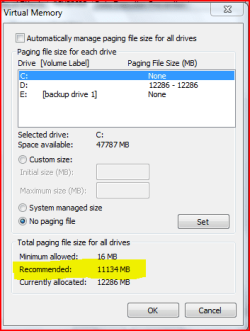
i always just use the recommended size.
for my system it's
minimum allowed: 16mb
recommended: 11134mb
hope that helps you

scrooge
 

My Computer

Computer Manufacturer/Model Number
home build
OS
win 7 ( 64 bit)
CPU
Intel Core i7-870 Lynnfield 2.93GHz 8MB L3 Cache LGA 1156 95
Motherboard
ASUS P7P55 LX LGA 1156
Memory
G.SKILL Sniper Series 16GB (4 x 4GB) 240-Pin DDR3 SDRAM
Graphics Card(s)
ATI Radeon HD6800 Series
Sound Card
hdmi
Monitor(s) Displays
42" lg 3d tv
Screen Resolution
1920 x 1080
Hard Drives
1 ssd pci-e revodrive
4 seagate 1.5 tb
PSU
Rosewill BRONZE Series RBR1000-M 1000W Continuous@40°C, 80Pl
Case
CoolMaster 922
Cooling
CORSAIR CWCH60 Hydro Series H60 High Performance Liquid CPU
Keyboard
logtech
Mouse
logitect
Internet Speed
5 mbit
The recommended size being, size of your memory times 1.5. Right?
 

My Computer

Computer type
PC/Desktop
Computer Manufacturer/Model Number
Self built.
OS
Windows 7 RTM 64bit, Windows 8 Pro 64bit
CPU
Intel i5-2500K @ 3.3Ghz
Motherboard
Asus Maximus IV GENE-Z/GEN3
Memory
16GB G.Skill RaptorX 1600MHz DDR3
Graphics Card(s)
N570GTX Twin Frozr III Power Edition
Sound Card
SupremeFX X-Fi 2
Monitor(s) Displays
BenQ XL2420T 120Hz 24 inch gaming monitor, Acer V233H 23 inc
Screen Resolution
1920x1080
Hard Drives
320GB Seagate Barracuda
WD 1TB Black Caviar
2TB WD Green Caviar
Samsung SSD 840 PRO Series
PSU
CoolerMaster Silent Pro Gold 1200WATT 80 Plus Gold
Case
CoolerMaster HAF X RC-942
Cooling
CoolerMaster V6GT Multi-Platform CPU Cooler
Keyboard
Logitech G510 Gaming Keyboard
Mouse
Logitech G700 Gaming Mouse
Antivirus
Norton Internet Security
Browser
Firefox 21
Other Info
Logitech Extreme 3D Pro Gaming Joystick, Logitech G930 Wireless Gaming Headset
Capture.PNG


scrooge
 

My Computer

Computer Manufacturer/Model Number
home build
OS
win 7 ( 64 bit)
CPU
Intel Core i7-870 Lynnfield 2.93GHz 8MB L3 Cache LGA 1156 95
Motherboard
ASUS P7P55 LX LGA 1156
Memory
G.SKILL Sniper Series 16GB (4 x 4GB) 240-Pin DDR3 SDRAM
Graphics Card(s)
ATI Radeon HD6800 Series
Sound Card
hdmi
Monitor(s) Displays
42" lg 3d tv
Screen Resolution
1920 x 1080
Hard Drives
1 ssd pci-e revodrive
4 seagate 1.5 tb
PSU
Rosewill BRONZE Series RBR1000-M 1000W Continuous@40°C, 80Pl
Case
CoolMaster 922
Cooling
CORSAIR CWCH60 Hydro Series H60 High Performance Liquid CPU
Keyboard
logtech
Mouse
logitect
Internet Speed
5 mbit
The recommended size being, size of your memory times 1.5. Right?


yes 1.5 times your psysical memory. I have min max set to the same to reduce drive fragmentation.
 

My Computer

Computer Manufacturer/Model Number
self built
OS
Windows 7 Professional 64-bit
CPU
Intel E8400 3GHz
Motherboard
Intel DX48BT2
Memory
Kingston PC3-10700H 4Gb
Graphics Card(s)
XFX Radeon HD 5850 BlackEd.
Sound Card
Asus Xonar DG
Monitor(s) Displays
2x Samsung SM-T220HD 22"
Screen Resolution
1680x1050 on two monitors
Hard Drives
OCZ Vertex 2 120gb 3.5" (OS)
Seagate Momentus XT 500gb
Samsung F3 1Tb (games)
2x Samsung F1 1Tb
PSU
Thermaltake ToughPower 850w
Case
Thermaltake Armor
Cooling
Scythe Mugen II
Keyboard
Microsoft Comfort Curve USB
Mouse
Razer Diamondback 3G
Internet Speed
8128/443

My Computer

Computer type
PC/Desktop
Computer Manufacturer/Model Number
Self built custom
OS
64-bit Windows 11 Pro for Workstations
CPU
Intel i7-8700K OC'd to 5 GHz
Motherboard
ASUS ROG Maximus XI Formula Z390
Memory
64 GB (4x16GB) G.SKILL TridentZ RGB DDR4 3600 MHz
Graphics Card(s)
ASUS ROG-STRIX-GTX1080TI-O11G-GAMING
Sound Card
Integrated
Monitor(s) Displays
2 x Samsung Odyssey G7 27"
Screen Resolution
2560x1440
Hard Drives
1TB Samsung 990 PRO M.2,
4TB Samsung 990 PRO PRO M.2,
TerraMaster F8 SSD Plus NAS
PSU
Seasonic Prime Titanium 850W
Case
Thermaltake Core P3
Cooling
Corsair Hydro H115i
Keyboard
Logitech wireless K800
Mouse
Logitech MX Master 4
Internet Speed
2 Gb/s Download and 100 Mb/s Upload
Antivirus
Malwarebyte Anti-Malware Premium
Browser
Google Chrome
Other Info
Logitech Z625 speaker system,
Logitech BRIO 4K Pro webcam,
HP Color LaserJet Pro MFP M477fdn,
APC SMART-UPS RT 1000 XL - SURT1000XLI,
Galaxy S23 Plus phone
Thanks for all the help and info guys! Definite increase in performance!!
 

My Computer

Computer type
PC/Desktop
Computer Manufacturer/Model Number
Self built.
OS
Windows 7 RTM 64bit, Windows 8 Pro 64bit
CPU
Intel i5-2500K @ 3.3Ghz
Motherboard
Asus Maximus IV GENE-Z/GEN3
Memory
16GB G.Skill RaptorX 1600MHz DDR3
Graphics Card(s)
N570GTX Twin Frozr III Power Edition
Sound Card
SupremeFX X-Fi 2
Monitor(s) Displays
BenQ XL2420T 120Hz 24 inch gaming monitor, Acer V233H 23 inc
Screen Resolution
1920x1080
Hard Drives
320GB Seagate Barracuda
WD 1TB Black Caviar
2TB WD Green Caviar
Samsung SSD 840 PRO Series
PSU
CoolerMaster Silent Pro Gold 1200WATT 80 Plus Gold
Case
CoolerMaster HAF X RC-942
Cooling
CoolerMaster V6GT Multi-Platform CPU Cooler
Keyboard
Logitech G510 Gaming Keyboard
Mouse
Logitech G700 Gaming Mouse
Antivirus
Norton Internet Security
Browser
Firefox 21
Other Info
Logitech Extreme 3D Pro Gaming Joystick, Logitech G930 Wireless Gaming Headset
Some points on page files . . .

Some points on page files . . .

  • If you have only ONE physical hard drive -- even if it is partitioned -- leave the page file in with the operating system. Putting the page file in a second partition just makes Windows have to work a little bit harder.
  • If you have TWO physical hard drives, the second one is probably a better location for the page file. I say 'probably' because it can depend on how you use the system. The page file is best located where there is the least file activity when its services are needed. Some applications, PhotoShop, for example, have their own cache/scratch file systems that can be pretty intensive. Having the page file on the same drive -- even worse, in a different partition on the same drive -- does no good. Here, knowing the characteristics of your applications and experimenting are the order of the day.
  • If you have THREE physical hard drives, odds are good that the best location for the page file is on the odd man out -- the drive that is neither your system drive nor the drive that is your primary work space. Aga, experiment. If you 3rd drive is an ancient slow-poke, it probably isn't a great idea.
  • As for the size of your page file, my best advice is to use a DEcreasing, sliding scale with the following parameters: (a) for a system with 2GB (or less) memory installed, set page file to 3x installed memory with a 4GB minimum; (b) for a system with 4GB memory installed, ramp that number down to 2x installed memory; and (c) for a system with 8GB (or more) memory installed, drop the multiplier to 1.5x installed memory. Also, note that a large page file may not be needed at all -- it all depends on the applications you use and how you use them and how many you use simultaneously. The 4GB minimum is probably a good estimate for any system running any version of Window from 32-bit XP to 64-bit Win7; however, if you are single-tasking, or browsing while running various office applications, you probably don't need more that the 4GB page file, regardless of your actual installed memory.
  • It is important to set the page file minimum size and maximum size to the same number for more reason that keeping a tidy file structure. Windows not having to adjust file size dynamically lessens its overhead, resulting in it being slightly more responsive.
  • It is possible to set page files on multiple drives. It is my understanding (I could be wrong here, but I think I understand correctly) that 64-bit versions of Windows will use the least active (and, therefore, most quickly accessible) of the page files at the time it needs to write out data. (This was supposedly a feature of 64-bit XP; it was not a feature of 32-bit XP. I don't know if it applies to the 32-bit versions of Vista or Win7.) Assuming this to be correct -- someone please post a correction if I am wrong in my understanding of this feature -- then it would probably be advantageous to keep a 4GB page file on the system drive and a larger one on your second or least used drive. I suspect that experimentation is in order to see if this applies for your applications and usage habits. There could easily be no gain in performance at all and you might simply be wasting drive space.
  • Finally, a page file is no substitute for for the real thing. While it is quite possible to create a 16GB page file on a computer having only 1GB of actual RAM installed, you'd be creating a throttling monster. The overhead of keeping track of all the paged data would be so great that your machine would slow to a crawl, defeating the purpose. More actual physical memory equates to needing the services of the page file much less often.
 

My Computer

Computer Manufacturer/Model Number
home brew
OS
Win.7.Ult.x64
CPU
Intel Core i7 970
Motherboard
Gigabyte GA-X58-UD5
Memory
12GB (6x2GB) OCZ Platinum DDR3 1600
Graphics Card(s)
Gigabyte GV-R485MC-1GH, ATI 4850, 1GB GDDR3, passive cooler
Sound Card
(on-board) Speakers - Klipsch ProMedia 2.1
Monitor(s) Displays
2x Dell U2410 (H-IPS)
Screen Resolution
1920x1200, 1920x1200
Hard Drives
System = Intel 320 160GB SSD --
Data = 2x WD2002FAEX, RAID1 (ICH10R) --
Backup = 5x WD20EARS (eSata port) --
Add'l Storage = 8x WD20EARS, RAID6 (Adaptec 5805)
PSU
PCP&C S75QB
Case
Lian Li PC-V2010B + EX-H34 expansion HD cage
Cooling
Xigmatek HDT-1283 heatsink & bracket + Scythe S-Flex SFF21E
Keyboard
Das Keyboard Professional, Logitech UltraX
Mouse
Logitech G400
Internet Speed
6.85 Mb/s down, 0.35 Mb/s up (typical)
Other Info
Pioneer DVR-217DBK burner --
stock Lian Li case fans + BS-06 PCI 140mm exhaust (all set on 'low')
You're welcome Bull. :)
 

My Computer

Computer type
PC/Desktop
Computer Manufacturer/Model Number
Self built custom
OS
64-bit Windows 11 Pro for Workstations
CPU
Intel i7-8700K OC'd to 5 GHz
Motherboard
ASUS ROG Maximus XI Formula Z390
Memory
64 GB (4x16GB) G.SKILL TridentZ RGB DDR4 3600 MHz
Graphics Card(s)
ASUS ROG-STRIX-GTX1080TI-O11G-GAMING
Sound Card
Integrated
Monitor(s) Displays
2 x Samsung Odyssey G7 27"
Screen Resolution
2560x1440
Hard Drives
1TB Samsung 990 PRO M.2,
4TB Samsung 990 PRO PRO M.2,
TerraMaster F8 SSD Plus NAS
PSU
Seasonic Prime Titanium 850W
Case
Thermaltake Core P3
Cooling
Corsair Hydro H115i
Keyboard
Logitech wireless K800
Mouse
Logitech MX Master 4
Internet Speed
2 Gb/s Download and 100 Mb/s Upload
Antivirus
Malwarebyte Anti-Malware Premium
Browser
Google Chrome
Other Info
Logitech Z625 speaker system,
Logitech BRIO 4K Pro webcam,
HP Color LaserJet Pro MFP M477fdn,
APC SMART-UPS RT 1000 XL - SURT1000XLI,
Galaxy S23 Plus phone
Nice advice Weh (if badly worded).
 

My Computer

Computer Manufacturer/Model Number
self built
OS
Windows 7 Professional 64-bit
CPU
Intel E8400 3GHz
Motherboard
Intel DX48BT2
Memory
Kingston PC3-10700H 4Gb
Graphics Card(s)
XFX Radeon HD 5850 BlackEd.
Sound Card
Asus Xonar DG
Monitor(s) Displays
2x Samsung SM-T220HD 22"
Screen Resolution
1680x1050 on two monitors
Hard Drives
OCZ Vertex 2 120gb 3.5" (OS)
Seagate Momentus XT 500gb
Samsung F3 1Tb (games)
2x Samsung F1 1Tb
PSU
Thermaltake ToughPower 850w
Case
Thermaltake Armor
Cooling
Scythe Mugen II
Keyboard
Microsoft Comfort Curve USB
Mouse
Razer Diamondback 3G
Internet Speed
8128/443
Does a page file work as well (if at all) on a flash drive? Never heard any one speak of it and I have never tried so I'm just wondering.
 

My Computer

Computer Manufacturer/Model Number
Custom Build.
OS
Windows 7 Ultimate x64.
CPU
i5 760 @ 4.2Ghz. 1.18v
Motherboard
Gigabyte - H55M-USB3
Memory
4g Corsair xms3 ddr3, 1600Mhz.
Graphics Card(s)
Gigabyte GTX-560Ti soc edition
Sound Card
Asus Xonar Dx - Logitech Z5500.
Monitor(s) Displays
Acer 22" LCD Wide screen 1680-1050 -Samsung 42" Plasma....
Screen Resolution
1680/1050 -----1920/1080p.
Hard Drives
2x 2TB Seagate Go Flex,
1x 1TB Seagate,
1x 640WD Black,
x16 Gig sandisc flash drive,
1x8Gig sandisc flash drive.
PSU
XigmaTek 80plus NRP-PC702 - 700w dual 30a.
Case
Venus Gamers Midi Tower Case with LED Display
Cooling
Arctic Freezer 7 Pro Rev 2... x2 Arctic F8 case fans........
Keyboard
Logitech G15-v2 Gaming.
Mouse
Microsoft Sidewinder X8.
Internet Speed
Virgin Media - 50mb down- 8mb up.
Other Info
x2 Xbox 360 wireless controllers...

Dual layer optical disc drive...

Chrome 79million

A.V = MSE
Nice advice Weh (if badly worded).
Thanks -- I've never been known to use two or three words when eleven or seventeen would do! lol Want to volunteer to be my editor?
Does a page file work as well (if at all) on a flash drive? Never heard any one speak of it and I have never tried so I'm just wondering.
Haven't tried it. No reason why it couldn't work except that, at least in the past, Windows got a bit upset if its page file disappears on it in mid-cache (or whatever).
 

My Computer

Computer Manufacturer/Model Number
home brew
OS
Win.7.Ult.x64
CPU
Intel Core i7 970
Motherboard
Gigabyte GA-X58-UD5
Memory
12GB (6x2GB) OCZ Platinum DDR3 1600
Graphics Card(s)
Gigabyte GV-R485MC-1GH, ATI 4850, 1GB GDDR3, passive cooler
Sound Card
(on-board) Speakers - Klipsch ProMedia 2.1
Monitor(s) Displays
2x Dell U2410 (H-IPS)
Screen Resolution
1920x1200, 1920x1200
Hard Drives
System = Intel 320 160GB SSD --
Data = 2x WD2002FAEX, RAID1 (ICH10R) --
Backup = 5x WD20EARS (eSata port) --
Add'l Storage = 8x WD20EARS, RAID6 (Adaptec 5805)
PSU
PCP&C S75QB
Case
Lian Li PC-V2010B + EX-H34 expansion HD cage
Cooling
Xigmatek HDT-1283 heatsink & bracket + Scythe S-Flex SFF21E
Keyboard
Das Keyboard Professional, Logitech UltraX
Mouse
Logitech G400
Internet Speed
6.85 Mb/s down, 0.35 Mb/s up (typical)
Other Info
Pioneer DVR-217DBK burner --
stock Lian Li case fans + BS-06 PCI 140mm exhaust (all set on 'low')
It might be better to use the flash drive for readyboost if the flash drive is fast enough.
 

My Computer

Computer Manufacturer/Model Number
self built
OS
Windows 7 Professional 64-bit
CPU
Intel E8400 3GHz
Motherboard
Intel DX48BT2
Memory
Kingston PC3-10700H 4Gb
Graphics Card(s)
XFX Radeon HD 5850 BlackEd.
Sound Card
Asus Xonar DG
Monitor(s) Displays
2x Samsung SM-T220HD 22"
Screen Resolution
1680x1050 on two monitors
Hard Drives
OCZ Vertex 2 120gb 3.5" (OS)
Seagate Momentus XT 500gb
Samsung F3 1Tb (games)
2x Samsung F1 1Tb
PSU
Thermaltake ToughPower 850w
Case
Thermaltake Armor
Cooling
Scythe Mugen II
Keyboard
Microsoft Comfort Curve USB
Mouse
Razer Diamondback 3G
Internet Speed
8128/443
It might be better to use the flash drive for readyboost if the flash drive is fast enough.

But isn't that essentially what a page file is? Extra space if and when needed. Mine is fast enough but don't see any gains from it when I do employ it for that purpose. I think if you have got enough ram then why bother with ready boost.
 

My Computer

Computer Manufacturer/Model Number
Custom Build.
OS
Windows 7 Ultimate x64.
CPU
i5 760 @ 4.2Ghz. 1.18v
Motherboard
Gigabyte - H55M-USB3
Memory
4g Corsair xms3 ddr3, 1600Mhz.
Graphics Card(s)
Gigabyte GTX-560Ti soc edition
Sound Card
Asus Xonar Dx - Logitech Z5500.
Monitor(s) Displays
Acer 22" LCD Wide screen 1680-1050 -Samsung 42" Plasma....
Screen Resolution
1680/1050 -----1920/1080p.
Hard Drives
2x 2TB Seagate Go Flex,
1x 1TB Seagate,
1x 640WD Black,
x16 Gig sandisc flash drive,
1x8Gig sandisc flash drive.
PSU
XigmaTek 80plus NRP-PC702 - 700w dual 30a.
Case
Venus Gamers Midi Tower Case with LED Display
Cooling
Arctic Freezer 7 Pro Rev 2... x2 Arctic F8 case fans........
Keyboard
Logitech G15-v2 Gaming.
Mouse
Microsoft Sidewinder X8.
Internet Speed
Virgin Media - 50mb down- 8mb up.
Other Info
x2 Xbox 360 wireless controllers...

Dual layer optical disc drive...

Chrome 79million

A.V = MSE
As I understand it, 'readyboost' is a technology whereby Windows aggregates files and/or bits of code that it might need quickly -- based on patterns of past use -- onto a device that can deliver those bits more rapidly than can a typical hard drive; whereas, a 'page file' is where Windows stores the bits and pieces of code cluttering up its memory while it is still using them -- but not at that very moment -- when it has a more immediate need for other code for which it has no room in active memory, thus the need for making space by paging to file.

Both are caching systems; however, their purposes and priorities are different. Having one of each on very fast USB flash drives would probably be ideal -- two different USB drives plugged into different controller channels (IOW, not into the same pair of sockets).
 

My Computer

Computer Manufacturer/Model Number
home brew
OS
Win.7.Ult.x64
CPU
Intel Core i7 970
Motherboard
Gigabyte GA-X58-UD5
Memory
12GB (6x2GB) OCZ Platinum DDR3 1600
Graphics Card(s)
Gigabyte GV-R485MC-1GH, ATI 4850, 1GB GDDR3, passive cooler
Sound Card
(on-board) Speakers - Klipsch ProMedia 2.1
Monitor(s) Displays
2x Dell U2410 (H-IPS)
Screen Resolution
1920x1200, 1920x1200
Hard Drives
System = Intel 320 160GB SSD --
Data = 2x WD2002FAEX, RAID1 (ICH10R) --
Backup = 5x WD20EARS (eSata port) --
Add'l Storage = 8x WD20EARS, RAID6 (Adaptec 5805)
PSU
PCP&C S75QB
Case
Lian Li PC-V2010B + EX-H34 expansion HD cage
Cooling
Xigmatek HDT-1283 heatsink & bracket + Scythe S-Flex SFF21E
Keyboard
Das Keyboard Professional, Logitech UltraX
Mouse
Logitech G400
Internet Speed
6.85 Mb/s down, 0.35 Mb/s up (typical)
Other Info
Pioneer DVR-217DBK burner --
stock Lian Li case fans + BS-06 PCI 140mm exhaust (all set on 'low')
Yeah your essentially correct, some people have reported faster program loading with a readyboost device active.

Pagefile and readyboost do different things. Windows uses the paging file as temporary storage for the memory dump whereas with ReadyBoost its caching system applies to all disk content, not just the page file or system DLLs.
 

My Computer

Computer Manufacturer/Model Number
self built
OS
Windows 7 Professional 64-bit
CPU
Intel E8400 3GHz
Motherboard
Intel DX48BT2
Memory
Kingston PC3-10700H 4Gb
Graphics Card(s)
XFX Radeon HD 5850 BlackEd.
Sound Card
Asus Xonar DG
Monitor(s) Displays
2x Samsung SM-T220HD 22"
Screen Resolution
1680x1050 on two monitors
Hard Drives
OCZ Vertex 2 120gb 3.5" (OS)
Seagate Momentus XT 500gb
Samsung F3 1Tb (games)
2x Samsung F1 1Tb
PSU
Thermaltake ToughPower 850w
Case
Thermaltake Armor
Cooling
Scythe Mugen II
Keyboard
Microsoft Comfort Curve USB
Mouse
Razer Diamondback 3G
Internet Speed
8128/443
On my primary system (see system specs), readyboost seems to have no effect at all. Also, I've tried various page file sizes and locations with little or no change in performance. I've settled on a pair of page files: 4GB on my system drive and 8GB on the extra drive in my 4-drive expansion cage. However, once I get the final version of Win.7.x64, that position will be taken by my 2nd 150GB VelociRaptor -- the OS will then be installed on a 2-drive RAID-0 array. At that point, I'll probably just leave the entire 12GB page file on the system drive array. I seriously doubt that any other configuration short of an SSD could be any faster.
 

My Computer

Computer Manufacturer/Model Number
home brew
OS
Win.7.Ult.x64
CPU
Intel Core i7 970
Motherboard
Gigabyte GA-X58-UD5
Memory
12GB (6x2GB) OCZ Platinum DDR3 1600
Graphics Card(s)
Gigabyte GV-R485MC-1GH, ATI 4850, 1GB GDDR3, passive cooler
Sound Card
(on-board) Speakers - Klipsch ProMedia 2.1
Monitor(s) Displays
2x Dell U2410 (H-IPS)
Screen Resolution
1920x1200, 1920x1200
Hard Drives
System = Intel 320 160GB SSD --
Data = 2x WD2002FAEX, RAID1 (ICH10R) --
Backup = 5x WD20EARS (eSata port) --
Add'l Storage = 8x WD20EARS, RAID6 (Adaptec 5805)
PSU
PCP&C S75QB
Case
Lian Li PC-V2010B + EX-H34 expansion HD cage
Cooling
Xigmatek HDT-1283 heatsink & bracket + Scythe S-Flex SFF21E
Keyboard
Das Keyboard Professional, Logitech UltraX
Mouse
Logitech G400
Internet Speed
6.85 Mb/s down, 0.35 Mb/s up (typical)
Other Info
Pioneer DVR-217DBK burner --
stock Lian Li case fans + BS-06 PCI 140mm exhaust (all set on 'low')
Well its not surprising with your top range system specs. You could probably disable pagefile altogether. Although be aware that some apps still require it and it might make the system unstable.
 

My Computer

Computer Manufacturer/Model Number
self built
OS
Windows 7 Professional 64-bit
CPU
Intel E8400 3GHz
Motherboard
Intel DX48BT2
Memory
Kingston PC3-10700H 4Gb
Graphics Card(s)
XFX Radeon HD 5850 BlackEd.
Sound Card
Asus Xonar DG
Monitor(s) Displays
2x Samsung SM-T220HD 22"
Screen Resolution
1680x1050 on two monitors
Hard Drives
OCZ Vertex 2 120gb 3.5" (OS)
Seagate Momentus XT 500gb
Samsung F3 1Tb (games)
2x Samsung F1 1Tb
PSU
Thermaltake ToughPower 850w
Case
Thermaltake Armor
Cooling
Scythe Mugen II
Keyboard
Microsoft Comfort Curve USB
Mouse
Razer Diamondback 3G
Internet Speed
8128/443
Somewhat off-topic, but . . .

Nikon's very poorly written NX2 software crashes very nicely, taking the computer with it, requiring a power off/on cycle when there is no page file at all. When the page file exists, NX2 still crashes nicely, but the computer survives. What amazed me was that NX2 actually installed and ran on Win.7.x64 in the first place. Its problems appear to be universal -- not OS specific. Nikon makes great lenses and cameras, but their software sucks. I've got PhotoShop, but my favorite is Bibble.
 

My Computer

Computer Manufacturer/Model Number
home brew
OS
Win.7.Ult.x64
CPU
Intel Core i7 970
Motherboard
Gigabyte GA-X58-UD5
Memory
12GB (6x2GB) OCZ Platinum DDR3 1600
Graphics Card(s)
Gigabyte GV-R485MC-1GH, ATI 4850, 1GB GDDR3, passive cooler
Sound Card
(on-board) Speakers - Klipsch ProMedia 2.1
Monitor(s) Displays
2x Dell U2410 (H-IPS)
Screen Resolution
1920x1200, 1920x1200
Hard Drives
System = Intel 320 160GB SSD --
Data = 2x WD2002FAEX, RAID1 (ICH10R) --
Backup = 5x WD20EARS (eSata port) --
Add'l Storage = 8x WD20EARS, RAID6 (Adaptec 5805)
PSU
PCP&C S75QB
Case
Lian Li PC-V2010B + EX-H34 expansion HD cage
Cooling
Xigmatek HDT-1283 heatsink & bracket + Scythe S-Flex SFF21E
Keyboard
Das Keyboard Professional, Logitech UltraX
Mouse
Logitech G400
Internet Speed
6.85 Mb/s down, 0.35 Mb/s up (typical)
Other Info
Pioneer DVR-217DBK burner --
stock Lian Li case fans + BS-06 PCI 140mm exhaust (all set on 'low')
Is there any proven benefit to having your pagefile on a separate HDD? I've read that the performance differences are minimal. Any benchmarks?
 

My Computer

Computer Manufacturer/Model Number
Apple MacBook Pro
OS
Windows 7 64-bit (7127) & Mac OS X 10.5.7
CPU
2.53 GHz Intel Core2Duo (6MB L2 Cache)
Memory
4GB DDR2 667
Graphics Card(s)
8600M GT 512MB
Monitor(s) Displays
15.4 LED backlit LCD
Screen Resolution
1440x900
Hard Drives
Hitachi 250GB 5400 RPM (soon to be replaced)
Mouse
Logitech
Back
Top