Pagefile

spyknee

Banned
Local time
5:21 PM
Messages
382
Location
NYC
Hello,
I have 6gb's of ram, do I need a pagefile? Played a little and turned it off but I noticed that there was some kind of usage in the performance monitor, still. Currently use 3 SSD's in RAID 0, with a 4th for pagefile and temp files.
Do I add 4th SSD to the RAID 0 array?
Do I go RAID 5, using the 4th that way?
Do I use the 3 SSD's in RAID 0, with the 4th for pagefile, as it is now?

RC1 is dying so I have purchased W7 Ultimate 64 bit and I am getting ready for a clean install, thats why the questions.
ty
 

My Computer

Computer Manufacturer/Model Number
DIY #3, #2
OS
W7 Ulti/64, XP Pro/32
CPU
INTEL i7 920 DO, Core2 Duo 6400
Motherboard
GIGABYTE EX58 UD3R-SLI, EP45-UD3R
Memory
KINGSTON DDR3 1333MHz, CORSAIR DDR2 800MHz
Graphics Card(s)
EVGA GTX 260 x2, 8800 GTX
Sound Card
REALTEK HD onboard, ditto
Monitor(s) Displays
SONY 40" BRAVIA LCD
Screen Resolution
1360 X 768
Hard Drives
OCZ VERTEX/RAID0 -3, Vertex 30GB
PSU
COOLERMASTER 900W, ENERMAX 850W
Case
COOLERMASTER HAF 932 x2
Cooling
stock
Keyboard
MS
Mouse
MS
Internet Speed
ADSL 3MB/768KBs
Other Info
amateur enthusiast
Yes, leave the pagefile.
Many programs expect and want a pagefile present.

Some will say say leave it as it and dont touch it.

I see nothing wrong with reducing the size and making it static with large amounts of RAM, but do not disable it.
With 8GB I use 768MB pagefile.

If you have the room, Pagefile would be best left on the SSD.

really a personal choice I think on how to set it up and how many other drives you have.

Im sure youll get many different viewpoints, some likely better than mine but:

If it were me I would just run RAID0
Disable Win7s Defrag Shedule .. and disable the Superfetch service. (7 may do this on its own but sometimes it doesnt)
Possibily change the Pagefile to either 768 or 1GB Min and Max.
Thats It.
Newer Gen SSDs do not need alot of tweaking. Moving TEMP Folder is OK if your really in need of space. But Id leave it where it is if you can.
then use a spinning drive for all backups, (FULL disk images) and backing up often

What kind of SSDs did you get? :)
 

My Computer

Computer Manufacturer/Model Number
Custom (Self Build)
OS
Windows 7 Home Premium 64bit
CPU
Intel Core i7 2700k
Motherboard
eVGA P67 SLI
Memory
8GB Mushkin Redline Ridgebacks @1866
Graphics Card(s)
EVGA GTX570 SC
Sound Card
XiFi Titanium HD
Monitor(s) Displays
LG W2453V
Screen Resolution
1920x1080
Hard Drives
Intel 320 80GB -- Intel X25-V 40GB --WD Black 1TB x2 -- WD Blue 640GB
PSU
Seasonic x750
Case
Corsair 600T SE White
Cooling
eVGA Superclocked CPU Cooler
Keyboard
Saitek Cyborg
Antivirus
Kaspersky
Browser
IE
Other Info
LG BD/DVD
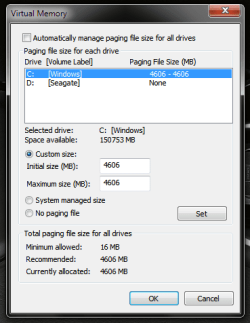
It's recommended by Microsoft to set the pagefile to 1.5x the amount of physical ram installed, Windows does this by default. However, moving the pagefile to a separate physical hard drive and setting the initial and maximum pagefile size to be equal can result in better overall system performance. :p
 

Attachments

  • Capture.PNG
    Capture.PNG
    15.1 KB · Views: 21
Last edited:

My Computer

OS
Windows 7 Professional
CPU
Intel Core i7-2670QM
Memory
Samsung 8GB
Graphics Card(s)
NVIDIA GT 555M
Hard Drives
Intel 525 120GB | HGST Travelstar 1TB
Mouse
CM Storm Xornet | Microsoft Sculpt Comfort
Internet Speed
25 Mbps | 600 Kbps
Other Info
Centrino 6205 | Seagate Backup Plus 1TB
TY,
I have been using 30gb OCZ Vertex, FW 1.1.
Intend on FW 1.5 update, before clean install of W7.
 

My Computer

Computer Manufacturer/Model Number
DIY #3, #2
OS
W7 Ulti/64, XP Pro/32
CPU
INTEL i7 920 DO, Core2 Duo 6400
Motherboard
GIGABYTE EX58 UD3R-SLI, EP45-UD3R
Memory
KINGSTON DDR3 1333MHz, CORSAIR DDR2 800MHz
Graphics Card(s)
EVGA GTX 260 x2, 8800 GTX
Sound Card
REALTEK HD onboard, ditto
Monitor(s) Displays
SONY 40" BRAVIA LCD
Screen Resolution
1360 X 768
Hard Drives
OCZ VERTEX/RAID0 -3, Vertex 30GB
PSU
COOLERMASTER 900W, ENERMAX 850W
Case
COOLERMASTER HAF 932 x2
Cooling
stock
Keyboard
MS
Mouse
MS
Internet Speed
ADSL 3MB/768KBs
Other Info
amateur enthusiast
Yes, 1.5x is recommended, but doesnt really need to be that large when your talking 4GB of RAM+
W/4Gb Id use around a 2GB PF though.

Moving the pagefile off the SSD to a spinning drive is going to hurt performance, as any spinning drive is much much slower.
Although with 4GB + RAM, youll seldom ever use the PF anyway, when you do, it will have to wait for the spinning drive to spin up and seek.


Those Vertex with FW 1.5 will do an excellent job. If your going to RAID them, Id do as I suggested earlier. They will serve you well.

If running just a solo 30Gb vertex .. then yea .. Id move the Temp Folder, disable Hiberfile etc because space will be cramped.

So long as you have at least 2 of them in RAID, It should no longer be a issue.

Flash them all to 1.5 seperatly, in IDE mode, before you set up the RAID.
I would also sanitary erase each drive after the FW update as well before setting up and installing windows
 

My Computer

Computer Manufacturer/Model Number
Custom (Self Build)
OS
Windows 7 Home Premium 64bit
CPU
Intel Core i7 2700k
Motherboard
eVGA P67 SLI
Memory
8GB Mushkin Redline Ridgebacks @1866
Graphics Card(s)
EVGA GTX570 SC
Sound Card
XiFi Titanium HD
Monitor(s) Displays
LG W2453V
Screen Resolution
1920x1080
Hard Drives
Intel 320 80GB -- Intel X25-V 40GB --WD Black 1TB x2 -- WD Blue 640GB
PSU
Seasonic x750
Case
Corsair 600T SE White
Cooling
eVGA Superclocked CPU Cooler
Keyboard
Saitek Cyborg
Antivirus
Kaspersky
Browser
IE
Other Info
LG BD/DVD
Wishmaster, he clearly stated that he has 3 SSD's on Raid and a 4th for Pagefile and that's the way he should do it. Having all 4 SSD's on Raid would not have the same effect on the Pagefile as having the Pagefile moved to on a separate SSD dedicated for the Pagefile.

:p
 

My Computer

OS
Windows 7 Professional
CPU
Intel Core i7-2670QM
Memory
Samsung 8GB
Graphics Card(s)
NVIDIA GT 555M
Hard Drives
Intel 525 120GB | HGST Travelstar 1TB
Mouse
CM Storm Xornet | Microsoft Sculpt Comfort
Internet Speed
25 Mbps | 600 Kbps
Other Info
Centrino 6205 | Seagate Backup Plus 1TB
on a spinning drive, I agree, moving the PF to a seperate drive can help some.

However, SSds have near 0 access times, no spin up time, and much faster read rates.
In a Raid array they are even faster.
You're still moving the Pagefile to a slower drive. 1 SSD VS 3 in RAID0


As long as theres room, theres no reason to move it away from the
Solid State RAID array. it will only hurt performance when the PF is needed, not help.
 

My Computer

Computer Manufacturer/Model Number
Custom (Self Build)
OS
Windows 7 Home Premium 64bit
CPU
Intel Core i7 2700k
Motherboard
eVGA P67 SLI
Memory
8GB Mushkin Redline Ridgebacks @1866
Graphics Card(s)
EVGA GTX570 SC
Sound Card
XiFi Titanium HD
Monitor(s) Displays
LG W2453V
Screen Resolution
1920x1080
Hard Drives
Intel 320 80GB -- Intel X25-V 40GB --WD Black 1TB x2 -- WD Blue 640GB
PSU
Seasonic x750
Case
Corsair 600T SE White
Cooling
eVGA Superclocked CPU Cooler
Keyboard
Saitek Cyborg
Antivirus
Kaspersky
Browser
IE
Other Info
LG BD/DVD
Whatever, I do not totally agree with you but I also do not want to go on arguing. Let him decide what he thinks is best. I'm done you hear?
For the sake of reasoning:
Raid 4 SSD's = 0.x access time, Pagefile with System Files
Single SSD = 0.x access time, Pagefile seperate from System files

:p
 
Last edited:

My Computer

OS
Windows 7 Professional
CPU
Intel Core i7-2670QM
Memory
Samsung 8GB
Graphics Card(s)
NVIDIA GT 555M
Hard Drives
Intel 525 120GB | HGST Travelstar 1TB
Mouse
CM Storm Xornet | Microsoft Sculpt Comfort
Internet Speed
25 Mbps | 600 Kbps
Other Info
Centrino 6205 | Seagate Backup Plus 1TB

My Computer

Computer Manufacturer/Model Number
Goonie Build 8 2010
OS
Windows 7 64bit Ultimate SP1, VMware Windows 7 64bit Ultimate SP1
CPU
Intel Core i7 920 @ 3.8 or 4.2 when i need it
Motherboard
Gigabyte GA-X58-UD5
Memory
Corsair XMS3 12GB DDR3 1600 1.5v
Graphics Card(s)
MSI GeForce GTX 560Ti OC Twin FrozR II
Sound Card
7.1 HD
Monitor(s) Displays
2x BenQ 24 LED 1080p + LG 50PK590 1080p
Screen Resolution
3840 x 1080p
Hard Drives
Intel X25-M 80GB OS/
Intel X25-M 160GB
Data Robotics Drobo V2 8TB
PSU
Corsair AX 750W ATX Modular
Case
Antec Fusion Remote Max
Cooling
Noctua NH D14
Keyboard
Logitech
Mouse
Logitech
Internet Speed
15Mbs Down 1.3Mbs Up
Other Info
Hauppauge HD PVR/
Pioneer 1017-k - 7.1 THX/
Xbox 360 250 Slim
SkyHD/LG 50PK590 TV
As you have been advised, leave paging memory decisions to MS. They have much more experience in this area. Reset your system to the defaults and never, never, never mess around with it again.
 

My Computer

Computer Manufacturer/Model Number
Toshiba Satellite S875D-S7239 laptop
OS
MS Windows 7 Ultimate SP1 64-bit
CPU
AMD A10-4600M
Motherboard
AMD Pumori (Socket FT1)
Memory
6.00 GB Dual-Channel DDR3 @ 798MHz (11-11-12-28)
Graphics Card(s)
AMD Radeon HD 7660G
Sound Card
High Definition Audio Device
Monitor(s) Displays
Generic PnP Monitor (1600x900@60Hz)
Screen Resolution
1600x900@60Hz
Hard Drives
SSD 119GB Corsair CSSD-V128GB2 ATA Device
Keyboard
Standard PS/2 Keyboard
Mouse
HP Wireless Optical Mobile Mouse Model FHA-3410
Internet Speed
What the local pub, local coffee shop offers.
Other Info
Optical Drive:MATSHITA BD-CMB UJ160B ATA Device


Also have an Asus ha1002xp netbook with Win 7 Ultimate installed.
On the whole pagefile on a separate drive thing .....

Mechanicl Hard Drives,, yes, It is beneficial to put it on a seperate drive.

SSD's No, there is no difference, you will not notice any speed difference.

As Stated, SSD's have near zero access read/write times.

So, I would personally,, if I had the money,, check out Raid 6 and run that.
It give you 2 Drive failures before you lose everything, and on SSD, you shouldn't even notice any performance hits. At least, I don't think you will. I would try it.

P.s . Leave the Pagefile alone,, if you have 4G + of Ram Min/Max should be set at 4096MB
 

My Computer

Computer Manufacturer/Model Number
Self Built
OS
Win 7 Ultimate 32bit
CPU
C2D E6600 2.4Ghz
Motherboard
Intel D965WH
Memory
4G Kingston KHX5400D2
Graphics Card(s)
EVGA GTX 570 HD SC (012-P3-1573-KR)
Sound Card
On-Board
Monitor(s) Displays
Samsung 226BW
Screen Resolution
1680 x 1050
Hard Drives
2 x 250 Seagate Barracuda
2 x 500 Seagate Barracuda (Raid1)
PSU
Corsair TX750W
Case
In-Win C589
Cooling
Stock Intel Cooling
As you have been advised, leave paging memory decisions to MS. They have much more experience in this area. Reset your system to the defaults and never, never, never mess around with it again.

Not a very good way to learn anything, and a very good way to make you dependant, or at the mercy, of people you will half to pay for.
 

My Computer

Computer Manufacturer/Model Number
DIY #3, #2
OS
W7 Ulti/64, XP Pro/32
CPU
INTEL i7 920 DO, Core2 Duo 6400
Motherboard
GIGABYTE EX58 UD3R-SLI, EP45-UD3R
Memory
KINGSTON DDR3 1333MHz, CORSAIR DDR2 800MHz
Graphics Card(s)
EVGA GTX 260 x2, 8800 GTX
Sound Card
REALTEK HD onboard, ditto
Monitor(s) Displays
SONY 40" BRAVIA LCD
Screen Resolution
1360 X 768
Hard Drives
OCZ VERTEX/RAID0 -3, Vertex 30GB
PSU
COOLERMASTER 900W, ENERMAX 850W
Case
COOLERMASTER HAF 932 x2
Cooling
stock
Keyboard
MS
Mouse
MS
Internet Speed
ADSL 3MB/768KBs
Other Info
amateur enthusiast
As I stated in the begining, I am already using a RAID 0 array with a 4th SSD for pagefile/temp files. I will most likely recreate the same config. Altho I understand that putting certain things on the non-RAID disk could cause a performance hit, it would be small. The main reason to do it in my mind is to keep the "writes" down on the boot array. SSD's do have a limited life based on how many times you write to them.
TY
 

My Computer

Computer Manufacturer/Model Number
DIY #3, #2
OS
W7 Ulti/64, XP Pro/32
CPU
INTEL i7 920 DO, Core2 Duo 6400
Motherboard
GIGABYTE EX58 UD3R-SLI, EP45-UD3R
Memory
KINGSTON DDR3 1333MHz, CORSAIR DDR2 800MHz
Graphics Card(s)
EVGA GTX 260 x2, 8800 GTX
Sound Card
REALTEK HD onboard, ditto
Monitor(s) Displays
SONY 40" BRAVIA LCD
Screen Resolution
1360 X 768
Hard Drives
OCZ VERTEX/RAID0 -3, Vertex 30GB
PSU
COOLERMASTER 900W, ENERMAX 850W
Case
COOLERMASTER HAF 932 x2
Cooling
stock
Keyboard
MS
Mouse
MS
Internet Speed
ADSL 3MB/768KBs
Other Info
amateur enthusiast
An update,
I got it all togather as I stated above. So far its the best setup I've done to date. Fast, stable, reliable, only crashes have come when I tried selecting alternate frame rendering, for the video cards. I have it OC'ed all the way around. Some settings in bios would not take, but if it booted to OS, it worked.

I have pagefile on a separate, 4th SSD. No apparent bad effects on sys performance. My reasoning for doing this, besides keeping down the writes to the boot array, is that the prcocessor can handle multiple input faster than waiting for the SSD ques. Same reason the technique started originally, multithreads are faster than ques.
I have used a SQL server technique for locking out the pagefile, it helped.
 

My Computer

Computer Manufacturer/Model Number
DIY #3, #2
OS
W7 Ulti/64, XP Pro/32
CPU
INTEL i7 920 DO, Core2 Duo 6400
Motherboard
GIGABYTE EX58 UD3R-SLI, EP45-UD3R
Memory
KINGSTON DDR3 1333MHz, CORSAIR DDR2 800MHz
Graphics Card(s)
EVGA GTX 260 x2, 8800 GTX
Sound Card
REALTEK HD onboard, ditto
Monitor(s) Displays
SONY 40" BRAVIA LCD
Screen Resolution
1360 X 768
Hard Drives
OCZ VERTEX/RAID0 -3, Vertex 30GB
PSU
COOLERMASTER 900W, ENERMAX 850W
Case
COOLERMASTER HAF 932 x2
Cooling
stock
Keyboard
MS
Mouse
MS
Internet Speed
ADSL 3MB/768KBs
Other Info
amateur enthusiast
Back
Top