pages like microsoft.com wont load

helper11

New member
Local time
2:30 AM
Messages
8
Hi all,

I have win 7 ultra 64 bit installed, I have certain sites that will not load. I have tried it with IE 8 (64bit and 32 bit) and Firefox 3.6. I am using microsofts firewall and microsoft essential for my virus protection. I have another computer using the same hub and internet connection but running off of xp and it works with no problems.

So far I have not been able to access the main page for microsoft.com, mozilla.com, the install software for adobe flash and a few others but then the other site work great and fast.

Any suggestions... Am I missing something?

Hope to hear from someone soon..
 

My Computer

OS
Win 7 Ultra 64
CPU
Core I7
Motherboard
Gigabyte
Memory
6 gig corsair
Graphics Card(s)
Nvida
Monitor(s) Displays
acer 23"
Hard Drives
WD
PSU
Corsair 650
Case
Coolmaster
Cooling
lots
Hello,

I also wanted to add this site to the list of sites I can not access. It just sites there and spin like it is trying to access the page but stop, again this is in ie and firefox. I have both 32 and 64 bit java incase that was the problem. I have even tried it with the firewall off and still not able to gain access to them.

Thank for any ideas...
 

My Computer

OS
Win 7 Ultra 64
CPU
Core I7
Motherboard
Gigabyte
Memory
6 gig corsair
Graphics Card(s)
Nvida
Monitor(s) Displays
acer 23"
Hard Drives
WD
PSU
Corsair 650
Case
Coolmaster
Cooling
lots
Hello all...

I think the problem is solved but I do not understand it. I decided to connect the network cable directly to the dsl modem and everything was working, so I concluded it was the router. I went in and reset it to the factory default, reset up the wireless security and password and then disabled the built in firewall and it started to work. The thing that makes it weird is the other xp machine and win 7 machine worked fine on it, just not the ultra setup. Any ideas on this, should I setup the firewall on the router? If so what values need to be set?

Thanks for any help..
 

My Computer

OS
Win 7 Ultra 64
CPU
Core I7
Motherboard
Gigabyte
Memory
6 gig corsair
Graphics Card(s)
Nvida
Monitor(s) Displays
acer 23"
Hard Drives
WD
PSU
Corsair 650
Case
Coolmaster
Cooling
lots
It may be that your router requires a firmware update in order to work properly with Windows 7. You shouldn't need to use any special firewall settings for Windows 7.
 

My Computer

Computer type
PC/Desktop
Computer Manufacturer/Model Number
Home built
OS
Windows 7 Ult, Windows 8.1 Pro,
CPU
Q9650-4.275GHz, E8600 4.5GHz, E6750-3.8GHz
Motherboard
Evga 780i FTW
Memory
G.Skill PC2 9600 1200Mhz 5 5 5 15 2T
Graphics Card(s)
GTX480
Sound Card
Asus Xonar D2
Monitor(s) Displays
HannsG
Screen Resolution
1680X1050
Hard Drives
GSkill Phoenix Pro 120GB SSD
PSU
ThermalTake Toughpower 1000Watt modular
Case
ThermalTake XaserV
Cooling
Xigmatek S1283
Keyboard
Logitech G15
Mouse
Logitech G9
Internet Speed
T1
tried that

Hi,

I actually checked all of that before posting, there was no firm ware updates for the router. I then messed with the firewall on win 7 and that made no difference. It took disabling the firewall in the router itself to get it to work. Weird to me... when the others used it fine.

Thanks for your time.

Andrew
 

My Computer

OS
Win 7 Ultra 64
CPU
Core I7
Motherboard
Gigabyte
Memory
6 gig corsair
Graphics Card(s)
Nvida
Monitor(s) Displays
acer 23"
Hard Drives
WD
PSU
Corsair 650
Case
Coolmaster
Cooling
lots
Well, it is back, so I did do the upgrade of the firm ware and no difference there. I am not sure what else to check any one have this with a trendnet router before?
 

My Computer

OS
Win 7 Ultra 64
CPU
Core I7
Motherboard
Gigabyte
Memory
6 gig corsair
Graphics Card(s)
Nvida
Monitor(s) Displays
acer 23"
Hard Drives
WD
PSU
Corsair 650
Case
Coolmaster
Cooling
lots
Well, it is back, so I did do the upgrade of the firm ware and no difference there. I am not sure what else to check any one have this with a trendnet router before?

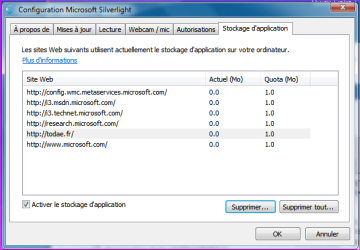
If it is only on some Microsoft sites you've got that prob, you might want to uninstall the MS Silverlight 4 from your "programs & features" then reinstall Silverlight 4 and check (see attached thumbnail) there, if those sites are well registred in that Applications Tab of Silverlight 4.
 

Attachments

  • Capture.PNG
    Capture.PNG
    14.5 KB · Views: 21

My Computer

Computer type
PC/Desktop
Computer Manufacturer/Model Number
Custom Build
OS
Windows 7 Professional SP1 - x64 [Non-UEFI Boot]
CPU
Ivy Bridge Core i5 3570K (Delidded)
Motherboard
Asus P8Z77-V LE PLUS
Memory
G.Skill "Ares" DDR3 PC3-12800 - 1600MHz (16Gb)
Graphics Card(s)
Asus Dual-RX480-O4G
Sound Card
Creative Sound Blaster Z w/5.1 sound system
Monitor(s) Displays
Asus IPS 23"
Screen Resolution
16/9
Hard Drives
Internal:
500Go Sata 6Gb/s (x2)
500Go Sata 3Gb/s (x2)
SSD 60Go Sata 6Gb/s
PSU
In Win C 900W Series 80+ Platinum
Case
Thermaltake Chaser A71
Cooling
Custom Water Cooling Loop
Keyboard
Cooler Master QuickFire XTi
Mouse
Razer Imperator 2012 (4G)
Antivirus
MSE
Browser
IE 11.0.xxx Rtm
Other Info
"Raid0" with Intel Smart Response Technology (HDD/SSD)
Hello,

Sorry to say it is more then just microsoft sites. I can not access compusa.com, this site again is not working, as well as the main microsoft.com site, but support.microsoft.com works. I tried directly hooking up the computer to the dsl modem and it works fine all sites come up. It is something with the trendnet 432brp router causing the problem with win 7 ultra, as my xp machine on the same router works fine. I can access those sites and I am writing from it now, both machine are hard wired into the router.
 

My Computer

OS
Win 7 Ultra 64
CPU
Core I7
Motherboard
Gigabyte
Memory
6 gig corsair
Graphics Card(s)
Nvida
Monitor(s) Displays
acer 23"
Hard Drives
WD
PSU
Corsair 650
Case
Coolmaster
Cooling
lots
Update: Also tried it with my win 7 home 64bit laptop and have the exact same problem. I am guessing it is something in the trendnet router. I have a help ticket in with them. Just incase I get totally tired of this any recommendations for a working wireless/wired router I am only on the lowest dsl speed by at&t so i dont need a super expensive model.

Thanks
 

My Computer

OS
Win 7 Ultra 64
CPU
Core I7
Motherboard
Gigabyte
Memory
6 gig corsair
Graphics Card(s)
Nvida
Monitor(s) Displays
acer 23"
Hard Drives
WD
PSU
Corsair 650
Case
Coolmaster
Cooling
lots
Fix???

Hi all,

Well I think I have it fixed. I added the DNS servers for the dsl to my router and then reset them both. I turned both off for a minute, then I started up the DSL modem and waited until it was fully started. I then started up the router and it appears to be working on all sites now.

Hope this helps someone else out down the road...
 

My Computer

OS
Win 7 Ultra 64
CPU
Core I7
Motherboard
Gigabyte
Memory
6 gig corsair
Graphics Card(s)
Nvida
Monitor(s) Displays
acer 23"
Hard Drives
WD
PSU
Corsair 650
Case
Coolmaster
Cooling
lots
Hi all,

Well I think I have it fixed. I added the DNS servers for the dsl to my router and then reset them both. I turned both off for a minute, then I started up the DSL modem and waited until it was fully started. I then started up the router and it appears to be working on all sites now.

Hope this helps someone else out down the road...

Glad you done it!:)

If you think it is solved, cilick on the Panel "!" upper right the post and type in the box "solved". We will all know it fix.
 

My Computer

Computer type
PC/Desktop
Computer Manufacturer/Model Number
Custom Build
OS
Windows 7 Professional SP1 - x64 [Non-UEFI Boot]
CPU
Ivy Bridge Core i5 3570K (Delidded)
Motherboard
Asus P8Z77-V LE PLUS
Memory
G.Skill "Ares" DDR3 PC3-12800 - 1600MHz (16Gb)
Graphics Card(s)
Asus Dual-RX480-O4G
Sound Card
Creative Sound Blaster Z w/5.1 sound system
Monitor(s) Displays
Asus IPS 23"
Screen Resolution
16/9
Hard Drives
Internal:
500Go Sata 6Gb/s (x2)
500Go Sata 3Gb/s (x2)
SSD 60Go Sata 6Gb/s
PSU
In Win C 900W Series 80+ Platinum
Case
Thermaltake Chaser A71
Cooling
Custom Water Cooling Loop
Keyboard
Cooler Master QuickFire XTi
Mouse
Razer Imperator 2012 (4G)
Antivirus
MSE
Browser
IE 11.0.xxx Rtm
Other Info
"Raid0" with Intel Smart Response Technology (HDD/SSD)
Back
Top