Paragon Recovery CD does not see the external Maxtor HD - strange

jumanji

New member
Guru
Gold Member
VIP
Local time
6:05 PM
Messages
5,915
I usually take my backups running the Paragon Advanced Recovery CD ISO (Win-PE based;provided with Paragon Hard Disk Manager Suite 11) from a multiboot pendrive and write the image to another partition in the internal drive. Later I copy it to the Maxtor external drive.

Today I tried to backup my C drive directly to my external 300GB Maxtor One Touch II hard disk. To my chagrin, the external drive would not show up. The program would try to recognise it but after 5 minutes throw up the error message
" I/O error on hard disk Drive 1 has occurred. The hard disk read or write operation has failed. This may be due to hardware problems. 1.Retry the operation 2.Ignore the error - the prog. might work incorrectly or your data may become corrupted in this case. 3. Ignore all errors - the prog. might work incorrectly or your data may become corrupted in this case."

Click on 2 or 3 the partitions on the Maxtor External drive will show up on the drive map but as "not formatted" So I cannot write the image onto it.

I then connected my Seagate GoFlex USB external hard drive which showed up without any problem.Wrote the image to it.

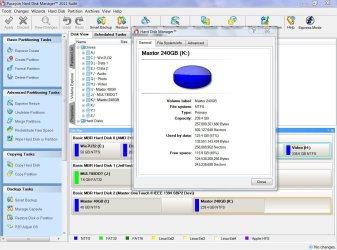
Now back to the Maxtor External Drive. Windows 7 and the Paragon HD Manager run from within Windows 7 could see it and read or write into it. Screenshot below.
MaxtorShows.jpg

I have been using one partition in it to back up my data using SyncBack. No problems. The other partition contains the periodical back-ups.

Anyway alarmed that it may be on the brink of giving up, I copied all the 150GB of data into the Seagate external drive and proceeded to check the Maxtor with Seagate Seatools for Windows.

Running the Long Generic Test for almost two hours, it finally said "Passed". No bad sectors at all. (The long Generic Test can find the bad sectors and repair, if possible, for external drives. To find and repair bad sectors in the Internal drives, one has to run the SeaTools DOS version)

Now the question is Why does my Maxtor drive fail to show up when I run the Recovery CD? What should I do?
 

My Computer My Computer

At a glance

Windows 7 Home Premium 32 bit
OS
Windows 7 Home Premium 32 bit
My first guess is that it is connected by firewire. Firewire, like USB 3.0 in not natively supported. It must have the drivers to operate or be seen. The drivers are located in the OS. So, when you boot to a recovery USB or CD, the OS is not loaded (so drivers are not loaded) therefore those ports don't work. I suspect your Seagate hard drive is USB 2.0 which is natively supported.
 

My Computers My Computers

  • At a glance

    Windows 11 ProRyzen 9 5900X32GB G Skill DDR4-3600EVGA RTX 3080 FTW 3 Ultra
    Computer type
    PC/Desktop
    Computer Manufacturer/Model Number
    ALWAYS UNDER CONSTRUCTION
    OS
    Windows 11 Pro
    CPU
    Ryzen 9 5900X
    Motherboard
    Asus X570 Crosshair Viii Hero
    Memory
    32GB G Skill DDR4-3600
    Graphics Card(s)
    EVGA RTX 3080 FTW 3 Ultra
    Sound Card
    On Board/Sennheiser PC37X Headset
    Monitor(s) Displays
    3 X Asus 27"
    Screen Resolution
    2560x1440
    Hard Drives
    2 X 1 TB NVME drives
    PSU
    EVGA 850
    Case
    Phanteks Eclipse P400A
    Cooling
    EVGA 280 AIO
    Keyboard
    Logitech G510s/ Logitech G13
    Mouse
    Logitech G502
    Internet Speed
    24/1
    Antivirus
    ESET/MBAM Pro/SAS Pro
    Browser
    Chrome/ Firefox/ Edge
  • At a glance

    Windows 11 ProIntel Ultra 9 288V32 GB LPDDR5X 8533
    Computer type
    Laptop
    System Manufacturer/Model Number
    Dell 16 Plus
    OS
    Windows 11 Pro
    CPU
    Intel Ultra 9 288V
    Memory
    32 GB LPDDR5X 8533
    Monitor(s) Displays
    16" Mini-LED HDR600 Touch 90 Hz
    Screen Resolution
    2560X1600
    Hard Drives
    1 TB NVME
Your guess is a good one but unfortunately it is not the case. I was aware of this issue from day one I bought this Maxtor External drive 6-7 years back and am only using the USB for connecting it to the desktop eversince I started using it to save the backup system images. I was using Firewire before.

I have to further state the Shadowprotect Desktop and Acronis TIH 11 WinPE recovery CDs - also run from my multiboot pendrive - have no difficulty in picking up the Maxtor drive and writing the images into it or reading from it.

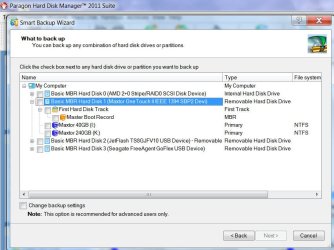
It really beats me. The two partitions in the external drive are NTFS formatted. Screenshot below - the same Paragon HD Manager 11 suite running from within Windows. I took the image and wrote it into it too. :)

PHD11 W7.jpg
 

My Computer My Computer

At a glance

Windows 7 Home Premium 32 bit
OS
Windows 7 Home Premium 32 bit
I have never used Paragon so I'm probably not much help. Many of these issues come up simply due to hardware or software incompatibilities. But, if I am not mistaken, the maxtor one touch is a backup drive in itself isn't it? I have used the same software, but not that drive. I'm just wondering if there is not some compatibility issue with the software's involved. Plus, I thought the one touch was a little different than a normal external hard drive. Am I correct in those assumptions?
 

My Computers My Computers

  • At a glance

    Windows 11 ProRyzen 9 5900X32GB G Skill DDR4-3600EVGA RTX 3080 FTW 3 Ultra
    Computer type
    PC/Desktop
    Computer Manufacturer/Model Number
    ALWAYS UNDER CONSTRUCTION
    OS
    Windows 11 Pro
    CPU
    Ryzen 9 5900X
    Motherboard
    Asus X570 Crosshair Viii Hero
    Memory
    32GB G Skill DDR4-3600
    Graphics Card(s)
    EVGA RTX 3080 FTW 3 Ultra
    Sound Card
    On Board/Sennheiser PC37X Headset
    Monitor(s) Displays
    3 X Asus 27"
    Screen Resolution
    2560x1440
    Hard Drives
    2 X 1 TB NVME drives
    PSU
    EVGA 850
    Case
    Phanteks Eclipse P400A
    Cooling
    EVGA 280 AIO
    Keyboard
    Logitech G510s/ Logitech G13
    Mouse
    Logitech G502
    Internet Speed
    24/1
    Antivirus
    ESET/MBAM Pro/SAS Pro
    Browser
    Chrome/ Firefox/ Edge
  • At a glance

    Windows 11 ProIntel Ultra 9 288V32 GB LPDDR5X 8533
    Computer type
    Laptop
    System Manufacturer/Model Number
    Dell 16 Plus
    OS
    Windows 11 Pro
    CPU
    Intel Ultra 9 288V
    Memory
    32 GB LPDDR5X 8533
    Monitor(s) Displays
    16" Mini-LED HDR600 Touch 90 Hz
    Screen Resolution
    2560X1600
    Hard Drives
    1 TB NVME
Yes, it came with a backup software ( I don't even remember the name) and a one touch driver for it.. But I am not using any of those. My desktop does not even have traces of it. I am using it purely as an external drive with the native Windows drivers. Same case with the Seagate Freeagent Go/GoFlex external drives. The first thing I do is to reformat the drive and remove all junk they deliver with the drive.:)

If no tangible solution comes out, I plan to reformat the Maxtor External drive using the Paragon Hard Disk Manager itself and check whether it will accept its own baby failing which I have to use the Seagate External drives for saving the system images.
 
Last edited:

My Computer My Computer

At a glance

Windows 7 Home Premium 32 bit
OS
Windows 7 Home Premium 32 bit
I do too with the GoFlex drives, but the backup software with the one touch works real well, I believe it's the Replica. It has saved me several times. I really don't know what to suggest, or why the recovery disk can't see your drive. Maybe someone else will have a better idea.
 

My Computers My Computers

  • At a glance

    Windows 11 ProRyzen 9 5900X32GB G Skill DDR4-3600EVGA RTX 3080 FTW 3 Ultra
    Computer type
    PC/Desktop
    Computer Manufacturer/Model Number
    ALWAYS UNDER CONSTRUCTION
    OS
    Windows 11 Pro
    CPU
    Ryzen 9 5900X
    Motherboard
    Asus X570 Crosshair Viii Hero
    Memory
    32GB G Skill DDR4-3600
    Graphics Card(s)
    EVGA RTX 3080 FTW 3 Ultra
    Sound Card
    On Board/Sennheiser PC37X Headset
    Monitor(s) Displays
    3 X Asus 27"
    Screen Resolution
    2560x1440
    Hard Drives
    2 X 1 TB NVME drives
    PSU
    EVGA 850
    Case
    Phanteks Eclipse P400A
    Cooling
    EVGA 280 AIO
    Keyboard
    Logitech G510s/ Logitech G13
    Mouse
    Logitech G502
    Internet Speed
    24/1
    Antivirus
    ESET/MBAM Pro/SAS Pro
    Browser
    Chrome/ Firefox/ Edge
  • At a glance

    Windows 11 ProIntel Ultra 9 288V32 GB LPDDR5X 8533
    Computer type
    Laptop
    System Manufacturer/Model Number
    Dell 16 Plus
    OS
    Windows 11 Pro
    CPU
    Intel Ultra 9 288V
    Memory
    32 GB LPDDR5X 8533
    Monitor(s) Displays
    16" Mini-LED HDR600 Touch 90 Hz
    Screen Resolution
    2560X1600
    Hard Drives
    1 TB NVME
Back
Top