Unable to initialize the external drive in Windows 7

hechesspee

New member
Local time
10:58 PM
Messages
6
Hi,
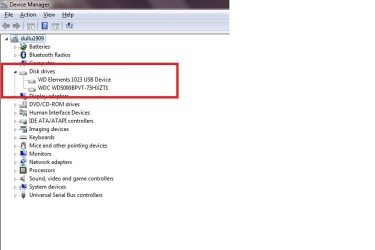
I have an WD Elements 1023 external hard drive which I want to connect to my laptop which runs a 64 bit Windows 7 Home Premium. When I connect the device, it shows up in the device manager and the driver is installed properly.

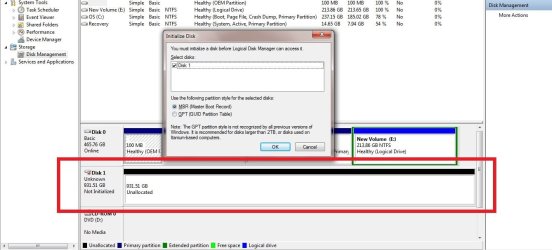
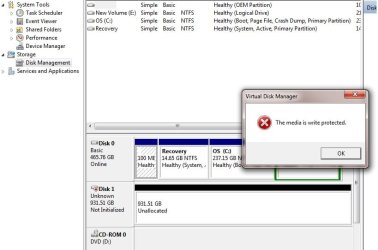
However, it doesnt show up as a drive and in the Disk Management, it shows as Disk1 unknown. When I try to Initialize the disk, I get a error that the "The Media is write protected".

Its been a real pain as I have a lot of data init and unable to access it.
It wud be great if anybody could suggest me a solution for this.

Thanks in advance!
Harsha
 

My Computer My Computer

Computer Manufacturer/Model Number
Dell Inspiron 5110
OS
Windows 7 Home Premium 64bit
CPU
Intel i5 2,3 GHz
Motherboard
Dell Inspiron 5110
Memory
6 GB
Graphics Card(s)
Intel
Welcome aboard. :)

If you restart with the laptop with the external drive connected, it may recognize the drive.
 

My Computer My Computer

Computer type
PC/Desktop
Computer Manufacturer/Model Number
Self Assembled
OS
Microsoft Windows 10 Pro Insider Preview 64-bit
CPU
Intel(R) Core(TM) i3-4130 CPU @ 3.40GHz
Motherboard
Gigabyte Technology Co., Ltd. B85M-D3H
Memory
Corsair Vengence 4GB x2 (8.00GB Dual-Channel DDR3 @ 798MHz)
Graphics Card(s)
2047MB GeForce GTS 450 (ZOTAC International)
Sound Card
Onboard (Realtek High Definition Audio)
Monitor(s) Displays
LG Flatron E2040T
Screen Resolution
1600x900
Hard Drives
Western Digital 1 TB
Seagate 500 GB
PSU
Corsair VS550
Case
Cooler Master K380
Cooling
Cooler Master Seidon 120V Plus
Keyboard
Logitech MK260r
Mouse
Logitech MK260r
Internet Speed
PMPL Broadband
Antivirus
Windows Defender + MBAM
Browser
Firefox
Other Info
Dell Studio 15" Laptop
I tried it restarting....but it hasnt worked....
 

My Computer My Computer

Computer Manufacturer/Model Number
Dell Inspiron 5110
OS
Windows 7 Home Premium 64bit
CPU
Intel i5 2,3 GHz
Motherboard
Dell Inspiron 5110
Memory
6 GB
Graphics Card(s)
Intel
Can you remove the ext. Hard drive from the case?

This may sound incorrect, but it worked for me with the same issue: switch off laptop and ext drive and completely unplug everything from the Ext case, remove drive from the case, reassemble the ext hard drive and plug all components back in before restarting the laptop and ext drive. I have no idea why this worked for me but I hope it works for you too.
 

My Computer My Computer

Computer type
PC/Desktop
Computer Manufacturer/Model Number
bertison
OS
Windows 7/64 HPremium.
CPU
AMD FX-6300.
Motherboard
Asus M5A78L-M LE/USB3.
Memory
Corsair (2x4) GB DDR3 CMXGX3M2A1337CL9.
Graphics Card(s)
NVidia/Gigabyte GT730 (2GB) GDDR5.
Sound Card
Onboard.
Monitor(s) Displays
Iiyama PLE2407HDS.
Screen Resolution
1920 x 1280
Hard Drives
Desktop: 1TB. WD10EZEX-00BN5A0.
Zyxel nsa310 NAS: 2TB Seagate Barracuda 7200.14.
Cache Drive: Sandisk SDSSDRC032G.
Laptop Lenovo B50/80 128 GB SSD.
PSU
Corsair 750M.
Case
Coolermaster N300.
Cooling
FRONT: (2X) 140mm. TOP: (1x) 120mm. REAR: (1x) 120mm.
Keyboard
Logitech K290
Mouse
Trust Optical Wired
Internet Speed
15 Mb Down, 0.55 Up.
Antivirus
Kaspersky Total Security 2017, Hitman Pro.
Browser
Firefox.
Other Info
NETWORK:
Sky "Q box" and router.
Desktop & NAS - 30 Metres Cat6 Ethernet wired, via TP-Link 4-port switch.
Lenovo B50/80 Laptop, 2x Wileyfox phones, Lenovo TAB3-8 tablet - all wireless.
Grandchildren, their parents and friends as bandwidth 'parasites' at various times!
Does the drive work in another computer ok?
 

My Computer My Computer

Computer type
PC/Desktop
Computer Manufacturer/Model Number
Home Built Desktop By DataTech
OS
Windows 7 Ultimate X64 SP1
CPU
Intel i5-2550K, Differing ~4.4-4.8GHz No built in GPU
Motherboard
ASUS P8Z68-V PRO/GEN3
Memory
16GB G.Skill Sniper 1866MHz @ 2133MHz 2x8GB
Graphics Card(s)
ASUS GTX650TIB-DC2OC-2GD5, (650TI Boost)
Sound Card
Onboard Realtek 5-1
Monitor(s) Displays
Samsung P2570HD
Screen Resolution
1920x1080
Hard Drives
Samsung 840 Pro 256GB SSD for OS, 500GB Seagate Constellation (Enterprise drive) for Data
PSU
Corsair HX650W
Case
Inwin Dragon Rider
Cooling
Hyper 212 EVO w/two Noctua fans, push-pull, @1300 RPM
Keyboard
E-Z Eyes, bright yellow keys with large characters
Mouse
steelseries SENSEI Laser Pro Gaming
Internet Speed
48-51Mbs Mbs down, 11 Mbs up Xfinity Cable
Antivirus
Norton Internet Security 2013
Browser
IE 10, Opera, Pale Moon if needed
Other Info
4 case fans, LG BluRay-RE, ASUS DVD-RW, Mr. Fusion power supply, 1.21 gigawatts.
Can you put out a screenshot of how it appears in Disk Management?

Where was it being used before?
 

My Computer My Computer

OS
Windows 7 Home Premium 32 bit
Hi all,
Thanks for your responses.

So far I have tried restarting the computer with the external HDD connected, but still it is not getting detected. The same HDD was working fine a couple of days back....suddenly its stopped working and its driving me crazy because all my data is init!


Screen shot of how the drive appears in the device manager
https://picasaweb.google.com/114564433723979804644/March3201202#5715608574510479554

Screen shot of how the drive appears in the disk manager
https://picasaweb.google.com/114564433723979804644/March32012#5715607129219976018
 

My Computer My Computer

Computer Manufacturer/Model Number
Dell Inspiron 5110
OS
Windows 7 Home Premium 64bit
CPU
Intel i5 2,3 GHz
Motherboard
Dell Inspiron 5110
Memory
6 GB
Graphics Card(s)
Intel
Hi,
I checked the diskpart from the command prompt and the disk is listed.

DISKPART> list disk

Disk ### Status Size Free Dyn Gpt
-------- ------------- ------- ------- --- ---
Disk 0 Online 465 GB 1024 KB
Disk 1 Online 931 GB 931 GB

So does this mean that the external HDD is not physically damaged?

Regards
hechesspee
 

My Computer My Computer

Computer Manufacturer/Model Number
Dell Inspiron 5110
OS
Windows 7 Home Premium 64bit
CPU
Intel i5 2,3 GHz
Motherboard
Dell Inspiron 5110
Memory
6 GB
Graphics Card(s)
Intel

My Computer My Computer

Computer type
PC/Desktop
Computer Manufacturer/Model Number
Home Built Desktop By DataTech
OS
Windows 7 Ultimate X64 SP1
CPU
Intel i5-2550K, Differing ~4.4-4.8GHz No built in GPU
Motherboard
ASUS P8Z68-V PRO/GEN3
Memory
16GB G.Skill Sniper 1866MHz @ 2133MHz 2x8GB
Graphics Card(s)
ASUS GTX650TIB-DC2OC-2GD5, (650TI Boost)
Sound Card
Onboard Realtek 5-1
Monitor(s) Displays
Samsung P2570HD
Screen Resolution
1920x1080
Hard Drives
Samsung 840 Pro 256GB SSD for OS, 500GB Seagate Constellation (Enterprise drive) for Data
PSU
Corsair HX650W
Case
Inwin Dragon Rider
Cooling
Hyper 212 EVO w/two Noctua fans, push-pull, @1300 RPM
Keyboard
E-Z Eyes, bright yellow keys with large characters
Mouse
steelseries SENSEI Laser Pro Gaming
Internet Speed
48-51Mbs Mbs down, 11 Mbs up Xfinity Cable
Antivirus
Norton Internet Security 2013
Browser
IE 10, Opera, Pale Moon if needed
Other Info
4 case fans, LG BluRay-RE, ASUS DVD-RW, Mr. Fusion power supply, 1.21 gigawatts.
Hi,
Please find the screen shots from device manager and disk manager.

Regards
Harsha
 

Attachments

  • device manager.jpg
    device manager.jpg
    28.2 KB · Views: 206
  • disk management screen shot.jpg
    disk management screen shot.jpg
    85.2 KB · Views: 273
  • error message.jpg
    error message.jpg
    44.8 KB · Views: 323
Last edited:

My Computer My Computer

Computer Manufacturer/Model Number
Dell Inspiron 5110
OS
Windows 7 Home Premium 64bit
CPU
Intel i5 2,3 GHz
Motherboard
Dell Inspiron 5110
Memory
6 GB
Graphics Card(s)
Intel

My Computer My Computer

Computer type
PC/Desktop
Computer Manufacturer/Model Number
Home Built Desktop By DataTech
OS
Windows 7 Ultimate X64 SP1
CPU
Intel i5-2550K, Differing ~4.4-4.8GHz No built in GPU
Motherboard
ASUS P8Z68-V PRO/GEN3
Memory
16GB G.Skill Sniper 1866MHz @ 2133MHz 2x8GB
Graphics Card(s)
ASUS GTX650TIB-DC2OC-2GD5, (650TI Boost)
Sound Card
Onboard Realtek 5-1
Monitor(s) Displays
Samsung P2570HD
Screen Resolution
1920x1080
Hard Drives
Samsung 840 Pro 256GB SSD for OS, 500GB Seagate Constellation (Enterprise drive) for Data
PSU
Corsair HX650W
Case
Inwin Dragon Rider
Cooling
Hyper 212 EVO w/two Noctua fans, push-pull, @1300 RPM
Keyboard
E-Z Eyes, bright yellow keys with large characters
Mouse
steelseries SENSEI Laser Pro Gaming
Internet Speed
48-51Mbs Mbs down, 11 Mbs up Xfinity Cable
Antivirus
Norton Internet Security 2013
Browser
IE 10, Opera, Pale Moon if needed
Other Info
4 case fans, LG BluRay-RE, ASUS DVD-RW, Mr. Fusion power supply, 1.21 gigawatts.
Have you installed WD's Smartware?

If you have it on your PC, open it and somwhere you may have to unlock it.

( That's what I read in another forum. I am just acting as a Post-office. :D)
 

My Computer My Computer

OS
Windows 7 Home Premium 32 bit
hi,
WD Smartware didnt help much as its not able to detect the drive.
This HDD was working until a couple of days back in the same laptop that I'm using now!

I tried it in another laptop with Windows 7, but its not working there too..

Regards
Harsha
 

My Computer My Computer

Computer Manufacturer/Model Number
Dell Inspiron 5110
OS
Windows 7 Home Premium 64bit
CPU
Intel i5 2,3 GHz
Motherboard
Dell Inspiron 5110
Memory
6 GB
Graphics Card(s)
Intel
I may be wrong, but it would appear you or someone did something in the last two days that "broke" the drive.:(
 

My Computer My Computer

Computer type
PC/Desktop
Computer Manufacturer/Model Number
Home Built Desktop By DataTech
OS
Windows 7 Ultimate X64 SP1
CPU
Intel i5-2550K, Differing ~4.4-4.8GHz No built in GPU
Motherboard
ASUS P8Z68-V PRO/GEN3
Memory
16GB G.Skill Sniper 1866MHz @ 2133MHz 2x8GB
Graphics Card(s)
ASUS GTX650TIB-DC2OC-2GD5, (650TI Boost)
Sound Card
Onboard Realtek 5-1
Monitor(s) Displays
Samsung P2570HD
Screen Resolution
1920x1080
Hard Drives
Samsung 840 Pro 256GB SSD for OS, 500GB Seagate Constellation (Enterprise drive) for Data
PSU
Corsair HX650W
Case
Inwin Dragon Rider
Cooling
Hyper 212 EVO w/two Noctua fans, push-pull, @1300 RPM
Keyboard
E-Z Eyes, bright yellow keys with large characters
Mouse
steelseries SENSEI Laser Pro Gaming
Internet Speed
48-51Mbs Mbs down, 11 Mbs up Xfinity Cable
Antivirus
Norton Internet Security 2013
Browser
IE 10, Opera, Pale Moon if needed
Other Info
4 case fans, LG BluRay-RE, ASUS DVD-RW, Mr. Fusion power supply, 1.21 gigawatts.
Would I tend to agree with Britton30? Not yet but may eventually:) if the following does not work. ( I wouldn't even discount that it died on its own without you or someone else causing it. )

1. Are you using an USB hub? Are you using an USB extension cable? If so dispense with them. Also try your drive with another USB cable.

2. Download Thumbscrew from Thumbscrew: Software USB Write Blocker . Extract the Zip to a folder and run thumbscrew.exe. You will have a thumbscrew icon in the System Tray with which you can toggle "Make USB Read only", "Make USB writeable"

Make your external drive writeable. ( requires a plug-out and plug-in for the change to reflect)

If it works post-haste copy all data elsewhere and give the drive a thrashing by formatting it with HP USB Disk Storage Format Utility.

If it does not work, well, you may have to get into Recovery Mode. Most recovery software will fail to see the drive. Someone, somewhere had said File Scavenger was successful. ( I haven't heard of File Scavenger. Google and find about it)

Let us know how it goes.

( And yep, before I tried Thumbscrew, I created a System Restore point. If I do not intend to keep it I shall do a System Restore. Thumbscrew adds atleast one registry entry on write protect if it is not there already. In my case it was not there and so I would like to bring the registry back to its original state if I do not intend to keep it ticking in my System Tray. That said it appears to be a quite useful utility.)
 
Last edited:

My Computer My Computer

OS
Windows 7 Home Premium 32 bit
Back
Top