
Partental Controls reminder issue

macgyver2

New member
Power User
VIP
Local time
6:40 PM
Messages
393
Location
NH
I saw a TV add about setting up time slots for accounts and took a look to see it in person and after doing so I keep getting a reminder about not having a password on Admin account, this laptop doesn't leave my sight and don't need the password. This image is what I see every time I access my account. Its a little anoying, I went and un-checked the force password box where the reminder sends me but doesn't stay that way. I would think the admin account would be able to disable anything but I can't disable this. Any suggestions besides a clean install?
 

Attachments
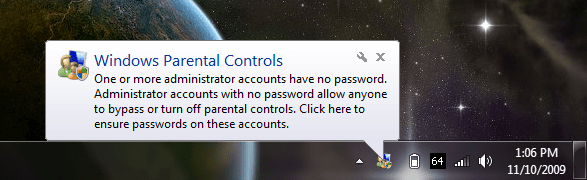
  • Untitled.png
    Untitled.png
    38.6 KB · Views: 8

My Computer

Computer Manufacturer/Model Number
Alienware M17x R3
OS
Windows 7 Ultimate x64
CPU
Intel Core i7 2670QM 2.2GHz 3.3GHz Turbo Mode
Memory
12GB Dual Channel DDR3 at 1333MHz
Graphics Card(s)
2GB GDDR5 AMD Radeon 6990M
Sound Card
Audio Powered by Klipsch
Monitor(s) Displays
17.3-inch WideFHD 1920 x 1080 60Hz WLED
Screen Resolution
1920x1080
Hard Drives
120GB SSD slot 1
1TB HDD slot 2
Case
alienware laptop case
Cooling
Dual heatsink and fans
Keyboard
Alienware multi color keyboard
Mouse
logitech G300 gaming mouse
Other Info
Intel® Centrino Advanced-N 6230 2x2 agn+ Bluetooth

finally got it!!!
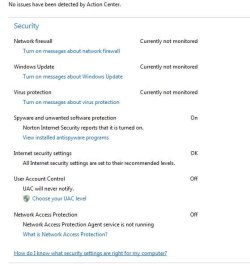
Could you please open Action center and expand the Security tab and post a screenshot?
 

My Computer

Computer Manufacturer/Model Number
Samsung NP530U4B-S02IN
OS
Windows® 8 Pro (64-bit)
CPU
Intel® Core™ i5 Processor 2467M (1.60GHz, 3MB L3 Cache)
Motherboard
Samsung Electronics
Memory
6GB DDR3 System Memory at 1,333MHz (on BD 4GB + 2GB x 1)
Graphics Card(s)
AMD Radeon™ HD7550M 1GB DDR3 (Ext. Graphic)
Sound Card
Realtek High Definition Audio
Monitor(s) Displays
35.56cm (14.0) SuperBright 300nit HD LED Display
Screen Resolution
1366x768
Hard Drives
1TB S-ATA II Hard Drive (5400RPM) with ExpressCache 16GB SSD
Internet Speed
sucks
Antivirus
Microsoft Security Essentials
Browser
Google Chrome (Sync enabled)
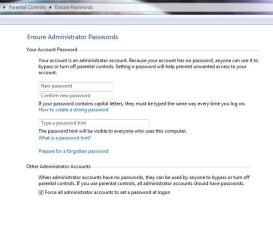
here it is, when I click the warning I get I goto the other capture and the bottom check box won't remain unchecked. sorry for messed up speech or whatever it is I am sitting in the hospital again.
 

Attachments

  • Capture.JPG
    Capture.JPG
    36.6 KB · Views: 8
  • Capture2.JPG
    Capture2.JPG
    49.7 KB · Views: 11

My Computer

Computer Manufacturer/Model Number
Alienware M17x R3
OS
Windows 7 Ultimate x64
CPU
Intel Core i7 2670QM 2.2GHz 3.3GHz Turbo Mode
Memory
12GB Dual Channel DDR3 at 1333MHz
Graphics Card(s)
2GB GDDR5 AMD Radeon 6990M
Sound Card
Audio Powered by Klipsch
Monitor(s) Displays
17.3-inch WideFHD 1920 x 1080 60Hz WLED
Screen Resolution
1920x1080
Hard Drives
120GB SSD slot 1
1TB HDD slot 2
Case
alienware laptop case
Cooling
Dual heatsink and fans
Keyboard
Alienware multi color keyboard
Mouse
logitech G300 gaming mouse
Other Info
Intel® Centrino Advanced-N 6230 2x2 agn+ Bluetooth

finally got it!!!
In the balloon click the wrench and tell it to hide everything.
You'll no longer see the message.
 

My Computer

Computer type
PC/Desktop
Computer Manufacturer/Model Number
Alienware Aurora ALX R4
OS
Windows 10 Pro (x64)
CPU
Intel Core i7-3930K (3.2GHz - 4.5GHz)
Motherboard
Alienware Aurora-R4 x79
Memory
4x Samsung 4GB PC3-12800 DDR3 (16GB 1600MHz)
Graphics Card(s)
Nvidia Geforce GTX 690
Sound Card
SteelSeries Siberia Elite
Monitor(s) Displays
Dell UltraSharp U3011
Screen Resolution
2560x1600
Hard Drives
Samsung 850 Pro 256 GB, Seagate 1TB Desktop Hybrid HDD, 2x Western Digital 4TB Green HDD
PSU
875W Some Dell PSU <.<
Case
Alienware Aurora ALX
Cooling
Custom Liquid Cooling (EK CPU & GPU blocks) dual EK 480RAD
Keyboard
Logitech G710+ Mechanical
Mouse
Logitech G700s
Internet Speed
Verizon Fios (50 mbps average)
Other Info
Server: Intel NUC D54250WYK: i5-4250U, 16GB, 256 GB mSATA, Windows Server 2012 R2
will give that a try, I should be able to uncheck that box in image 2 and be done with it but for some reason it won't stay in the state I pick which shouldn't be the caseI think.
 

My Computer

Computer Manufacturer/Model Number
Alienware M17x R3
OS
Windows 7 Ultimate x64
CPU
Intel Core i7 2670QM 2.2GHz 3.3GHz Turbo Mode
Memory
12GB Dual Channel DDR3 at 1333MHz
Graphics Card(s)
2GB GDDR5 AMD Radeon 6990M
Sound Card
Audio Powered by Klipsch
Monitor(s) Displays
17.3-inch WideFHD 1920 x 1080 60Hz WLED
Screen Resolution
1920x1080
Hard Drives
120GB SSD slot 1
1TB HDD slot 2
Case
alienware laptop case
Cooling
Dual heatsink and fans
Keyboard
Alienware multi color keyboard
Mouse
logitech G300 gaming mouse
Other Info
Intel® Centrino Advanced-N 6230 2x2 agn+ Bluetooth

finally got it!!!
well I clicked the wrench and there was no option to stop that warning it was only options for the programs or setting like volume.
 

My Computer

Computer Manufacturer/Model Number
Alienware M17x R3
OS
Windows 7 Ultimate x64
CPU
Intel Core i7 2670QM 2.2GHz 3.3GHz Turbo Mode
Memory
12GB Dual Channel DDR3 at 1333MHz
Graphics Card(s)
2GB GDDR5 AMD Radeon 6990M
Sound Card
Audio Powered by Klipsch
Monitor(s) Displays
17.3-inch WideFHD 1920 x 1080 60Hz WLED
Screen Resolution
1920x1080
Hard Drives
120GB SSD slot 1
1TB HDD slot 2
Case
alienware laptop case
Cooling
Dual heatsink and fans
Keyboard
Alienware multi color keyboard
Mouse
logitech G300 gaming mouse
Other Info
Intel® Centrino Advanced-N 6230 2x2 agn+ Bluetooth

finally got it!!!
I used the Admin account after enabling it, (back to disabled) and try to get this warning stopped and no go. I finally went to my account via the computer management module removed myself from the admin group and put myself as backup, power user and home user, I should be able to keep the account like this and do everything I want, I still have UAC turned off since I can't auto run core temp with out UAC asking me every time I log in and I won't go without temp monitoring. So the warning are gone and my software runs as it should so far.
 

My Computer

Computer Manufacturer/Model Number
Alienware M17x R3
OS
Windows 7 Ultimate x64
CPU
Intel Core i7 2670QM 2.2GHz 3.3GHz Turbo Mode
Memory
12GB Dual Channel DDR3 at 1333MHz
Graphics Card(s)
2GB GDDR5 AMD Radeon 6990M
Sound Card
Audio Powered by Klipsch
Monitor(s) Displays
17.3-inch WideFHD 1920 x 1080 60Hz WLED
Screen Resolution
1920x1080
Hard Drives
120GB SSD slot 1
1TB HDD slot 2
Case
alienware laptop case
Cooling
Dual heatsink and fans
Keyboard
Alienware multi color keyboard
Mouse
logitech G300 gaming mouse
Other Info
Intel® Centrino Advanced-N 6230 2x2 agn+ Bluetooth

finally got it!!!
Back
Top