Solved Partition a 500GB M2.NVME and instal W7 to both partitions?

teckneeculler

Member
Power User
VIP
Local time
1:24 PM
Messages
512
My main PC is running W7 Ultimate from a 250G Samsung 970 EVO M2 NVME.

By way of a system backup and improvement, I've purchased a 500G Samsung 970 EVO NVME M2. My plan is to:
a) Set up two equal sized partitions on the new 500G drive, probably with Aomei Partition Master. (This will be done on a separate PC)
b) Clone my system drive into one of the two new partitions, using Macrium Reflect. (This will be also done on the separate PC)
c) Move the 500G drive back to my original machine, boot the system from the cloned OS partition and check that everything works.
d) Once that's stable, reboot and install a new Windows 7 version into the second, empty, partition on the new drive, then install a slimmed-down, hopefully junk-free collection of apps and stuff from the original drive.

Does this all sound feasible? The only fishhook I can think of is what to name the two new partitions created in c) above.
I mean, they'll both become 'C' drives eventually, won't they?
Also, I'll need to set them up to dual-boot, I guess. Do I need extra software for that?
Thanks.
 

My Computer My Computer

At a glance

Win7 Ultimate SP1Intel Core i5 9400 Coffee Lake 14nm16G DDR4NVidia GeForce GTX 960
Computer type
PC/Desktop
Computer Manufacturer/Model Number
My build
OS
Win7 Ultimate SP1
CPU
Intel Core i5 9400 Coffee Lake 14nm
Motherboard
Asus Prime H310M-E R2.0 (LGA1151)
Memory
16G DDR4
Graphics Card(s)
NVidia GeForce GTX 960
Sound Card
Realtek High Definition Audio (mobo)
Monitor(s) Displays
Asus PA248 24" 16:10 format
Screen Resolution
1920x1200@59Hz
Hard Drives
1863GB Seagate ST2000DM
3726GB Seagate ST4000DM
1863GB Seagate ST2000DM
6TB Seagate
465GB NVMe Samsung SSD 970
PSU
750G2
Case
Tower
Cooling
Standard
Keyboard
USB
Mouse
USB
Internet Speed
920Mbs/480Mbs
Antivirus
Malwarebytes
Browser
Firefox
you dont need to partition it first a decent os migration tool will do that.

can you attach both nvme to the same pc ? if you only have one nvme slot, pcie>nvme adapters work well.
for example:
basic cheap version:
multibao pcie(3.0/2.0)x4 adapter
or a fancy version:
glotrends pcie (4.0/3.0/2.0) x4 adapter


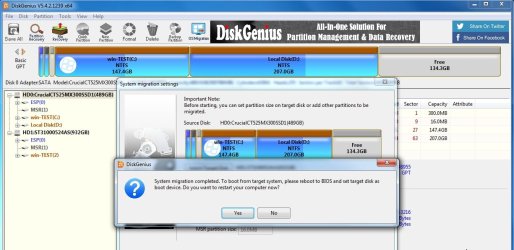
if both nvme are attached to the same pc, use diskgenius ( free ) os migration.
DiskGenius: Data Recovery, Partition Manager, Backup & Disk Utilities

During the os migration, only extend the windows partition as far as you like to leave plenty of unallocated space at the end of the new disk.

You can create new partition in that unallocated space with anything e.g. diskmgmt after you have booted into the cloned os.

---------------------------------------------------------------------

if you want to install win7 into that extra partition, no need to reboot .

you could just apply the image to the new partition and add a boot menu entry.

Note:

If you want to install fresh win7 to nvme you will need to add a windows nvme driver before attempting to boot into it. Also usb3 drivers and maybe some others depending on your hardware.

- - - Updated - - -

-----------------------------------------------------------------------------------------


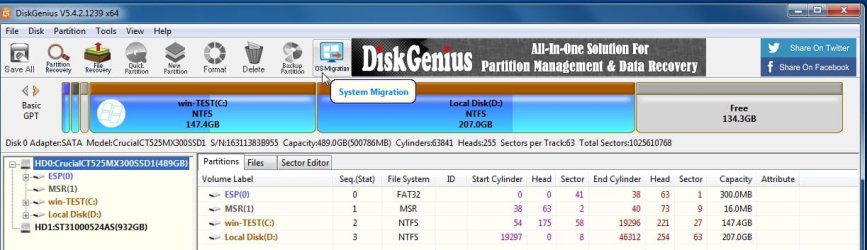
Click os migration

osmigrate3.jpg


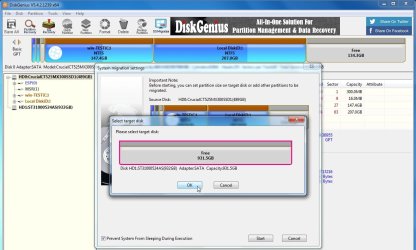
select the target disk

osmigrate5.jpg


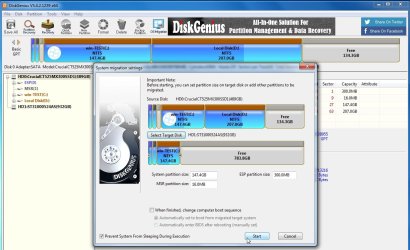
this shows the proposed result.

you can drag the arrow at the right of the windows partition to extend as far as you like

osmigrate6.jpg


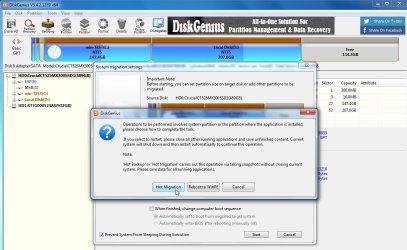
click Hot Migration. Click Start

osmigrate8.jpg

osmigrate10.jpg
 

My Computers My Computers

  • At a glance

    7 X64i5 84002x8gb 3200mhz
    Computer type
    PC/Desktop
    OS
    7 X64
    CPU
    i5 8400
    Motherboard
    gigabyte b365m ds3h
    Memory
    2x8gb 3200mhz
    Hard Drives
    various
    PSU
    pure power 11 400w cm
    Case
    Coolermaster
    Cooling
    cryorig m9i
  • At a glance

    7x64g54008gb ddr4 2400
    Computer type
    PC/Desktop
    OS
    7x64
    CPU
    g5400
    Motherboard
    ga b365m ds3h
    Memory
    8gb ddr4 2400
    PSU
    xfx pro 450w
SIW7: Thanks for your how-to, but I'm not actually migrating the OS - I'm cloning its drive in another PC.

I'd originally intended to do the cloning work in my main W7 machine, and had bought a UGreen PCIe (3.0 X4) to NVME Adapter for the purpose. But when I took a closer look at the motherboard (Asus H310M-ER2.0), it didn't have the right slots for the job. The motherboard paperwork said it had one PCIe16 slot (which holds a GTX1060 gfx card) and two PCIe 2.0 slots (which are empty). But the actuality was that the two small slots are PCIe1.0x, not 2.0x and the UGreen adapter wouldn't fit to them.

Hence the change to using a spare Windows 10 machine, which has ample mounting space. That board is an Asus H370M-PLUS, which has two PCIe16 slots (one holds a GFX card), two PCIe2 slots, plus mounts for two M2.NVME cards. The W10 OS is on a SATA 250G SSD, so there's plenty of free mount choices. As I'd already mounted the 500G NVME onto the UGreen PCIe adapter card, I've placed that in the empty PCIe 16 slot, so both NVME slots spaces are available.

So I thought I'd partition the 500G NVME using Aomei, then use Macrium for the cloning.
 
Last edited:

My Computer My Computer

At a glance

Win7 Ultimate SP1Intel Core i5 9400 Coffee Lake 14nm16G DDR4NVidia GeForce GTX 960
Computer type
PC/Desktop
Computer Manufacturer/Model Number
My build
OS
Win7 Ultimate SP1
CPU
Intel Core i5 9400 Coffee Lake 14nm
Motherboard
Asus Prime H310M-E R2.0 (LGA1151)
Memory
16G DDR4
Graphics Card(s)
NVidia GeForce GTX 960
Sound Card
Realtek High Definition Audio (mobo)
Monitor(s) Displays
Asus PA248 24" 16:10 format
Screen Resolution
1920x1200@59Hz
Hard Drives
1863GB Seagate ST2000DM
3726GB Seagate ST4000DM
1863GB Seagate ST2000DM
6TB Seagate
465GB NVMe Samsung SSD 970
PSU
750G2
Case
Tower
Cooling
Standard
Keyboard
USB
Mouse
USB
Internet Speed
920Mbs/480Mbs
Antivirus
Malwarebytes
Browser
Firefox
One pcie (3.0 ) x16 and two pcie (2.0) x1 is the usual configuration for 310 mobo.

The x16 slot is fine for nvme adapter to go in, unless it is wasted on a graphics card.

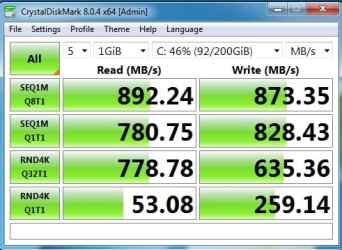
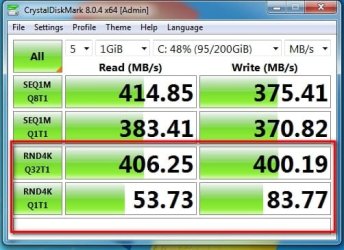
Just out of interest I tried out a pcie>nvme x1 adapter. It was very cheap at about £3. It works well.

This exact model, but is not so cheap now.
Amazon.co.uk

there are similar adapters on the well known auction site for much less.
M.2 NVME SSD to pcie 3.0 X1 x4 x8 x16 Desktop Hard Expansion,Adapter Y Card C2S2 | eBay

pcie (3.0) x1

mp510-gab75m-pcie-x1-crystaldisk.jpg

pcie (2.0) x1

adpter-x1-on-pcie-2..0.jpg
 
Last edited:

My Computers My Computers

  • At a glance

    7 X64i5 84002x8gb 3200mhz
    Computer type
    PC/Desktop
    OS
    7 X64
    CPU
    i5 8400
    Motherboard
    gigabyte b365m ds3h
    Memory
    2x8gb 3200mhz
    Hard Drives
    various
    PSU
    pure power 11 400w cm
    Case
    Coolermaster
    Cooling
    cryorig m9i
  • At a glance

    7x64g54008gb ddr4 2400
    Computer type
    PC/Desktop
    OS
    7x64
    CPU
    g5400
    Motherboard
    ga b365m ds3h
    Memory
    8gb ddr4 2400
    PSU
    xfx pro 450w
SIW2: Thanks for your tips. In the end I did the job with two M2\USB adapters in two USB ports. Should've done it at the start.
 

My Computer My Computer

At a glance

Win7 Ultimate SP1Intel Core i5 9400 Coffee Lake 14nm16G DDR4NVidia GeForce GTX 960
Computer type
PC/Desktop
Computer Manufacturer/Model Number
My build
OS
Win7 Ultimate SP1
CPU
Intel Core i5 9400 Coffee Lake 14nm
Motherboard
Asus Prime H310M-E R2.0 (LGA1151)
Memory
16G DDR4
Graphics Card(s)
NVidia GeForce GTX 960
Sound Card
Realtek High Definition Audio (mobo)
Monitor(s) Displays
Asus PA248 24" 16:10 format
Screen Resolution
1920x1200@59Hz
Hard Drives
1863GB Seagate ST2000DM
3726GB Seagate ST4000DM
1863GB Seagate ST2000DM
6TB Seagate
465GB NVMe Samsung SSD 970
PSU
750G2
Case
Tower
Cooling
Standard
Keyboard
USB
Mouse
USB
Internet Speed
920Mbs/480Mbs
Antivirus
Malwarebytes
Browser
Firefox
Back
Top