Partition help!

ToonArmy

New member
Member
Local time
3:48 AM
Messages
33
Location
Wales
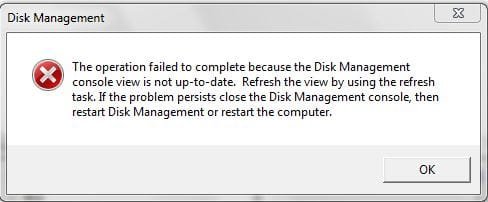
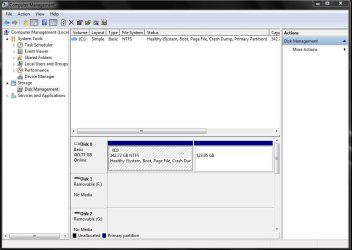
I booted up my computer this morning only to find that my 'D' partition has disappeared! I can see the partition in disk management but the drive letter has gone and when I try to assign a letter it gives me an error. The partition has all my downloads and tools on it so I really need to recover if possible!
 

Attachments
  • partition1.JPG
    partition1.JPG
    66.9 KB · Views: 29
  • partition2.JPG
    partition2.JPG
    21.6 KB · Views: 19

My Computer

OS
Windows 7 Ultimate x64 (Build 7600 RTM)
CPU
Phenom II X4 955BE
Motherboard
GIGABYTE GA-MA790XT-UD5P
Memory
G.Skill Ripjaw 4GB (2x2GB) DDR3 PC3-12800C8 1600MH
Graphics Card(s)
ATI 5870 VaporX
Monitor(s) Displays
Samsung SM2033SW 20"TFT
Screen Resolution
1600 x 900
Hard Drives
2 x OCZ Vertex 2E RAID0
WDC640 Black x2 Storage
PSU
Corsair HX 850W Modular
Case
Coolermaster 690
Cooling
Noctua NH-D14
Keyboard
Razor Lycosa
Mouse
Roccat Kone V2
Internet Speed
8mb/sec
Try asigning a drive letter with this - EASEUS Partition Master Home Edition
Why do you make your OS partition 342 GB? Windows 7 just needs 16 plus whatever your gonna install.
 

My Computer

Computer Manufacturer/Model Number
Haha! You peeked. Why so nosey?
OS
XP / Windows 7 Pro RTM
That programme wont work on 64bit Windows. My 'C' drive has the OS and all installed programmes and games etc on it
 

My Computer

OS
Windows 7 Ultimate x64 (Build 7600 RTM)
CPU
Phenom II X4 955BE
Motherboard
GIGABYTE GA-MA790XT-UD5P
Memory
G.Skill Ripjaw 4GB (2x2GB) DDR3 PC3-12800C8 1600MH
Graphics Card(s)
ATI 5870 VaporX
Monitor(s) Displays
Samsung SM2033SW 20"TFT
Screen Resolution
1600 x 900
Hard Drives
2 x OCZ Vertex 2E RAID0
WDC640 Black x2 Storage
PSU
Corsair HX 850W Modular
Case
Coolermaster 690
Cooling
Noctua NH-D14
Keyboard
Razor Lycosa
Mouse
Roccat Kone V2
Internet Speed
8mb/sec
What options does it give you on the rt click in Disk Management?
 

My Computers

System One System Two

  • Computer type
    PC/Desktop
    OS
    7 X64
    CPU
    i5 8400
    Motherboard
    gigabyte b365m ds3h
    Memory
    2x8gb 3200mhz
    Hard Drives
    various
    PSU
    pure power 11 400w cm
    Case
    Coolermaster
    Cooling
    cryorig m9i
  • Computer type
    PC/Desktop
    OS
    7x64
    CPU
    g5400
    Motherboard
    ga b365m ds3h
    Memory
    8gb ddr4 2400
    PSU
    xfx pro 450w
Change drive letter and paths...
Format...
Delete Volume...
Properties

All the rest are greyed out
 

My Computer

OS
Windows 7 Ultimate x64 (Build 7600 RTM)
CPU
Phenom II X4 955BE
Motherboard
GIGABYTE GA-MA790XT-UD5P
Memory
G.Skill Ripjaw 4GB (2x2GB) DDR3 PC3-12800C8 1600MH
Graphics Card(s)
ATI 5870 VaporX
Monitor(s) Displays
Samsung SM2033SW 20"TFT
Screen Resolution
1600 x 900
Hard Drives
2 x OCZ Vertex 2E RAID0
WDC640 Black x2 Storage
PSU
Corsair HX 850W Modular
Case
Coolermaster 690
Cooling
Noctua NH-D14
Keyboard
Razor Lycosa
Mouse
Roccat Kone V2
Internet Speed
8mb/sec
It doesn't think it is formatted.

Any idea what may have caused that?

Do you have a partition app. , like Paragon - and what does it say?
 

My Computers

System One System Two

  • Computer type
    PC/Desktop
    OS
    7 X64
    CPU
    i5 8400
    Motherboard
    gigabyte b365m ds3h
    Memory
    2x8gb 3200mhz
    Hard Drives
    various
    PSU
    pure power 11 400w cm
    Case
    Coolermaster
    Cooling
    cryorig m9i
  • Computer type
    PC/Desktop
    OS
    7x64
    CPU
    g5400
    Motherboard
    ga b365m ds3h
    Memory
    8gb ddr4 2400
    PSU
    xfx pro 450w
I forgot to mention I installed Partition Magic yesterday but it wouldnt work (an error was coming up the program wouldnt start) so I uninstalled it again.
 

My Computer

OS
Windows 7 Ultimate x64 (Build 7600 RTM)
CPU
Phenom II X4 955BE
Motherboard
GIGABYTE GA-MA790XT-UD5P
Memory
G.Skill Ripjaw 4GB (2x2GB) DDR3 PC3-12800C8 1600MH
Graphics Card(s)
ATI 5870 VaporX
Monitor(s) Displays
Samsung SM2033SW 20"TFT
Screen Resolution
1600 x 900
Hard Drives
2 x OCZ Vertex 2E RAID0
WDC640 Black x2 Storage
PSU
Corsair HX 850W Modular
Case
Coolermaster 690
Cooling
Noctua NH-D14
Keyboard
Razor Lycosa
Mouse
Roccat Kone V2
Internet Speed
8mb/sec
Elevated CMD > Diskpart > select disk > select partition > Assign?
 

My Computer

OS
Windows 7077
Partition Magic hoses NT6 systems - it's got to be more than a coincidence that you just installed it.

Seems it tried to move the start sectors and Windows has lost track of what is going on.

3 possible solutions :

1. get a decent partition manger - Paragon is my choice. Shrink the unrecognsed partition a little then extend it back. That often cures these kind of errors.

2. Use Diskpart to shrink and extend it a little as above - but I suspect Diskpart won't recognise it as being formatted.

3. Start to do a clean install from the 7 dvd, when you get to the select partition screen, choose Drive Options (advanced) , shrink that partition and extend. Abort the installation.
 

My Computers

System One System Two

  • Computer type
    PC/Desktop
    OS
    7 X64
    CPU
    i5 8400
    Motherboard
    gigabyte b365m ds3h
    Memory
    2x8gb 3200mhz
    Hard Drives
    various
    PSU
    pure power 11 400w cm
    Case
    Coolermaster
    Cooling
    cryorig m9i
  • Computer type
    PC/Desktop
    OS
    7x64
    CPU
    g5400
    Motherboard
    ga b365m ds3h
    Memory
    8gb ddr4 2400
    PSU
    xfx pro 450w
There is one solution, I think it will work for you. It worked for me in the same situation as yours.

Put the drive back under any winxp os, then you will find the partition read/write able. Copy the files you need from there to anyother harddisk! I then put the drive back under seven, delete the partition D, re-assign the partition D, copy back all the files.
 

My Computer

OS
Windows 7 x64 and x86
CPU
Q8200
Motherboard
Gigabyte EP45-UD3P
Memory
Patriot 6400LL 2GBx4 ddr2-800
Graphics Card(s)
ASUS 9600GSO
Monitor(s) Displays
Sony 19
Screen Resolution
1280x1024
Hard Drives
WD 80G SATA I
Seagate 80G SATA I
PSU
Antec SmartPower 350w
Case
Antec
Cooling
Intel box cpu cooling
Keyboard
Lenovo 101
Mouse
Microsoft Wireless IntelliMouse Explorer 2.0
Internet Speed
slow dsl

My Computer

OS
Windows 7 x64 and x86
CPU
Q8200
Motherboard
Gigabyte EP45-UD3P
Memory
Patriot 6400LL 2GBx4 ddr2-800
Graphics Card(s)
ASUS 9600GSO
Monitor(s) Displays
Sony 19
Screen Resolution
1280x1024
Hard Drives
WD 80G SATA I
Seagate 80G SATA I
PSU
Antec SmartPower 350w
Case
Antec
Cooling
Intel box cpu cooling
Keyboard
Lenovo 101
Mouse
Microsoft Wireless IntelliMouse Explorer 2.0
Internet Speed
slow dsl
Hi cw,

Thanks for posting that.

I don't understand what you did from that post.:confused:

The OP in this case is running 7100 - not XP:(
 

My Computers

System One System Two

  • Computer type
    PC/Desktop
    OS
    7 X64
    CPU
    i5 8400
    Motherboard
    gigabyte b365m ds3h
    Memory
    2x8gb 3200mhz
    Hard Drives
    various
    PSU
    pure power 11 400w cm
    Case
    Coolermaster
    Cooling
    cryorig m9i
  • Computer type
    PC/Desktop
    OS
    7x64
    CPU
    g5400
    Motherboard
    ga b365m ds3h
    Memory
    8gb ddr4 2400
    PSU
    xfx pro 450w
Another thing that has worked in the past is :

Download the free version of Macrium.

Macrium Reflect FREE Edition - Information and download

Use Disk Management to shrink your 7100 partition and make another partition large enough to hold the image.

The image size will about half the used space on the unrecognised partition.

Use Macrium from within 7100 to make an image of the unrecognised partition - store it on the new one.

Use Disk Management to delete, receate and format the unrecognised partition.

Open up Macrium again and restore the image.
 

My Computers

System One System Two

  • Computer type
    PC/Desktop
    OS
    7 X64
    CPU
    i5 8400
    Motherboard
    gigabyte b365m ds3h
    Memory
    2x8gb 3200mhz
    Hard Drives
    various
    PSU
    pure power 11 400w cm
    Case
    Coolermaster
    Cooling
    cryorig m9i
  • Computer type
    PC/Desktop
    OS
    7x64
    CPU
    g5400
    Motherboard
    ga b365m ds3h
    Memory
    8gb ddr4 2400
    PSU
    xfx pro 450w
I have installed Paragon and now im getting an error 'BOOTMGR is missing' on startup. Ihave had this problem before with Vista but I have tried the same steps to fix it and nothing is working!

EDIT: Sorted the Bootmgr error now I had to mark the partition 1 as active in command prompt. Going to try what you suggested to get the other partition back now SIW2.
 
Last edited:

My Computer

OS
Windows 7 Ultimate x64 (Build 7600 RTM)
CPU
Phenom II X4 955BE
Motherboard
GIGABYTE GA-MA790XT-UD5P
Memory
G.Skill Ripjaw 4GB (2x2GB) DDR3 PC3-12800C8 1600MH
Graphics Card(s)
ATI 5870 VaporX
Monitor(s) Displays
Samsung SM2033SW 20"TFT
Screen Resolution
1600 x 900
Hard Drives
2 x OCZ Vertex 2E RAID0
WDC640 Black x2 Storage
PSU
Corsair HX 850W Modular
Case
Coolermaster 690
Cooling
Noctua NH-D14
Keyboard
Razor Lycosa
Mouse
Roccat Kone V2
Internet Speed
8mb/sec
Hi Toon,

Any progress? If you are using the Trial version of Paragon - I am not sure what limitations it has.
 

My Computers

System One System Two

  • Computer type
    PC/Desktop
    OS
    7 X64
    CPU
    i5 8400
    Motherboard
    gigabyte b365m ds3h
    Memory
    2x8gb 3200mhz
    Hard Drives
    various
    PSU
    pure power 11 400w cm
    Case
    Coolermaster
    Cooling
    cryorig m9i
  • Computer type
    PC/Desktop
    OS
    7x64
    CPU
    g5400
    Motherboard
    ga b365m ds3h
    Memory
    8gb ddr4 2400
    PSU
    xfx pro 450w
Hi mate, I tried what you suggested above only using Acronis instead of Macrium and as I started to create an image of the unrecognised partition it suddenly showed up in Windows as 'Drive F' and seems to be ok so I deleted the new partition and renamed it back to 'D' and it is all good!

Whats the best way to have drives arranged? Is it possible to have only the OS on 'C' and all programs, documents, games, etc on partition 'D' so each time I do a clean install there is no need to re-install everything again? Thanks for the help SIW2 and everyone else who replied!
 

My Computer

OS
Windows 7 Ultimate x64 (Build 7600 RTM)
CPU
Phenom II X4 955BE
Motherboard
GIGABYTE GA-MA790XT-UD5P
Memory
G.Skill Ripjaw 4GB (2x2GB) DDR3 PC3-12800C8 1600MH
Graphics Card(s)
ATI 5870 VaporX
Monitor(s) Displays
Samsung SM2033SW 20"TFT
Screen Resolution
1600 x 900
Hard Drives
2 x OCZ Vertex 2E RAID0
WDC640 Black x2 Storage
PSU
Corsair HX 850W Modular
Case
Coolermaster 690
Cooling
Noctua NH-D14
Keyboard
Razor Lycosa
Mouse
Roccat Kone V2
Internet Speed
8mb/sec
It's messy putting programs on a separate disk. You won't be able to keep the programs between installs either as most of the setup information is in the registry.
 

My Computer

OS
Windows 7077
Hi Toon,

As 12eason says, it is messy installing programs on a different partition.

I have a small partition for the o/s and it's installed programs, and a separate partition for all my data.

If I wipe the o/s partition , all my data is safe - I also keep the setup files for programs on the data partition.

Before reinstalling a new build, I export my browser profiles and bookmarks, and emails and email account details onto the data partition.

After the new o/s is installed, import email stuff and browser stuff, reinstall programs.

Hope it helps.
 

My Computers

System One System Two

  • Computer type
    PC/Desktop
    OS
    7 X64
    CPU
    i5 8400
    Motherboard
    gigabyte b365m ds3h
    Memory
    2x8gb 3200mhz
    Hard Drives
    various
    PSU
    pure power 11 400w cm
    Case
    Coolermaster
    Cooling
    cryorig m9i
  • Computer type
    PC/Desktop
    OS
    7x64
    CPU
    g5400
    Motherboard
    ga b365m ds3h
    Memory
    8gb ddr4 2400
    PSU
    xfx pro 450w
I do the same keeping all setup files, saved games and firefox profile backed up on the 'D' partition its just a pain re-installing all games and the patches etc for them each time. Thanks for the help guys I will keep it the way it is for now then! Cheers!
 

My Computer

OS
Windows 7 Ultimate x64 (Build 7600 RTM)
CPU
Phenom II X4 955BE
Motherboard
GIGABYTE GA-MA790XT-UD5P
Memory
G.Skill Ripjaw 4GB (2x2GB) DDR3 PC3-12800C8 1600MH
Graphics Card(s)
ATI 5870 VaporX
Monitor(s) Displays
Samsung SM2033SW 20"TFT
Screen Resolution
1600 x 900
Hard Drives
2 x OCZ Vertex 2E RAID0
WDC640 Black x2 Storage
PSU
Corsair HX 850W Modular
Case
Coolermaster 690
Cooling
Noctua NH-D14
Keyboard
Razor Lycosa
Mouse
Roccat Kone V2
Internet Speed
8mb/sec
Hi cw,

Thanks for posting that.

I don't understand what you did from that post.:confused:

The OP in this case is running 7100 - not XP:(


Hi siw,

Right now OP has solved his problem, that's great.

About what I suggested, is a method to keep all his files/data in that missing partition for putting the disk under XP, just that simple. The partition will show up under XP, but not Seven. Also, EASEUS Partition Master, as well as Gparted can't solve it.

Sure, I assumed he has extra OS like XP in his desktop or laptop.
 

My Computer

OS
Windows 7 x64 and x86
CPU
Q8200
Motherboard
Gigabyte EP45-UD3P
Memory
Patriot 6400LL 2GBx4 ddr2-800
Graphics Card(s)
ASUS 9600GSO
Monitor(s) Displays
Sony 19
Screen Resolution
1280x1024
Hard Drives
WD 80G SATA I
Seagate 80G SATA I
PSU
Antec SmartPower 350w
Case
Antec
Cooling
Intel box cpu cooling
Keyboard
Lenovo 101
Mouse
Microsoft Wireless IntelliMouse Explorer 2.0
Internet Speed
slow dsl
Back
Top