Partition Problem

techman9

New member
Local time
4:24 PM
Messages
6
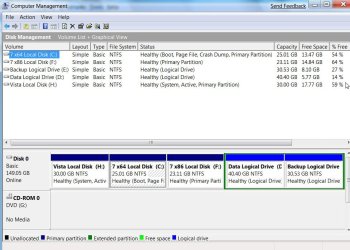
Please Help Me! i was just gonna try out 7 for a few days. now it is the OS i use more. the problem is that when i attempt to add to the 20gb partion. i have free space it gives me this message. help.jpg. i dont know what to do.

the new one
-techman9
 

My Computer

OS
windows 7/vista

My Computers

System One System Two

  • Computer type
    PC/Desktop
    OS
    7 X64
    CPU
    i5 8400
    Motherboard
    gigabyte b365m ds3h
    Memory
    2x8gb 3200mhz
    Hard Drives
    various
    PSU
    pure power 11 400w cm
    Case
    Coolermaster
    Cooling
    cryorig m9i
  • Computer type
    PC/Desktop
    OS
    7x64
    CPU
    g5400
    Motherboard
    ga b365m ds3h
    Memory
    8gb ddr4 2400
    PSU
    xfx pro 450w
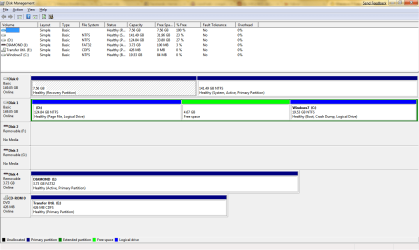
i'm not sure how you would define primary and secondary so i'll just post a window. i have two drives, C, D. my 7 part is on the D drive. here's the screenshot though:
help2.png
the green is freed space to expand the the Z: drive or windows 7
 

My Computer

OS
windows 7/vista
Disk Management will only allow you to expand into free space on the Right.

You could expand D as the free space is on the right of D.

You can't expand C as the free space is on the Left.

You would need a 3rd party partition app.

It would need to merge the free space with C and will take a little while to do.

Which is the Z drive? When I look closely, C is the 7 drive.
 

My Computers

System One System Two

  • Computer type
    PC/Desktop
    OS
    7 X64
    CPU
    i5 8400
    Motherboard
    gigabyte b365m ds3h
    Memory
    2x8gb 3200mhz
    Hard Drives
    various
    PSU
    pure power 11 400w cm
    Case
    Coolermaster
    Cooling
    cryorig m9i
  • Computer type
    PC/Desktop
    OS
    7x64
    CPU
    g5400
    Motherboard
    ga b365m ds3h
    Memory
    8gb ddr4 2400
    PSU
    xfx pro 450w
when i boot into vista and attempt to, it will allow me to, however, it gives me that message. should i just attempt to use Paragon and hope that works or is there a vista problem?
 

My Computer

OS
windows 7/vista
Vista Disk Management has the same limitations as the one in 7. Don't try it in Vista Disk Manangement.

Install the Paragon on the Vista partition.

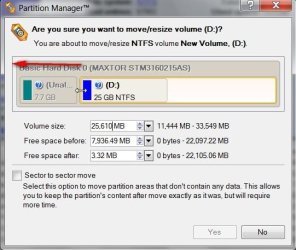
Rt click the C(7) partition and select Move/Resize - you get a window like below - use the mouse to drag it to the Left to include the all the Free Space - click Yes.

PAR-2-2009-06-16_050113.jpg

You will then see the intended changes along the bottom of the window.

If you are happy with that, click Apply at the top of the window.

It will take a while to complete - do not interrupt once it has started.

I do not know if that free version will update bcd for you.

If not, no problem , just run startup repair from the 7 dvd - that will adjust the bcd entry .
 

My Computers

System One System Two

  • Computer type
    PC/Desktop
    OS
    7 X64
    CPU
    i5 8400
    Motherboard
    gigabyte b365m ds3h
    Memory
    2x8gb 3200mhz
    Hard Drives
    various
    PSU
    pure power 11 400w cm
    Case
    Coolermaster
    Cooling
    cryorig m9i
  • Computer type
    PC/Desktop
    OS
    7x64
    CPU
    g5400
    Motherboard
    ga b365m ds3h
    Memory
    8gb ddr4 2400
    PSU
    xfx pro 450w
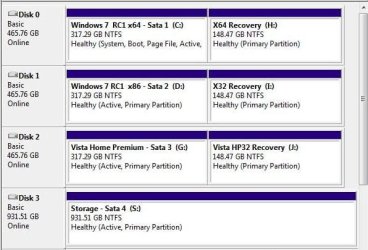
If nothing is presently going on with the D partition seen on HD1 you can easily expand that into the free space seen to the right towards the rear of the drive and the present 7 primary and use that instead. 7 would then be seen as D when booted in Vista while still being seen as C when in 7 itself.

All that will depend on the files presently on the second drive as well as how you want that set up. Once the D is expanded easily enough into the free space a reformat of the present C for 7 could see that space used for storage and a fresh copy of 7 on the first D.

To give you an idea that while noting that Vista was previously seen on the 3rd drive here and the recovery partiion for Vista is first on the first drive HD0 there simply reverse the recovery with the 7 installation on the image here.
 

Attachments

  • OLD PARTITION LAYOUT.jpg
    OLD PARTITION LAYOUT.jpg
    47.5 KB · Views: 11

My Computers

System One System Two

  • Computer type
    PC/Desktop
    Computer Manufacturer/Model Number
    Custom builds = 2
    OS
    W7 Ultimate x64/W10 Pro x64/W11 Pro Triple Boot - Main PC W7 Remote PC Micro ATX W7 Pro x64/W11 Pro
    CPU
    AMD Phenom II X4 975 Deneb 3.6ghz - 965 2nd remote pc
    Motherboard
    Gigabyte GA-790XTA-UD4-Gigabyte GA-880GM-D2H remote pc
    Memory
    Kingston Hyper X DDR3 1600 1.5v 16gb - Hyper X Fury 8gb 2nd
    Graphics Card(s)
    MSI HD Radeon 5750 1gb - MSI HD Radeon 6450 on mini tower
    Sound Card
    Creative Labs X-Fi Xtreme Audio P - Realtek onooard 2nd case
    Monitor(s) Displays
    ASUS VW199T-P 19" HP 2082a Main-HP 2082a 20" remote pc
    Screen Resolution
    Asus 1440x900 - HP 1600x900
    Hard Drives
    WD Black 1TB HD per OS W7, W10, and pending W11 presently on 500gb OS Drive - Pending Triple 1TB HDs for Spanned Storage/backup volume
    Single 2TB external USB enclosure, single 1TB System 7 Host/Boot drive, Pending 8TB external HD for system image b
    PSU
    Corsair 750TX - primary / Corsair CX600 - second
    Case
    Antec 900-2 - SSD compatible / NZXT Vulcan mini tower
    Cooling
    Zalman CNPS9900A
    Keyboard
    AZIO L70 Backlit Letters Gaming - ONN Cordless/USB
    Mouse
    MSI DS200 Programmable, Logitech Cordless
    Internet Speed
    30mbps upgrade - primary hard wired - mini tower usb WiFi
    Antivirus
    GFI VIPRE Internet Security 2014 on W7 2016 beta on W10,
    Browser
    Cyberfox, WaterFox 64bit FF variants, FireFox x64, Pale Moon
    Other Info
    Accomdata fan cooled usb 2.0 PIDE/Sata II, III external enclosure.
    Sambient usb/eSata PATA/Sata II, III external enclosure.
  • Computer type
    PC/Desktop
    System Manufacturer/Model Number
    CUSTOM ASSEMBLY
    OS
    W7 Pro x64/W11 Pro
    CPU
    AMD Deneb 3.6ghz - 965
    Motherboard
    Gigabyte GA-880GM-D2H remote pc
    Memory
    Kingston Hyper X Fury 8gb
    Graphics Card(s)
    MSI HD Radeon 6450 DVI Output
    Sound Card
    Realtek onooard Creative or Other separate PENDING
    Monitor(s) Displays
    VIZIO 32" LCD TV Separate LCD Pending
    Screen Resolution
    1600x1080
    Hard Drives
    WD 500GB OS Host/Boot WD Green 1TB Storage/Backup
    PSU
    Corsair 600W - THERMALTAKE 600W spare case
    Case
    NZXT Vulcan mini tower
    Cooling
    Twin 120mm Top Fans - 240mm Side Cover
    Keyboard
    ONN Cordless/USB Logitech Cordless
    Mouse
    ONN USB/Cordless - Logitech Cordless
    Internet Speed
    DSL 5G
    Browser
    MS Edge, FireFox, WaterFox x64, FireFox Nightly
    Other Info
    OS Testing-Remote Access to Main TeamViewer
I have a similar issue with not being able to create a second partition to be able to do a dual boot of vista & windows 7.

Currently, I have 100+gb free on a raid0 primary disk. Every single program and hardware I have works on Windows 7 now except for an add-on program for Solidworks 2009(CAD-Program)called Gearteq 2009.

Which actually works except it will not allow me to be able to convert a gear model from gearteq into a Solidworks 3D model.

So, I know that the program worked flawlessly in Vista yet now it won't convert at all?

Thus the reason for a dual windows 7 & vista boot.

For whatever reason when I go to create a partition from the primary it says 0 mb/gb available for the new partition, even though there is 100+gb free on the drive?

So, if I must I will have to get an additional hdd, but I would prefer that windows 7 just allow gearteq 2009 to mesh-up with Solidworks 2009?
 

My Computer

Computer Manufacturer/Model Number
Self-Build
OS
Windows 7 RC 7100
CPU
Intel c2q6600 oc'd @4239Mhz 1.68v w/mod'd VapoChill LS
Motherboard
Asus Rampage Extreme
Memory
2gb Ocz Flex II DDR3 2000 8-8-8-24 2.2v
Graphics Card(s)
2x Asus 3870x2 Tops in quad xfire
Sound Card
Asus SupremeFX X-FI
Monitor(s) Displays
1-HP 2408 24'' LCD & 1-Viewsonic VG2230wm 22'' LCD
Screen Resolution
1920x1200 & 1600x1200
Hard Drives
2x WD Caviar 160gb in Raid0
1x 1TB backup

Opticals:

Sony optical drive
Samsung optical drive
PSU
1x Apevia 680watt & 1x Logisys 550watt
Case
2x Custom Plexiglass cases 1-PC & 1- LS Phase Change
Cooling
Aqua Computer 360xt single loop north/south & Flex II DDR3
Keyboard
Logitech Di Novo Edge Keyboard & Optimus Mini 3 Keyboard
Mouse
Saitek Obsidian mouse & 3D Connexion Space Pilot 3D mouse
Internet Speed
not worth mentioning
Other Info
Upek Fingerprint reader
Plantronic 590 Bluetooth headset
HP 7550 Photo Printer
HP 4670 See-Thru Scanner
NextEngine 3D Scanner
Enzotech north, south and mosfet blocks, 4xDanger Den Maze-5 vga blocks, //UPGRADES COMING SOON//
Koolance liquid-cooled psu, i7 975, Rampage II Extreme
What are you using for a partitioning tool there?

If you are using the DM tool Windows is still accessing the 100gb most likely preventing any change from being seen.

One of the reasons I usually recommend GParted live is that you don't need any OS involvement since you are booted live from cd or even from a usb key made up for the purpose.
 

My Computers

System One System Two

  • Computer type
    PC/Desktop
    Computer Manufacturer/Model Number
    Custom builds = 2
    OS
    W7 Ultimate x64/W10 Pro x64/W11 Pro Triple Boot - Main PC W7 Remote PC Micro ATX W7 Pro x64/W11 Pro
    CPU
    AMD Phenom II X4 975 Deneb 3.6ghz - 965 2nd remote pc
    Motherboard
    Gigabyte GA-790XTA-UD4-Gigabyte GA-880GM-D2H remote pc
    Memory
    Kingston Hyper X DDR3 1600 1.5v 16gb - Hyper X Fury 8gb 2nd
    Graphics Card(s)
    MSI HD Radeon 5750 1gb - MSI HD Radeon 6450 on mini tower
    Sound Card
    Creative Labs X-Fi Xtreme Audio P - Realtek onooard 2nd case
    Monitor(s) Displays
    ASUS VW199T-P 19" HP 2082a Main-HP 2082a 20" remote pc
    Screen Resolution
    Asus 1440x900 - HP 1600x900
    Hard Drives
    WD Black 1TB HD per OS W7, W10, and pending W11 presently on 500gb OS Drive - Pending Triple 1TB HDs for Spanned Storage/backup volume
    Single 2TB external USB enclosure, single 1TB System 7 Host/Boot drive, Pending 8TB external HD for system image b
    PSU
    Corsair 750TX - primary / Corsair CX600 - second
    Case
    Antec 900-2 - SSD compatible / NZXT Vulcan mini tower
    Cooling
    Zalman CNPS9900A
    Keyboard
    AZIO L70 Backlit Letters Gaming - ONN Cordless/USB
    Mouse
    MSI DS200 Programmable, Logitech Cordless
    Internet Speed
    30mbps upgrade - primary hard wired - mini tower usb WiFi
    Antivirus
    GFI VIPRE Internet Security 2014 on W7 2016 beta on W10,
    Browser
    Cyberfox, WaterFox 64bit FF variants, FireFox x64, Pale Moon
    Other Info
    Accomdata fan cooled usb 2.0 PIDE/Sata II, III external enclosure.
    Sambient usb/eSata PATA/Sata II, III external enclosure.
  • Computer type
    PC/Desktop
    System Manufacturer/Model Number
    CUSTOM ASSEMBLY
    OS
    W7 Pro x64/W11 Pro
    CPU
    AMD Deneb 3.6ghz - 965
    Motherboard
    Gigabyte GA-880GM-D2H remote pc
    Memory
    Kingston Hyper X Fury 8gb
    Graphics Card(s)
    MSI HD Radeon 6450 DVI Output
    Sound Card
    Realtek onooard Creative or Other separate PENDING
    Monitor(s) Displays
    VIZIO 32" LCD TV Separate LCD Pending
    Screen Resolution
    1600x1080
    Hard Drives
    WD 500GB OS Host/Boot WD Green 1TB Storage/Backup
    PSU
    Corsair 600W - THERMALTAKE 600W spare case
    Case
    NZXT Vulcan mini tower
    Cooling
    Twin 120mm Top Fans - 240mm Side Cover
    Keyboard
    ONN Cordless/USB Logitech Cordless
    Mouse
    ONN USB/Cordless - Logitech Cordless
    Internet Speed
    DSL 5G
    Browser
    MS Edge, FireFox, WaterFox x64, FireFox Nightly
    Other Info
    OS Testing-Remote Access to Main TeamViewer
Gparted live? Sounds interesting but neither a cd nor usb drive is an option for me, as I have no recording cd,dvd optics drive. And, I do not have a usb drive that is large enough to handle the minimum 15gb that I will need to do a vista os boot/install as well as to load Solidworks including the gearteq programs?

Hmm, though usb drives are cheaper than new hdd no? How can I setup a usb drive to be able to boot vista from?
 

My Computer

Computer Manufacturer/Model Number
Self-Build
OS
Windows 7 RC 7100
CPU
Intel c2q6600 oc'd @4239Mhz 1.68v w/mod'd VapoChill LS
Motherboard
Asus Rampage Extreme
Memory
2gb Ocz Flex II DDR3 2000 8-8-8-24 2.2v
Graphics Card(s)
2x Asus 3870x2 Tops in quad xfire
Sound Card
Asus SupremeFX X-FI
Monitor(s) Displays
1-HP 2408 24'' LCD & 1-Viewsonic VG2230wm 22'' LCD
Screen Resolution
1920x1200 & 1600x1200
Hard Drives
2x WD Caviar 160gb in Raid0
1x 1TB backup

Opticals:

Sony optical drive
Samsung optical drive
PSU
1x Apevia 680watt & 1x Logisys 550watt
Case
2x Custom Plexiglass cases 1-PC & 1- LS Phase Change
Cooling
Aqua Computer 360xt single loop north/south & Flex II DDR3
Keyboard
Logitech Di Novo Edge Keyboard & Optimus Mini 3 Keyboard
Mouse
Saitek Obsidian mouse & 3D Connexion Space Pilot 3D mouse
Internet Speed
not worth mentioning
Other Info
Upek Fingerprint reader
Plantronic 590 Bluetooth headset
HP 7550 Photo Printer
HP 4670 See-Thru Scanner
NextEngine 3D Scanner
Enzotech north, south and mosfet blocks, 4xDanger Den Maze-5 vga blocks, //UPGRADES COMING SOON//
Koolance liquid-cooled psu, i7 975, Rampage II Extreme
A usb key is made from a usb flash drive. It can be used for installing 7 or writing another live image using the same method. http://www.sevenforums.com/tutorials/2432-usb-windows-7-installation-key-drive-create.html

With the same method outlined there you would substitute the 7 iso image for either GParted live available at SourceForge.net: GParted: Files

Or the latest ubuntu 9.04 release a live for cd Linux distro includes GParted as well. A usb key would help you out since you lack a cd or dvd burner. If you add in another hard drive you could simply use the disk management tool for partitioning and formatting while booted from the present drive.
 

My Computers

System One System Two

  • Computer type
    PC/Desktop
    Computer Manufacturer/Model Number
    Custom builds = 2
    OS
    W7 Ultimate x64/W10 Pro x64/W11 Pro Triple Boot - Main PC W7 Remote PC Micro ATX W7 Pro x64/W11 Pro
    CPU
    AMD Phenom II X4 975 Deneb 3.6ghz - 965 2nd remote pc
    Motherboard
    Gigabyte GA-790XTA-UD4-Gigabyte GA-880GM-D2H remote pc
    Memory
    Kingston Hyper X DDR3 1600 1.5v 16gb - Hyper X Fury 8gb 2nd
    Graphics Card(s)
    MSI HD Radeon 5750 1gb - MSI HD Radeon 6450 on mini tower
    Sound Card
    Creative Labs X-Fi Xtreme Audio P - Realtek onooard 2nd case
    Monitor(s) Displays
    ASUS VW199T-P 19" HP 2082a Main-HP 2082a 20" remote pc
    Screen Resolution
    Asus 1440x900 - HP 1600x900
    Hard Drives
    WD Black 1TB HD per OS W7, W10, and pending W11 presently on 500gb OS Drive - Pending Triple 1TB HDs for Spanned Storage/backup volume
    Single 2TB external USB enclosure, single 1TB System 7 Host/Boot drive, Pending 8TB external HD for system image b
    PSU
    Corsair 750TX - primary / Corsair CX600 - second
    Case
    Antec 900-2 - SSD compatible / NZXT Vulcan mini tower
    Cooling
    Zalman CNPS9900A
    Keyboard
    AZIO L70 Backlit Letters Gaming - ONN Cordless/USB
    Mouse
    MSI DS200 Programmable, Logitech Cordless
    Internet Speed
    30mbps upgrade - primary hard wired - mini tower usb WiFi
    Antivirus
    GFI VIPRE Internet Security 2014 on W7 2016 beta on W10,
    Browser
    Cyberfox, WaterFox 64bit FF variants, FireFox x64, Pale Moon
    Other Info
    Accomdata fan cooled usb 2.0 PIDE/Sata II, III external enclosure.
    Sambient usb/eSata PATA/Sata II, III external enclosure.
  • Computer type
    PC/Desktop
    System Manufacturer/Model Number
    CUSTOM ASSEMBLY
    OS
    W7 Pro x64/W11 Pro
    CPU
    AMD Deneb 3.6ghz - 965
    Motherboard
    Gigabyte GA-880GM-D2H remote pc
    Memory
    Kingston Hyper X Fury 8gb
    Graphics Card(s)
    MSI HD Radeon 6450 DVI Output
    Sound Card
    Realtek onooard Creative or Other separate PENDING
    Monitor(s) Displays
    VIZIO 32" LCD TV Separate LCD Pending
    Screen Resolution
    1600x1080
    Hard Drives
    WD 500GB OS Host/Boot WD Green 1TB Storage/Backup
    PSU
    Corsair 600W - THERMALTAKE 600W spare case
    Case
    NZXT Vulcan mini tower
    Cooling
    Twin 120mm Top Fans - 240mm Side Cover
    Keyboard
    ONN Cordless/USB Logitech Cordless
    Mouse
    ONN USB/Cordless - Logitech Cordless
    Internet Speed
    DSL 5G
    Browser
    MS Edge, FireFox, WaterFox x64, FireFox Nightly
    Other Info
    OS Testing-Remote Access to Main TeamViewer
A usb key is made from a usb flash drive. It can be used for installing 7 or writing another live image using the same method. http://www.sevenforums.com/tutorials/2432-usb-windows-7-installation-key-drive-create.html

With the same method outlined there you would substitute the 7 iso image for either GParted live available at SourceForge.net: GParted: Files

Or the latest ubuntu 9.04 release a live for cd Linux distro includes GParted as well. A usb key would help you out since you lack a cd or dvd burner. If you add in another hard drive you could simply use the disk management tool for partitioning and formatting while booted from the present drive.


I know how to do boot from a hard drive but can I use a usb drive to boot " VISTA "?
 

My Computer

Computer Manufacturer/Model Number
Self-Build
OS
Windows 7 RC 7100
CPU
Intel c2q6600 oc'd @4239Mhz 1.68v w/mod'd VapoChill LS
Motherboard
Asus Rampage Extreme
Memory
2gb Ocz Flex II DDR3 2000 8-8-8-24 2.2v
Graphics Card(s)
2x Asus 3870x2 Tops in quad xfire
Sound Card
Asus SupremeFX X-FI
Monitor(s) Displays
1-HP 2408 24'' LCD & 1-Viewsonic VG2230wm 22'' LCD
Screen Resolution
1920x1200 & 1600x1200
Hard Drives
2x WD Caviar 160gb in Raid0
1x 1TB backup

Opticals:

Sony optical drive
Samsung optical drive
PSU
1x Apevia 680watt & 1x Logisys 550watt
Case
2x Custom Plexiglass cases 1-PC & 1- LS Phase Change
Cooling
Aqua Computer 360xt single loop north/south & Flex II DDR3
Keyboard
Logitech Di Novo Edge Keyboard & Optimus Mini 3 Keyboard
Mouse
Saitek Obsidian mouse & 3D Connexion Space Pilot 3D mouse
Internet Speed
not worth mentioning
Other Info
Upek Fingerprint reader
Plantronic 590 Bluetooth headset
HP 7550 Photo Printer
HP 4670 See-Thru Scanner
NextEngine 3D Scanner
Enzotech north, south and mosfet blocks, 4xDanger Den Maze-5 vga blocks, //UPGRADES COMING SOON//
Koolance liquid-cooled psu, i7 975, Rampage II Extreme
While some have even managed to see 7 installed on an external usb hard drive generally Windows isn't installed to removable devices to start with as a rule. The idea was to boot live from a usb device in order get past the limitations being imposed by Windows to start in order to gain access to the 100gb that seems lost to your there.

While booted live with GParted written to a flash drive you no longer have Windows placing a lock on the 100gb of drive space if actually free and not reserved for any scheduled backup or system restore points. Windows no longer has any say on you shrinking the primary in order to create the second primary on the main drive itself.

Without problems appearing later you can then use the same method for seeing 7 installed onto the new primary created for it. If the free drive space is found available you then having a working dual boot of both with 7 going on last. http://www.sevenforums.com/tutorials/5166-dual-boot-installation-windows-7-vista.html
 

My Computers

System One System Two

  • Computer type
    PC/Desktop
    Computer Manufacturer/Model Number
    Custom builds = 2
    OS
    W7 Ultimate x64/W10 Pro x64/W11 Pro Triple Boot - Main PC W7 Remote PC Micro ATX W7 Pro x64/W11 Pro
    CPU
    AMD Phenom II X4 975 Deneb 3.6ghz - 965 2nd remote pc
    Motherboard
    Gigabyte GA-790XTA-UD4-Gigabyte GA-880GM-D2H remote pc
    Memory
    Kingston Hyper X DDR3 1600 1.5v 16gb - Hyper X Fury 8gb 2nd
    Graphics Card(s)
    MSI HD Radeon 5750 1gb - MSI HD Radeon 6450 on mini tower
    Sound Card
    Creative Labs X-Fi Xtreme Audio P - Realtek onooard 2nd case
    Monitor(s) Displays
    ASUS VW199T-P 19" HP 2082a Main-HP 2082a 20" remote pc
    Screen Resolution
    Asus 1440x900 - HP 1600x900
    Hard Drives
    WD Black 1TB HD per OS W7, W10, and pending W11 presently on 500gb OS Drive - Pending Triple 1TB HDs for Spanned Storage/backup volume
    Single 2TB external USB enclosure, single 1TB System 7 Host/Boot drive, Pending 8TB external HD for system image b
    PSU
    Corsair 750TX - primary / Corsair CX600 - second
    Case
    Antec 900-2 - SSD compatible / NZXT Vulcan mini tower
    Cooling
    Zalman CNPS9900A
    Keyboard
    AZIO L70 Backlit Letters Gaming - ONN Cordless/USB
    Mouse
    MSI DS200 Programmable, Logitech Cordless
    Internet Speed
    30mbps upgrade - primary hard wired - mini tower usb WiFi
    Antivirus
    GFI VIPRE Internet Security 2014 on W7 2016 beta on W10,
    Browser
    Cyberfox, WaterFox 64bit FF variants, FireFox x64, Pale Moon
    Other Info
    Accomdata fan cooled usb 2.0 PIDE/Sata II, III external enclosure.
    Sambient usb/eSata PATA/Sata II, III external enclosure.
  • Computer type
    PC/Desktop
    System Manufacturer/Model Number
    CUSTOM ASSEMBLY
    OS
    W7 Pro x64/W11 Pro
    CPU
    AMD Deneb 3.6ghz - 965
    Motherboard
    Gigabyte GA-880GM-D2H remote pc
    Memory
    Kingston Hyper X Fury 8gb
    Graphics Card(s)
    MSI HD Radeon 6450 DVI Output
    Sound Card
    Realtek onooard Creative or Other separate PENDING
    Monitor(s) Displays
    VIZIO 32" LCD TV Separate LCD Pending
    Screen Resolution
    1600x1080
    Hard Drives
    WD 500GB OS Host/Boot WD Green 1TB Storage/Backup
    PSU
    Corsair 600W - THERMALTAKE 600W spare case
    Case
    NZXT Vulcan mini tower
    Cooling
    Twin 120mm Top Fans - 240mm Side Cover
    Keyboard
    ONN Cordless/USB Logitech Cordless
    Mouse
    ONN USB/Cordless - Logitech Cordless
    Internet Speed
    DSL 5G
    Browser
    MS Edge, FireFox, WaterFox x64, FireFox Nightly
    Other Info
    OS Testing-Remote Access to Main TeamViewer
Today I will go to get either a usb drive or hdd at frys. Then solve the issue.
 

My Computer

Computer Manufacturer/Model Number
Self-Build
OS
Windows 7 RC 7100
CPU
Intel c2q6600 oc'd @4239Mhz 1.68v w/mod'd VapoChill LS
Motherboard
Asus Rampage Extreme
Memory
2gb Ocz Flex II DDR3 2000 8-8-8-24 2.2v
Graphics Card(s)
2x Asus 3870x2 Tops in quad xfire
Sound Card
Asus SupremeFX X-FI
Monitor(s) Displays
1-HP 2408 24'' LCD & 1-Viewsonic VG2230wm 22'' LCD
Screen Resolution
1920x1200 & 1600x1200
Hard Drives
2x WD Caviar 160gb in Raid0
1x 1TB backup

Opticals:

Sony optical drive
Samsung optical drive
PSU
1x Apevia 680watt & 1x Logisys 550watt
Case
2x Custom Plexiglass cases 1-PC & 1- LS Phase Change
Cooling
Aqua Computer 360xt single loop north/south & Flex II DDR3
Keyboard
Logitech Di Novo Edge Keyboard & Optimus Mini 3 Keyboard
Mouse
Saitek Obsidian mouse & 3D Connexion Space Pilot 3D mouse
Internet Speed
not worth mentioning
Other Info
Upek Fingerprint reader
Plantronic 590 Bluetooth headset
HP 7550 Photo Printer
HP 4670 See-Thru Scanner
NextEngine 3D Scanner
Enzotech north, south and mosfet blocks, 4xDanger Den Maze-5 vga blocks, //UPGRADES COMING SOON//
Koolance liquid-cooled psu, i7 975, Rampage II Extreme
With another drive added in you solved where to put 7 or files being stored. But a flash drive or better yet a burner would be a thought there as well. If you can order from newegg or another vendor you'll find better prices on burners like $18-$30 over the retail store's typical $45-$70!

Meanwhile until 7 is final and the next one is out for beta testing I'll be keeping Vista at bay on a virtual machine. Besides the newer versions always seem to look more colorful when first seen! :D
 

Attachments

  • More Colorful Being New.jpg
    More Colorful Being New.jpg
    130.1 KB · Views: 6

My Computers

System One System Two

  • Computer type
    PC/Desktop
    Computer Manufacturer/Model Number
    Custom builds = 2
    OS
    W7 Ultimate x64/W10 Pro x64/W11 Pro Triple Boot - Main PC W7 Remote PC Micro ATX W7 Pro x64/W11 Pro
    CPU
    AMD Phenom II X4 975 Deneb 3.6ghz - 965 2nd remote pc
    Motherboard
    Gigabyte GA-790XTA-UD4-Gigabyte GA-880GM-D2H remote pc
    Memory
    Kingston Hyper X DDR3 1600 1.5v 16gb - Hyper X Fury 8gb 2nd
    Graphics Card(s)
    MSI HD Radeon 5750 1gb - MSI HD Radeon 6450 on mini tower
    Sound Card
    Creative Labs X-Fi Xtreme Audio P - Realtek onooard 2nd case
    Monitor(s) Displays
    ASUS VW199T-P 19" HP 2082a Main-HP 2082a 20" remote pc
    Screen Resolution
    Asus 1440x900 - HP 1600x900
    Hard Drives
    WD Black 1TB HD per OS W7, W10, and pending W11 presently on 500gb OS Drive - Pending Triple 1TB HDs for Spanned Storage/backup volume
    Single 2TB external USB enclosure, single 1TB System 7 Host/Boot drive, Pending 8TB external HD for system image b
    PSU
    Corsair 750TX - primary / Corsair CX600 - second
    Case
    Antec 900-2 - SSD compatible / NZXT Vulcan mini tower
    Cooling
    Zalman CNPS9900A
    Keyboard
    AZIO L70 Backlit Letters Gaming - ONN Cordless/USB
    Mouse
    MSI DS200 Programmable, Logitech Cordless
    Internet Speed
    30mbps upgrade - primary hard wired - mini tower usb WiFi
    Antivirus
    GFI VIPRE Internet Security 2014 on W7 2016 beta on W10,
    Browser
    Cyberfox, WaterFox 64bit FF variants, FireFox x64, Pale Moon
    Other Info
    Accomdata fan cooled usb 2.0 PIDE/Sata II, III external enclosure.
    Sambient usb/eSata PATA/Sata II, III external enclosure.
  • Computer type
    PC/Desktop
    System Manufacturer/Model Number
    CUSTOM ASSEMBLY
    OS
    W7 Pro x64/W11 Pro
    CPU
    AMD Deneb 3.6ghz - 965
    Motherboard
    Gigabyte GA-880GM-D2H remote pc
    Memory
    Kingston Hyper X Fury 8gb
    Graphics Card(s)
    MSI HD Radeon 6450 DVI Output
    Sound Card
    Realtek onooard Creative or Other separate PENDING
    Monitor(s) Displays
    VIZIO 32" LCD TV Separate LCD Pending
    Screen Resolution
    1600x1080
    Hard Drives
    WD 500GB OS Host/Boot WD Green 1TB Storage/Backup
    PSU
    Corsair 600W - THERMALTAKE 600W spare case
    Case
    NZXT Vulcan mini tower
    Cooling
    Twin 120mm Top Fans - 240mm Side Cover
    Keyboard
    ONN Cordless/USB Logitech Cordless
    Mouse
    ONN USB/Cordless - Logitech Cordless
    Internet Speed
    DSL 5G
    Browser
    MS Edge, FireFox, WaterFox x64, FireFox Nightly
    Other Info
    OS Testing-Remote Access to Main TeamViewer
So, far windows 7 is not allowing me to do much of anything? I bought a new usb external drive from frys for $50. It only shows up in the device manager and disk manager of W7 it does not show in Windows explorer at all.

Also, it will not iniate for use from the disk manager. Nor will it open up to begin my being able to use it as a vista boot drive?

This maybe due to the fact that it uses a password to open the drive when it's usb is connected, and it is made for vista and xp. Since it needs to open a software for the password and since I'm using it on windows 7 to do the format it never allows the chance for switching the compatibility mode.

So, I should have bought a sata internal drive, just Fry's is retail so theyre lowest hdd is $70 for a sata hdd.

At any rate I will return this one for a sata tomorrow, then I will simply install vista on one and leave W7 on the other.

All this would not be necessary if the coding in W7, was not somehow interfering with Gearteq 2009 from patching into Solidworks 2009?

But, what I can't do this the coding myself so I do the dual booty for the win~!

 

My Computer

Computer Manufacturer/Model Number
Self-Build
OS
Windows 7 RC 7100
CPU
Intel c2q6600 oc'd @4239Mhz 1.68v w/mod'd VapoChill LS
Motherboard
Asus Rampage Extreme
Memory
2gb Ocz Flex II DDR3 2000 8-8-8-24 2.2v
Graphics Card(s)
2x Asus 3870x2 Tops in quad xfire
Sound Card
Asus SupremeFX X-FI
Monitor(s) Displays
1-HP 2408 24'' LCD & 1-Viewsonic VG2230wm 22'' LCD
Screen Resolution
1920x1200 & 1600x1200
Hard Drives
2x WD Caviar 160gb in Raid0
1x 1TB backup

Opticals:

Sony optical drive
Samsung optical drive
PSU
1x Apevia 680watt & 1x Logisys 550watt
Case
2x Custom Plexiglass cases 1-PC & 1- LS Phase Change
Cooling
Aqua Computer 360xt single loop north/south & Flex II DDR3
Keyboard
Logitech Di Novo Edge Keyboard & Optimus Mini 3 Keyboard
Mouse
Saitek Obsidian mouse & 3D Connexion Space Pilot 3D mouse
Internet Speed
not worth mentioning
Other Info
Upek Fingerprint reader
Plantronic 590 Bluetooth headset
HP 7550 Photo Printer
HP 4670 See-Thru Scanner
NextEngine 3D Scanner
Enzotech north, south and mosfet blocks, 4xDanger Den Maze-5 vga blocks, //UPGRADES COMING SOON//
Koolance liquid-cooled psu, i7 975, Rampage II Extreme
Did you right click on it in the disk management to see if that was greyed out or if it is seen as offline?

What make and size is the external drive? If it's large enough and a WD model you can easily extract it from the external casing and install it internally just like any other drive. Reboot Daily: How to open the Western Digital My Book 500GB

The installation attempt of Vista to an external drive will go over like a lead balloon since the Windows installer itself won't install to an external drive but internal only. But I've already removed a few drives from the usb housings for internal use here when the drive space was needed.
 

My Computers

System One System Two

  • Computer type
    PC/Desktop
    Computer Manufacturer/Model Number
    Custom builds = 2
    OS
    W7 Ultimate x64/W10 Pro x64/W11 Pro Triple Boot - Main PC W7 Remote PC Micro ATX W7 Pro x64/W11 Pro
    CPU
    AMD Phenom II X4 975 Deneb 3.6ghz - 965 2nd remote pc
    Motherboard
    Gigabyte GA-790XTA-UD4-Gigabyte GA-880GM-D2H remote pc
    Memory
    Kingston Hyper X DDR3 1600 1.5v 16gb - Hyper X Fury 8gb 2nd
    Graphics Card(s)
    MSI HD Radeon 5750 1gb - MSI HD Radeon 6450 on mini tower
    Sound Card
    Creative Labs X-Fi Xtreme Audio P - Realtek onooard 2nd case
    Monitor(s) Displays
    ASUS VW199T-P 19" HP 2082a Main-HP 2082a 20" remote pc
    Screen Resolution
    Asus 1440x900 - HP 1600x900
    Hard Drives
    WD Black 1TB HD per OS W7, W10, and pending W11 presently on 500gb OS Drive - Pending Triple 1TB HDs for Spanned Storage/backup volume
    Single 2TB external USB enclosure, single 1TB System 7 Host/Boot drive, Pending 8TB external HD for system image b
    PSU
    Corsair 750TX - primary / Corsair CX600 - second
    Case
    Antec 900-2 - SSD compatible / NZXT Vulcan mini tower
    Cooling
    Zalman CNPS9900A
    Keyboard
    AZIO L70 Backlit Letters Gaming - ONN Cordless/USB
    Mouse
    MSI DS200 Programmable, Logitech Cordless
    Internet Speed
    30mbps upgrade - primary hard wired - mini tower usb WiFi
    Antivirus
    GFI VIPRE Internet Security 2014 on W7 2016 beta on W10,
    Browser
    Cyberfox, WaterFox 64bit FF variants, FireFox x64, Pale Moon
    Other Info
    Accomdata fan cooled usb 2.0 PIDE/Sata II, III external enclosure.
    Sambient usb/eSata PATA/Sata II, III external enclosure.
  • Computer type
    PC/Desktop
    System Manufacturer/Model Number
    CUSTOM ASSEMBLY
    OS
    W7 Pro x64/W11 Pro
    CPU
    AMD Deneb 3.6ghz - 965
    Motherboard
    Gigabyte GA-880GM-D2H remote pc
    Memory
    Kingston Hyper X Fury 8gb
    Graphics Card(s)
    MSI HD Radeon 6450 DVI Output
    Sound Card
    Realtek onooard Creative or Other separate PENDING
    Monitor(s) Displays
    VIZIO 32" LCD TV Separate LCD Pending
    Screen Resolution
    1600x1080
    Hard Drives
    WD 500GB OS Host/Boot WD Green 1TB Storage/Backup
    PSU
    Corsair 600W - THERMALTAKE 600W spare case
    Case
    NZXT Vulcan mini tower
    Cooling
    Twin 120mm Top Fans - 240mm Side Cover
    Keyboard
    ONN Cordless/USB Logitech Cordless
    Mouse
    ONN USB/Cordless - Logitech Cordless
    Internet Speed
    DSL 5G
    Browser
    MS Edge, FireFox, WaterFox x64, FireFox Nightly
    Other Info
    OS Testing-Remote Access to Main TeamViewer
Hmm, yes i did right click in that area it was offline the new drive that is.

But, my problem has been solved in another way I just finished an un/re install of Solidworks 2009, it meshes it works~!

Not sure why it did not work properly before though?

Perhaps because I installed Solidworks first and the gearteq program needed to be install first?

At any rate I no longer have a need for doing a dual-boot, hooray what a relief too~!

Hmm, still I am wondering why my primary 120gb in my raid0 is not able to be shrunk and partioned.

At any rate I thank you kindly.
 

My Computer

Computer Manufacturer/Model Number
Self-Build
OS
Windows 7 RC 7100
CPU
Intel c2q6600 oc'd @4239Mhz 1.68v w/mod'd VapoChill LS
Motherboard
Asus Rampage Extreme
Memory
2gb Ocz Flex II DDR3 2000 8-8-8-24 2.2v
Graphics Card(s)
2x Asus 3870x2 Tops in quad xfire
Sound Card
Asus SupremeFX X-FI
Monitor(s) Displays
1-HP 2408 24'' LCD & 1-Viewsonic VG2230wm 22'' LCD
Screen Resolution
1920x1200 & 1600x1200
Hard Drives
2x WD Caviar 160gb in Raid0
1x 1TB backup

Opticals:

Sony optical drive
Samsung optical drive
PSU
1x Apevia 680watt & 1x Logisys 550watt
Case
2x Custom Plexiglass cases 1-PC & 1- LS Phase Change
Cooling
Aqua Computer 360xt single loop north/south & Flex II DDR3
Keyboard
Logitech Di Novo Edge Keyboard & Optimus Mini 3 Keyboard
Mouse
Saitek Obsidian mouse & 3D Connexion Space Pilot 3D mouse
Internet Speed
not worth mentioning
Other Info
Upek Fingerprint reader
Plantronic 590 Bluetooth headset
HP 7550 Photo Printer
HP 4670 See-Thru Scanner
NextEngine 3D Scanner
Enzotech north, south and mosfet blocks, 4xDanger Den Maze-5 vga blocks, //UPGRADES COMING SOON//
Koolance liquid-cooled psu, i7 975, Rampage II Extreme
For shrinking any primary with an OS loaded on it I simply boot live with GParted on a disk or usb key I have made up for that purpose. There's no OS loaded from the partition at the same time you are working with it.

One thing needs to go on first? That sounds all too familiar with the new XP mode and the need for the Virtual PC beta to go on first there. No need to dual boot here except for seeing the 32bit RC on one drive while the 64bit is on the host. The rest are either storage or backup or simply left open for ? :D

Glad to see you got going on 7 there. I recently managed to get some old XP stuff running on the 64bit RC that would not run on the 32bit Vista! (well until lately anyways!)
 

My Computers

System One System Two

  • Computer type
    PC/Desktop
    Computer Manufacturer/Model Number
    Custom builds = 2
    OS
    W7 Ultimate x64/W10 Pro x64/W11 Pro Triple Boot - Main PC W7 Remote PC Micro ATX W7 Pro x64/W11 Pro
    CPU
    AMD Phenom II X4 975 Deneb 3.6ghz - 965 2nd remote pc
    Motherboard
    Gigabyte GA-790XTA-UD4-Gigabyte GA-880GM-D2H remote pc
    Memory
    Kingston Hyper X DDR3 1600 1.5v 16gb - Hyper X Fury 8gb 2nd
    Graphics Card(s)
    MSI HD Radeon 5750 1gb - MSI HD Radeon 6450 on mini tower
    Sound Card
    Creative Labs X-Fi Xtreme Audio P - Realtek onooard 2nd case
    Monitor(s) Displays
    ASUS VW199T-P 19" HP 2082a Main-HP 2082a 20" remote pc
    Screen Resolution
    Asus 1440x900 - HP 1600x900
    Hard Drives
    WD Black 1TB HD per OS W7, W10, and pending W11 presently on 500gb OS Drive - Pending Triple 1TB HDs for Spanned Storage/backup volume
    Single 2TB external USB enclosure, single 1TB System 7 Host/Boot drive, Pending 8TB external HD for system image b
    PSU
    Corsair 750TX - primary / Corsair CX600 - second
    Case
    Antec 900-2 - SSD compatible / NZXT Vulcan mini tower
    Cooling
    Zalman CNPS9900A
    Keyboard
    AZIO L70 Backlit Letters Gaming - ONN Cordless/USB
    Mouse
    MSI DS200 Programmable, Logitech Cordless
    Internet Speed
    30mbps upgrade - primary hard wired - mini tower usb WiFi
    Antivirus
    GFI VIPRE Internet Security 2014 on W7 2016 beta on W10,
    Browser
    Cyberfox, WaterFox 64bit FF variants, FireFox x64, Pale Moon
    Other Info
    Accomdata fan cooled usb 2.0 PIDE/Sata II, III external enclosure.
    Sambient usb/eSata PATA/Sata II, III external enclosure.
  • Computer type
    PC/Desktop
    System Manufacturer/Model Number
    CUSTOM ASSEMBLY
    OS
    W7 Pro x64/W11 Pro
    CPU
    AMD Deneb 3.6ghz - 965
    Motherboard
    Gigabyte GA-880GM-D2H remote pc
    Memory
    Kingston Hyper X Fury 8gb
    Graphics Card(s)
    MSI HD Radeon 6450 DVI Output
    Sound Card
    Realtek onooard Creative or Other separate PENDING
    Monitor(s) Displays
    VIZIO 32" LCD TV Separate LCD Pending
    Screen Resolution
    1600x1080
    Hard Drives
    WD 500GB OS Host/Boot WD Green 1TB Storage/Backup
    PSU
    Corsair 600W - THERMALTAKE 600W spare case
    Case
    NZXT Vulcan mini tower
    Cooling
    Twin 120mm Top Fans - 240mm Side Cover
    Keyboard
    ONN Cordless/USB Logitech Cordless
    Mouse
    ONN USB/Cordless - Logitech Cordless
    Internet Speed
    DSL 5G
    Browser
    MS Edge, FireFox, WaterFox x64, FireFox Nightly
    Other Info
    OS Testing-Remote Access to Main TeamViewer
I downloaded the gparted but it would not open in windows 7, said unrecognized file.

At any rate I do have the program up now.

Thanks Again
 

My Computer

Computer Manufacturer/Model Number
Self-Build
OS
Windows 7 RC 7100
CPU
Intel c2q6600 oc'd @4239Mhz 1.68v w/mod'd VapoChill LS
Motherboard
Asus Rampage Extreme
Memory
2gb Ocz Flex II DDR3 2000 8-8-8-24 2.2v
Graphics Card(s)
2x Asus 3870x2 Tops in quad xfire
Sound Card
Asus SupremeFX X-FI
Monitor(s) Displays
1-HP 2408 24'' LCD & 1-Viewsonic VG2230wm 22'' LCD
Screen Resolution
1920x1200 & 1600x1200
Hard Drives
2x WD Caviar 160gb in Raid0
1x 1TB backup

Opticals:

Sony optical drive
Samsung optical drive
PSU
1x Apevia 680watt & 1x Logisys 550watt
Case
2x Custom Plexiglass cases 1-PC & 1- LS Phase Change
Cooling
Aqua Computer 360xt single loop north/south & Flex II DDR3
Keyboard
Logitech Di Novo Edge Keyboard & Optimus Mini 3 Keyboard
Mouse
Saitek Obsidian mouse & 3D Connexion Space Pilot 3D mouse
Internet Speed
not worth mentioning
Other Info
Upek Fingerprint reader
Plantronic 590 Bluetooth headset
HP 7550 Photo Printer
HP 4670 See-Thru Scanner
NextEngine 3D Scanner
Enzotech north, south and mosfet blocks, 4xDanger Den Maze-5 vga blocks, //UPGRADES COMING SOON//
Koolance liquid-cooled psu, i7 975, Rampage II Extreme
Back
Top