Solved Partitioning a hard drive in Windows 7

pare

New member
Member
Local time
6:18 AM
Messages
98
Location
Aruba
Hi guys,
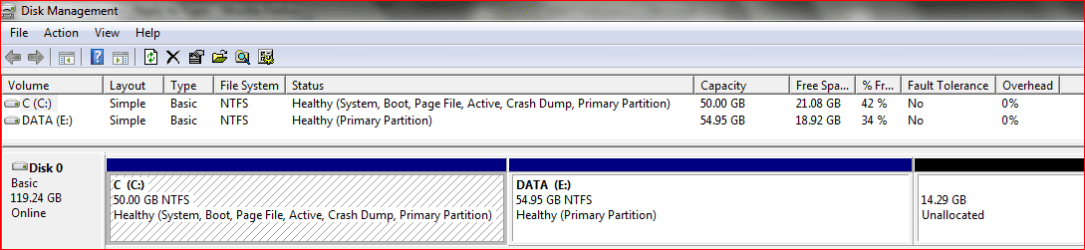
I did extend the primary partition on disk 0 but did n't I make it to big?
Will it be no problem to make it a little smaller in order to have more space unallocated for my data partition. Will I just have to follow the tutorial word by word. Any advice will be appreciated.
Thanks.
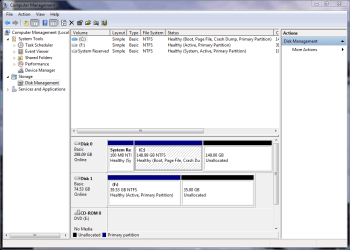
Capture.PNG
 

My Computer My Computer

At a glance

windows 7 home premium 64bitIntel (R) Pentium (R) 4 CPU 3.06 GHzUltra 1024 MB PC2700 DDR 333 MHz (2 RAM)Nvidia Geforce 6200 256 Mbytes
OS
windows 7 home premium 64bit
CPU
Intel (R) Pentium (R) 4 CPU 3.06 GHz
Motherboard
Gigabyte GA-81865 GME-775
Memory
Ultra 1024 MB PC2700 DDR 333 MHz (2 RAM)
Graphics Card(s)
Nvidia Geforce 6200 256 Mbytes
Sound Card
Realtek AC'97 Audio
Monitor(s) Displays
Generic PnP monitor
Screen Resolution
1024*768 @ 75 Hz
Hard Drives
Seagate ST3320620AS 320 GB Serial ATA
Case
PC312 Lyra Super Case
Internet Speed
100 Mbps
Hello Pare,

It will not be a problem if you wanted to shrink C: a bit more to add to the unallocated space to create a new partition with. Just be sure to leave enough room on the C: partition to meet your needs. :)

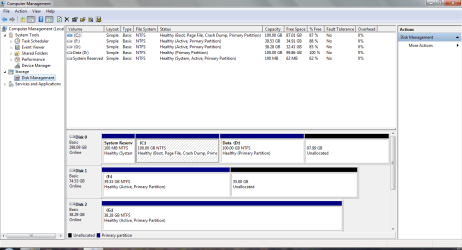
I noticed that you also have 35GB of unallocated on Disk 1 as well. Do note that you will not be able to combine space from Disk 0 and Disk 1 together.

Hope this helps,
Shawn
 

My Computer My Computer

At a glance

64-bit Windows 11 Pro for WorkstationsIntel i7-8700K OC'd to 5 GHz64 GB (4x16GB) G.SKILL TridentZ RGB DDR4 3600...ASUS ROG-STRIX-GTX1080TI-O11G-GAMING
Computer type
PC/Desktop
Computer Manufacturer/Model Number
Self built custom
OS
64-bit Windows 11 Pro for Workstations
CPU
Intel i7-8700K OC'd to 5 GHz
Motherboard
ASUS ROG Maximus XI Formula Z390
Memory
64 GB (4x16GB) G.SKILL TridentZ RGB DDR4 3600 MHz
Graphics Card(s)
ASUS ROG-STRIX-GTX1080TI-O11G-GAMING
Sound Card
Integrated
Monitor(s) Displays
2 x Samsung Odyssey G7 27"
Screen Resolution
2560x1440
Hard Drives
1TB Samsung 990 PRO M.2,
4TB Samsung 990 PRO PRO M.2,
TerraMaster F8 SSD Plus NAS
PSU
Seasonic Prime Titanium 850W
Case
Thermaltake Core P3
Cooling
Corsair Hydro H115i
Keyboard
Logitech wireless K800
Mouse
Logitech MX Master 4
Internet Speed
2 Gb/s Download and 100 Mb/s Upload
Antivirus
Malwarebyte Anti-Malware Premium
Browser
Google Chrome
Other Info
Logitech Z625 speaker system,
Logitech BRIO 4K Pro webcam,
HP Color LaserJet Pro MFP M477fdn,
APC SMART-UPS RT 1000 XL - SURT1000XLI,
Galaxy S23 Plus phone
Hi, Brink!
Thanks for your reply.
I found out that I only have 75176 MB of available shrink space. Divided by 1024 gives me
73 GB for my C:drive.
Well, I am not so sure that it will be enough. What do you think?
 

My Computer My Computer

At a glance

windows 7 home premium 64bitIntel (R) Pentium (R) 4 CPU 3.06 GHzUltra 1024 MB PC2700 DDR 333 MHz (2 RAM)Nvidia Geforce 6200 256 Mbytes
OS
windows 7 home premium 64bit
CPU
Intel (R) Pentium (R) 4 CPU 3.06 GHz
Motherboard
Gigabyte GA-81865 GME-775
Memory
Ultra 1024 MB PC2700 DDR 333 MHz (2 RAM)
Graphics Card(s)
Nvidia Geforce 6200 256 Mbytes
Sound Card
Realtek AC'97 Audio
Monitor(s) Displays
Generic PnP monitor
Screen Resolution
1024*768 @ 75 Hz
Hard Drives
Seagate ST3320620AS 320 GB Serial ATA
Case
PC312 Lyra Super Case
Internet Speed
100 Mbps
Pare,

If you plan to use the C for your system and program files, then that is plenty.

If you want to also put your data there then you could have problems.

You can "locate" the folders such as documents, pictures, videos and music to another drive and then there will be no problems.

Brink has written an excellent tutorial on relocated the folders.
User Folders - Change Default Location - Windows 7 Forums

Here's my present partitioning on my laptop:
MyToshibaLaptopDiskPartitions.PNG
 

My Computer My Computer

At a glance

MS Windows 7 Ultimate SP1 64-bitAMD A10-4600M6.00 GB Dual-Channel DDR3 @ 798MHz (11-11-12-28)AMD Radeon HD 7660G
Computer Manufacturer/Model Number
Toshiba Satellite S875D-S7239 laptop
OS
MS Windows 7 Ultimate SP1 64-bit
CPU
AMD A10-4600M
Motherboard
AMD Pumori (Socket FT1)
Memory
6.00 GB Dual-Channel DDR3 @ 798MHz (11-11-12-28)
Graphics Card(s)
AMD Radeon HD 7660G
Sound Card
High Definition Audio Device
Monitor(s) Displays
Generic PnP Monitor (1600x900@60Hz)
Screen Resolution
1600x900@60Hz
Hard Drives
SSD 119GB Corsair CSSD-V128GB2 ATA Device
Keyboard
Standard PS/2 Keyboard
Mouse
HP Wireless Optical Mobile Mouse Model FHA-3410
Internet Speed
What the local pub, local coffee shop offers.
Other Info
Optical Drive:MATSHITA BD-CMB UJ160B ATA Device


Also have an Asus ha1002xp netbook with Win 7 Ultimate installed.
Pare,

I agree with Karl. 73 GB should be plenty for that. :)
 

My Computer My Computer

At a glance

64-bit Windows 11 Pro for WorkstationsIntel i7-8700K OC'd to 5 GHz64 GB (4x16GB) G.SKILL TridentZ RGB DDR4 3600...ASUS ROG-STRIX-GTX1080TI-O11G-GAMING
Computer type
PC/Desktop
Computer Manufacturer/Model Number
Self built custom
OS
64-bit Windows 11 Pro for Workstations
CPU
Intel i7-8700K OC'd to 5 GHz
Motherboard
ASUS ROG Maximus XI Formula Z390
Memory
64 GB (4x16GB) G.SKILL TridentZ RGB DDR4 3600 MHz
Graphics Card(s)
ASUS ROG-STRIX-GTX1080TI-O11G-GAMING
Sound Card
Integrated
Monitor(s) Displays
2 x Samsung Odyssey G7 27"
Screen Resolution
2560x1440
Hard Drives
1TB Samsung 990 PRO M.2,
4TB Samsung 990 PRO PRO M.2,
TerraMaster F8 SSD Plus NAS
PSU
Seasonic Prime Titanium 850W
Case
Thermaltake Core P3
Cooling
Corsair Hydro H115i
Keyboard
Logitech wireless K800
Mouse
Logitech MX Master 4
Internet Speed
2 Gb/s Download and 100 Mb/s Upload
Antivirus
Malwarebyte Anti-Malware Premium
Browser
Google Chrome
Other Info
Logitech Z625 speaker system,
Logitech BRIO 4K Pro webcam,
HP Color LaserJet Pro MFP M477fdn,
APC SMART-UPS RT 1000 XL - SURT1000XLI,
Galaxy S23 Plus phone
Hi Guys,
I made it like this but it seems still to big. Since I already created a second primary partition, will it be a problem on shrinking it a little further?

Capture.PNG
 

My Computer My Computer

At a glance

windows 7 home premium 64bitIntel (R) Pentium (R) 4 CPU 3.06 GHzUltra 1024 MB PC2700 DDR 333 MHz (2 RAM)Nvidia Geforce 6200 256 Mbytes
OS
windows 7 home premium 64bit
CPU
Intel (R) Pentium (R) 4 CPU 3.06 GHz
Motherboard
Gigabyte GA-81865 GME-775
Memory
Ultra 1024 MB PC2700 DDR 333 MHz (2 RAM)
Graphics Card(s)
Nvidia Geforce 6200 256 Mbytes
Sound Card
Realtek AC'97 Audio
Monitor(s) Displays
Generic PnP monitor
Screen Resolution
1024*768 @ 75 Hz
Hard Drives
Seagate ST3320620AS 320 GB Serial ATA
Case
PC312 Lyra Super Case
Internet Speed
100 Mbps
Hi Guys,
I made it like this but it seems still to big. Since I already created a second primary partition, will it be a problem on shrinking it a little further?

No problem, but can be problematic.

First see if diskmanagement will let you shrink the C partition to the size you desire.

If not, then use Win 7 Backup and Restore to make a system image backup that includes your C and D.

The backup is a safety measure.

Next, download, burn to CD and use Partition Wizard Partition Wizard - free download

I very strongly recommend reading and using this tutorial on Partition Wizard which was written by a person with much experience with Partition Wizard. Partition Wizard : Use the Bootable CD

I have used Partition Wizard with no problems, but since you will be manipulating the size and location of your partitions, error is possible.

I only do one step at a time. I decrease the size of a partition and 'apply" the decrease. Then I move the adjacent partition over next to the first partition. This is "applied".

Since you would then have two partitions with the first being the size you desire and the 2nd adjacent. You can terminate Partition Wizard and return to Windows 7.

Once back in Windows 7, then you can use Disk Management to extend the 2nd partition if you desire.
 

My Computer My Computer

At a glance

MS Windows 7 Ultimate SP1 64-bitAMD A10-4600M6.00 GB Dual-Channel DDR3 @ 798MHz (11-11-12-28)AMD Radeon HD 7660G
Computer Manufacturer/Model Number
Toshiba Satellite S875D-S7239 laptop
OS
MS Windows 7 Ultimate SP1 64-bit
CPU
AMD A10-4600M
Motherboard
AMD Pumori (Socket FT1)
Memory
6.00 GB Dual-Channel DDR3 @ 798MHz (11-11-12-28)
Graphics Card(s)
AMD Radeon HD 7660G
Sound Card
High Definition Audio Device
Monitor(s) Displays
Generic PnP Monitor (1600x900@60Hz)
Screen Resolution
1600x900@60Hz
Hard Drives
SSD 119GB Corsair CSSD-V128GB2 ATA Device
Keyboard
Standard PS/2 Keyboard
Mouse
HP Wireless Optical Mobile Mouse Model FHA-3410
Internet Speed
What the local pub, local coffee shop offers.
Other Info
Optical Drive:MATSHITA BD-CMB UJ160B ATA Device


Also have an Asus ha1002xp netbook with Win 7 Ultimate installed.
Hi Guys,
I made it like this but it seems still to big. Since I already created a second primary partition, will it be a problem on shrinking it a little further?

View attachment 109835

Pare,

If you wanted to combine the D: drive and the 97.99 GB of unallocated space together as on on the D: drive, then you could just extend the D: drive into all of the unallocated space using Disk Management.
 

My Computer My Computer

At a glance

64-bit Windows 11 Pro for WorkstationsIntel i7-8700K OC'd to 5 GHz64 GB (4x16GB) G.SKILL TridentZ RGB DDR4 3600...ASUS ROG-STRIX-GTX1080TI-O11G-GAMING
Computer type
PC/Desktop
Computer Manufacturer/Model Number
Self built custom
OS
64-bit Windows 11 Pro for Workstations
CPU
Intel i7-8700K OC'd to 5 GHz
Motherboard
ASUS ROG Maximus XI Formula Z390
Memory
64 GB (4x16GB) G.SKILL TridentZ RGB DDR4 3600 MHz
Graphics Card(s)
ASUS ROG-STRIX-GTX1080TI-O11G-GAMING
Sound Card
Integrated
Monitor(s) Displays
2 x Samsung Odyssey G7 27"
Screen Resolution
2560x1440
Hard Drives
1TB Samsung 990 PRO M.2,
4TB Samsung 990 PRO PRO M.2,
TerraMaster F8 SSD Plus NAS
PSU
Seasonic Prime Titanium 850W
Case
Thermaltake Core P3
Cooling
Corsair Hydro H115i
Keyboard
Logitech wireless K800
Mouse
Logitech MX Master 4
Internet Speed
2 Gb/s Download and 100 Mb/s Upload
Antivirus
Malwarebyte Anti-Malware Premium
Browser
Google Chrome
Other Info
Logitech Z625 speaker system,
Logitech BRIO 4K Pro webcam,
HP Color LaserJet Pro MFP M477fdn,
APC SMART-UPS RT 1000 XL - SURT1000XLI,
Galaxy S23 Plus phone
Hello pare.


I would be a very good idea to mark "Disk 1, partition 1" and "Disk 2 Partition 1" as " Inactive ", the "Active" flag is an indication that the repair utility uses and in the future if you ever need to use it having more than 1 "Active" will cause issues; have a thorough look at this tutorial for a further understanding, then use the info in Option Two #2 to mark these partitions as "Inactive" to save you some grief later.


Startup Repair - Run 3 Separate Times
 

My Computer My Computer

At a glance

W 7 64-bit UltimateIntel Q9550 Yorkfield8GB Dominator 8500C5DATI : XFX 5870
Computer Manufacturer/Model Number
* BFK Customs *
OS
W 7 64-bit Ultimate
CPU
Intel Q9550 Yorkfield
Motherboard
ASUS P5Q Pro
Memory
8GB Dominator 8500C5D
Graphics Card(s)
ATI : XFX 5870
Sound Card
Realtek HD Audio 7-1
Monitor(s) Displays
1x 47" LCD HDMI & 3x 26" LCD HDMI
Screen Resolution
1920x1080P & 1920x1200
Hard Drives
1x 80GB Intel X25-M G2 SSD : 1x 500GB & 1x 640GB WD Caviar Black(s)
PSU
Corsair 620HX
Case
Cooler Master RC-690
Cooling
Tuniq Tower 120, 2x 140mm and 3x 120mm case fans
Keyboard
Microsoft 500
Mouse
Razer Diamondback 3G
Internet Speed
14 Mb/s
Other Info
1x Koutech 3Gb/s SATA HDD Hot Swap Rack
Hi guys and thanks for the reply!
The partition wizard part sounds complicated and frightened.
I might take Brink's advice and extend the D:drive into all of the unallocated space,
and leave the C:drive as is.
About the disk 1 and disk 2 partition setting inactive in order to only have disk 0 active, I will have to tell you that I don't have Windows-managed dual or multi booting but I have Bios-managed dual or multi booting.
Will I still have to set disk 1 and disk 2 inactive?
 

My Computer My Computer

At a glance

windows 7 home premium 64bitIntel (R) Pentium (R) 4 CPU 3.06 GHzUltra 1024 MB PC2700 DDR 333 MHz (2 RAM)Nvidia Geforce 6200 256 Mbytes
OS
windows 7 home premium 64bit
CPU
Intel (R) Pentium (R) 4 CPU 3.06 GHz
Motherboard
Gigabyte GA-81865 GME-775
Memory
Ultra 1024 MB PC2700 DDR 333 MHz (2 RAM)
Graphics Card(s)
Nvidia Geforce 6200 256 Mbytes
Sound Card
Realtek AC'97 Audio
Monitor(s) Displays
Generic PnP monitor
Screen Resolution
1024*768 @ 75 Hz
Hard Drives
Seagate ST3320620AS 320 GB Serial ATA
Case
PC312 Lyra Super Case
Internet Speed
100 Mbps
Hi guys and thanks for the reply!
The partition wizard part sounds complicated and frightened.
I might take Brink's advice and extend the D:drive into all of the unallocated space,
and leave the C:drive as is.
About the disk 1 and disk 2 partition setting inactive in order to only have disk 0 active, I will have to tell you that I don't have Windows-managed dual or multi booting but I have Bios-managed dual or multi booting.
Will I still have to set disk 1 and disk 2 inactive?


Yes, you need to do that, it's not that difficult and it may make your life easier if ever you have boot issues later.

Just open an elevated command window to do it like the link at Option Two #2 shows.

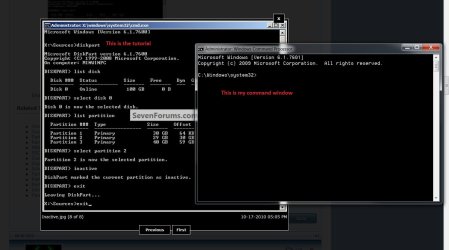
You can keep the tutorial snip on the screen and place your command window so you can see both at the same time just like I did in this snip below.


click to enlarge
tut.jpg
 

My Computer My Computer

At a glance

W 7 64-bit UltimateIntel Q9550 Yorkfield8GB Dominator 8500C5DATI : XFX 5870
Computer Manufacturer/Model Number
* BFK Customs *
OS
W 7 64-bit Ultimate
CPU
Intel Q9550 Yorkfield
Motherboard
ASUS P5Q Pro
Memory
8GB Dominator 8500C5D
Graphics Card(s)
ATI : XFX 5870
Sound Card
Realtek HD Audio 7-1
Monitor(s) Displays
1x 47" LCD HDMI & 3x 26" LCD HDMI
Screen Resolution
1920x1080P & 1920x1200
Hard Drives
1x 80GB Intel X25-M G2 SSD : 1x 500GB & 1x 640GB WD Caviar Black(s)
PSU
Corsair 620HX
Case
Cooler Master RC-690
Cooling
Tuniq Tower 120, 2x 140mm and 3x 120mm case fans
Keyboard
Microsoft 500
Mouse
Razer Diamondback 3G
Internet Speed
14 Mb/s
Other Info
1x Koutech 3Gb/s SATA HDD Hot Swap Rack
Just curious, how did they become active?
How come my C:drive on disk 0 is not set to active.
As a matter of fact disk 2 has no operating system on it.
Will I be able to put stuff (ex: music, pictures) on it?
 

My Computer My Computer

At a glance

windows 7 home premium 64bitIntel (R) Pentium (R) 4 CPU 3.06 GHzUltra 1024 MB PC2700 DDR 333 MHz (2 RAM)Nvidia Geforce 6200 256 Mbytes
OS
windows 7 home premium 64bit
CPU
Intel (R) Pentium (R) 4 CPU 3.06 GHz
Motherboard
Gigabyte GA-81865 GME-775
Memory
Ultra 1024 MB PC2700 DDR 333 MHz (2 RAM)
Graphics Card(s)
Nvidia Geforce 6200 256 Mbytes
Sound Card
Realtek AC'97 Audio
Monitor(s) Displays
Generic PnP monitor
Screen Resolution
1024*768 @ 75 Hz
Hard Drives
Seagate ST3320620AS 320 GB Serial ATA
Case
PC312 Lyra Super Case
Internet Speed
100 Mbps
If you'll look, the System Reserved partition on C: is the active partition and needs to remain so because that's where the boot files are stored for the system.
 

My Computer My Computer

At a glance

W 7 64-bit UltimateIntel Q9550 Yorkfield8GB Dominator 8500C5DATI : XFX 5870
Computer Manufacturer/Model Number
* BFK Customs *
OS
W 7 64-bit Ultimate
CPU
Intel Q9550 Yorkfield
Motherboard
ASUS P5Q Pro
Memory
8GB Dominator 8500C5D
Graphics Card(s)
ATI : XFX 5870
Sound Card
Realtek HD Audio 7-1
Monitor(s) Displays
1x 47" LCD HDMI & 3x 26" LCD HDMI
Screen Resolution
1920x1080P & 1920x1200
Hard Drives
1x 80GB Intel X25-M G2 SSD : 1x 500GB & 1x 640GB WD Caviar Black(s)
PSU
Corsair 620HX
Case
Cooler Master RC-690
Cooling
Tuniq Tower 120, 2x 140mm and 3x 120mm case fans
Keyboard
Microsoft 500
Mouse
Razer Diamondback 3G
Internet Speed
14 Mb/s
Other Info
1x Koutech 3Gb/s SATA HDD Hot Swap Rack
Hi Guys,
I did set the partitions on disk 1 and 2 inactive and it went well. Now I have a question on changing the default location of the user folders. If I change the main user profile folder from my C: partition to my D: partition do I still have to change the user folders like my music folder, pictures folder etc. from the C: to the D: partition? Is it better to extend my D: partition into the rest of the unallocated space before doing this relocation of the folders? If I want to create a system image can I put it on the D: partition? Those are 3 questions. I know I can put it on one of the other disks but I am not sure if the one who has XP on it is a 64 bit.
Thanks again guys.
 

My Computer My Computer

At a glance

windows 7 home premium 64bitIntel (R) Pentium (R) 4 CPU 3.06 GHzUltra 1024 MB PC2700 DDR 333 MHz (2 RAM)Nvidia Geforce 6200 256 Mbytes
OS
windows 7 home premium 64bit
CPU
Intel (R) Pentium (R) 4 CPU 3.06 GHz
Motherboard
Gigabyte GA-81865 GME-775
Memory
Ultra 1024 MB PC2700 DDR 333 MHz (2 RAM)
Graphics Card(s)
Nvidia Geforce 6200 256 Mbytes
Sound Card
Realtek AC'97 Audio
Monitor(s) Displays
Generic PnP monitor
Screen Resolution
1024*768 @ 75 Hz
Hard Drives
Seagate ST3320620AS 320 GB Serial ATA
Case
PC312 Lyra Super Case
Internet Speed
100 Mbps
Hi Guys,
I did set the partitions on disk 1 and 2 inactive and it went well. Now I have a question on changing the default location of the user folders.

If I change the main user profile folder from my C: partition to my D: partition do I still have to change the user folders like my music folder, pictures folder etc. from the C: to the D: partition?
NO
Is it better to extend my D: partition into the rest of the unallocated space before doing this relocation of the folders?
YES

If I want to create a system image can I put it on the D: partition?
NO
Those are 3 questions. I know I can put it on one of the other disks but I am not sure if the one who has XP on it is a 64 bit.
DISKS ARE NOT 32/64 BIT. MAKE SURE THEY ARE NTFS FORMATTED.

Thanks again guys.

Glad to help.
 

My Computer My Computer

At a glance

MS Windows 7 Ultimate SP1 64-bitAMD A10-4600M6.00 GB Dual-Channel DDR3 @ 798MHz (11-11-12-28)AMD Radeon HD 7660G
Computer Manufacturer/Model Number
Toshiba Satellite S875D-S7239 laptop
OS
MS Windows 7 Ultimate SP1 64-bit
CPU
AMD A10-4600M
Motherboard
AMD Pumori (Socket FT1)
Memory
6.00 GB Dual-Channel DDR3 @ 798MHz (11-11-12-28)
Graphics Card(s)
AMD Radeon HD 7660G
Sound Card
High Definition Audio Device
Monitor(s) Displays
Generic PnP Monitor (1600x900@60Hz)
Screen Resolution
1600x900@60Hz
Hard Drives
SSD 119GB Corsair CSSD-V128GB2 ATA Device
Keyboard
Standard PS/2 Keyboard
Mouse
HP Wireless Optical Mobile Mouse Model FHA-3410
Internet Speed
What the local pub, local coffee shop offers.
Other Info
Optical Drive:MATSHITA BD-CMB UJ160B ATA Device


Also have an Asus ha1002xp netbook with Win 7 Ultimate installed.
Hello Guys,
The partitions on disk 1 and 2 both with XP that I have set to inactive now does not want to boot any more and my husband is mad at me (it is his Computer) Was this supossed to have happened?
Is there any other way?

Capture.PNG
 

My Computer My Computer

At a glance

windows 7 home premium 64bitIntel (R) Pentium (R) 4 CPU 3.06 GHzUltra 1024 MB PC2700 DDR 333 MHz (2 RAM)Nvidia Geforce 6200 256 Mbytes
OS
windows 7 home premium 64bit
CPU
Intel (R) Pentium (R) 4 CPU 3.06 GHz
Motherboard
Gigabyte GA-81865 GME-775
Memory
Ultra 1024 MB PC2700 DDR 333 MHz (2 RAM)
Graphics Card(s)
Nvidia Geforce 6200 256 Mbytes
Sound Card
Realtek AC'97 Audio
Monitor(s) Displays
Generic PnP monitor
Screen Resolution
1024*768 @ 75 Hz
Hard Drives
Seagate ST3320620AS 320 GB Serial ATA
Case
PC312 Lyra Super Case
Internet Speed
100 Mbps
Pare,
You need an active partition.

Make C active (assuming that C is youe Win 7 Drive).

How to do that.

Boot from your System Repair Disc.

Go to a command prompt.
You must see X: if you did this step correctly.

Enter following:
DISKPART
type following commands for DiskPart
Select Disk 0
Select Partition 1
Active
Exit
Exit


COMMAND PROMPT - GO TO A COMMAND PROMPT USING A SYSTEM REPAIR DISC

1) Insert System Repair Disc into optical reader.
2) Shutdown your computer.
3) Boot up your computer from the System Repair Disc
If your computer doesn’t boot from the optical drive, then
Immediately after pushing your Power ON button, start tapping the F2 key to get to the BIOS to change the boot order.OR
Immediately after pushing your Power ON button, start tapping the F12 key and choose CD/DVD to change the boot order only for this time.
4) Wait while a mini-version of Windows is loaded and finally the System Recovery Options dialog appears.
5) SYSTEM RECOVERY OPTIONS dialog |
Select a keyboard input method |
NEXT button
6) SYSTEM RECOVERY OPTIONS dialog
will search your system for installed versions of Windows.
7) SYSTEM RECOVERY OPTIONS dialog |
select the Use recovery tools that can help fix problems starting Windows radio button |
NEXT button
8) SYSTEM RECOVERY OPTIONS |
Choose a recovery tool |
9) Click on command prompt from the list shown

Run any desired commands and type EXIT when finished.
Remove the System Repair Disc.
Shutdown your computer.
Power on your computer.
 

My Computer My Computer

At a glance

MS Windows 7 Ultimate SP1 64-bitAMD A10-4600M6.00 GB Dual-Channel DDR3 @ 798MHz (11-11-12-28)AMD Radeon HD 7660G
Computer Manufacturer/Model Number
Toshiba Satellite S875D-S7239 laptop
OS
MS Windows 7 Ultimate SP1 64-bit
CPU
AMD A10-4600M
Motherboard
AMD Pumori (Socket FT1)
Memory
6.00 GB Dual-Channel DDR3 @ 798MHz (11-11-12-28)
Graphics Card(s)
AMD Radeon HD 7660G
Sound Card
High Definition Audio Device
Monitor(s) Displays
Generic PnP Monitor (1600x900@60Hz)
Screen Resolution
1600x900@60Hz
Hard Drives
SSD 119GB Corsair CSSD-V128GB2 ATA Device
Keyboard
Standard PS/2 Keyboard
Mouse
HP Wireless Optical Mobile Mouse Model FHA-3410
Internet Speed
What the local pub, local coffee shop offers.
Other Info
Optical Drive:MATSHITA BD-CMB UJ160B ATA Device


Also have an Asus ha1002xp netbook with Win 7 Ultimate installed.
Pare,
Just noticed that you have one of those system reserved partitions.

Hold off a second.

Question for you-- If the system won't boot then how did you get the snapshot of DiskManagement output?

Things aren't matching up.
 

My Computer My Computer

At a glance

MS Windows 7 Ultimate SP1 64-bitAMD A10-4600M6.00 GB Dual-Channel DDR3 @ 798MHz (11-11-12-28)AMD Radeon HD 7660G
Computer Manufacturer/Model Number
Toshiba Satellite S875D-S7239 laptop
OS
MS Windows 7 Ultimate SP1 64-bit
CPU
AMD A10-4600M
Motherboard
AMD Pumori (Socket FT1)
Memory
6.00 GB Dual-Channel DDR3 @ 798MHz (11-11-12-28)
Graphics Card(s)
AMD Radeon HD 7660G
Sound Card
High Definition Audio Device
Monitor(s) Displays
Generic PnP Monitor (1600x900@60Hz)
Screen Resolution
1600x900@60Hz
Hard Drives
SSD 119GB Corsair CSSD-V128GB2 ATA Device
Keyboard
Standard PS/2 Keyboard
Mouse
HP Wireless Optical Mobile Mouse Model FHA-3410
Internet Speed
What the local pub, local coffee shop offers.
Other Info
Optical Drive:MATSHITA BD-CMB UJ160B ATA Device


Also have an Asus ha1002xp netbook with Win 7 Ultimate installed.
Since you said that you have another OS on DISK1 which you are wisely booting via BIOS, you should not have been told to mark that partition Inactive. Try marking it Active again to see if it will boot on its own via BIOS.

Leave DISK0 alone. SysReserved should remain Active without a letter.

As a matter of fact disk 2 has no operating system on it.

Hello Guys,
The partitions on disk 1 and 2 both with XP that I have set to inactive now does not want to boot

Are you saying now that you have XP on both DISK1 and DISK2, booted via BIOS? In that case both should be marked Active. If they fail to boot, I will give you repair commands.
 
Greg,
I think she wants to boot into Win 7 which as I understand is on Disk 0.

She may have to set the bios to boot from Disk 0 and do the startup repair routine.

What do you think?
 

My Computer My Computer

At a glance

MS Windows 7 Ultimate SP1 64-bitAMD A10-4600M6.00 GB Dual-Channel DDR3 @ 798MHz (11-11-12-28)AMD Radeon HD 7660G
Computer Manufacturer/Model Number
Toshiba Satellite S875D-S7239 laptop
OS
MS Windows 7 Ultimate SP1 64-bit
CPU
AMD A10-4600M
Motherboard
AMD Pumori (Socket FT1)
Memory
6.00 GB Dual-Channel DDR3 @ 798MHz (11-11-12-28)
Graphics Card(s)
AMD Radeon HD 7660G
Sound Card
High Definition Audio Device
Monitor(s) Displays
Generic PnP Monitor (1600x900@60Hz)
Screen Resolution
1600x900@60Hz
Hard Drives
SSD 119GB Corsair CSSD-V128GB2 ATA Device
Keyboard
Standard PS/2 Keyboard
Mouse
HP Wireless Optical Mobile Mouse Model FHA-3410
Internet Speed
What the local pub, local coffee shop offers.
Other Info
Optical Drive:MATSHITA BD-CMB UJ160B ATA Device


Also have an Asus ha1002xp netbook with Win 7 Ultimate installed.
Back
Top