Solved partitioning problem

dumborambo

New member
Local time
5:29 AM
Messages
19
I have purchase new hp laptop with hard drive 320gb. There is two partition, that contain windows and recovery. I want partitioning of C almost 100gb. while partitioning there is problem, "C" is shrink to make unallocated volume .when this unallocated volume is used to make new drive, the problem persist showing that :
"The operation you selected will convert the selected disk to dynamic disk. if you convert the disk to dynamic, you will not be able to start installed operating system from any volume on the disk (except the current boot volume). are you sure you want to continue?"..... when i click yes.... another window appear showing that...
"Dynamic disk are not supported by this operating system or server configuration . dynamic disks are not supported on clusters."

how ever my all disks are labelled as "BASIC". please help me and guide me with the proper procedure
 

My Computer

OS
windows 7 starter 32 bit
Do not convert to Dynamic!

This prompt occurs because you already have four primary partitions. You'll need to convert one to Logical which can be sub-divided into as many other partitions as there are remaining drive letters. Use free Partition Wizard bootable CD. Free Download Magic Partition Manager Software - Partition Wizard Online

You do not want to convert to Logical your System Reserved, Win7, or Recovery partitions.

Best to post back a screenshot of your full Disk management drive map and listings, using Snipping Tool in Start Menu, so we can advise you better. Tell us what is on each partition.
 
snapshots

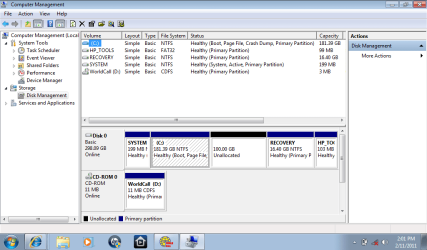
here are the partitions and i hope they are self explanatory....
c drive contains the windows
d drive has the recovery
the other two are recovery and system.......
tell me what to do now with these drives how can i make my unallocated prt into a E drive where ican store my data
 

Attachments

  • disk manager.png
    disk manager.png
    31.8 KB · Views: 2,033

My Computer

OS
windows 7 starter 32 bit
Since your System Active boot files are on the System Partition and not Win7, you can convert the Win7 partition to Logical Extended so that additional Logical partitions can be added.

Backup your files and a Win7 backup image, make your Recovery Disks from HP Recovery in the All Programs list. http://www.sevenforums.com/tutorials/663-backup-complete-computer-create-image-backup.html

Now download and burn to CD free Partition Wizard bootable CD, rightclick Win7 partition>Modify>Convert to Logical, OK.

Now you can rightclick on the Unallocated Space to Create New Logical partition, OK, Apply all Steps.

The only other choice to convert to Logical so you can add more partitions is Tools but this would require moving the Recovery partition intact to the left to access the Unallocated Space. This could result in Recovery losing it's Windows functionality to make Recovery Disks or run from it's hotkey during bootup.
 
can u please explain it again? a bit more detialed and in a layman launguage.im new to computers and i did not understan what u posted.please im not joking but seriously saying i didnt get what you said.pleae be kind enough and expalin me in a way that i can do step by step. thanks dear
 

My Computer

OS
windows 7 starter 32 bit
You can only have four Primary Partitions, which you already have.

In order to have another partition, it must be another type partition called Logical Extended. Once you convert one of the Primary partitions to a Logical Extended partition, you can add as many other partitions as you want (and space allows).

The only partition which can be converted is the Win7 partition. This is because its boot files are on the partition named "System" which cannot be converted for that reason. The Recovery Partition cannot be converted or it will not run in case you need to restore your computer to factory condition from boot. And the HP Tools partition has no space to expand without moving the Recovery Partition, which can't be safely done.

To convert Win7 partition use free Partition Wizard bootable CD from the link provided. Burn the CD using ImgBurn at 4x speed, or Windows Image Burner built into Win7.

Boot the CD, Rightclick the Win7 partition to Modify>Convert to Logical, click OK. Then create the new data partition as a logical partition, making it NTFS Logical with a letter, click OK, click Apply all steps.

This is a safe operation but it is always wisest when partitioning to back up your files and, if you want, a Win7 backup image so you can start over if necessary. And you should make your HP Recovery Disks anyway at All Programs>Recovery Manager>Recovery Disk Creation.
 
i dont have a dvd/cd rom in my netbook so where do i save the back up ?
secondly there are many versions of wizards....which one i should install? i have windows 7 starter
thirdly is it poosible to make up a back up and use the wizard tool from usb rather than burning it on dvd?
 
Last edited:

My Computer

OS
windows 7 starter 32 bit
Hello dumborambo, welcome to Seven Forums!

Make back-ups of any data you need to save before you attempt this, I will not be responsible if you lose data using this method, though it worked flawlessly for me.

I just tried this in Windows 7 instead of booting the disk like we always suggest.


Install the "Home Edition" Partition Wizard program from this link below to Windows 7.

Partition Wizard Free Home Edition


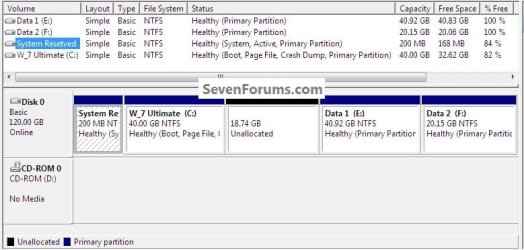
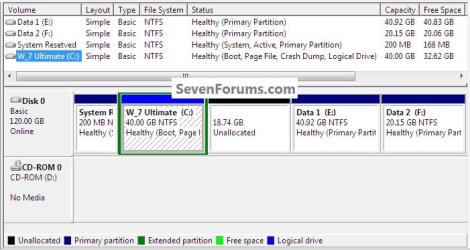
Here's what I started with just like your situation.
click to enlarge
Convert1.jpg
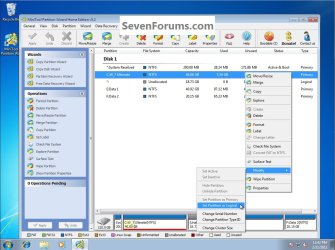
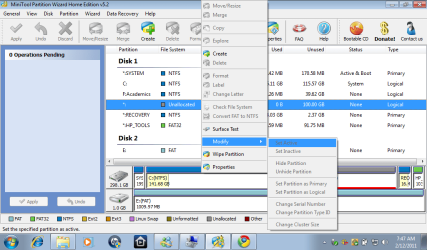
Start the program and right click the Windows 7 partition to highlight/select it.

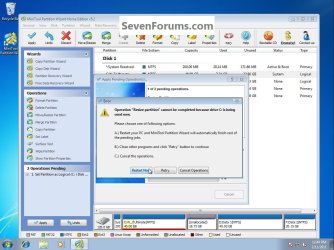
Then click "Modify" then "Set as Logical" then in the lower left pane Operations Pending click "Apply" then "Restart Now" as you can see it says something about resize but just ignore that bit and click restart.
Convert2.jpg
Convert3.jpg
You will get this "Boot Mode" pending changes dialog box, just let it complete and do the restarts it needs.
Convert4.jpg
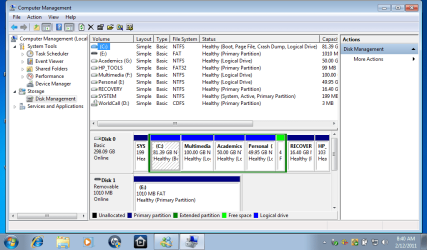
This is what you will have when it finishes.
Convert5.jpg
 

My Computer

Computer Manufacturer/Model Number
* BFK Customs *
OS
W 7 64-bit Ultimate
CPU
Intel Q9550 Yorkfield
Motherboard
ASUS P5Q Pro
Memory
8GB Dominator 8500C5D
Graphics Card(s)
ATI : XFX 5870
Sound Card
Realtek HD Audio 7-1
Monitor(s) Displays
1x 47" LCD HDMI & 3x 26" LCD HDMI
Screen Resolution
1920x1080P & 1920x1200
Hard Drives
1x 80GB Intel X25-M G2 SSD : 1x 500GB & 1x 640GB WD Caviar Black(s)
PSU
Corsair 620HX
Case
Cooler Master RC-690
Cooling
Tuniq Tower 120, 2x 140mm and 3x 120mm case fans
Keyboard
Microsoft 500
Mouse
Razer Diamondback 3G
Internet Speed
14 Mb/s
Other Info
1x Koutech 3Gb/s SATA HDD Hot Swap Rack
  • Like
Reactions: whs
With all apps. that flip into boot time mode - there is a slight danger they will stop.

Always have the bootable media to hand , just in case.

Those with glorified mobile phones will need to make a bootable usb stick for safety.

If you have a notebook - you are lucky enough to have 32 bit windows7 - that means it is easier to make pe3 media with apps. - e.g PW included.
 

My Computers

System One System Two

  • Computer type
    PC/Desktop
    OS
    7 X64
    CPU
    i5 8400
    Motherboard
    gigabyte b365m ds3h
    Memory
    2x8gb 3200mhz
    Hard Drives
    various
    PSU
    pure power 11 400w cm
    Case
    Coolermaster
    Cooling
    cryorig m9i
  • Computer type
    PC/Desktop
    OS
    7x64
    CPU
    g5400
    Motherboard
    ga b365m ds3h
    Memory
    8gb ddr4 2400
    PSU
    xfx pro 450w
can i make a back up of my windows 7 starter on a usb? if yes then how???? its not giving an option...i dont have a cd rom in my netbook what do i do?
 

My Computer

OS
windows 7 starter 32 bit
You could make a system recovery usb - that would contain just the windows 7 system recovery ( repair) options - quite easily.

However , you cannot use that to install ( or reinstall ) windows.

It should also be possible to make a usb that can reinstall windows from the files you already have on your recovery partition.

1. What is the make and model of your machine?

2. Please post a screenshot of the contents of the recovery partition.

If it's an HP machine there is probably already a program on there which will do it for you.
 

My Computers

System One System Two

  • Computer type
    PC/Desktop
    OS
    7 X64
    CPU
    i5 8400
    Motherboard
    gigabyte b365m ds3h
    Memory
    2x8gb 3200mhz
    Hard Drives
    various
    PSU
    pure power 11 400w cm
    Case
    Coolermaster
    Cooling
    cryorig m9i
  • Computer type
    PC/Desktop
    OS
    7x64
    CPU
    g5400
    Motherboard
    ga b365m ds3h
    Memory
    8gb ddr4 2400
    PSU
    xfx pro 450w

My Computers

System One System Two

  • Computer type
    PC/Desktop
    OS
    7 X64
    CPU
    i5 8400
    Motherboard
    gigabyte b365m ds3h
    Memory
    2x8gb 3200mhz
    Hard Drives
    various
    PSU
    pure power 11 400w cm
    Case
    Coolermaster
    Cooling
    cryorig m9i
  • Computer type
    PC/Desktop
    OS
    7x64
    CPU
    g5400
    Motherboard
    ga b365m ds3h
    Memory
    8gb ddr4 2400
    PSU
    xfx pro 450w
If Starter has Win7 backup imaging then save a backup image along with your files to an external drive or another computer on your network.

http://www.sevenforums.com/tutorials/663-backup-complete-computer-create-image-backup.html

Then follow Barefoot's steps to convert your partition using PW Home Edition.

We've never had PW fail in hundreds of tricky operations we've helped with here.

But if it should, just reimage your HD to start over. http://www.sevenforums.com/tutorials/675-system-image-recovery.html
 
i have done exactly as you told me and i have been able to make a drive out of my LOGICAL C drove......but i can not change my unallocated part to logical drive OR to a simple volume.....when i click on simple volume it gives me the error disk already contains maximum number of partitions.....WHAT DO I DO NOW? heres a screenshot from my partition wizard
 

Attachments

  • partition wizard.png
    partition wizard.png
    48 KB · Views: 196

My Computer

OS
windows 7 starter 32 bit
Use the Create choice showing available on the rightclick Context menu in your screenshot. Create and label as many logical partition(s) of any size as you want.
 
well gregrocker i did not do as you said rather i first changed back the c logical drive to primary drive....then extended my c drive back to its original size....then again converted to logical and then made partitions from the free space i got out of my logical drive....is that right way? heres a screen shot of what i got in the end
 

Attachments

  • final.png
    final.png
    38.6 KB · Views: 200

My Computer

OS
windows 7 starter 32 bit
Well it worked!

No reason to convert Logical back to Primary once you had Logical C: and Unallocated Space as shown in your previous screenshot. You should be able to Create as many Logical Partiitions in the space as you please, Resize C forward or back, etc.

Here are some tips for cleaning up the HP bloatware and useless factory utiltiies which have much better versions built into Win7: http://www.sevenforums.com/installa...p-all-four-primary-partitions.html#post952573

Now that you're a partitioning ace, you may want to consider finding a Win7 Installation DVD for your version to clean reinstall with the Product Key on your COA sticker. This lets Win7 run free and unhindered by the HP lard. http://www.sevenforums.com/installation-setup/125874-re-install-windows-7-a.html#post1086729
 
Well, we now know the free home version of Partition Wizard installed to Windows 7 will convert an Extended/Logical drive to a Primary partition without having to boot the CD.

In the further experimenting I did with this scenario, it was necessary to use PW to create the additional Logical drive(s) once the original Extended partition was created, Windows 7 disk management would not do it. ;)


Hello again dumborambo.

You did an excellent job of it, well done; I'm glad we could help you get what you needed.
 

My Computer

Computer Manufacturer/Model Number
* BFK Customs *
OS
W 7 64-bit Ultimate
CPU
Intel Q9550 Yorkfield
Motherboard
ASUS P5Q Pro
Memory
8GB Dominator 8500C5D
Graphics Card(s)
ATI : XFX 5870
Sound Card
Realtek HD Audio 7-1
Monitor(s) Displays
1x 47" LCD HDMI & 3x 26" LCD HDMI
Screen Resolution
1920x1080P & 1920x1200
Hard Drives
1x 80GB Intel X25-M G2 SSD : 1x 500GB & 1x 640GB WD Caviar Black(s)
PSU
Corsair 620HX
Case
Cooler Master RC-690
Cooling
Tuniq Tower 120, 2x 140mm and 3x 120mm case fans
Keyboard
Microsoft 500
Mouse
Razer Diamondback 3G
Internet Speed
14 Mb/s
Other Info
1x Koutech 3Gb/s SATA HDD Hot Swap Rack
I am very grateful to you BAREFOOT KID and GREGROCKER for helping me out through this forum.my best wished and prayers with you people. May you enjoy all the blessings of your god
 

My Computer

OS
windows 7 starter 32 bit
Back
Top