Partitions are corrupted

cma6

New member
Local time
5:41 AM
Messages
49
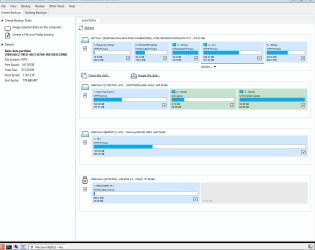
On my Windows 10 pro system, I have lost the ability to boot into Windows 10. All I get on the screen after boot up is: "EFI shell 2.40".System contains 2 physical HDs. Windows and C: installed on SSD. On the spinning HD, all the other programs and data were installed.BIOS shows only 1 "UEFI Hard Disk." The attached .bmp from Macrium Reflect shows a totally messed up pictures of the hard drives. On GPT Disk 1, C: partition primary is not shown as Active. Both physical drive C: and E:\ show a \Windows folder. However, I installed Windows only on C:.How should I fix this mess to get back to normal boot onto C:\Windows and what tool will should I use? Thanks, cma
 

Attachments
  • kafka220219.jpg
    kafka220219.jpg
    88.9 KB · Views: 2

My Computer

Computer type
PC/Desktop
OS
Microsoft Windows 7 Professional 64-bit 7601 Multiprocessor Free Service Pack 1
CPU
Intel(R) Core(TM) i7-4930K CPU @ 3.40GHz
Motherboard
ASUSTeK COMPUTER INC. X79-DELUXE
Memory
32.00 GB
Graphics Card(s)
NVIDIA GeForce GTX 650 Ti BOOST
Sound Card
(1) NVIDIA High Definition Audio (2) High Definition Audio
Screen Resolution
1280 x 1024 x 32 bits (4294967296 colors) @ 75 Hz
Hard Drives
(1) Samsung SSD 840 Series SCSI Disk Device (2) WDC WD1000DHTZ-04N21 SCSI Disk Device (3) TOSHIBA External USB 3.0 USB Device
PSU
Corsair RM 850
Case
Cooler Master HAF932 Advanced
Cooling
Cooler Master Eisberg 240L Prestige
Keyboard
TypeMatrix 2030
Mouse
Logitech MS10 wireless
Internet Speed
high speed
Antivirus
System Suite 10; Trend Micro
Browser
several
GPT Disk 1, C: partition primary is not shown as Active

It won't be marked active because it is gpt partition style.

did you try booting that macrium media in efi mode and at cmd prompt type

bcdboot c:\windows
(then press enter)
 

My Computers

System One System Two

  • Computer type
    PC/Desktop
    OS
    7 X64
    CPU
    i5 8400
    Motherboard
    gigabyte b365m ds3h
    Memory
    2x8gb 3200mhz
    Hard Drives
    various
    PSU
    pure power 11 400w cm
    Case
    Coolermaster
    Cooling
    cryorig m9i
  • Computer type
    PC/Desktop
    OS
    7x64
    CPU
    g5400
    Motherboard
    ga b365m ds3h
    Memory
    8gb ddr4 2400
    PSU
    xfx pro 450w
Booting in EFI mode

It won't be marked active because it is gpt partition style. Did you try booting that macrium media in efi mode and at cmd prompt type "bcdboot c:\windows"?
Interesting idea. How do get the system to boot into macrium media (USB PE) in efi mode? The way I boot into the macrium usb media is to put it at the top of the BIOS Boot menu.
 

My Computer

Computer type
PC/Desktop
OS
Microsoft Windows 7 Professional 64-bit 7601 Multiprocessor Free Service Pack 1
CPU
Intel(R) Core(TM) i7-4930K CPU @ 3.40GHz
Motherboard
ASUSTeK COMPUTER INC. X79-DELUXE
Memory
32.00 GB
Graphics Card(s)
NVIDIA GeForce GTX 650 Ti BOOST
Sound Card
(1) NVIDIA High Definition Audio (2) High Definition Audio
Screen Resolution
1280 x 1024 x 32 bits (4294967296 colors) @ 75 Hz
Hard Drives
(1) Samsung SSD 840 Series SCSI Disk Device (2) WDC WD1000DHTZ-04N21 SCSI Disk Device (3) TOSHIBA External USB 3.0 USB Device
PSU
Corsair RM 850
Case
Cooler Master HAF932 Advanced
Cooling
Cooler Master Eisberg 240L Prestige
Keyboard
TypeMatrix 2030
Mouse
Logitech MS10 wireless
Internet Speed
high speed
Antivirus
System Suite 10; Trend Micro
Browser
several
there should be 2 choices for the usb stick on the one time boot menu. pick the one that says efi.

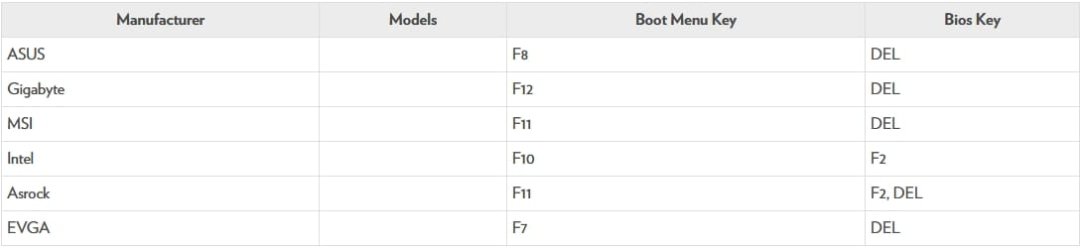
might be by tapping f8 during post on your mobo
 

My Computers

System One System Two

  • Computer type
    PC/Desktop
    OS
    7 X64
    CPU
    i5 8400
    Motherboard
    gigabyte b365m ds3h
    Memory
    2x8gb 3200mhz
    Hard Drives
    various
    PSU
    pure power 11 400w cm
    Case
    Coolermaster
    Cooling
    cryorig m9i
  • Computer type
    PC/Desktop
    OS
    7x64
    CPU
    g5400
    Motherboard
    ga b365m ds3h
    Memory
    8gb ddr4 2400
    PSU
    xfx pro 450w
EFI shell

From your reference to "tapping F8 during post", I assume you meant to get into BIOS in order to get to EFI mode command prompt?

So I got into BIOS (by DEL)/ Boot Menu/ UEFI Application Boot Priorities/Boot Option/
(at which point Boot Option #1 was the Macrium USB stick).

I changed Boot Option from "Disabled" to "UEFI: Built-in EFI Shell" and rebooted after removing Macrium USB stick. I came to the same Shell> command line and tried bcdboot c:\windows but got, as expected, "bcdboot is not recognized as internal or external command"

I don't know if this is progress but I booted back into Macrium boot disk with its mini-windows environment and typed "bcdboot c:\windows" and got "boot file created" or something like that, which seemed a positive step. However, system still boots into EFI Shell.
 

My Computer

Computer type
PC/Desktop
OS
Microsoft Windows 7 Professional 64-bit 7601 Multiprocessor Free Service Pack 1
CPU
Intel(R) Core(TM) i7-4930K CPU @ 3.40GHz
Motherboard
ASUSTeK COMPUTER INC. X79-DELUXE
Memory
32.00 GB
Graphics Card(s)
NVIDIA GeForce GTX 650 Ti BOOST
Sound Card
(1) NVIDIA High Definition Audio (2) High Definition Audio
Screen Resolution
1280 x 1024 x 32 bits (4294967296 colors) @ 75 Hz
Hard Drives
(1) Samsung SSD 840 Series SCSI Disk Device (2) WDC WD1000DHTZ-04N21 SCSI Disk Device (3) TOSHIBA External USB 3.0 USB Device
PSU
Corsair RM 850
Case
Cooler Master HAF932 Advanced
Cooling
Cooler Master Eisberg 240L Prestige
Keyboard
TypeMatrix 2030
Mouse
Logitech MS10 wireless
Internet Speed
high speed
Antivirus
System Suite 10; Trend Micro
Browser
several
Pull powser leads on other drive see if c boot then. Your second disk has logical paritions which means any corruption all the partition wont be accessable it should be primary
 

My Computer

Computer type
PC/Desktop
OS
win 8 32 bit
Boot into EFI shell

Samuria, that is a very interesting idea.

The tech guy from Macrium pushed your idea hard. His view was that, for some reason, system was cross booting to 2nd or third physical drive and therefore not seeing c:\windows on 1st physical drive. Macrium tech guy insisted I physically removed 2nd physical drive from system (or pull power lead from mobo) and try to boot.
So this last weekend I had a friend come over who did just that. He pulled the power lead on the 2nd physical drive to see if got a boot into the first drive, but unfortunately we still booted into EFI Shell. He tried the reverse with the same result.
It is a great mystery.
 

My Computer

Computer type
PC/Desktop
OS
Microsoft Windows 7 Professional 64-bit 7601 Multiprocessor Free Service Pack 1
CPU
Intel(R) Core(TM) i7-4930K CPU @ 3.40GHz
Motherboard
ASUSTeK COMPUTER INC. X79-DELUXE
Memory
32.00 GB
Graphics Card(s)
NVIDIA GeForce GTX 650 Ti BOOST
Sound Card
(1) NVIDIA High Definition Audio (2) High Definition Audio
Screen Resolution
1280 x 1024 x 32 bits (4294967296 colors) @ 75 Hz
Hard Drives
(1) Samsung SSD 840 Series SCSI Disk Device (2) WDC WD1000DHTZ-04N21 SCSI Disk Device (3) TOSHIBA External USB 3.0 USB Device
PSU
Corsair RM 850
Case
Cooler Master HAF932 Advanced
Cooling
Cooler Master Eisberg 240L Prestige
Keyboard
TypeMatrix 2030
Mouse
Logitech MS10 wireless
Internet Speed
high speed
Antivirus
System Suite 10; Trend Micro
Browser
several
ASUSTeK COMPUTER INC. X79-DELUXE

your mobo firmware doesnt seem to be showing you an efi option for the gpt disk or usb stick.
Tapping f8 during post on Asus usually brings up a one time boot menu without going directly into bios.

bios-keypress.jpg

might be worth having a look at the settings

bios advanced menu > boot tab > Rom or something like that.

also check under CSM and see if it is set for efi and legacy ( some mobos say "both" )

Has anybody else here got that mobo and can advise ?
 
Last edited:

My Computers

System One System Two

  • Computer type
    PC/Desktop
    OS
    7 X64
    CPU
    i5 8400
    Motherboard
    gigabyte b365m ds3h
    Memory
    2x8gb 3200mhz
    Hard Drives
    various
    PSU
    pure power 11 400w cm
    Case
    Coolermaster
    Cooling
    cryorig m9i
  • Computer type
    PC/Desktop
    OS
    7x64
    CPU
    g5400
    Motherboard
    ga b365m ds3h
    Memory
    8gb ddr4 2400
    PSU
    xfx pro 450w
Firmware settings

That's an excellent post. I will try to figure out how to get into [FONT=&quot]one time boot menu without going directly into bios.[/FONT]

- - - Updated - - -

That's an excellent post. I will try to figure out how to get into one time boot menu without going directly into bios. Mobo from 2016 build is Supermicro MBD-X10DRI.
I will try to contact Supermicro to see if they have an idea on how to fix the BIOS issue that you did a great job diagnosing.
BIOS ver. 3.4 of 6/10/2021 ; CPLD ver. 02.a1.00 American Megatrends 2.17.1249 2021
Advanced menu /Boot Feature/ Add on ROM Display Mode: "Force BIOS." The other choice: "Keep Current".
 

My Computer

Computer type
PC/Desktop
OS
Microsoft Windows 7 Professional 64-bit 7601 Multiprocessor Free Service Pack 1
CPU
Intel(R) Core(TM) i7-4930K CPU @ 3.40GHz
Motherboard
ASUSTeK COMPUTER INC. X79-DELUXE
Memory
32.00 GB
Graphics Card(s)
NVIDIA GeForce GTX 650 Ti BOOST
Sound Card
(1) NVIDIA High Definition Audio (2) High Definition Audio
Screen Resolution
1280 x 1024 x 32 bits (4294967296 colors) @ 75 Hz
Hard Drives
(1) Samsung SSD 840 Series SCSI Disk Device (2) WDC WD1000DHTZ-04N21 SCSI Disk Device (3) TOSHIBA External USB 3.0 USB Device
PSU
Corsair RM 850
Case
Cooler Master HAF932 Advanced
Cooling
Cooler Master Eisberg 240L Prestige
Keyboard
TypeMatrix 2030
Mouse
Logitech MS10 wireless
Internet Speed
high speed
Antivirus
System Suite 10; Trend Micro
Browser
several
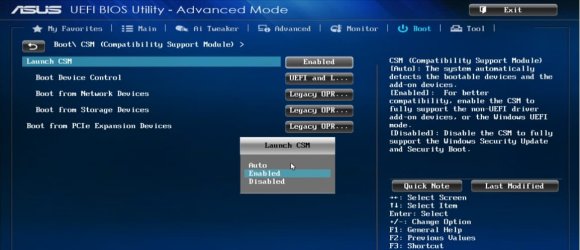
set csm to efi and bios

Launch CSM [Enabled]

asus-enable -csm.jpg

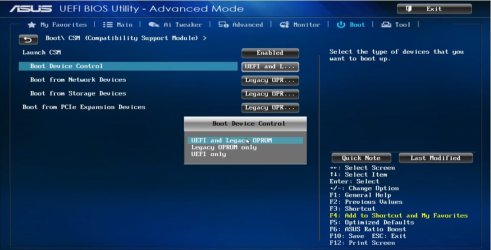
Boot Devices Control [UEFI and Legacy OpROM]

asus-boot-device-control.jpg

F10 to save and exit
 

My Computers

System One System Two

  • Computer type
    PC/Desktop
    OS
    7 X64
    CPU
    i5 8400
    Motherboard
    gigabyte b365m ds3h
    Memory
    2x8gb 3200mhz
    Hard Drives
    various
    PSU
    pure power 11 400w cm
    Case
    Coolermaster
    Cooling
    cryorig m9i
  • Computer type
    PC/Desktop
    OS
    7x64
    CPU
    g5400
    Motherboard
    ga b365m ds3h
    Memory
    8gb ddr4 2400
    PSU
    xfx pro 450w
set csm to efi and bios

Launch CSM [Enabled]

View attachment 422586

Boot Devices Control [UEFI and Legacy OpROM]

View attachment 422587

F10 to save and exit

Thanks for the idea. I will see if I can implement it in my BIOS tomorrow.

- - - Updated - - -

Interesting ideas that I tried to implement. CSM support was already Enabled in BIOS. I did not find anything like "UEFI & Legacy OpRom" in Supermicro BIOS. On Boot Menu/Boot Mode Select is UEFI, though Legacy and Dual are choices.
\Boot\UEFI Application Boot Priorities Boot Option #1 I changed from Disabled to Built-in EFI Shell. No luck.

Supermicro tech: "And from the error message, it does not seem to be a bios issue. If you have this hardware running well last few years with same bios and configuration then it’s not a bios issue. It seems system was interrupted during boot at some point that caused the drive to loose it boot partition so it is not able to see the OS drive as a bootable device. If you have a blank drive somewhere, you should try installing the OS to see if there is any issue which will give you confirmation if there is a hardware issue."
 

My Computer

Computer type
PC/Desktop
OS
Microsoft Windows 7 Professional 64-bit 7601 Multiprocessor Free Service Pack 1
CPU
Intel(R) Core(TM) i7-4930K CPU @ 3.40GHz
Motherboard
ASUSTeK COMPUTER INC. X79-DELUXE
Memory
32.00 GB
Graphics Card(s)
NVIDIA GeForce GTX 650 Ti BOOST
Sound Card
(1) NVIDIA High Definition Audio (2) High Definition Audio
Screen Resolution
1280 x 1024 x 32 bits (4294967296 colors) @ 75 Hz
Hard Drives
(1) Samsung SSD 840 Series SCSI Disk Device (2) WDC WD1000DHTZ-04N21 SCSI Disk Device (3) TOSHIBA External USB 3.0 USB Device
PSU
Corsair RM 850
Case
Cooler Master HAF932 Advanced
Cooling
Cooler Master Eisberg 240L Prestige
Keyboard
TypeMatrix 2030
Mouse
Logitech MS10 wireless
Internet Speed
high speed
Antivirus
System Suite 10; Trend Micro
Browser
several
Fixing the partitions

When I try to do a clean Windows install, and select various partitions, I get this message:
"Window cannot be installed to this disk, which has MBR partition table. On EFI systems, Windows can be installed only on GPT disks."
 

My Computer

Computer type
PC/Desktop
OS
Microsoft Windows 7 Professional 64-bit 7601 Multiprocessor Free Service Pack 1
CPU
Intel(R) Core(TM) i7-4930K CPU @ 3.40GHz
Motherboard
ASUSTeK COMPUTER INC. X79-DELUXE
Memory
32.00 GB
Graphics Card(s)
NVIDIA GeForce GTX 650 Ti BOOST
Sound Card
(1) NVIDIA High Definition Audio (2) High Definition Audio
Screen Resolution
1280 x 1024 x 32 bits (4294967296 colors) @ 75 Hz
Hard Drives
(1) Samsung SSD 840 Series SCSI Disk Device (2) WDC WD1000DHTZ-04N21 SCSI Disk Device (3) TOSHIBA External USB 3.0 USB Device
PSU
Corsair RM 850
Case
Cooler Master HAF932 Advanced
Cooling
Cooler Master Eisberg 240L Prestige
Keyboard
TypeMatrix 2030
Mouse
Logitech MS10 wireless
Internet Speed
high speed
Antivirus
System Suite 10; Trend Micro
Browser
several
for efi installation:

if you dont need anything on those partitions, delete them all then it will allow you to proceed.

if you need stuff that is on those partitions covert the disk to gpt first using a 3rd party tool that can convert non destructively.


for bios installation:


boot the installation media in bios mode
 

My Computers

System One System Two

  • Computer type
    PC/Desktop
    OS
    7 X64
    CPU
    i5 8400
    Motherboard
    gigabyte b365m ds3h
    Memory
    2x8gb 3200mhz
    Hard Drives
    various
    PSU
    pure power 11 400w cm
    Case
    Coolermaster
    Cooling
    cryorig m9i
  • Computer type
    PC/Desktop
    OS
    7x64
    CPU
    g5400
    Motherboard
    ga b365m ds3h
    Memory
    8gb ddr4 2400
    PSU
    xfx pro 450w
Clean windows install

Today I was able to to format and then convert physical disk 1 to GPT and then install Windows 10 Pro on that physical disk. However, no good news: system still boots to EFI Shell and no Windows boot manager in BIOS.
How does one "boot the installation media in bios mode"?
 

My Computer

Computer type
PC/Desktop
OS
Microsoft Windows 7 Professional 64-bit 7601 Multiprocessor Free Service Pack 1
CPU
Intel(R) Core(TM) i7-4930K CPU @ 3.40GHz
Motherboard
ASUSTeK COMPUTER INC. X79-DELUXE
Memory
32.00 GB
Graphics Card(s)
NVIDIA GeForce GTX 650 Ti BOOST
Sound Card
(1) NVIDIA High Definition Audio (2) High Definition Audio
Screen Resolution
1280 x 1024 x 32 bits (4294967296 colors) @ 75 Hz
Hard Drives
(1) Samsung SSD 840 Series SCSI Disk Device (2) WDC WD1000DHTZ-04N21 SCSI Disk Device (3) TOSHIBA External USB 3.0 USB Device
PSU
Corsair RM 850
Case
Cooler Master HAF932 Advanced
Cooling
Cooler Master Eisberg 240L Prestige
Keyboard
TypeMatrix 2030
Mouse
Logitech MS10 wireless
Internet Speed
high speed
Antivirus
System Suite 10; Trend Micro
Browser
several

My Computers

System One System Two

  • Computer type
    PC/Desktop
    OS
    7 X64
    CPU
    i5 8400
    Motherboard
    gigabyte b365m ds3h
    Memory
    2x8gb 3200mhz
    Hard Drives
    various
    PSU
    pure power 11 400w cm
    Case
    Coolermaster
    Cooling
    cryorig m9i
  • Computer type
    PC/Desktop
    OS
    7x64
    CPU
    g5400
    Motherboard
    ga b365m ds3h
    Memory
    8gb ddr4 2400
    PSU
    xfx pro 450w
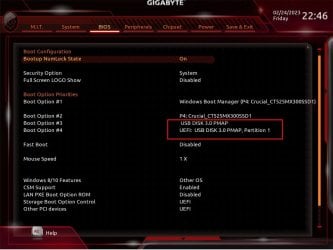
The mobo is a Supermicro from 2016. I got several replies from the tech there. When I have the Macrium Reflect USB stick attached, I do sometimes get two versions of it shown as in your picture. What difference does that make, since I assume both boot to the USB stick?

The key issue is that your BIOS shows, as does every normal BIOS, "Windows Boot Manager." But my BIOS still does not have that, even after a clean install of Windows 10 Pro. So the question is: how to get Windows Boot Manager seen by BIOS, since I assume it was installed on the hard drive. Since we don't have a capable tech in my area, I may have to sell this fine system with great hardware on ebay.
I liked your quotes from Curran and Abbey.
 

My Computer

Computer type
PC/Desktop
OS
Microsoft Windows 7 Professional 64-bit 7601 Multiprocessor Free Service Pack 1
CPU
Intel(R) Core(TM) i7-4930K CPU @ 3.40GHz
Motherboard
ASUSTeK COMPUTER INC. X79-DELUXE
Memory
32.00 GB
Graphics Card(s)
NVIDIA GeForce GTX 650 Ti BOOST
Sound Card
(1) NVIDIA High Definition Audio (2) High Definition Audio
Screen Resolution
1280 x 1024 x 32 bits (4294967296 colors) @ 75 Hz
Hard Drives
(1) Samsung SSD 840 Series SCSI Disk Device (2) WDC WD1000DHTZ-04N21 SCSI Disk Device (3) TOSHIBA External USB 3.0 USB Device
PSU
Corsair RM 850
Case
Cooler Master HAF932 Advanced
Cooling
Cooler Master Eisberg 240L Prestige
Keyboard
TypeMatrix 2030
Mouse
Logitech MS10 wireless
Internet Speed
high speed
Antivirus
System Suite 10; Trend Micro
Browser
several
What difference does that make, since I assume both boot to the USB stick?

setup.exe will only install in the same mode in which it was booted.

if booted in uefi mode, it will refuse to install to an mbr partitioneddisk.

If booted in bios mode, it will refuse to install to a gpt partitioned disk.

"Windows Boot Manager." But my BIOS still does not have that

your bios is probably looking for a fat32 partition \EFI\MICROSOFT\BOOT\BOOTMGFW.EFI

perhaps you dont have that on your disk.

When I have the Macrium Reflect USB stick attached, I do sometimes get two versions of it shown as in your picture

that means your bios sees the efi file on the fat32 macrium usb.
 

My Computers

System One System Two

  • Computer type
    PC/Desktop
    OS
    7 X64
    CPU
    i5 8400
    Motherboard
    gigabyte b365m ds3h
    Memory
    2x8gb 3200mhz
    Hard Drives
    various
    PSU
    pure power 11 400w cm
    Case
    Coolermaster
    Cooling
    cryorig m9i
  • Computer type
    PC/Desktop
    OS
    7x64
    CPU
    g5400
    Motherboard
    ga b365m ds3h
    Memory
    8gb ddr4 2400
    PSU
    xfx pro 450w
EFI partition

"setup.exe will only install in the same mode in which it was booted. if booted in uefi mode, it will refuse to install to an mbr partitioneddisk."

Just maybe this is an important insight. I have the Windows 10 install on a USB stick. I put it at the top of BIOS and booted into it and did Windows clean install, which completed.

So how can I boot into that Win 10 install usb stick in BIOS mode?

Or more to the point, how can I create
a fat32 partition \EFI\MICROSOFT\BOOT\BOOTMGFW.EFI ?
 

My Computer

Computer type
PC/Desktop
OS
Microsoft Windows 7 Professional 64-bit 7601 Multiprocessor Free Service Pack 1
CPU
Intel(R) Core(TM) i7-4930K CPU @ 3.40GHz
Motherboard
ASUSTeK COMPUTER INC. X79-DELUXE
Memory
32.00 GB
Graphics Card(s)
NVIDIA GeForce GTX 650 Ti BOOST
Sound Card
(1) NVIDIA High Definition Audio (2) High Definition Audio
Screen Resolution
1280 x 1024 x 32 bits (4294967296 colors) @ 75 Hz
Hard Drives
(1) Samsung SSD 840 Series SCSI Disk Device (2) WDC WD1000DHTZ-04N21 SCSI Disk Device (3) TOSHIBA External USB 3.0 USB Device
PSU
Corsair RM 850
Case
Cooler Master HAF932 Advanced
Cooling
Cooler Master Eisberg 240L Prestige
Keyboard
TypeMatrix 2030
Mouse
Logitech MS10 wireless
Internet Speed
high speed
Antivirus
System Suite 10; Trend Micro
Browser
several
we are not familiar with your motherboard.

what is the exact model name and number
 

My Computers

System One System Two

  • Computer type
    PC/Desktop
    OS
    7 X64
    CPU
    i5 8400
    Motherboard
    gigabyte b365m ds3h
    Memory
    2x8gb 3200mhz
    Hard Drives
    various
    PSU
    pure power 11 400w cm
    Case
    Coolermaster
    Cooling
    cryorig m9i
  • Computer type
    PC/Desktop
    OS
    7x64
    CPU
    g5400
    Motherboard
    ga b365m ds3h
    Memory
    8gb ddr4 2400
    PSU
    xfx pro 450w
Mobo model

SUPERMICRO MBD-X10DRI-O Extended ATX Server Motherboard.
My system was built around that mobo in 2016.
 

My Computer

Computer type
PC/Desktop
OS
Microsoft Windows 7 Professional 64-bit 7601 Multiprocessor Free Service Pack 1
CPU
Intel(R) Core(TM) i7-4930K CPU @ 3.40GHz
Motherboard
ASUSTeK COMPUTER INC. X79-DELUXE
Memory
32.00 GB
Graphics Card(s)
NVIDIA GeForce GTX 650 Ti BOOST
Sound Card
(1) NVIDIA High Definition Audio (2) High Definition Audio
Screen Resolution
1280 x 1024 x 32 bits (4294967296 colors) @ 75 Hz
Hard Drives
(1) Samsung SSD 840 Series SCSI Disk Device (2) WDC WD1000DHTZ-04N21 SCSI Disk Device (3) TOSHIBA External USB 3.0 USB Device
PSU
Corsair RM 850
Case
Cooler Master HAF932 Advanced
Cooling
Cooler Master Eisberg 240L Prestige
Keyboard
TypeMatrix 2030
Mouse
Logitech MS10 wireless
Internet Speed
high speed
Antivirus
System Suite 10; Trend Micro
Browser
several
Back
Top