Partitions visible in disk director but not in Win Explorer (Win 7)

redtuiop

New member
Local time
3:04 PM
Messages
92
Location
Belfast, N. Ireland UK
[SOLVED]Partitions visible ......but not in Win Explorer (Win 7)

I have 3 drives in my PC - the largest of which I'd recently copied the contents of a smaller drive over to (8 partitions). This also held my old copy of XP as my backup OS. Since moving everything it wouldn't work, so I decided to reinstall XP today, but even after doing so it still wouldn't run, & when I looked closer at the drive setup I noticed there was 1Mb of unallocated space prior which I presumed was the problem.

SO, I returned to Win 7 to sort that out, but then discovered that 6 of my 8 partitions were no longer visible. I used Partition Wizard to recover them, but while they now show in a disk management program, I can't access them nor view them in Explorer.

Obviously getting quite desperate now to ensure I've not lost them for good as while I have some of the most vital info backed up, I certainly haven't it all given there's the guts of 400 odd Gb in the missing sections :(

Any help (& encouragement) would be hugely appreciated.
Thanks, Romayne
 
Last edited:

My Computer My Computer

At a glance

Win 7 64bit SP2?Intel G2030 3GHz4 GbOnBoard
Computer type
PC/Desktop
Computer Manufacturer/Model Number
Generic
OS
Win 7 64bit SP2?
CPU
Intel G2030 3GHz
Motherboard
Gigabyte Motherboard GA-H61M
Memory
4 Gb
Graphics Card(s)
OnBoard
Sound Card
OnBoard
Monitor(s) Displays
BenQ GL2250
Screen Resolution
1920 x 1080
Hard Drives
3 x SATA (500, 1000, 2000)
PSU
460W Coolermaster
Case
Coolermaster
Cooling
3 x Fans
Keyboard
Microsoft Ergonomic 4000
Mouse
Kensington Trackball
Internet Speed
100 Gb
Post a picture of what you see in Windows Disk Management.
 

My Computer My Computer

At a glance

Windows 7 Home Premium SP1, 64-bitIntel Skylake i5-6600K, not overclocked8 GB HyperX DDR4-2666 (2 x 4 GB)none; graphics are integrated on CPU
Computer type
PC/Desktop
Computer Manufacturer/Model Number
Ignatz Special; 4 speed manual gearbox; factory air conditioning; one of one
OS
Windows 7 Home Premium SP1, 64-bit
CPU
Intel Skylake i5-6600K, not overclocked
Motherboard
AsRock Z170M Extreme 4, micro ATX
Memory
8 GB HyperX DDR4-2666 (2 x 4 GB)
Graphics Card(s)
none; graphics are integrated on CPU
Sound Card
onboard: Realtek ALC1150; external: USB Behringer UF0-202
Monitor(s) Displays
Dell S2340M 23 inch IPS
Screen Resolution
1600 x 900
Hard Drives
System: Crucial MX100 series SSD, 128 GB;
Data: Samsung Spinpoint 103SJ, 1 TB;
Backup: WD Caviar Green WD30EZRX-00D8PB0, 3 TB
PSU
Rosewill SilentNight 500 watt fanless, semi-modular
Case
Antec Solo II
Cooling
Noctua NH-U12S; Noctua F12 intake, Noctua S12A exhaust
Keyboard
Microsoft 200 6JH-00001 USB
Mouse
Dell or Microsoft optical wired; USB
Antivirus
Microsoft Security Essentials and Malwarebytes Premium
Browser
Pale Moon
Other Info
All fans PWM; speeds at idle: CPU circa 500 rpm; intake circa 600 rpm; exhaust circa 600 rpm; CPU temps 27 idle and 47 C load in a warm room (27 C/81 F) when running Intel Extreme Tuning Utility stress test.
Gosh that was quick :cool:!!

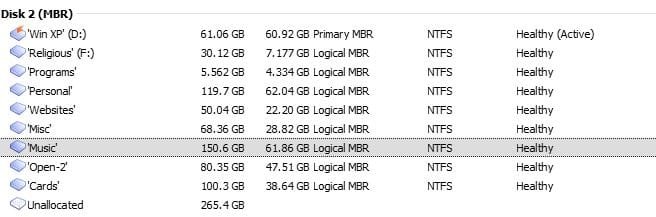
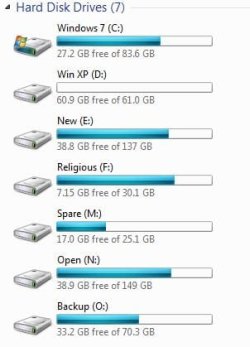
Ok - I'm using 2 DMs to deal with this as each offers something the other doesn't.

In Partition Wizard (on the right) it shows the unallocated 1 Mb before each partition (& seemingly in a lot of other places too on other drives). While it shows it, the program apparently has a bug which won't allow me to add it into any of the partitions. I've done everything the program suggested in order to recover the partitions but unsure if that's what perhaps caused this issue of extraneous space (& whether it's actually there or some sort of ghosting).

Acronis DD on the other hand neither shows that nor makes it available to add in to any of the partitions.

But you can see how they're all showing ok. Just unable to be accessed from within Win 7 as you can see from the WDM at the bottom.
 

Attachments

  • AD.JPG
    AD.JPG
    30.7 KB · Views: 28
  • PM.JPG
    PM.JPG
    33.3 KB · Views: 29
  • WDM.JPG
    WDM.JPG
    24.4 KB · Views: 15
Last edited:

My Computer My Computer

At a glance

Win 7 64bit SP2?Intel G2030 3GHz4 GbOnBoard
Computer type
PC/Desktop
Computer Manufacturer/Model Number
Generic
OS
Win 7 64bit SP2?
CPU
Intel G2030 3GHz
Motherboard
Gigabyte Motherboard GA-H61M
Memory
4 Gb
Graphics Card(s)
OnBoard
Sound Card
OnBoard
Monitor(s) Displays
BenQ GL2250
Screen Resolution
1920 x 1080
Hard Drives
3 x SATA (500, 1000, 2000)
PSU
460W Coolermaster
Case
Coolermaster
Cooling
3 x Fans
Keyboard
Microsoft Ergonomic 4000
Mouse
Kensington Trackball
Internet Speed
100 Gb
I doubt if the 1 MB unallocated spaces have anything to do with whatever issues you have.

But we need a picture of Windows Disk Management. None of the above pix are Disk Management.

Type Disk Management into the start button search box and follow the link.
 

My Computer My Computer

At a glance

Windows 7 Home Premium SP1, 64-bitIntel Skylake i5-6600K, not overclocked8 GB HyperX DDR4-2666 (2 x 4 GB)none; graphics are integrated on CPU
Computer type
PC/Desktop
Computer Manufacturer/Model Number
Ignatz Special; 4 speed manual gearbox; factory air conditioning; one of one
OS
Windows 7 Home Premium SP1, 64-bit
CPU
Intel Skylake i5-6600K, not overclocked
Motherboard
AsRock Z170M Extreme 4, micro ATX
Memory
8 GB HyperX DDR4-2666 (2 x 4 GB)
Graphics Card(s)
none; graphics are integrated on CPU
Sound Card
onboard: Realtek ALC1150; external: USB Behringer UF0-202
Monitor(s) Displays
Dell S2340M 23 inch IPS
Screen Resolution
1600 x 900
Hard Drives
System: Crucial MX100 series SSD, 128 GB;
Data: Samsung Spinpoint 103SJ, 1 TB;
Backup: WD Caviar Green WD30EZRX-00D8PB0, 3 TB
PSU
Rosewill SilentNight 500 watt fanless, semi-modular
Case
Antec Solo II
Cooling
Noctua NH-U12S; Noctua F12 intake, Noctua S12A exhaust
Keyboard
Microsoft 200 6JH-00001 USB
Mouse
Dell or Microsoft optical wired; USB
Antivirus
Microsoft Security Essentials and Malwarebytes Premium
Browser
Pale Moon
Other Info
All fans PWM; speeds at idle: CPU circa 500 rpm; intake circa 600 rpm; exhaust circa 600 rpm; CPU temps 27 idle and 47 C load in a warm room (27 C/81 F) when running Intel Extreme Tuning Utility stress test.
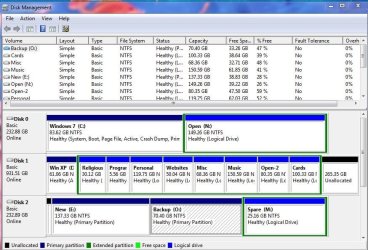
Apologies - unsure of the difference but here you go :)
 

Attachments

  • DM.JPG
    DM.JPG
    108.5 KB · Views: 50

My Computer My Computer

At a glance

Win 7 64bit SP2?Intel G2030 3GHz4 GbOnBoard
Computer type
PC/Desktop
Computer Manufacturer/Model Number
Generic
OS
Win 7 64bit SP2?
CPU
Intel G2030 3GHz
Motherboard
Gigabyte Motherboard GA-H61M
Memory
4 Gb
Graphics Card(s)
OnBoard
Sound Card
OnBoard
Monitor(s) Displays
BenQ GL2250
Screen Resolution
1920 x 1080
Hard Drives
3 x SATA (500, 1000, 2000)
PSU
460W Coolermaster
Case
Coolermaster
Cooling
3 x Fans
Keyboard
Microsoft Ergonomic 4000
Mouse
Kensington Trackball
Internet Speed
100 Gb
Apologies - unsure of the difference but here you go :)

Notice that on the C partition, we can read "system, boot, page file, active, crash dump, primary".

We can't read what it says on the D partition because of the column spacing. What does it say there other than "active"?

Can you boot from the XP drive or do you care?

The only problem you have is that you cannot see 6 of 8 partitions in Explorer?


Lastly: is there some strong reason why you have that big drive chopped up into so many partitions? I'd think it would be much simpler and more space-efficient to have 2 partitions on that drive--D and E. D for XP and E for everything else, subdivided by folders for religious, programs, personal, etc.

Clarify the above. I don't know if I can resolve your issue, but others who might would likely need answers.
 

My Computer My Computer

At a glance

Windows 7 Home Premium SP1, 64-bitIntel Skylake i5-6600K, not overclocked8 GB HyperX DDR4-2666 (2 x 4 GB)none; graphics are integrated on CPU
Computer type
PC/Desktop
Computer Manufacturer/Model Number
Ignatz Special; 4 speed manual gearbox; factory air conditioning; one of one
OS
Windows 7 Home Premium SP1, 64-bit
CPU
Intel Skylake i5-6600K, not overclocked
Motherboard
AsRock Z170M Extreme 4, micro ATX
Memory
8 GB HyperX DDR4-2666 (2 x 4 GB)
Graphics Card(s)
none; graphics are integrated on CPU
Sound Card
onboard: Realtek ALC1150; external: USB Behringer UF0-202
Monitor(s) Displays
Dell S2340M 23 inch IPS
Screen Resolution
1600 x 900
Hard Drives
System: Crucial MX100 series SSD, 128 GB;
Data: Samsung Spinpoint 103SJ, 1 TB;
Backup: WD Caviar Green WD30EZRX-00D8PB0, 3 TB
PSU
Rosewill SilentNight 500 watt fanless, semi-modular
Case
Antec Solo II
Cooling
Noctua NH-U12S; Noctua F12 intake, Noctua S12A exhaust
Keyboard
Microsoft 200 6JH-00001 USB
Mouse
Dell or Microsoft optical wired; USB
Antivirus
Microsoft Security Essentials and Malwarebytes Premium
Browser
Pale Moon
Other Info
All fans PWM; speeds at idle: CPU circa 500 rpm; intake circa 600 rpm; exhaust circa 600 rpm; CPU temps 27 idle and 47 C load in a warm room (27 C/81 F) when running Intel Extreme Tuning Utility stress test.
"We can't read what it says on the D partition because of the column spacing. What does it say there other than "active"?"
It says "Active, Healthy, Primary partition"

"Can you boot from the XP drive or do you care?"
No to both questions although I'd ideally like to get it working at some point in order to have an alternate OS for those times Win 7 goes pear shaped.

"The only problem you have is that you cannot see 6 of 8 partitions in Explorer?"
Yep - The first 3 show but the last 6 won't.

"Lastly: is there some strong reason why you have that big drive chopped up into so many partitions? I'd think it would be much simpler and more space-efficient to have 2 partitions on that drive--D and E. D for XP and E for everything else, subdivided by folders for religious, programs, personal, etc."
Hmm - well, I suppose somewhere along the way I read that it was better to split a drive into multiple partitions rather than just a couple, esp if a large drive, and have always done it, but it's not set in stone certainly & ultimately if it was going to be a fix of sorts I'd not worry how I achieve it - regaining the info is more important than how it's sitting on the drive.

My other concern is that I've only got about 4 hrs max before I'm going to be hitting bed & even that's quite late, so ideally would also like to know if shutting down/rebooting is likely to cause any further issues, (if the problem hasn't been resolved beforehand).

Thanks again for your patience & input on this problem - truly appreciated :)
 

My Computer My Computer

At a glance

Win 7 64bit SP2?Intel G2030 3GHz4 GbOnBoard
Computer type
PC/Desktop
Computer Manufacturer/Model Number
Generic
OS
Win 7 64bit SP2?
CPU
Intel G2030 3GHz
Motherboard
Gigabyte Motherboard GA-H61M
Memory
4 Gb
Graphics Card(s)
OnBoard
Sound Card
OnBoard
Monitor(s) Displays
BenQ GL2250
Screen Resolution
1920 x 1080
Hard Drives
3 x SATA (500, 1000, 2000)
PSU
460W Coolermaster
Case
Coolermaster
Cooling
3 x Fans
Keyboard
Microsoft Ergonomic 4000
Mouse
Kensington Trackball
Internet Speed
100 Gb
I have no immediate answer to why you can't see 6 of the partitions on the large drive in Explorer. Nor a solution.

You say you installed XP earlier today. Could you see all of your partitions prior to installing XP today?

Was the Windows 7 drive connected when you installed XP today? I'm guessing it was.

The XP drive appears not to be marked "system". I'd guess that's why it won't boot. Something went wrong during that installation attempt.

I wouldn't think a shutdown overnight would have an effect, but if you are worried let it run overnight.

There is no advantage to chopping that big drive up like that. And it is wasteful of space---with many smallish partitions, you tend to run out of space on a partition, whereas you would not if you had a single large partition.

My inclination would be to get rid of XP at least temporarily. If Win 7 goes pear-shaped, use an imaging program to restore it, rather than rely on XP as a fall back position. Unless you have some over-riding reason to keep XP.

I'd use a single partition on the big drive and back up my data to an external. I'm guessing you have no external to which you could temporarily offload all data on the big drive?

I assume you have no way whatsoever of seeing all of your data on the big drive and have no backups of that data?

Do all of your partitions now show as simple, NTFS, and basic in Disk Managment?

Greg, WHS, or others may have ideas about how to access your data.
 

My Computer My Computer

At a glance

Windows 7 Home Premium SP1, 64-bitIntel Skylake i5-6600K, not overclocked8 GB HyperX DDR4-2666 (2 x 4 GB)none; graphics are integrated on CPU
Computer type
PC/Desktop
Computer Manufacturer/Model Number
Ignatz Special; 4 speed manual gearbox; factory air conditioning; one of one
OS
Windows 7 Home Premium SP1, 64-bit
CPU
Intel Skylake i5-6600K, not overclocked
Motherboard
AsRock Z170M Extreme 4, micro ATX
Memory
8 GB HyperX DDR4-2666 (2 x 4 GB)
Graphics Card(s)
none; graphics are integrated on CPU
Sound Card
onboard: Realtek ALC1150; external: USB Behringer UF0-202
Monitor(s) Displays
Dell S2340M 23 inch IPS
Screen Resolution
1600 x 900
Hard Drives
System: Crucial MX100 series SSD, 128 GB;
Data: Samsung Spinpoint 103SJ, 1 TB;
Backup: WD Caviar Green WD30EZRX-00D8PB0, 3 TB
PSU
Rosewill SilentNight 500 watt fanless, semi-modular
Case
Antec Solo II
Cooling
Noctua NH-U12S; Noctua F12 intake, Noctua S12A exhaust
Keyboard
Microsoft 200 6JH-00001 USB
Mouse
Dell or Microsoft optical wired; USB
Antivirus
Microsoft Security Essentials and Malwarebytes Premium
Browser
Pale Moon
Other Info
All fans PWM; speeds at idle: CPU circa 500 rpm; intake circa 600 rpm; exhaust circa 600 rpm; CPU temps 27 idle and 47 C load in a warm room (27 C/81 F) when running Intel Extreme Tuning Utility stress test.
I disconnected my other 2 drives before doing the XP reinstall to make sure I didn't overwrite anything on them accidentally (hard as it should be!), & yes on the 1st attempt all the partitions were showing. When the installation finished & rebooted it came up with some error about the XP OS, which is when I figured I'd maybe try again, but I didn't bother once I spotted those unallocated spaces figuring it better to sort those out first. It was just odd that it didn't install correctly but ever since I moved everything onto this drive, there's been a problem with that XP partition which is why I ended up just reformatting it entirely & starting over.

I do have an external drive, but stupidly haven't backed up as much as I should have done.

I'm a webmaster & all the important data of all 3 sites I manage is on that Websites partition - I do have some of it backed up but certainly not all. Old story - takes SO long to do large backups I get impatient:o so give up & don't bother. So nobody to blame but myself as I'm more than aware for the need to do them.

If I could access ALL of the partitions fully once more I think I'd be inclined to remove them all off to my old drive, & reformat the large one, & start over but differently i.e. do as you say & just have 2 or 3 and organise things differently.

Can but hope I can get back to that point which hopefully should be possible given they ARE showing up at least in some of the Disk managers.
 

My Computer My Computer

At a glance

Win 7 64bit SP2?Intel G2030 3GHz4 GbOnBoard
Computer type
PC/Desktop
Computer Manufacturer/Model Number
Generic
OS
Win 7 64bit SP2?
CPU
Intel G2030 3GHz
Motherboard
Gigabyte Motherboard GA-H61M
Memory
4 Gb
Graphics Card(s)
OnBoard
Sound Card
OnBoard
Monitor(s) Displays
BenQ GL2250
Screen Resolution
1920 x 1080
Hard Drives
3 x SATA (500, 1000, 2000)
PSU
460W Coolermaster
Case
Coolermaster
Cooling
3 x Fans
Keyboard
Microsoft Ergonomic 4000
Mouse
Kensington Trackball
Internet Speed
100 Gb
Stand by. I've placed a request for more assistance.
 

My Computer My Computer

At a glance

Windows 7 Home Premium SP1, 64-bitIntel Skylake i5-6600K, not overclocked8 GB HyperX DDR4-2666 (2 x 4 GB)none; graphics are integrated on CPU
Computer type
PC/Desktop
Computer Manufacturer/Model Number
Ignatz Special; 4 speed manual gearbox; factory air conditioning; one of one
OS
Windows 7 Home Premium SP1, 64-bit
CPU
Intel Skylake i5-6600K, not overclocked
Motherboard
AsRock Z170M Extreme 4, micro ATX
Memory
8 GB HyperX DDR4-2666 (2 x 4 GB)
Graphics Card(s)
none; graphics are integrated on CPU
Sound Card
onboard: Realtek ALC1150; external: USB Behringer UF0-202
Monitor(s) Displays
Dell S2340M 23 inch IPS
Screen Resolution
1600 x 900
Hard Drives
System: Crucial MX100 series SSD, 128 GB;
Data: Samsung Spinpoint 103SJ, 1 TB;
Backup: WD Caviar Green WD30EZRX-00D8PB0, 3 TB
PSU
Rosewill SilentNight 500 watt fanless, semi-modular
Case
Antec Solo II
Cooling
Noctua NH-U12S; Noctua F12 intake, Noctua S12A exhaust
Keyboard
Microsoft 200 6JH-00001 USB
Mouse
Dell or Microsoft optical wired; USB
Antivirus
Microsoft Security Essentials and Malwarebytes Premium
Browser
Pale Moon
Other Info
All fans PWM; speeds at idle: CPU circa 500 rpm; intake circa 600 rpm; exhaust circa 600 rpm; CPU temps 27 idle and 47 C load in a warm room (27 C/81 F) when running Intel Extreme Tuning Utility stress test.
Tks - I'm just running TestDisk which I vaguely remember helping me a few years back with something similar - it's turning up a ton of errors :(. Will post up info when it's completed.
 

My Computer My Computer

At a glance

Win 7 64bit SP2?Intel G2030 3GHz4 GbOnBoard
Computer type
PC/Desktop
Computer Manufacturer/Model Number
Generic
OS
Win 7 64bit SP2?
CPU
Intel G2030 3GHz
Motherboard
Gigabyte Motherboard GA-H61M
Memory
4 Gb
Graphics Card(s)
OnBoard
Sound Card
OnBoard
Monitor(s) Displays
BenQ GL2250
Screen Resolution
1920 x 1080
Hard Drives
3 x SATA (500, 1000, 2000)
PSU
460W Coolermaster
Case
Coolermaster
Cooling
3 x Fans
Keyboard
Microsoft Ergonomic 4000
Mouse
Kensington Trackball
Internet Speed
100 Gb
I've noticed that in disk management some of your partitionx do not have drive letters associated with them. You need to right-click the partitions that do not, and click "Assign Drive Letter" (or something similar) and manual assign each of them a different drive letter.
 

My Computer My Computer

At a glance

Windows 7 Professional SP1 64-bitIntel Core i5-2450M @2.5 GHz6 GB DDR3 1333MHzIntel HD 3000
Computer type
Laptop
Computer Manufacturer/Model Number
Toshiba P775-S7100
OS
Windows 7 Professional SP1 64-bit
CPU
Intel Core i5-2450M @2.5 GHz
Memory
6 GB DDR3 1333MHz
Graphics Card(s)
Intel HD 3000
Monitor(s) Displays
Built-in 17.3" LED; 22" Insignia NS-L22Q-10A
Screen Resolution
1600x900; 1360x768
Hard Drives
750 GB Hitachi
1TB Seagate FreeAgent External
Internet Speed
Verizon DSL Speed(Down/Up): 3360 Kbps / 800 Kbps
Antivirus
MSE and MBAM Pro
Browser
IE10
Adding to what Petey said, do you still have the XP drive with the 8 partitions you copied from? Try another copy with only those two drives connected and wipe the current copy first.
 

My Computer My Computer

At a glance

Windows 7 Ultimate X64 SP1Intel i5-2550K, Differing ~4.4-4.8GHz No buil...16GB G.Skill Sniper 1866MHz @ 2133MHz 2x8GBASUS GTX650TIB-DC2OC-2GD5, (650TI Boost)
Computer type
PC/Desktop
Computer Manufacturer/Model Number
Home Built Desktop By DataTech
OS
Windows 7 Ultimate X64 SP1
CPU
Intel i5-2550K, Differing ~4.4-4.8GHz No built in GPU
Motherboard
ASUS P8Z68-V PRO/GEN3
Memory
16GB G.Skill Sniper 1866MHz @ 2133MHz 2x8GB
Graphics Card(s)
ASUS GTX650TIB-DC2OC-2GD5, (650TI Boost)
Sound Card
Onboard Realtek 5-1
Monitor(s) Displays
Samsung P2570HD
Screen Resolution
1920x1080
Hard Drives
Samsung 840 Pro 256GB SSD for OS, 500GB Seagate Constellation (Enterprise drive) for Data
PSU
Corsair HX650W
Case
Inwin Dragon Rider
Cooling
Hyper 212 EVO w/two Noctua fans, push-pull, @1300 RPM
Keyboard
E-Z Eyes, bright yellow keys with large characters
Mouse
steelseries SENSEI Laser Pro Gaming
Internet Speed
48-51Mbs Mbs down, 11 Mbs up Xfinity Cable
Antivirus
Norton Internet Security 2013
Browser
IE 10, Opera, Pale Moon if needed
Other Info
4 case fans, LG BluRay-RE, ASUS DVD-RW, Mr. Fusion power supply, 1.21 gigawatts.
Be careful with testdisk. The "errors" you may be referring to might actually just refer to "deleted" or "missing" partitions that were replaced by you or installs that were truly and correctly desired.

It might be best to first use testdisk to copy out all data that you might want to recover before using it to correct errors.
 

My Computer My Computer

At a glance

Windows 7 Ultimate x64
OS
Windows 7 Ultimate x64
Try that Disk Management screenshot one more time, with the window maximized and the panes/columns adjusted to display maximum info.

For some reason it seems none of the logical partitions in the extended partition on Disk1 got drive letters. Using DM to add drive letters for them will allow you to see them in explorer.
 

My Computer My Computer

At a glance

Windows 7 Ultimate x64
OS
Windows 7 Ultimate x64
SORTED & solved!! :))

I've noticed that in disk management some of your partitionx do not have drive letters associated with them. You need to right-click the partitions that do not, and click "Assign Drive Letter" (or something similar) and manual assign each of them a different drive letter.

WAYHO!!!!! Unbelievably that appears to be all that was needed & my huge apologies that I stupidly never even noticed that fact :o:o.

Thanks SO much guys - can't tell you how grateful I am for all of you who've put in ideas & for this one finally getting me sorted. Each partition is showing up perfectly now & all data intact.

I'll organise a proper & fuller backup now before anything else happens, & figure out what to do with XP another time, taking on board all the suggestions put forward.

THANK YOU!!!
Romayne
 

My Computer My Computer

At a glance

Win 7 64bit SP2?Intel G2030 3GHz4 GbOnBoard
Computer type
PC/Desktop
Computer Manufacturer/Model Number
Generic
OS
Win 7 64bit SP2?
CPU
Intel G2030 3GHz
Motherboard
Gigabyte Motherboard GA-H61M
Memory
4 Gb
Graphics Card(s)
OnBoard
Sound Card
OnBoard
Monitor(s) Displays
BenQ GL2250
Screen Resolution
1920 x 1080
Hard Drives
3 x SATA (500, 1000, 2000)
PSU
460W Coolermaster
Case
Coolermaster
Cooling
3 x Fans
Keyboard
Microsoft Ergonomic 4000
Mouse
Kensington Trackball
Internet Speed
100 Gb
I'm truly glad to have been of service. Funny how sometimes its the simplest things. Go ahaed and get those backups done. They are a life saver.
 

My Computer My Computer

At a glance

Windows 7 Professional SP1 64-bitIntel Core i5-2450M @2.5 GHz6 GB DDR3 1333MHzIntel HD 3000
Computer type
Laptop
Computer Manufacturer/Model Number
Toshiba P775-S7100
OS
Windows 7 Professional SP1 64-bit
CPU
Intel Core i5-2450M @2.5 GHz
Memory
6 GB DDR3 1333MHz
Graphics Card(s)
Intel HD 3000
Monitor(s) Displays
Built-in 17.3" LED; 22" Insignia NS-L22Q-10A
Screen Resolution
1600x900; 1360x768
Hard Drives
750 GB Hitachi
1TB Seagate FreeAgent External
Internet Speed
Verizon DSL Speed(Down/Up): 3360 Kbps / 800 Kbps
Antivirus
MSE and MBAM Pro
Browser
IE10
You're welcome Romayne, as a friend said today, he learned something by "dumbing into it" which is how I've learned.
 

My Computer My Computer

At a glance

Windows 7 Ultimate X64 SP1Intel i5-2550K, Differing ~4.4-4.8GHz No buil...16GB G.Skill Sniper 1866MHz @ 2133MHz 2x8GBASUS GTX650TIB-DC2OC-2GD5, (650TI Boost)
Computer type
PC/Desktop
Computer Manufacturer/Model Number
Home Built Desktop By DataTech
OS
Windows 7 Ultimate X64 SP1
CPU
Intel i5-2550K, Differing ~4.4-4.8GHz No built in GPU
Motherboard
ASUS P8Z68-V PRO/GEN3
Memory
16GB G.Skill Sniper 1866MHz @ 2133MHz 2x8GB
Graphics Card(s)
ASUS GTX650TIB-DC2OC-2GD5, (650TI Boost)
Sound Card
Onboard Realtek 5-1
Monitor(s) Displays
Samsung P2570HD
Screen Resolution
1920x1080
Hard Drives
Samsung 840 Pro 256GB SSD for OS, 500GB Seagate Constellation (Enterprise drive) for Data
PSU
Corsair HX650W
Case
Inwin Dragon Rider
Cooling
Hyper 212 EVO w/two Noctua fans, push-pull, @1300 RPM
Keyboard
E-Z Eyes, bright yellow keys with large characters
Mouse
steelseries SENSEI Laser Pro Gaming
Internet Speed
48-51Mbs Mbs down, 11 Mbs up Xfinity Cable
Antivirus
Norton Internet Security 2013
Browser
IE 10, Opera, Pale Moon if needed
Other Info
4 case fans, LG BluRay-RE, ASUS DVD-RW, Mr. Fusion power supply, 1.21 gigawatts.
Thanks Greg. You deserve some of the credit. You were the first person to teach me to look for that.
 

My Computer My Computer

At a glance

Windows 7 Professional SP1 64-bitIntel Core i5-2450M @2.5 GHz6 GB DDR3 1333MHzIntel HD 3000
Computer type
Laptop
Computer Manufacturer/Model Number
Toshiba P775-S7100
OS
Windows 7 Professional SP1 64-bit
CPU
Intel Core i5-2450M @2.5 GHz
Memory
6 GB DDR3 1333MHz
Graphics Card(s)
Intel HD 3000
Monitor(s) Displays
Built-in 17.3" LED; 22" Insignia NS-L22Q-10A
Screen Resolution
1600x900; 1360x768
Hard Drives
750 GB Hitachi
1TB Seagate FreeAgent External
Internet Speed
Verizon DSL Speed(Down/Up): 3360 Kbps / 800 Kbps
Antivirus
MSE and MBAM Pro
Browser
IE10
Back
Top