passport says need to format everytime i pugged it in

chinita0018

New member
Local time
5:12 PM
Messages
11
HI there,

I have a similar problem, but my passport says need to format everytime i pugged it in. i already formated it and says unable to complete formatting what should i do?? thanks
 
Last edited by a moderator:

My Computer My Computer

At a glance

windows 7 home basic 64bit
Computer type
PC/Desktop
Computer Manufacturer/Model Number
Acer
OS
windows 7 home basic 64bit
Hi there.

Did you try running chkdsk /r command using the CMD on the drive? This will locate the bad sectors and fix errors on the disk.

Hope this helps. Cheers! :)
 

My Computer My Computer

At a glance

Windows 7
Computer type
PC/Desktop
OS
Windows 7
Hi there can u teach me how. I really dnt have any idea abt it. Thanks.
 

My Computer My Computer

At a glance

windows 7 home basic 64bit
Computer type
PC/Desktop
Computer Manufacturer/Model Number
Acer
OS
windows 7 home basic 64bit
Of course :)

Click on Start. In the field Search Programs and files type CMD. Right-click on the first icon on the top and choose Run as Administrator. A new window will appear and in it type chkdsk x: /r (where x: is the letter of your external drive).

Keep in mind that you must not stop the process until it is over.
 

My Computer My Computer

At a glance

Windows 7
Computer type
PC/Desktop
OS
Windows 7
I had a similar problem with my Passport USB drive. But in my case there was all ready data on the drive that I did not want to lose. After many Google searches, I ran across a solution that worked for me.

I plugged the passport in, then when the "format window" opened, I just closed the window asking me to format the drive, then opened Windows Explorer. I was able to "see" the drive (passport). I created a new folder on the drive, then renamed the folder "autorun.inf" without the quotes. (The folder is empty -- just named autorun.inf). This solved my problem of windows wanting to format the passport drive every time I plugged it in. Worked great for me, even though I am not quite sure why.

Harmless to try if you want...

Jim
 

My Computer My Computer

At a glance

Windows 7 Professional
Computer type
PC/Desktop
OS
Windows 7 Professional
hi icant do it. it says cannot open volume for direct access.

Of course :)

Click on Start. In the field Search Programs and files type CMD. Right-click on the first icon on the top and choose Run as Administrator. A new window will appear and in it type chkdsk x: /r (where x: is the letter of your external drive).

Keep in mind that you must not stop the process until it is over.
 

My Computer My Computer

At a glance

windows 7 home basic 64bit
Computer type
PC/Desktop
Computer Manufacturer/Model Number
Acer
OS
windows 7 home basic 64bit
hi,

in my case i cant also see the device at my computer. after deleting from disk mngement. after mking a new volume same result.

I had a similar problem with my Passport USB drive. But in my case there was all ready data on the drive that I did not want to lose. After many Google searches, I ran across a solution that worked for me.

I plugged the passport in, then when the "format window" opened, I just closed the window asking me to format the drive, then opened Windows Explorer. I was able to "see" the drive (passport). I created a new folder on the drive, then renamed the folder "autorun.inf" without the quotes. (The folder is empty -- just named autorun.inf). This solved my problem of windows wanting to format the passport drive every time I plugged it in. Worked great for me, even though I am not quite sure why.

Harmless to try if you want...

Jim
 

My Computer My Computer

At a glance

windows 7 home basic 64bit
Computer type
PC/Desktop
Computer Manufacturer/Model Number
Acer
OS
windows 7 home basic 64bit
OK, let's try another thing.
Can you try to assign letter to the drive?
1. Click the Start button, right click on Computer, click Manage and in the window that'll open - go to Disk Management.
2. If the device is there, right click on it and chose Change drive letter and Paths.
3. Click Change → Assign the following drive letter.
4. Type the letter you want to use and click OK.

If this doesn't work, try to reinstall the device:
1) Open device manager (go to run and type devmgmt.msc).
2) Locate the external hard drive.
3) Right click on it and choose uninstall.
4) Reboot and let windows to reinstall a new driver.

Let me know how it went. :)
 

My Computer My Computer

At a glance

Windows 7
Computer type
PC/Desktop
OS
Windows 7
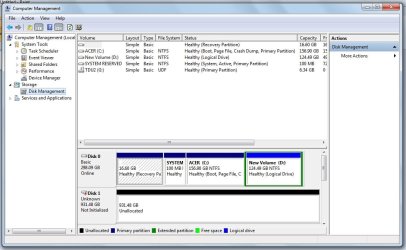
this is what i have for my disk management sould i initialized it again made a new volume before doing ur sugegstion? because last night i try again to format it using the write zero. HD7.jpg
 

My Computer My Computer

At a glance

windows 7 home basic 64bit
Computer type
PC/Desktop
Computer Manufacturer/Model Number
Acer
OS
windows 7 home basic 64bit
Just right click on the drive, format it and after that assign a letter. :)
 

My Computer My Computer

At a glance

Windows 7
Computer type
PC/Desktop
OS
Windows 7
after assigning a drive. should i do the cmd command? well i did then it says chkdsk is not availble for RAW drives
 

My Computer My Computer

At a glance

windows 7 home basic 64bit
Computer type
PC/Desktop
Computer Manufacturer/Model Number
Acer
OS
windows 7 home basic 64bit
OK, let's try to reformat the drive. Unfortunately, this will erase the information you have on it, in case you have any stored there.

1. Open Computer Management by clicking the Start button, clicking Control Panel, clicking System and Security, clicking Administrative Tools, and then double-clicking Computer Management. If you're prompted for an administrator password or confirmation, type the password or provide confirmation.
2. In the left pane, under Storage, click Disk Management.
3. Right-click on the volume that is going to be formatted and then click Format.
4. To format the volume with the default settings, in the Format dialog box, click OK, and then click OK again.
 

My Computer My Computer

At a glance

Windows 7
Computer type
PC/Desktop
OS
Windows 7
Back
Top