Patch tuesday March 2015

The problem should be resolved shortly.

It's been 13 hours since you posted this. Define shortly (I'm not being sarcastic; different people have different definitions of shortly that can range from a few seconds to a few days).
 

My Computer

Computer type
PC/Desktop
Computer Manufacturer/Model Number
Custom Build
OS
Win 7 Ultimate 64 bit
CPU
Intel i7-3930K
Motherboard
ASUS P9X79 WS
Memory
Kingston HyperX Genesis 32GB Kit (8x4GB Modules) 1600MHz DDR
Graphics Card(s)
MSI R7850 Twin Frozr 2GD5/OC Radeon HD 7850 2GB 256-bit GDDR
Sound Card
Asus Xonar Essence STX
Monitor(s) Displays
3x Asus VG248QE 24", Vizio 32" TV
Screen Resolution
1920 x 1080, ?
Hard Drives
Samsung 128GB 840 Pro SSD (1),
Samsung 4TB 850 EVO SSDs (4)
Samsung 4TB 850 EVO SSDs (16) external backup drives used in 2.5" hot swap bays in the computer.
PSU
Corsair HX750w
Case
Antec Two Hundred v2 (modified)
Cooling
Cooler Master GeminII S524 120mm (fan replaced with a 140mm)
Keyboard
Logitech G510s
Mouse
Logitech M525 (two in use)
Internet Speed
=< 32Mbps down, 8Mbps up
Antivirus
AVAST!, MBAM, SAS, Spybot S&D (all but MBAM free) Glary Util
Browser
IE11
Other Info
LSI 9211-8i HBA card (8 SATA III ports), 2.5" & 3.5" Hot Swap Bays, HooToo HT-CR001 PCI-E to USB 3.0 Internal Hub + 6 Slot Card Reader, and LG Model CH12LS28 BD-ROM Optical Drive. Also, ScanSnap S1500 ADF duplexing scanner, Canon 9000F flat bed scanner, Corsair SP2500 2.1 speakers, Samsung CLP 415nw laser color printer, Cyberpower PP2200SW UPS
I'm about to install my Updates today. Would it be advisable to hide "KB3033929"
I successfully installed these dozen updates on a couple/three computers before, but today tried another computer and the updates failed after maybe three. I'd have guessed the problem one was for IE11 KB3032359 but don't doubt it was more likely 3033929.

In any case, I'd gotten two successfully installed and then the rest failed, and did so in spectacular fashion i.e. no amount of reboots/retries worked after. I did a System Restore to the first one (of the updates), effectively starting-over, and after a number of subsequent fails and retries finally got them all installed

Then I came here to report and found this thread! :confused:

Don't hide that KB, but if you want to try the updates just de-select that one and see if you have any trouble (and report back).


Everything else is now installed for the exception of "KB3033929" Since updating..My Windows start up Splash symbol is now loading fully. Prior to that it would load half way then go straight to the desktop. Is that normal?
 

My Computer

Computer type
PC/Desktop
Computer Manufacturer/Model Number
Custom
OS
Windows 7 Ultimate x64
CPU
Intel i5-4670k @ 4.30GHz
Motherboard
GByte Z87X-UD4H MOBO
Memory
8gb
Graphics Card(s)
3GB EVGA NVIDIA GeForce GTX 780 OC
Sound Card
ASUS Xonar Essence STX
Monitor(s) Displays
ASUS VG248QE 144hz
Screen Resolution
1920x1080
Hard Drives
Samsung SSD 840 Pro Series 256gb & Seagate 3TB Performance SATA 3 Hard Drive ST3000DM001 7200rpm
PSU
XFX 750w P1-750B-BEFX
Case
Silverstone SST-FT02B-W
Cooling
Noctua NH-D14 Dual
Internet Speed
150mb
Antivirus
ESET Smart Security 8 / Malwarebytes
Browser
Firefox/Chrome
Strange one lol 20 minutes after the Updates were installed and After restarting a few times..The loading Windows symbol is now loading as it was. Half way then loading straight into my Desktop
 

My Computer

Computer type
PC/Desktop
Computer Manufacturer/Model Number
Custom
OS
Windows 7 Ultimate x64
CPU
Intel i5-4670k @ 4.30GHz
Motherboard
GByte Z87X-UD4H MOBO
Memory
8gb
Graphics Card(s)
3GB EVGA NVIDIA GeForce GTX 780 OC
Sound Card
ASUS Xonar Essence STX
Monitor(s) Displays
ASUS VG248QE 144hz
Screen Resolution
1920x1080
Hard Drives
Samsung SSD 840 Pro Series 256gb & Seagate 3TB Performance SATA 3 Hard Drive ST3000DM001 7200rpm
PSU
XFX 750w P1-750B-BEFX
Case
Silverstone SST-FT02B-W
Cooling
Noctua NH-D14 Dual
Internet Speed
150mb
Antivirus
ESET Smart Security 8 / Malwarebytes
Browser
Firefox/Chrome
I'm about to install my Updates today. Would it be advisable to hide "KB3033929"
I successfully installed these dozen updates on a couple/three computers before, but today tried another computer and the updates failed after maybe three. I'd have guessed the problem one was for IE11 KB3032359 but don't doubt it was more likely 3033929.

In any case, I'd gotten two successfully installed and then the rest failed, and did so in spectacular fashion i.e. no amount of reboots/retries worked after. I did a System Restore to the first one (of the updates), effectively starting-over, and after a number of subsequent fails and retries finally got them all installed

Then I came here to report and found this thread! :confused:

Don't hide that KB, but if you want to try the updates just de-select that one and see if you have any trouble (and report back).


Everything else is now installed for the exception of "KB3033929" Since updating..My Windows start up Splash symbol is now loading fully. Prior to that it would load half way then go straight to the desktop. Is that normal?

Curious. Seeing only part of the Windows symbol on the splash screen before going to the desktop usually means Win 7 is running really fast. My 840 Pro isn't nearly that fast (though way faster than a spinner) but, then again, I have a lot of stuff in my start menu (and yes, I cleared out everything I don't need starting up). I don't worry about it since I run it 24/7 and normally reboot only once a week.
 

My Computer

Computer type
PC/Desktop
Computer Manufacturer/Model Number
Custom Build
OS
Win 7 Ultimate 64 bit
CPU
Intel i7-3930K
Motherboard
ASUS P9X79 WS
Memory
Kingston HyperX Genesis 32GB Kit (8x4GB Modules) 1600MHz DDR
Graphics Card(s)
MSI R7850 Twin Frozr 2GD5/OC Radeon HD 7850 2GB 256-bit GDDR
Sound Card
Asus Xonar Essence STX
Monitor(s) Displays
3x Asus VG248QE 24", Vizio 32" TV
Screen Resolution
1920 x 1080, ?
Hard Drives
Samsung 128GB 840 Pro SSD (1),
Samsung 4TB 850 EVO SSDs (4)
Samsung 4TB 850 EVO SSDs (16) external backup drives used in 2.5" hot swap bays in the computer.
PSU
Corsair HX750w
Case
Antec Two Hundred v2 (modified)
Cooling
Cooler Master GeminII S524 120mm (fan replaced with a 140mm)
Keyboard
Logitech G510s
Mouse
Logitech M525 (two in use)
Internet Speed
=< 32Mbps down, 8Mbps up
Antivirus
AVAST!, MBAM, SAS, Spybot S&D (all but MBAM free) Glary Util
Browser
IE11
Other Info
LSI 9211-8i HBA card (8 SATA III ports), 2.5" & 3.5" Hot Swap Bays, HooToo HT-CR001 PCI-E to USB 3.0 Internal Hub + 6 Slot Card Reader, and LG Model CH12LS28 BD-ROM Optical Drive. Also, ScanSnap S1500 ADF duplexing scanner, Canon 9000F flat bed scanner, Corsair SP2500 2.1 speakers, Samsung CLP 415nw laser color printer, Cyberpower PP2200SW UPS
I successfully installed these dozen updates on a couple/three computers before, but today tried another computer and the updates failed after maybe three. I'd have guessed the problem one was for IE11 KB3032359 but don't doubt it was more likely 3033929.

In any case, I'd gotten two successfully installed and then the rest failed, and did so in spectacular fashion i.e. no amount of reboots/retries worked after. I did a System Restore to the first one (of the updates), effectively starting-over, and after a number of subsequent fails and retries finally got them all installed

Then I came here to report and found this thread! :confused:

Don't hide that KB, but if you want to try the updates just de-select that one and see if you have any trouble (and report back).


Everything else is now installed for the exception of "KB3033929" Since updating..My Windows start up Splash symbol is now loading fully. Prior to that it would load half way then go straight to the desktop. Is that normal?

Curious. Seeing only part of the Windows symbol on the splash screen before going to the desktop usually means Win 7 is running really fast. My 840 Pro isn't nearly that fast (though way faster than a spinner) but, then again, I have a lot of stuff in my start menu (and yes, I cleared out everything I don't need starting up). I don't worry about it since I run it 24/7 and normally reboot only once a week.

It's been running like that for almost two years, since day one. Two years approaching this coming June. In all honesty I can't fault her. Would having a SSD have anything to do with it?
 

My Computer

Computer type
PC/Desktop
Computer Manufacturer/Model Number
Custom
OS
Windows 7 Ultimate x64
CPU
Intel i5-4670k @ 4.30GHz
Motherboard
GByte Z87X-UD4H MOBO
Memory
8gb
Graphics Card(s)
3GB EVGA NVIDIA GeForce GTX 780 OC
Sound Card
ASUS Xonar Essence STX
Monitor(s) Displays
ASUS VG248QE 144hz
Screen Resolution
1920x1080
Hard Drives
Samsung SSD 840 Pro Series 256gb & Seagate 3TB Performance SATA 3 Hard Drive ST3000DM001 7200rpm
PSU
XFX 750w P1-750B-BEFX
Case
Silverstone SST-FT02B-W
Cooling
Noctua NH-D14 Dual
Internet Speed
150mb
Antivirus
ESET Smart Security 8 / Malwarebytes
Browser
Firefox/Chrome
Everything else is now installed for the exception of "KB3033929" Since updating..My Windows start up Splash symbol is now loading fully. Prior to that it would load half way then go straight to the desktop. Is that normal?

Curious. Seeing only part of the Windows symbol on the splash screen before going to the desktop usually means Win 7 is running really fast. My 840 Pro isn't nearly that fast (though way faster than a spinner) but, then again, I have a lot of stuff in my start menu (and yes, I cleared out everything I don't need starting up). I don't worry about it since I run it 24/7 and normally reboot only once a week.

It's been running like that for almost two years, since day one. Two years approaching this coming June. In all honesty I can't fault her. Would having a SSD have anything to do with it?

Heck, yeah! The SSDs in my notebooks don't have to work as hard as the one in my desktop and the little animated dots in the splash screen barely have time to combine into the Windows logo before going to the desktop. It's curious that the recent updates would have slowed down your boot time.
 

My Computer

Computer type
PC/Desktop
Computer Manufacturer/Model Number
Custom Build
OS
Win 7 Ultimate 64 bit
CPU
Intel i7-3930K
Motherboard
ASUS P9X79 WS
Memory
Kingston HyperX Genesis 32GB Kit (8x4GB Modules) 1600MHz DDR
Graphics Card(s)
MSI R7850 Twin Frozr 2GD5/OC Radeon HD 7850 2GB 256-bit GDDR
Sound Card
Asus Xonar Essence STX
Monitor(s) Displays
3x Asus VG248QE 24", Vizio 32" TV
Screen Resolution
1920 x 1080, ?
Hard Drives
Samsung 128GB 840 Pro SSD (1),
Samsung 4TB 850 EVO SSDs (4)
Samsung 4TB 850 EVO SSDs (16) external backup drives used in 2.5" hot swap bays in the computer.
PSU
Corsair HX750w
Case
Antec Two Hundred v2 (modified)
Cooling
Cooler Master GeminII S524 120mm (fan replaced with a 140mm)
Keyboard
Logitech G510s
Mouse
Logitech M525 (two in use)
Internet Speed
=< 32Mbps down, 8Mbps up
Antivirus
AVAST!, MBAM, SAS, Spybot S&D (all but MBAM free) Glary Util
Browser
IE11
Other Info
LSI 9211-8i HBA card (8 SATA III ports), 2.5" & 3.5" Hot Swap Bays, HooToo HT-CR001 PCI-E to USB 3.0 Internal Hub + 6 Slot Card Reader, and LG Model CH12LS28 BD-ROM Optical Drive. Also, ScanSnap S1500 ADF duplexing scanner, Canon 9000F flat bed scanner, Corsair SP2500 2.1 speakers, Samsung CLP 415nw laser color printer, Cyberpower PP2200SW UPS
Curious. Seeing only part of the Windows symbol on the splash screen before going to the desktop usually means Win 7 is running really fast. My 840 Pro isn't nearly that fast (though way faster than a spinner) but, then again, I have a lot of stuff in my start menu (and yes, I cleared out everything I don't need starting up). I don't worry about it since I run it 24/7 and normally reboot only once a week.

It's been running like that for almost two years, since day one. Two years approaching this coming June. In all honesty I can't fault her. Would having a SSD have anything to do with it?

Heck, yeah! The SSDs in my notebooks don't have to work as hard as the one in my desktop and the little animated dots in the splash screen barely have time to combine into the Windows logo before going to the desktop. It's curious that the recent updates would have slowed down your boot time.

Within the space of 20 minutes I did reboot it 3/4 times times. But the logo still proceeded to load in full. After leaving it a few more minutes, the load-up went back to normal. Not to sure what that was all about.
 

My Computer

Computer type
PC/Desktop
Computer Manufacturer/Model Number
Custom
OS
Windows 7 Ultimate x64
CPU
Intel i5-4670k @ 4.30GHz
Motherboard
GByte Z87X-UD4H MOBO
Memory
8gb
Graphics Card(s)
3GB EVGA NVIDIA GeForce GTX 780 OC
Sound Card
ASUS Xonar Essence STX
Monitor(s) Displays
ASUS VG248QE 144hz
Screen Resolution
1920x1080
Hard Drives
Samsung SSD 840 Pro Series 256gb & Seagate 3TB Performance SATA 3 Hard Drive ST3000DM001 7200rpm
PSU
XFX 750w P1-750B-BEFX
Case
Silverstone SST-FT02B-W
Cooling
Noctua NH-D14 Dual
Internet Speed
150mb
Antivirus
ESET Smart Security 8 / Malwarebytes
Browser
Firefox/Chrome
I'm not either but if "ain't broke" now, don't fix it. ;)
 

My Computer

Computer type
PC/Desktop
Computer Manufacturer/Model Number
Custom Build
OS
Win 7 Ultimate 64 bit
CPU
Intel i7-3930K
Motherboard
ASUS P9X79 WS
Memory
Kingston HyperX Genesis 32GB Kit (8x4GB Modules) 1600MHz DDR
Graphics Card(s)
MSI R7850 Twin Frozr 2GD5/OC Radeon HD 7850 2GB 256-bit GDDR
Sound Card
Asus Xonar Essence STX
Monitor(s) Displays
3x Asus VG248QE 24", Vizio 32" TV
Screen Resolution
1920 x 1080, ?
Hard Drives
Samsung 128GB 840 Pro SSD (1),
Samsung 4TB 850 EVO SSDs (4)
Samsung 4TB 850 EVO SSDs (16) external backup drives used in 2.5" hot swap bays in the computer.
PSU
Corsair HX750w
Case
Antec Two Hundred v2 (modified)
Cooling
Cooler Master GeminII S524 120mm (fan replaced with a 140mm)
Keyboard
Logitech G510s
Mouse
Logitech M525 (two in use)
Internet Speed
=< 32Mbps down, 8Mbps up
Antivirus
AVAST!, MBAM, SAS, Spybot S&D (all but MBAM free) Glary Util
Browser
IE11
Other Info
LSI 9211-8i HBA card (8 SATA III ports), 2.5" & 3.5" Hot Swap Bays, HooToo HT-CR001 PCI-E to USB 3.0 Internal Hub + 6 Slot Card Reader, and LG Model CH12LS28 BD-ROM Optical Drive. Also, ScanSnap S1500 ADF duplexing scanner, Canon 9000F flat bed scanner, Corsair SP2500 2.1 speakers, Samsung CLP 415nw laser color printer, Cyberpower PP2200SW UPS
Everything else is now installed for the exception of "KB3033929" Since updating..My Windows start up Splash symbol is now loading fully. Prior to that it would load half way then go straight to the desktop. Is that normal?
Did another computer today and KB3033929 did "fail" once but it installed OK on a subsequent restart. Had a fail in one of the eleven others too but Faileds don't bother me if they install a 2nd or 3rd time.

So I only had bad trouble with 1 of 4 computers, and that one I had trouble with is one of my "cleanest" (fewest programs and changes, no errors ever) so there's no telling what the problem might have been with that one.
 

My Computer

Computer type
Laptop
Computer Manufacturer/Model Number
Dell Latitude E6540 Laptop
OS
Windows 7 Professional 64bit
CPU
Intel Core i7 4600M @ 2.90GHz
Motherboard
Dell Inc. 0CYT5F (SOCKET 0)
Memory
16.0GB Dual-Channel DDR3 @ 797MHz (11-11-11-28)
Graphics Card(s)
Intel HD Graphics 4600 (Dell) 2048MB ATI AMD Radeon HD 8790M
Sound Card
Realtek High Definition Audio
Monitor(s) Displays
HP ZR30w (2560x1600@60Hz)
Hard Drives
256GB LITEONIT LMT-256M6M-41 mm SATA (SSD)
1TB Samsung SSD 860 EVO mSATA SATA (SSD)
2TB USB 3.0 USB Device
115GB SanDisk Ultra Fit USB
Other Info
Multiple Dell E-Port Plus II Port Replicator/Docking Stations 0Y72NH USB 3.0 + 130W AC Adapters
I've now installed this month's updates on both my machines, except for KB3034344 (Windows) and KB2956207 (Office) which Susan Bradley recommended in her Patch Watch should be held back pending her further recommendations. All installed in one block and with no apparent problems.

One question for those who install all updates separately or in e.g. blocks of 10 - how do you cope with situations where MS have intended that certain updates should be installed in a particular order? For example, this month it was apparently necessary for KB3035131 to be installed before KB3033029 in order to avoid possible issues. If all updates are installed together then WU will automatically install them in the right order. Have you ever encountered problems when installing updates separately or in smaller blocks?
 

My Computer

Computer type
PC/Desktop
Computer Manufacturer/Model Number
Custom build by PC Specialist
OS
Windows 7 Home Premium 64
CPU
AMD Phenom II X4 955
Motherboard
Asus M4A78T-E
Memory
8GB Corsair XMS3 DDR3
Graphics Card(s)
Gigabyte Geforce GTX 960 2GB
Sound Card
SB Audigy
Monitor(s) Displays
BenQ 24"
Screen Resolution
1920 x 1080
Hard Drives
500GB Serial ATA
PSU
1010W Quiet Quad Rail
Case
Antec 900
Cooling
Fenrir
Keyboard
Corsair
Mouse
Logitech
Internet Speed
20mbps
Antivirus
MSE plus MBAM 2.x Free
Browser
Chrome
Other Info
Second desktop different spec but similar level.
Guys should I install all updates now? Or are there still issues?


Also should I install this or hide it? I remember having done it before in the past and sometimes not. This is a bit cloudy for me weather or not this is recommended to install.
Intel Corporation - Graphics Adapter WDDM1.1, Graphics Adapter WDDM1.2 - Intel(R) HD Graphics

Download size: 59,5 MB

You may need to restart your computer for this update to take effect.

Update type: Optional

Intel Corporation Graphics Adapter WDDM1.1, Graphics Adapter WDDM1.2 software update released in January, 2015

More information:
Information about hardware device drivers for Windows XP

Help and Support:
Product Solution Centers
 

My Computer

Computer type
PC/Desktop
Computer Manufacturer/Model Number
Asus
OS
Windows 7 Ultimate 64-bit
Browser
Chrome
...One question for those who install all updates separately or in e.g. blocks of 10 - how do you cope with situations where MS have intended that certain updates should be installed in a particular order? For example, this month it was apparently necessary for KB3035131 to be installed before KB3033029 in order to avoid possible issues. If all updates are installed together then WU will automatically install them in the right order. Have you ever encountered problems when installing updates separately or in smaller blocks?

I start with the 10-15 updates at the bottom of the list and work my way up. I've run into problems in the past doing too many updates at the same time. I've found I can get away with running as many as 15 updates at a time without problems so I just divide the number of updates to more or less equal numbers that fall between 10 and 15. If an update was left unchecked by M$, I also leave it unchecked until all the other updates have been run, then run the unchecked one by itself.
 

My Computer

Computer type
PC/Desktop
Computer Manufacturer/Model Number
Custom Build
OS
Win 7 Ultimate 64 bit
CPU
Intel i7-3930K
Motherboard
ASUS P9X79 WS
Memory
Kingston HyperX Genesis 32GB Kit (8x4GB Modules) 1600MHz DDR
Graphics Card(s)
MSI R7850 Twin Frozr 2GD5/OC Radeon HD 7850 2GB 256-bit GDDR
Sound Card
Asus Xonar Essence STX
Monitor(s) Displays
3x Asus VG248QE 24", Vizio 32" TV
Screen Resolution
1920 x 1080, ?
Hard Drives
Samsung 128GB 840 Pro SSD (1),
Samsung 4TB 850 EVO SSDs (4)
Samsung 4TB 850 EVO SSDs (16) external backup drives used in 2.5" hot swap bays in the computer.
PSU
Corsair HX750w
Case
Antec Two Hundred v2 (modified)
Cooling
Cooler Master GeminII S524 120mm (fan replaced with a 140mm)
Keyboard
Logitech G510s
Mouse
Logitech M525 (two in use)
Internet Speed
=< 32Mbps down, 8Mbps up
Antivirus
AVAST!, MBAM, SAS, Spybot S&D (all but MBAM free) Glary Util
Browser
IE11
Other Info
LSI 9211-8i HBA card (8 SATA III ports), 2.5" & 3.5" Hot Swap Bays, HooToo HT-CR001 PCI-E to USB 3.0 Internal Hub + 6 Slot Card Reader, and LG Model CH12LS28 BD-ROM Optical Drive. Also, ScanSnap S1500 ADF duplexing scanner, Canon 9000F flat bed scanner, Corsair SP2500 2.1 speakers, Samsung CLP 415nw laser color printer, Cyberpower PP2200SW UPS
So can this 3033929 update be installed now... I myself have this update yet to be installed, but I don't want to install it if it's not been fixed...
 

My Computer

Computer type
PC/Desktop
Computer Manufacturer/Model Number
Custom Build
OS
Windows 10 Home x64
CPU
AMD FX-8320 @ 3.5 GHz
Motherboard
Gigabyte GA-990FXA-UD3 (rev. 4.0)
Memory
4 x 2 GB G Skill Ripjaws DDR3-1600
Graphics Card(s)
EVGA Nvidia GTX 550 Ti 1 GB
Sound Card
Realtek
Monitor(s) Displays
Acer S201HL
Screen Resolution
1600x900
Hard Drives
1 x 240 GB OCZ SSD
1 x 60 GB Intel SSD
1 x 1 TB Samsung HDD
PSU
Silverstone Strider 750w Modular
Case
Antec 300 Illusion
Cooling
Air
Keyboard
Microsoft
Mouse
HP
Antivirus
Microsoft Security Essentials
Browser
Google Chrome
I installed 3033929 several days ago without incident. I think I had 25 total items on the update list--either for Windows or Office 2010.

I don't see any sign of 3033151 on my PC.
 

My Computer

Computer type
PC/Desktop
Computer Manufacturer/Model Number
Ignatz Special; 4 speed manual gearbox; factory air conditioning; one of one
OS
Windows 7 Home Premium SP1, 64-bit
CPU
Intel Skylake i5-6600K, not overclocked
Motherboard
AsRock Z170M Extreme 4, micro ATX
Memory
8 GB HyperX DDR4-2666 (2 x 4 GB)
Graphics Card(s)
none; graphics are integrated on CPU
Sound Card
onboard: Realtek ALC1150; external: USB Behringer UF0-202
Monitor(s) Displays
Dell S2340M 23 inch IPS
Screen Resolution
1600 x 900
Hard Drives
System: Crucial MX100 series SSD, 128 GB;
Data: Samsung Spinpoint 103SJ, 1 TB;
Backup: WD Caviar Green WD30EZRX-00D8PB0, 3 TB
PSU
Rosewill SilentNight 500 watt fanless, semi-modular
Case
Antec Solo II
Cooling
Noctua NH-U12S; Noctua F12 intake, Noctua S12A exhaust
Keyboard
Microsoft 200 6JH-00001 USB
Mouse
Dell or Microsoft optical wired; USB
Antivirus
Microsoft Security Essentials and Malwarebytes Premium
Browser
Pale Moon
Other Info
All fans PWM; speeds at idle: CPU circa 500 rpm; intake circa 600 rpm; exhaust circa 600 rpm; CPU temps 27 idle and 47 C load in a warm room (27 C/81 F) when running Intel Extreme Tuning Utility stress test.
I don't see any sign of 3033151 on my PC.

Me either, not as an update to be installed or an update installed.

Unless you meant 3035131? In which case, that's an update to be installed on my computer, with the release date of 3/10/2015.
 

My Computer

Computer type
PC/Desktop
Computer Manufacturer/Model Number
Custom Build
OS
Windows 10 Home x64
CPU
AMD FX-8320 @ 3.5 GHz
Motherboard
Gigabyte GA-990FXA-UD3 (rev. 4.0)
Memory
4 x 2 GB G Skill Ripjaws DDR3-1600
Graphics Card(s)
EVGA Nvidia GTX 550 Ti 1 GB
Sound Card
Realtek
Monitor(s) Displays
Acer S201HL
Screen Resolution
1600x900
Hard Drives
1 x 240 GB OCZ SSD
1 x 60 GB Intel SSD
1 x 1 TB Samsung HDD
PSU
Silverstone Strider 750w Modular
Case
Antec 300 Illusion
Cooling
Air
Keyboard
Microsoft
Mouse
HP
Antivirus
Microsoft Security Essentials
Browser
Google Chrome
I don't see any sign of 3033151 on my PC.

Me either, not as an update to be installed or an update installed.

Unless you meant 3035131? In which case, that's an update to be installed on my computer, with the release date of 3/10/2015.

My error. I did mean 3035131 as it was referred to earlier in this thread. I do NOT have it, nor is it scheduled.

I DO have 3035132, whatever it is.
 

My Computer

Computer type
PC/Desktop
Computer Manufacturer/Model Number
Ignatz Special; 4 speed manual gearbox; factory air conditioning; one of one
OS
Windows 7 Home Premium SP1, 64-bit
CPU
Intel Skylake i5-6600K, not overclocked
Motherboard
AsRock Z170M Extreme 4, micro ATX
Memory
8 GB HyperX DDR4-2666 (2 x 4 GB)
Graphics Card(s)
none; graphics are integrated on CPU
Sound Card
onboard: Realtek ALC1150; external: USB Behringer UF0-202
Monitor(s) Displays
Dell S2340M 23 inch IPS
Screen Resolution
1600 x 900
Hard Drives
System: Crucial MX100 series SSD, 128 GB;
Data: Samsung Spinpoint 103SJ, 1 TB;
Backup: WD Caviar Green WD30EZRX-00D8PB0, 3 TB
PSU
Rosewill SilentNight 500 watt fanless, semi-modular
Case
Antec Solo II
Cooling
Noctua NH-U12S; Noctua F12 intake, Noctua S12A exhaust
Keyboard
Microsoft 200 6JH-00001 USB
Mouse
Dell or Microsoft optical wired; USB
Antivirus
Microsoft Security Essentials and Malwarebytes Premium
Browser
Pale Moon
Other Info
All fans PWM; speeds at idle: CPU circa 500 rpm; intake circa 600 rpm; exhaust circa 600 rpm; CPU temps 27 idle and 47 C load in a warm room (27 C/81 F) when running Intel Extreme Tuning Utility stress test.
I don't see any sign of 3033151 on my PC.

Me either, not as an update to be installed or an update installed.

Unless you meant 3035131? In which case, that's an update to be installed on my computer, with the release date of 3/10/2015.

My error. I did mean 3035131 as it was referred to earlier in this thread. I do NOT have it, nor is it scheduled.

I DO have 3035132, whatever it is.

Hmmm, even after checking for updates?

From what I found 3035132 is a Security Update for Windows 7. One of those "a security issue has been identified in a Microsoft software product that could affect your system" updates. ;)
 

My Computer

Computer type
PC/Desktop
Computer Manufacturer/Model Number
Custom Build
OS
Windows 10 Home x64
CPU
AMD FX-8320 @ 3.5 GHz
Motherboard
Gigabyte GA-990FXA-UD3 (rev. 4.0)
Memory
4 x 2 GB G Skill Ripjaws DDR3-1600
Graphics Card(s)
EVGA Nvidia GTX 550 Ti 1 GB
Sound Card
Realtek
Monitor(s) Displays
Acer S201HL
Screen Resolution
1600x900
Hard Drives
1 x 240 GB OCZ SSD
1 x 60 GB Intel SSD
1 x 1 TB Samsung HDD
PSU
Silverstone Strider 750w Modular
Case
Antec 300 Illusion
Cooling
Air
Keyboard
Microsoft
Mouse
HP
Antivirus
Microsoft Security Essentials
Browser
Google Chrome
My Windows Update currently has nothing else to offer me.

But.....it's weird (or maybe normal. I don't understand WU too well)........

Here's what I find:

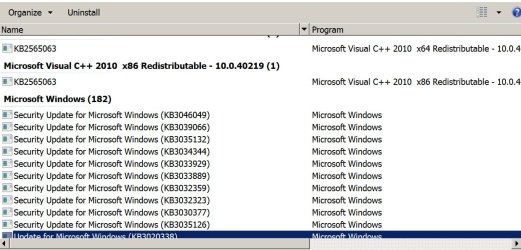
When I look through my list of installed updates, I do NOT see 3035131. Below is a pic of what I do see for the March installs--everything above that dark blue highlighted line at the bottom is from March. You see 3035132. You don't see 3035131.

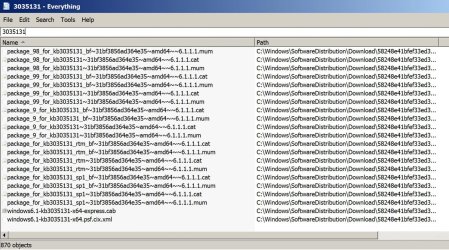
However, notice the second pic. It's the result of a search on my C drive for the text string "3035131". Notice there are 870 items found. The pic shows the bottom 25 or so of the 870. The entire 870 appear to refer to that MS KB.

Don't ask me what it means. As I say, I don't understand the inner workings of Windows Update.
 

Attachments

  • Untitled-1.jpg
    Untitled-1.jpg
    138.8 KB · Views: 1
  • Untitled-3.jpg
    Untitled-3.jpg
    244.9 KB · Views: 0

My Computer

Computer type
PC/Desktop
Computer Manufacturer/Model Number
Ignatz Special; 4 speed manual gearbox; factory air conditioning; one of one
OS
Windows 7 Home Premium SP1, 64-bit
CPU
Intel Skylake i5-6600K, not overclocked
Motherboard
AsRock Z170M Extreme 4, micro ATX
Memory
8 GB HyperX DDR4-2666 (2 x 4 GB)
Graphics Card(s)
none; graphics are integrated on CPU
Sound Card
onboard: Realtek ALC1150; external: USB Behringer UF0-202
Monitor(s) Displays
Dell S2340M 23 inch IPS
Screen Resolution
1600 x 900
Hard Drives
System: Crucial MX100 series SSD, 128 GB;
Data: Samsung Spinpoint 103SJ, 1 TB;
Backup: WD Caviar Green WD30EZRX-00D8PB0, 3 TB
PSU
Rosewill SilentNight 500 watt fanless, semi-modular
Case
Antec Solo II
Cooling
Noctua NH-U12S; Noctua F12 intake, Noctua S12A exhaust
Keyboard
Microsoft 200 6JH-00001 USB
Mouse
Dell or Microsoft optical wired; USB
Antivirus
Microsoft Security Essentials and Malwarebytes Premium
Browser
Pale Moon
Other Info
All fans PWM; speeds at idle: CPU circa 500 rpm; intake circa 600 rpm; exhaust circa 600 rpm; CPU temps 27 idle and 47 C load in a warm room (27 C/81 F) when running Intel Extreme Tuning Utility stress test.
Me either, lol.

I just go with the flow half the time. I really wish Microsoft would've released a second service pack. These individual updates are cumbersome half the time. However, it does allow one to remove a particular problematic update. :)
 

My Computer

Computer type
PC/Desktop
Computer Manufacturer/Model Number
Custom Build
OS
Windows 10 Home x64
CPU
AMD FX-8320 @ 3.5 GHz
Motherboard
Gigabyte GA-990FXA-UD3 (rev. 4.0)
Memory
4 x 2 GB G Skill Ripjaws DDR3-1600
Graphics Card(s)
EVGA Nvidia GTX 550 Ti 1 GB
Sound Card
Realtek
Monitor(s) Displays
Acer S201HL
Screen Resolution
1600x900
Hard Drives
1 x 240 GB OCZ SSD
1 x 60 GB Intel SSD
1 x 1 TB Samsung HDD
PSU
Silverstone Strider 750w Modular
Case
Antec 300 Illusion
Cooling
Air
Keyboard
Microsoft
Mouse
HP
Antivirus
Microsoft Security Essentials
Browser
Google Chrome
KB3035131 & KB3033929 madness...

Another M$ FUBAR-ed pretzel logic update. Long story short and without going into gory details M$ released on patch tuesday (among others) KB's 3033929 & 3035131. As I understand it, KB3033929 contained the same "stuff" as 3035131 + additional "stuff" so in essence, 3033929 supersedes 3035131. If you installed 3033929 before 3035131 either manually or by letting Win Updates "do it's thing" 3033929 actually installs the "stuff" for both KB's but KB3035131 doesn't show under installed updates.

Conversely, if you manually install 3035131 before 3033929 both will show under Installed Updates.

There must be some method to this utter lunacy but it's likely way beyond my pay grade, so I just shrug my shoulders and move on.
 
Last edited:

My Computer

Computer type
Laptop
Computer Manufacturer/Model Number
MSI PE60 6QE
OS
Win 10 Pro x64, Win 7 Pro x64
CPU
Intel Core i7-6700HQ Skylake
Motherboard
MSI MS-16J5
Memory
16gb Crucial DDR4
Graphics Card(s)
NVIDIA GeForce GTX 960M 2 GB
Screen Resolution
1920 x 1080
Hard Drives
Samsung 850 EVO 250 GB M.2 SSD (MZ-N5E250BW)
HGST 1TB @7200 RPM HTS721010A9E630
Case
Plastic
Keyboard
Got one...
Mouse
Yep, one of those too.
Internet Speed
FIOS 75/75
Antivirus
Defender
Browser
Chrome/FFox/Ex-PLODE-r/(L)Edge
Other Info
Defender, Custom Hosts, uBlock, regular backups w/ Macrium (Free)
Back
Top