Patching printnightmare bug in win7 is a nightmare

Davidk101

New member
Member
Local time
12:57 AM
Messages
47
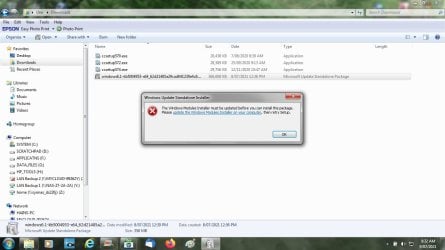
For several days after this was announced, I watched the update channel for the patch. nothing. Then I poked more deeply - and for win7, if you don't have extended support, it won't happen via that channel. But links lead you the update catalog page, and it is there. Download and execute, gets an error: update the windows modules installer, and try again. Follow the links to update the module installer and that page is no longer available. There's nowhere to go from here.
If MS really expects the 15% of win7 users to patch their OS for such a severe bug that MS goes out of support to fix it with this weirdo and unusual approach, they will be disappointed.
So, is there a way around the MS snafu, or will home win7 users just have to live with printnightmare???
 

My Computer My Computer

Computer type
PC/Desktop
Computer Manufacturer/Model Number
custom build
OS
windows 7 home premium 64bit
CPU
Intel core i3-4700
Motherboard
Gigabyte GA-H97M-d3H
Memory
8gb
Hard Drives
1x256gb SSD
3x500gb HDD
I have the same problem as Davidk101. Anyone have any guidance, particularly step-by-step guidance for those of us without superior technical skills?
 

My Computer My Computer

Computer type
PC/Desktop
Computer Manufacturer/Model Number
Dell Optiplex 755/Optiplex 780/Latitude E6400/Precision T3500
OS
Win7 Pro x86/Win7 Pro x64/Win 10 Pro x64
CPU
Intel Core 2 Duo E7200 2.53 gHz/Core 2 Duo E8400 3.0 gHz/
Internet Speed
FiOS 100 mB
Antivirus
Bitdefender Total Security
Browser
SeaMonkey/Edge
Your Windows 7 SP1 computer needs to be set up and configured for ESU support in order to receive and install the PrintNightmare security update (and other post-January 2020 updates).

Unfortunately, it was discovered after the update was released that it doesn't fix the issue.

Let's see what Microsoft does about it before "patch Tuesday" on July 13th.
 

My Computer My Computer

Computer type
PC/Desktop
Computer Manufacturer/Model Number
Dell OptiPlex 9020
OS
Windows 7 Professional SP1 64-bit
CPU
Intel Core i7-4790 3.60 GHz
Memory
32 GB DDR3-1600 MHz
Graphics Card(s)
Integrated Intel HD Graphics 4600
Monitor(s) Displays
Viewsonic 32" LCD
Hard Drives
Kingston SATA 3 240 GB SSD
Internet Speed
Spectrum Internet 1000 Mbps
So, for those of us not set up for ESU, things appear to be that we have to await Microsoft's solution on allowing the print spooler fix to load absent ESU.
 

My Computer My Computer

Computer type
PC/Desktop
Computer Manufacturer/Model Number
Dell Optiplex 755/Optiplex 780/Latitude E6400/Precision T3500
OS
Win7 Pro x86/Win7 Pro x64/Win 10 Pro x64
CPU
Intel Core 2 Duo E7200 2.53 gHz/Core 2 Duo E8400 3.0 gHz/
Internet Speed
FiOS 100 mB
Antivirus
Bitdefender Total Security
Browser
SeaMonkey/Edge
ESU is extended support - the sort of thing a large company using win7 might do/pay for, but home users generally don't have this because it costs. So, home users - the largest contingent of win7 users, probably - are swinging in the wind: MS announced a bug serious enough to go post end-of-life with a fix, but they can't get and apply it. Finding that out after release is not only poor testing, but makes it seem that MS does not think about home users at all.

Disabling the spooler has been suggested elsewhere, but if you read the details in the services.msc list, this action means you cannot print at all. At least with the current state, printing works and there is just a large risk. If you disable the spooler, printing is kaput. As always, the best security is to not use the subject device . . . . not using a PC also falls into that category. Something MS may want to think about.
 

My Computer My Computer

Computer type
PC/Desktop
Computer Manufacturer/Model Number
custom build
OS
windows 7 home premium 64bit
CPU
Intel core i3-4700
Motherboard
Gigabyte GA-H97M-d3H
Memory
8gb
Hard Drives
1x256gb SSD
3x500gb HDD
Minimizing the threat

I rarely need to print anything nowadays.

If I stop the Print Spooler in Services and turn it back on only on those rare days when I need to print a page, have I minimized my exposure? Or could Nightmare be lurking in the darkness just waiting to pounce the second the Spooler is restarted.
 

My Computer My Computer

Computer type
PC/Desktop
Computer Manufacturer/Model Number
Dell
OS
win 7 Home Premium
CPU
3.4GhZ
Motherboard
Dell 0KWVT8
Memory
8GB
Graphics Card(s)
NVIDIA GeForce GT 635
Monitor(s) Displays
Dell 2407
Hard Drives
ST1000DM003
Antivirus
Windows/SAS/MBAM
Browser
Firefox
Three Win7 security updates were automatically downloaded on my PC today, KB3118401, KB2676562, KB3123479.

At least I presume that's what they are for.
 

My Computer My Computer

Computer type
PC/Desktop
Computer Manufacturer/Model Number
Dell Vostro
OS
Windows 7 Pro 64 Bit, Windows 10 Pro 64 Bit, Linux Mint 20.1 LTS
CPU
Intel Core i5-3470 3.2 GHz
Motherboard
Intel 7 Series C/216 Chipset
Memory
6GB RAM
Graphics Card(s)
Intel HD Graphics
Monitor(s) Displays
Asus VC239 (23.5")
Hard Drives
Western Digital WD10EZEX 1TB
Western Digital WD3200AAKS 320GB
PSU
Corsair 500W
Antivirus
Microsoft Essentials, Malwarebytes, Kapersky Rescue Disk
Browser
Firefox 87 64 Bit
Bendipa,
Those 3 KB's are old (2012- 2016) windows and security updates. Most certainly not related to print nightmare, unless MS thinks they are a necessary precursor to a patch.

I had to really search the installed updates on my win7 machine to find them, but they were there. They were installed when I tried to execute the printnightmare patch and got my update the modules installer error, which looked like this: attached image
 

Attachments

  • printnightmare error.jpg
    printnightmare error.jpg
    86.1 KB · Views: 1

My Computer My Computer

Computer type
PC/Desktop
Computer Manufacturer/Model Number
custom build
OS
windows 7 home premium 64bit
CPU
Intel core i3-4700
Motherboard
Gigabyte GA-H97M-d3H
Memory
8gb
Hard Drives
1x256gb SSD
3x500gb HDD

My Computers My Computers

System One System Two

  • Computer type
    PC/Desktop
    Computer Manufacturer/Model Number
    custom build
    OS
    Windows 7 HP 64
    CPU
    i5 6600K - 800MHz to 4200MHz
    Motherboard
    GA-Z170-HD3P
    Memory
    4+4G GSkill DDR4 3000
    Graphics Card(s)
    IG - Intel 530
    Monitor(s) Displays
    Samsung 226BW
    Screen Resolution
    1680x1050
    Hard Drives
    (1) -1 SM951 – 128GB M.2 AHCI PCIe SSD drive for Windows 7 and Lubuntu
    (2) -1 WD SATA 3 - 1T for Data
    (3) -1 WD SATA 3 - 1T for backup
    PSU
    Thermaltake 450W TR2 gold
    Keyboard
    Old and good Chicony mechanical keyboard
    Mouse
    Logitech mX performance - 9 buttons (had to disable some)
    Internet Speed
    500Mb/s
    Browser
    Firefox 64
    Other Info
    TinyWall firewall
  • Computer type
    Laptop
    System Manufacturer/Model Number
    Asus Q550LF
    OS
    Windows 7 Pro
    CPU
    i7-4500U 800MHz to 3.0GHz
    Motherboard
    Asus Q550LF
    Memory
    (4+4)G DDR3 1600
    Graphics Card(s)
    IG intel 4400 + NVIDIA GeForce GT 745M
    Sound Card
    Realtek
    Monitor(s) Displays
    LG Display LP156WF4-SPH1
    Screen Resolution
    1920 x 1080
    Hard Drives
    BX500 120G SSD for Windows and programs +
    1T HDD for data
    Internet Speed
    500 Mb/s
    Browser
    Firefox
    Other Info
    TinyWall firewall
Megahertz attached a link to a thing called simplix that allegedly covers all win7 updates. But reading it, there are pages and pages about it, running manually, bypassing some things, and involving .net updates. And all the posts dated before print nightmare. Complicated, to say the least, and there's no reference in those posts to print nightmare.
I have applied all the recommended patches that have been issued up to the eol date (14 Jan 2020 - altho some of those came thru up to a week later because of the way windows updates runs) including the .net updates.

So, for the unedified re simplix,
- what is it?
- does it do the print nightmare patch (any respondents successfully done?)
- to just get the print nightmare update, instructions please.
 

My Computer My Computer

Computer type
PC/Desktop
Computer Manufacturer/Model Number
custom build
OS
windows 7 home premium 64bit
CPU
Intel core i3-4700
Motherboard
Gigabyte GA-H97M-d3H
Memory
8gb
Hard Drives
1x256gb SSD
3x500gb HDD
So, for the unedified re simplix,
- what is it? It is a single file with ALL updates including print nightmare. Very good, specially if you just installed Win 7.
- does it do the print nightmare patch (any respondents successfully done?) Yes
- to just get the print nightmare update, instructions please. Don't know how. If you get it from M$ catalog it won't install.

The last Simplix Version is UpdatePack7R2-21.7.7.exe
 

My Computers My Computers

System One System Two

  • Computer type
    PC/Desktop
    Computer Manufacturer/Model Number
    custom build
    OS
    Windows 7 HP 64
    CPU
    i5 6600K - 800MHz to 4200MHz
    Motherboard
    GA-Z170-HD3P
    Memory
    4+4G GSkill DDR4 3000
    Graphics Card(s)
    IG - Intel 530
    Monitor(s) Displays
    Samsung 226BW
    Screen Resolution
    1680x1050
    Hard Drives
    (1) -1 SM951 – 128GB M.2 AHCI PCIe SSD drive for Windows 7 and Lubuntu
    (2) -1 WD SATA 3 - 1T for Data
    (3) -1 WD SATA 3 - 1T for backup
    PSU
    Thermaltake 450W TR2 gold
    Keyboard
    Old and good Chicony mechanical keyboard
    Mouse
    Logitech mX performance - 9 buttons (had to disable some)
    Internet Speed
    500Mb/s
    Browser
    Firefox 64
    Other Info
    TinyWall firewall
  • Computer type
    Laptop
    System Manufacturer/Model Number
    Asus Q550LF
    OS
    Windows 7 Pro
    CPU
    i7-4500U 800MHz to 3.0GHz
    Motherboard
    Asus Q550LF
    Memory
    (4+4)G DDR3 1600
    Graphics Card(s)
    IG intel 4400 + NVIDIA GeForce GT 745M
    Sound Card
    Realtek
    Monitor(s) Displays
    LG Display LP156WF4-SPH1
    Screen Resolution
    1920 x 1080
    Hard Drives
    BX500 120G SSD for Windows and programs +
    1T HDD for data
    Internet Speed
    500 Mb/s
    Browser
    Firefox
    Other Info
    TinyWall firewall
Just re-read this last post. It seems to say that running simplix, if you have all the updates already installed, it will just do the printnightmare patch? ????

So far, in several threads that deal with MS issues, and where the problems of installing the printnightmare patch have been raised, there has been no definitive MS response at all.
 

My Computer My Computer

Computer type
PC/Desktop
Computer Manufacturer/Model Number
custom build
OS
windows 7 home premium 64bit
CPU
Intel core i3-4700
Motherboard
Gigabyte GA-H97M-d3H
Memory
8gb
Hard Drives
1x256gb SSD
3x500gb HDD
Back
Top