
Patching UxTheme does not work

Lebon14

Gomen ne Jenna-chan
Guru
VIP
Local time
9:06 AM
Messages
1,324
Location
Canada
Hi guys.

Since I can now replace my Aero.msstyle, I've tried patching the UxTheme and all those files. but... it didn't work. Whatever theme I try to apply, it's not working. It either gives me Windows Classic or doesn't change anything (Windows Aero to Windows Aero)

My goal was to apply the black Basic taskbar theme here :
http://www.sevenforums.com/tutorials/4315-taskbar-customize-skin.html

Like I said, even if I patched, it didn't work.
Also, I'm positive that those themes here doesn't work too :
molinarosp's deviantART gallery

Any help on ths guys?
 

My Computer

Computer type
PC/Desktop
Computer Manufacturer/Model Number
Custom build
OS
Windows 10 Professional 64-bit
CPU
Ryzen 9 5900X
Motherboard
Gigabyte X570 Aorus Master
Memory
G.Skill 3600Mhz CL16 16GB × 4
Graphics Card(s)
EVGA GeForce RTX 3070 Ti FTW3 Ultra Gaming
Sound Card
On-board
Monitor(s) Displays
Dell Alienware AW3418DW
Screen Resolution
3440x1440
Hard Drives
1×Sabrent Rocket 4 Plus 2TB nvme SSD (System, internal)
2x4TB Western Digital Blue (Internal)
1x4TB HDST 7200RPM (Internal)
PSU
Seasonic Focus Plus 850W Platinum
Case
Corsair 680X
Cooling
Stock fans + 3× Corsair QL120, Corsair H100i Platinum
Keyboard
Logitech K350
Mouse
Logitech M510
Internet Speed
120Mbits dl - 20Mbits up
Antivirus
ESET NOD32 Antivirus
Browser
Firefox (latest version)
Other Info
Headphones : Audio-Technica ATH-M50x
Scanner : Canon Canoscan LiDE 220 + Plustek OptiBook 4800
I have been using molinarosp's work with rafael's UxStyle just fine, nice and easy method without patching. ;)
 

My Computer

OS
Win 7

My Computer

Computer type
PC/Desktop
Computer Manufacturer/Model Number
Custom build
OS
Windows 10 Professional 64-bit
CPU
Ryzen 9 5900X
Motherboard
Gigabyte X570 Aorus Master
Memory
G.Skill 3600Mhz CL16 16GB × 4
Graphics Card(s)
EVGA GeForce RTX 3070 Ti FTW3 Ultra Gaming
Sound Card
On-board
Monitor(s) Displays
Dell Alienware AW3418DW
Screen Resolution
3440x1440
Hard Drives
1×Sabrent Rocket 4 Plus 2TB nvme SSD (System, internal)
2x4TB Western Digital Blue (Internal)
1x4TB HDST 7200RPM (Internal)
PSU
Seasonic Focus Plus 850W Platinum
Case
Corsair 680X
Cooling
Stock fans + 3× Corsair QL120, Corsair H100i Platinum
Keyboard
Logitech K350
Mouse
Logitech M510
Internet Speed
120Mbits dl - 20Mbits up
Antivirus
ESET NOD32 Antivirus
Browser
Firefox (latest version)
Other Info
Headphones : Audio-Technica ATH-M50x
Scanner : Canon Canoscan LiDE 220 + Plustek OptiBook 4800
DOES
NOT
WORK

I get nothing. NOTHING.

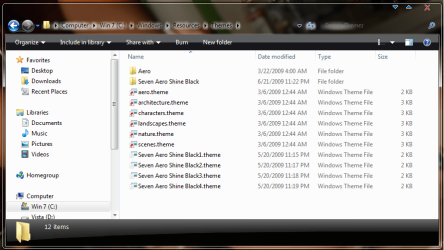
That's a little vague as to what does not work. The UxStyle installs as a service you may want to check to see if it is running. After that all i did was paste the theme to the location in the pic below, and the themes show up in the pesronalize window with the rest.
 

Attachments

  • 7-aero.png
    7-aero.png
    41.8 KB · Views: 453

My Computer

OS
Win 7
I know where to install Themes. That it's not the problem. I patched, then installed the them then double clicked the .theme in the folder (the same as yours). Changed absolutely nothing.

Also, what is the name of the service. If the service is "Themes", then, it's running but still doesn't work.

EDIT

I've run this :
sfc /verifyfile=C:\Windows\System32\uxtheme.dll

And there was an integrity error. According to UxTheme Core's forum (anyway, a post I found, the service name is :
UnsignedThemesSvc.exe

And, that service isn't in my Services list.
 

My Computer

Computer type
PC/Desktop
Computer Manufacturer/Model Number
Custom build
OS
Windows 10 Professional 64-bit
CPU
Ryzen 9 5900X
Motherboard
Gigabyte X570 Aorus Master
Memory
G.Skill 3600Mhz CL16 16GB × 4
Graphics Card(s)
EVGA GeForce RTX 3070 Ti FTW3 Ultra Gaming
Sound Card
On-board
Monitor(s) Displays
Dell Alienware AW3418DW
Screen Resolution
3440x1440
Hard Drives
1×Sabrent Rocket 4 Plus 2TB nvme SSD (System, internal)
2x4TB Western Digital Blue (Internal)
1x4TB HDST 7200RPM (Internal)
PSU
Seasonic Focus Plus 850W Platinum
Case
Corsair 680X
Cooling
Stock fans + 3× Corsair QL120, Corsair H100i Platinum
Keyboard
Logitech K350
Mouse
Logitech M510
Internet Speed
120Mbits dl - 20Mbits up
Antivirus
ESET NOD32 Antivirus
Browser
Firefox (latest version)
Other Info
Headphones : Audio-Technica ATH-M50x
Scanner : Canon Canoscan LiDE 220 + Plustek OptiBook 4800
You shouldn't use patched files that is what the Uxstyle service is for, could be the reason it is not working.
 

My Computer

OS
Win 7
Like I used them! How should I use them lol?

Is there a way to "repair" it?
 

My Computer

Computer type
PC/Desktop
Computer Manufacturer/Model Number
Custom build
OS
Windows 10 Professional 64-bit
CPU
Ryzen 9 5900X
Motherboard
Gigabyte X570 Aorus Master
Memory
G.Skill 3600Mhz CL16 16GB × 4
Graphics Card(s)
EVGA GeForce RTX 3070 Ti FTW3 Ultra Gaming
Sound Card
On-board
Monitor(s) Displays
Dell Alienware AW3418DW
Screen Resolution
3440x1440
Hard Drives
1×Sabrent Rocket 4 Plus 2TB nvme SSD (System, internal)
2x4TB Western Digital Blue (Internal)
1x4TB HDST 7200RPM (Internal)
PSU
Seasonic Focus Plus 850W Platinum
Case
Corsair 680X
Cooling
Stock fans + 3× Corsair QL120, Corsair H100i Platinum
Keyboard
Logitech K350
Mouse
Logitech M510
Internet Speed
120Mbits dl - 20Mbits up
Antivirus
ESET NOD32 Antivirus
Browser
Firefox (latest version)
Other Info
Headphones : Audio-Technica ATH-M50x
Scanner : Canon Canoscan LiDE 220 + Plustek OptiBook 4800
Like I used them! How should I use them lol?

Is there a way to "repair" it?
Use sfc /scanfile for everyfile you patched example (sfc /scanfile=C:\Windows\System32\uxtheme.dll) or sfc /scannow for all system files.
 

My Computer

OS
Win 7
uXTheme and ThemeService appears to be broken. I repeated the command on ThemeService and ask me to reboot.
I'm doing so.

EDIT

Ran sfc /scannow

No errors.
 
Last edited:

My Computer

Computer type
PC/Desktop
Computer Manufacturer/Model Number
Custom build
OS
Windows 10 Professional 64-bit
CPU
Ryzen 9 5900X
Motherboard
Gigabyte X570 Aorus Master
Memory
G.Skill 3600Mhz CL16 16GB × 4
Graphics Card(s)
EVGA GeForce RTX 3070 Ti FTW3 Ultra Gaming
Sound Card
On-board
Monitor(s) Displays
Dell Alienware AW3418DW
Screen Resolution
3440x1440
Hard Drives
1×Sabrent Rocket 4 Plus 2TB nvme SSD (System, internal)
2x4TB Western Digital Blue (Internal)
1x4TB HDST 7200RPM (Internal)
PSU
Seasonic Focus Plus 850W Platinum
Case
Corsair 680X
Cooling
Stock fans + 3× Corsair QL120, Corsair H100i Platinum
Keyboard
Logitech K350
Mouse
Logitech M510
Internet Speed
120Mbits dl - 20Mbits up
Antivirus
ESET NOD32 Antivirus
Browser
Firefox (latest version)
Other Info
Headphones : Audio-Technica ATH-M50x
Scanner : Canon Canoscan LiDE 220 + Plustek OptiBook 4800
UxStyle will install an "Unsigned Themes" service. If you don't see this, I suggest you attempt re-installation. You did download it, right?

UxStyle requires that all system files be intact and in original format before it'll work correctly. I also suggest, after UxStyle installation, that you run the following commands in an elevated command prompt (this is fixed in our next build):

sc config uxpatch group= "File System"
sc config UnsignedThemes group= UIGroup


NOTE: The spaces are intended, do not modify the commands.
 

My Computer

OS
null
UxStyle will install an "Unsigned Themes" service. If you don't see this, I suggest you attempt re-installation. You did download it, right?

UxStyle requires that all system files be intact and in original format before it'll work correctly. I also suggest, after UxStyle installation, that you run the following commands in an elevated command prompt (this is fixed in our next build):

sc config uxpatch group= "File System"
sc config UnsignedThemes group= UIGroup


NOTE: The spaces are intended, do not modify the commands.

Yes, I did download it.
Just desisntall and reinstall it.

I've ran the commands and they completed succesfully.

I will be trying a theme right away.

EDIT

My theme works!! But.. Explorer is ****ed up. I can't open any folders, Computer, Config Panel and search doesn't work either.


EDIT 2

So, now, if I want to use Explorer, Config Panel 'n all I have to open Task Manager and desactivate both services to get on Classic and everything works back.

So, your service screws everything over.

I'm uninstalling this to get Aero back.
 

My Computer

Computer type
PC/Desktop
Computer Manufacturer/Model Number
Custom build
OS
Windows 10 Professional 64-bit
CPU
Ryzen 9 5900X
Motherboard
Gigabyte X570 Aorus Master
Memory
G.Skill 3600Mhz CL16 16GB × 4
Graphics Card(s)
EVGA GeForce RTX 3070 Ti FTW3 Ultra Gaming
Sound Card
On-board
Monitor(s) Displays
Dell Alienware AW3418DW
Screen Resolution
3440x1440
Hard Drives
1×Sabrent Rocket 4 Plus 2TB nvme SSD (System, internal)
2x4TB Western Digital Blue (Internal)
1x4TB HDST 7200RPM (Internal)
PSU
Seasonic Focus Plus 850W Platinum
Case
Corsair 680X
Cooling
Stock fans + 3× Corsair QL120, Corsair H100i Platinum
Keyboard
Logitech K350
Mouse
Logitech M510
Internet Speed
120Mbits dl - 20Mbits up
Antivirus
ESET NOD32 Antivirus
Browser
Firefox (latest version)
Other Info
Headphones : Audio-Technica ATH-M50x
Scanner : Canon Canoscan LiDE 220 + Plustek OptiBook 4800
Yes, I did download it.
Just desisntall and reinstall it.

I've ran the commands and they completed succesfully.

I will be trying a theme right away.

EDIT

My theme works!! But.. Explorer is ****ed up. I can't open any folders, Computer, Config Panel and search doesn't work either.


EDIT 2

So, now, if I want to use Explorer, Config Panel 'n all I have to open Task Manager and desactivate both services to get on Classic and everything works back.

So, your service screws everything over.

I'm uninstalling this to get Aero back.

It's only you that it isn't working fo,r so the one that screwed up is you!

If you want help in future be polite or go somewhere else.
 

My Computer

Computer type
PC/Desktop
OS
Windows 11
My theme works!! But.. Explorer is ****ed up. I can't open any folders, Computer, Config Panel and search doesn't work either.

Can you be more specific -- is it crashing? Errors? There are over 21,342 other users that are using this (real number) so be patient -- it's likely a localized issue that we need to fix. Were your dlls (themeui.dll, uxtheme.dll, themeservice.dll or shsvcs.dll) restored to originals?
 

My Computer

OS
null
^ Does not work as is not opening at all. Trying to open Computer and nothing appears.
Searching from start menu gives a white start menu.
Nothing appears from the context menus link (Personalize, etc)
There are no errors


Here is what I've done :
1. Desinstall UxThemeCore
2. Install UxThemeCore
3. Run as admin, cmd and ran the commands you wrote
4. Went to C:\Windows\Resources and selected a theme (non-signed)
5. Theme is working but the Personalize page that appear wrote "Can't open this page" or something along the line.
6. Result : Except softwares, nothing would open or work (folders, search, etc) except the Task Manager where I've been able to stop both service.
7. Once returned on Classic theme, everything worked.

I can't tell, during the uninstall, if the original dlls were replaced by the original though... how can you tell that.
 

My Computer

Computer type
PC/Desktop
Computer Manufacturer/Model Number
Custom build
OS
Windows 10 Professional 64-bit
CPU
Ryzen 9 5900X
Motherboard
Gigabyte X570 Aorus Master
Memory
G.Skill 3600Mhz CL16 16GB × 4
Graphics Card(s)
EVGA GeForce RTX 3070 Ti FTW3 Ultra Gaming
Sound Card
On-board
Monitor(s) Displays
Dell Alienware AW3418DW
Screen Resolution
3440x1440
Hard Drives
1×Sabrent Rocket 4 Plus 2TB nvme SSD (System, internal)
2x4TB Western Digital Blue (Internal)
1x4TB HDST 7200RPM (Internal)
PSU
Seasonic Focus Plus 850W Platinum
Case
Corsair 680X
Cooling
Stock fans + 3× Corsair QL120, Corsair H100i Platinum
Keyboard
Logitech K350
Mouse
Logitech M510
Internet Speed
120Mbits dl - 20Mbits up
Antivirus
ESET NOD32 Antivirus
Browser
Firefox (latest version)
Other Info
Headphones : Audio-Technica ATH-M50x
Scanner : Canon Canoscan LiDE 220 + Plustek OptiBook 4800
5. Theme is working but the Personalize page that appear wrote "Can't open this page" or something along the line.

I need the exact error. Or maybe you should just not use UxStyle beta. You're obviously not patient enough to use beta software.
 

My Computer

OS
null
I reinstalled again without running the command lines and, same thing happen but this time, I haven't got the error.

Desinstalled again (Stopped the services again before).

Re-installed and tried another theme instead of my Basic 7 Black one. Turned out that the theme here :
http://www.sevenforums.com/tutorials/4315-taskbar-customize-skin.html
is causing all kind of troubles to windows.........

Thanks for the help.
 

My Computer

Computer type
PC/Desktop
Computer Manufacturer/Model Number
Custom build
OS
Windows 10 Professional 64-bit
CPU
Ryzen 9 5900X
Motherboard
Gigabyte X570 Aorus Master
Memory
G.Skill 3600Mhz CL16 16GB × 4
Graphics Card(s)
EVGA GeForce RTX 3070 Ti FTW3 Ultra Gaming
Sound Card
On-board
Monitor(s) Displays
Dell Alienware AW3418DW
Screen Resolution
3440x1440
Hard Drives
1×Sabrent Rocket 4 Plus 2TB nvme SSD (System, internal)
2x4TB Western Digital Blue (Internal)
1x4TB HDST 7200RPM (Internal)
PSU
Seasonic Focus Plus 850W Platinum
Case
Corsair 680X
Cooling
Stock fans + 3× Corsair QL120, Corsair H100i Platinum
Keyboard
Logitech K350
Mouse
Logitech M510
Internet Speed
120Mbits dl - 20Mbits up
Antivirus
ESET NOD32 Antivirus
Browser
Firefox (latest version)
Other Info
Headphones : Audio-Technica ATH-M50x
Scanner : Canon Canoscan LiDE 220 + Plustek OptiBook 4800
I reinstalled again without running the command lines and, same thing happen but this time, I haven't got the error.

Desinstalled again (Stopped the services again before).

Re-installed and tried another theme instead of my Basic 7 Black one. Turned out that the theme here :
http://www.sevenforums.com/tutorials/4315-taskbar-customize-skin.html
is causing all kind of troubles to windows.........

Thanks for the help.

That is because
UxStyle requires that all system files be intact and in original format before it'll work correctly.
 

My Computer

OS
Win 7
That is because

Now, I have the same theme as you and it's working...
Anyways.
We'll see the next time I format. (pretty much in a long time)
 

My Computer

Computer type
PC/Desktop
Computer Manufacturer/Model Number
Custom build
OS
Windows 10 Professional 64-bit
CPU
Ryzen 9 5900X
Motherboard
Gigabyte X570 Aorus Master
Memory
G.Skill 3600Mhz CL16 16GB × 4
Graphics Card(s)
EVGA GeForce RTX 3070 Ti FTW3 Ultra Gaming
Sound Card
On-board
Monitor(s) Displays
Dell Alienware AW3418DW
Screen Resolution
3440x1440
Hard Drives
1×Sabrent Rocket 4 Plus 2TB nvme SSD (System, internal)
2x4TB Western Digital Blue (Internal)
1x4TB HDST 7200RPM (Internal)
PSU
Seasonic Focus Plus 850W Platinum
Case
Corsair 680X
Cooling
Stock fans + 3× Corsair QL120, Corsair H100i Platinum
Keyboard
Logitech K350
Mouse
Logitech M510
Internet Speed
120Mbits dl - 20Mbits up
Antivirus
ESET NOD32 Antivirus
Browser
Firefox (latest version)
Other Info
Headphones : Audio-Technica ATH-M50x
Scanner : Canon Canoscan LiDE 220 + Plustek OptiBook 4800
Were you trying to use the Black Bars style in that thread? I'm going to test it now.

EDIT: That theme is broken and doesn't apply correctly. I will get with the team and discuss building a blacklist for broken **** like that.
 

My Computer

OS
null
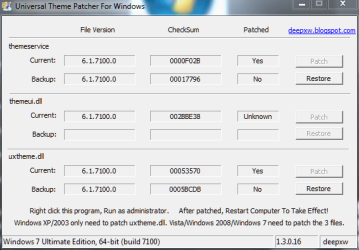
I think I have the same problem. Two months ago, I tried to install another of molinarisp's themes, using the method he outlines, and it wouldn't work. His method involves patching the uxtheme files with Windows 7 Power Tools.

However, when I would run the patcher, it could only patch two of the three files... one of them would show up as "unknown" in the list of files needing patching.

UxTheme Patcher.PNG

Could there be a missing or corrupt theme file in the 7100 x64 build?

I'll try Rafael's UxStyle. (Although, if a file is missing, that might not work either.)
 

My Computer

Computer Manufacturer/Model Number
me / #1
OS
windows 7 x64 Home Premium
CPU
intel q6600
Motherboard
gigbyte ga ep45 ud3l
Memory
g.skill 8gb ddr2 1066 (pc2 8500)
Graphics Card(s)
evga geforce 9800 gtx 512 mb
Screen Resolution
1680 x 1050
Hard Drives
wd caviar black 500 gb
wd caviar black 1tb
wd elements 1tb external hd x2
PSU
raidmax 500w
Case
smilodon (yes, t'was the pretty blue lites that got me!)
Back
Top