
Solved Path to the Network

markaz

New member
Power User
VIP
Local time
7:13 AM
Messages
168
Location
Peoria, AZ
In Win 7 one can either place an icon on the desktop to access the Network or click the Start Menu > Network. I've gotten into the habit of accessing frequently used programs by using the desktop context menu. It's just a habit that I'm now on "autopilot" when I want to launch frequently used apps. Here's a snip of my desktop context menu with the yellow highlighted items being the files I access frequently:
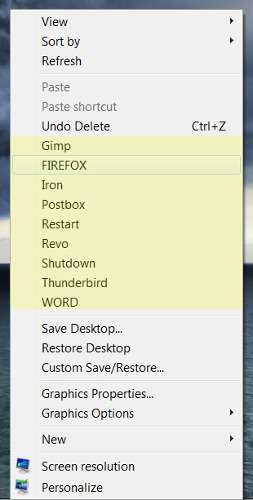
contextmenu.jpg


My question is this...What is the path to the Network so that I can tweak the registry and have Network available from the context menu? Can it even be launched from the context menu?

Thanks for any help.
 

My Computer My Computer

Computer type
PC/Desktop
Computer Manufacturer/Model Number
Custom
OS
Windows 7 Home Premium x64
CPU
AMD A6-6400K APU
Motherboard
Gigabyte F2A88XM-D3H
Memory
8.0GB DDR3-1600
Graphics Card(s)
Radeon Onboard Graphics
Sound Card
Realtek High Def
Monitor(s) Displays
Acer K242HQL
Screen Resolution
1920x1080
Hard Drives
Samsung 850 EVO SSD 250GB
PSU
Corsair 430W
Case
Silverstone PS-08
Cooling
Enermax fans (120mm-intake, 80mm-exhaust)
Keyboard
Logitech K360
Mouse
Logitech M305 Cordless Optical
Internet Speed
Download 60.19Mbps Upload 6.71Mbps
Antivirus
AVG
Browser
Iron Version 51.0.2700.0 (64-bit)
The path for Control Panel can found within this resolved tutorial:

http://www.sevenforums.com/general-discussion/66749-link-path-within-control-panel.html

Found a tutorial which allow you to add icons to the context menu if preferred:

http://www.sevenforums.com/tutorials/21878-context-menu-add-shortcuts-icons.html

EDIT: Managed to find the file path for the Network connections within Control Panel, if you click Network and Internet it will bring you to the Network part of Control Panel:

File Path: C:\Windows\System32\ncpa.cpl

P.S From some of the forums and tutorials I have found, Network Connections is the closest you can get to the Network section of the Control Panel.

Hope this helps,

Harry
 
Last edited:

My Computer My Computer

Computer type
Laptop
Hello Mark,

In addition, depending on what network you wanted:

http://www.sevenforums.com/tutorials/49210-network-folder-shortcut-create.html
%windir%\explorer.exe /e,::{F02C1A0D-BE21-4350-88B0-7367FC96EF3C}

http://www.sevenforums.com/tutorials/24545-network-connections-create-shortcut.html
rundll32.exe shell32.dll,Control_RunDLL ncpa.cpl

http://www.sevenforums.com/tutorials/136045-network-workgroup-shortcut-create.html
%windir%\explorer.exe /e,::{208D2C60-3AEA-1069-A2D7-08002B30309D}


Hope this helps, :)
Shawn
 

My Computer My Computer

Computer type
PC/Desktop
Computer Manufacturer/Model Number
Self built custom
OS
64-bit Windows 11 Pro for Workstations
CPU
Intel i7-8700K OC'd to 5 GHz
Motherboard
ASUS ROG Maximus XI Formula Z390
Memory
64 GB (4x16GB) G.SKILL TridentZ RGB DDR4 3600 MHz
Graphics Card(s)
ASUS ROG-STRIX-GTX1080TI-O11G-GAMING
Sound Card
Integrated
Monitor(s) Displays
2 x Samsung Odyssey G7 27"
Screen Resolution
2560x1440
Hard Drives
1TB Samsung 990 PRO M.2,
4TB Samsung 990 PRO PRO M.2,
TerraMaster F8 SSD Plus NAS
PSU
Seasonic Prime Titanium 850W
Case
Thermaltake Core P3
Cooling
Corsair Hydro H115i
Keyboard
Logitech wireless K800
Mouse
Logitech MX Master 4
Internet Speed
2 Gb/s Download and 100 Mb/s Upload
Antivirus
Malwarebyte Anti-Malware Premium
Browser
Google Chrome
Other Info
Logitech Z625 speaker system,
Logitech BRIO 4K Pro webcam,
HP Color LaserJet Pro MFP M477fdn,
APC SMART-UPS RT 1000 XL - SURT1000XLI,
Galaxy S23 Plus phone
Thank you both for the replies and I apologize for responding so late. It is the Network Folder that I would like to open when I click on Network from the context menu. However, when I add %windir%\explorer.exe /e,::{F02C1A0D-BE21-4350-88B0-7367FC96EF3C} as the ValueI get the followingwhen I click on Network
from the context menu:
capture098.jpg


If %windir% is a specific path I would have to know that as permissions is no problem.

Thanks so much for your assistance. -Mark
 

My Computer My Computer

Computer type
PC/Desktop
Computer Manufacturer/Model Number
Custom
OS
Windows 7 Home Premium x64
CPU
AMD A6-6400K APU
Motherboard
Gigabyte F2A88XM-D3H
Memory
8.0GB DDR3-1600
Graphics Card(s)
Radeon Onboard Graphics
Sound Card
Realtek High Def
Monitor(s) Displays
Acer K242HQL
Screen Resolution
1920x1080
Hard Drives
Samsung 850 EVO SSD 250GB
PSU
Corsair 430W
Case
Silverstone PS-08
Cooling
Enermax fans (120mm-intake, 80mm-exhaust)
Keyboard
Logitech K360
Mouse
Logitech M305 Cordless Optical
Internet Speed
Download 60.19Mbps Upload 6.71Mbps
Antivirus
AVG
Browser
Iron Version 51.0.2700.0 (64-bit)
Thank you both for the replies and I apologize for responding so late. It is the Network Folder that I would like to open when I click on Network from the context menu. However, when I add %windir%\explorer.exe /e,::{F02C1A0D-BE21-4350-88B0-7367FC96EF3C} as the ValueI get the followingwhen I click on Network
from the context menu:
capture098.jpg


If %windir% is a specific path I would have to know that as permissions is no problem.

Thanks so much for your assistance. -Mark

I believe you need to replace the %windir% with the drive whereby your operating system is located; mostly it is the C: drive.

Hope this helps,

Harry
 

My Computer My Computer

Computer type
Laptop
Thank you both for the replies and I apologize for responding so late. It is the Network Folder that I would like to open when I click on Network from the context menu. However, when I add %windir%\explorer.exe /e,::{F02C1A0D-BE21-4350-88B0-7367FC96EF3C} as the ValueI get the followingwhen I click on Network
from the context menu:
capture098.jpg


If %windir% is a specific path I would have to know that as permissions is no problem.

Thanks so much for your assistance. -Mark

I believe you need to replace the %windir% with the drive whereby your operating system is located; mostly it is the C: drive.

Hope this helps,

Harry
Thanks for the reply, Harry. It had to be more than that as C: is just the drive, not the Directory where Windows is located. But your response turned on the light, age is at work here, and %windir% is almost universally C:\Windows. Brink probably would have stated that in his response only he did not know the drive letter where Windows is located. On my computer %windir% could be G:\Windows. But you're correct....it is C:\.

Thank you Brink for bringing to my attention which Network I was looking for and providing the path. Just a massive brain lapse as to %windir%. So C:\Windows\explorer.exe /e,::{F02C1A0D-BE21-4350-88B0-7367FC96EF3C} was added as the Value and the Network Folder opens perfectly from the desktop context menu.

Thank you very much!!

Mark
 

My Computer My Computer

Computer type
PC/Desktop
Computer Manufacturer/Model Number
Custom
OS
Windows 7 Home Premium x64
CPU
AMD A6-6400K APU
Motherboard
Gigabyte F2A88XM-D3H
Memory
8.0GB DDR3-1600
Graphics Card(s)
Radeon Onboard Graphics
Sound Card
Realtek High Def
Monitor(s) Displays
Acer K242HQL
Screen Resolution
1920x1080
Hard Drives
Samsung 850 EVO SSD 250GB
PSU
Corsair 430W
Case
Silverstone PS-08
Cooling
Enermax fans (120mm-intake, 80mm-exhaust)
Keyboard
Logitech K360
Mouse
Logitech M305 Cordless Optical
Internet Speed
Download 60.19Mbps Upload 6.71Mbps
Antivirus
AVG
Browser
Iron Version 51.0.2700.0 (64-bit)
That's great news Mark. I'm glad we were able to help. :)
 

My Computer My Computer

Computer type
PC/Desktop
Computer Manufacturer/Model Number
Self built custom
OS
64-bit Windows 11 Pro for Workstations
CPU
Intel i7-8700K OC'd to 5 GHz
Motherboard
ASUS ROG Maximus XI Formula Z390
Memory
64 GB (4x16GB) G.SKILL TridentZ RGB DDR4 3600 MHz
Graphics Card(s)
ASUS ROG-STRIX-GTX1080TI-O11G-GAMING
Sound Card
Integrated
Monitor(s) Displays
2 x Samsung Odyssey G7 27"
Screen Resolution
2560x1440
Hard Drives
1TB Samsung 990 PRO M.2,
4TB Samsung 990 PRO PRO M.2,
TerraMaster F8 SSD Plus NAS
PSU
Seasonic Prime Titanium 850W
Case
Thermaltake Core P3
Cooling
Corsair Hydro H115i
Keyboard
Logitech wireless K800
Mouse
Logitech MX Master 4
Internet Speed
2 Gb/s Download and 100 Mb/s Upload
Antivirus
Malwarebyte Anti-Malware Premium
Browser
Google Chrome
Other Info
Logitech Z625 speaker system,
Logitech BRIO 4K Pro webcam,
HP Color LaserJet Pro MFP M477fdn,
APC SMART-UPS RT 1000 XL - SURT1000XLI,
Galaxy S23 Plus phone
I'm glad your problem has been solved, and glad we were able to help you (:
 

My Computer My Computer

Computer type
Laptop
On my computer %windir% could be G:\Windows. But you're correct....it is C:\.

I wonder why your %windir% setting points to the root of C:.
 

My Computer My Computer

OS
Windows 7 Ultimate x64
Back
Top