pathname

Herm61

New member
Member
VIP
Local time
5:27 AM
Messages
199
Location
virginia beach
What am I doing wrong?I can't find the boxes to display the pathname for a file.as shown below.


Select the "View" tab and check one or both of these boxes: "Display the full path in the address bar" and "Display the full path in the title bar."
 

My Computer

Computer Manufacturer/Model Number
HP Pavilion p7xt series)
OS
Windows 7 Home Premium (x64) Service Pack 1
CPU
3.30 gigahertz Intel Core i3-2120
Motherboard
PEGATRON CORPORATION 2AC2 2.00
Memory
128 kilobyte primary memory cache
Graphics Card(s)
enbedded Intel(R) HD Graphics
Sound Card
Realtek High Definition Audio
Monitor(s) Displays
DELL E193FP [Monitor] (19.1"vis
Hard Drives
6052 Megabytes Usable Installed Memory
PSU
?
Case
desktop
Cooling
?
You need to be in Classic Theme and go to Tools then Folder Options and then click the View tab and the boxes are there. It only works in Classic Theme though!
 

My Computer

Computer type
PC/Desktop
OS
Microsoft Windows 7 Home Premium 64-bit 7601 Multiprocessor Free Service Pack 1
CPU
Intel(R) Core(TM) i7-3770 CPU @ 3.40GHz
Motherboard
ASUSTeK COMPUTER INC. P8H77-M
Memory
8.00 GB
Graphics Card(s)
Intel(R) HD Graphics 4000
Sound Card
On Board
Monitor(s) Displays
Dell 24"
Screen Resolution
1920 x 1080
Hard Drives
(1) INTEL SSDSC2CT180A3 ATA Device (2) ST500DM002-1BD142 ATA Device (3) WDC WD3200AAKS-75L9A0 ATA Device (4) Generic- Compact Flash USB Device (5) Generic- MS/MS-Pro USB Device (6) Generic- SD/MMC USB Device (7) Generic- SM/xD-Picture USB

PSU
500w Corsair
Case
Cooler Master
Cooling
3 Fans
Keyboard
Logitech MK300
Mouse
Logitech WOM
Internet Speed
75Mb
Antivirus
Norton 360
Browser
Firefox, Opera, IE
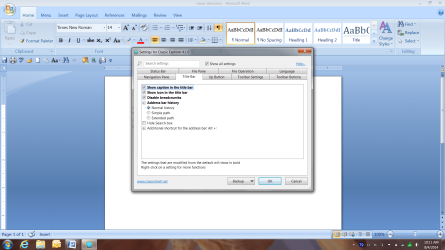
In addition to checking both options, if you want it to work under Aero, you need to install Classic Shell. Its Explorer component can fix the bug mitchell65 pointed to, removing the limitation to "classic style only".

ClassicShellTitleBar.png
 

My Computer

Computer type
Laptop
Computer Manufacturer/Model Number
Toshiba Sattelite A665-S6092
OS
Windows 7 Ultimate x64
CPU
Intel Core i7-740QM
Memory
8 GB DDR3
Graphics Card(s)
NVIDIA GeForce 330GT
Screen Resolution
1366x768
Hard Drives
Samsung 840 SSD 500GB
1TB USB3 external HD
Cooling
Coolermaster Notepal U3 notebook cooling pad
Internet Speed
3mbps ASDL
Antivirus
ClamWin 0.98.7
Browser
Opera 12.17 x86 (main), Firefox 38 (sec), IE11 (last resort)
menu

You need to be in Classic Theme and go to Tools then Folder Options and then click the View tab and the boxes are there. It only works in Classic Theme though!


Thanks!! I have downloaded the Ubit classic menu but don't know how to make it work! I read elsewhere that it is an add in.
 

My Computer

Computer Manufacturer/Model Number
HP Pavilion p7xt series)
OS
Windows 7 Home Premium (x64) Service Pack 1
CPU
3.30 gigahertz Intel Core i3-2120
Motherboard
PEGATRON CORPORATION 2AC2 2.00
Memory
128 kilobyte primary memory cache
Graphics Card(s)
enbedded Intel(R) HD Graphics
Sound Card
Realtek High Definition Audio
Monitor(s) Displays
DELL E193FP [Monitor] (19.1"vis
Hard Drives
6052 Megabytes Usable Installed Memory
PSU
?
Case
desktop
Cooling
?
Then use the link that Alejandro85 sent you in his post #3!
 

My Computer

Computer type
PC/Desktop
OS
Microsoft Windows 7 Home Premium 64-bit 7601 Multiprocessor Free Service Pack 1
CPU
Intel(R) Core(TM) i7-3770 CPU @ 3.40GHz
Motherboard
ASUSTeK COMPUTER INC. P8H77-M
Memory
8.00 GB
Graphics Card(s)
Intel(R) HD Graphics 4000
Sound Card
On Board
Monitor(s) Displays
Dell 24"
Screen Resolution
1920 x 1080
Hard Drives
(1) INTEL SSDSC2CT180A3 ATA Device (2) ST500DM002-1BD142 ATA Device (3) WDC WD3200AAKS-75L9A0 ATA Device (4) Generic- Compact Flash USB Device (5) Generic- MS/MS-Pro USB Device (6) Generic- SD/MMC USB Device (7) Generic- SM/xD-Picture USB
PSU
500w Corsair
Case
Cooler Master
Cooling
3 Fans
Keyboard
Logitech MK300
Mouse
Logitech WOM
Internet Speed
75Mb
Antivirus
Norton 360
Browser
Firefox, Opera, IE
You need to be in Classic Theme and go to Tools then Folder Options and then click the View tab and the boxes are there. It only works in Classic Theme though!


Thanks!! I have downloaded the Ubit classic menu but don't know how to make it work!I read elsewhere that it is an add in.

Why did you download UbitMenu instead of the recommended "Classic Shell"? I believe UBitMenu is for Office 2007, 2010 and 2013, not Windows OS.

See the following link for more information;

UBit Schweiz: UBitMenu International Languages

HTH
 

My Computer

Computer type
PC/Desktop
Computer Manufacturer/Model Number
Custom Built
OS
Windows 7 Professional x64
CPU
Intel i5 quad processor
Motherboard
DP67BG
Memory
16 GB
Graphics Card(s)
Radeon HD 5770
Sound Card
Realtek High Definition Audio
Monitor(s) Displays
Samsung SyncMaster
Screen Resolution
1920X1080
Hard Drives
WD 2TB (SATA Internal)
WD 1TB (USB External)
PSU
Corsair GS800
Case
Tower (Generic)
Cooling
3 Internal Fans
Keyboard
MS Wireless
Mouse
MS Optical Wired
Internet Speed
54 mbps
Antivirus
Emsisoft
Browser
IE-Version 9, Palemoon-Version 24.2.0
ubit classic menu

to answer you question:

I downloaded ubit because it was the only free classic menu in my Google search.

I use word 2007!
 

My Computer

Computer Manufacturer/Model Number
HP Pavilion p7xt series)
OS
Windows 7 Home Premium (x64) Service Pack 1
CPU
3.30 gigahertz Intel Core i3-2120
Motherboard
PEGATRON CORPORATION 2AC2 2.00
Memory
128 kilobyte primary memory cache
Graphics Card(s)
enbedded Intel(R) HD Graphics
Sound Card
Realtek High Definition Audio
Monitor(s) Displays
DELL E193FP [Monitor] (19.1"vis
Hard Drives
6052 Megabytes Usable Installed Memory
PSU
?
Case
desktop
Cooling
?
to answer you question:

I downloaded ubit because it was the only free classic menu in my Google search.

I use word 2007!

The link for Classic Shell was in the post from Alejandro85; "you need to install Classic Shell." If you click the words Classic Shell (light blue color) you will be taken to the download site. There was no need to do a Google search.

Good luck, I hope you get things sorted out.
 

My Computer

Computer type
PC/Desktop
Computer Manufacturer/Model Number
Custom Built
OS
Windows 7 Professional x64
CPU
Intel i5 quad processor
Motherboard
DP67BG
Memory
16 GB
Graphics Card(s)
Radeon HD 5770
Sound Card
Realtek High Definition Audio
Monitor(s) Displays
Samsung SyncMaster
Screen Resolution
1920X1080
Hard Drives
WD 2TB (SATA Internal)
WD 1TB (USB External)
PSU
Corsair GS800
Case
Tower (Generic)
Cooling
3 Internal Fans
Keyboard
MS Wireless
Mouse
MS Optical Wired
Internet Speed
54 mbps
Antivirus
Emsisoft
Browser
IE-Version 9, Palemoon-Version 24.2.0
path

I downloaded the ie classic shell but can't find the boxes (options) Alejandro85 is showing. Where are they??
 

My Computer

Computer Manufacturer/Model Number
HP Pavilion p7xt series)
OS
Windows 7 Home Premium (x64) Service Pack 1
CPU
3.30 gigahertz Intel Core i3-2120
Motherboard
PEGATRON CORPORATION 2AC2 2.00
Memory
128 kilobyte primary memory cache
Graphics Card(s)
enbedded Intel(R) HD Graphics
Sound Card
Realtek High Definition Audio
Monitor(s) Displays
DELL E193FP [Monitor] (19.1"vis
Hard Drives
6052 Megabytes Usable Installed Memory
PSU
?
Case
desktop
Cooling
?
I downloaded the ie classic shell but can't find the boxes (options) Alejandro85 is showing. Where are they??

It's not in the IE part, it's the "classic explorer settings", on install it will create shortcuts on the start menu. There tick "show all settings" in the upper part of the window, then select the "title bar" tab, from there camy my screenshot. Close and open Windows explorer for the changes to take effect.
 

My Computer

Computer type
Laptop
Computer Manufacturer/Model Number
Toshiba Sattelite A665-S6092
OS
Windows 7 Ultimate x64
CPU
Intel Core i7-740QM
Memory
8 GB DDR3
Graphics Card(s)
NVIDIA GeForce 330GT
Screen Resolution
1366x768
Hard Drives
Samsung 840 SSD 500GB
1TB USB3 external HD
Cooling
Coolermaster Notepal U3 notebook cooling pad
Internet Speed
3mbps ASDL
Antivirus
ClamWin 0.98.7
Browser
Opera 12.17 x86 (main), Firefox 38 (sec), IE11 (last resort)
Do I need both classic shell and classic menu?? I've checked the boxes you show and restarted but still no pathnames
 

My Computer

Computer Manufacturer/Model Number
HP Pavilion p7xt series)
OS
Windows 7 Home Premium (x64) Service Pack 1
CPU
3.30 gigahertz Intel Core i3-2120
Motherboard
PEGATRON CORPORATION 2AC2 2.00
Memory
128 kilobyte primary memory cache
Graphics Card(s)
enbedded Intel(R) HD Graphics
Sound Card
Realtek High Definition Audio
Monitor(s) Displays
DELL E193FP [Monitor] (19.1"vis
Hard Drives
6052 Megabytes Usable Installed Memory
PSU
?
Case
desktop
Cooling
?
Classic Shell includes BOTH!!!!!! Are you sure you've looked at the screenshots and read what we told you?

Please post a screenshot of what do you want.
 

My Computer

Computer type
Laptop
Computer Manufacturer/Model Number
Toshiba Sattelite A665-S6092
OS
Windows 7 Ultimate x64
CPU
Intel Core i7-740QM
Memory
8 GB DDR3
Graphics Card(s)
NVIDIA GeForce 330GT
Screen Resolution
1366x768
Hard Drives
Samsung 840 SSD 500GB
1TB USB3 external HD
Cooling
Coolermaster Notepal U3 notebook cooling pad
Internet Speed
3mbps ASDL
Antivirus
ClamWin 0.98.7
Browser
Opera 12.17 x86 (main), Firefox 38 (sec), IE11 (last resort)
classic shell settings.png

here is a screecbnsot of what I see
 

My Computer

Computer Manufacturer/Model Number
HP Pavilion p7xt series)
OS
Windows 7 Home Premium (x64) Service Pack 1
CPU
3.30 gigahertz Intel Core i3-2120
Motherboard
PEGATRON CORPORATION 2AC2 2.00
Memory
128 kilobyte primary memory cache
Graphics Card(s)
enbedded Intel(R) HD Graphics
Sound Card
Realtek High Definition Audio
Monitor(s) Displays
DELL E193FP [Monitor] (19.1"vis
Hard Drives
6052 Megabytes Usable Installed Memory
PSU
?
Case
desktop
Cooling
?
Please please look again at the screenshot that Alejandro85 posted and you will see where you have gone wrong!

EDIT Apologies Please forget this post
 
Last edited:

My Computer

Computer type
PC/Desktop
OS
Microsoft Windows 7 Home Premium 64-bit 7601 Multiprocessor Free Service Pack 1
CPU
Intel(R) Core(TM) i7-3770 CPU @ 3.40GHz
Motherboard
ASUSTeK COMPUTER INC. P8H77-M
Memory
8.00 GB
Graphics Card(s)
Intel(R) HD Graphics 4000
Sound Card
On Board
Monitor(s) Displays
Dell 24"
Screen Resolution
1920 x 1080
Hard Drives
(1) INTEL SSDSC2CT180A3 ATA Device (2) ST500DM002-1BD142 ATA Device (3) WDC WD3200AAKS-75L9A0 ATA Device (4) Generic- Compact Flash USB Device (5) Generic- MS/MS-Pro USB Device (6) Generic- SD/MMC USB Device (7) Generic- SM/xD-Picture USB
PSU
500w Corsair
Case
Cooler Master
Cooling
3 Fans
Keyboard
Logitech MK300
Mouse
Logitech WOM
Internet Speed
75Mb
Antivirus
Norton 360
Browser
Firefox, Opera, IE
Back
Top