Solved PC automatically wakes from sleep - concerns

metroid79

New member
Local time
12:43 PM
Messages
21
My Windows 7 computer automatically wakes up from sleep, several minutes after putting it to sleep

This has never happened before, and just started a couple days ago

I did a check for lastwake according to an article I found and it says my intel ethernet connection did it. I am not sure if that's correct or not.

I went to the ethernet thing in the device manager and did not see an option to disable waking for that, contrary to some articles I saw.

Any tips or advice on what else I can do to track down the true cause of this issue? Tests or things to check? Settings to change?

I did a windows update the other day but can't imagine that would be the cause.
I also installed Jungle Disk Workgroup the other day but can't recall if the waking issue started before or after that installation. Also I exited jungle disk and disconnected the drives and stopped the processes for it, so theoretically if Jungle Disk were the issue that should have stopped it.

Also of concern is: Why would this suddenly begin happening when it has never happened previously? I just want to make sure nothing is corrupted or hacked.

Regarding the ethernet connection waking my PC, is it possible that my router wifi was hacked and is being controlled by someone?

Thanks for the help
 

My Computer

Computer type
PC/Desktop
Computer Manufacturer/Model Number
HP HPE-170t built to order // HP Elite 8200 Workstation
OS
Windows 7 Home Premium x64 // Windows 7 Pro x64
CPU
i7 2.8 GHz // i7 3.4GHZ
Memory
8 gb // 16 gb
Graphics Card(s)
geforce gtx 550 ti // unknown
Hard Drives
WD Black 2 TB & Seagate 1TB sshd // 256 gb SSD & WD Black 2 TB
Antivirus
kasperky internet security
Browser
Chrome, FF, IE
My Windows 7 computer automatically wakes up from sleep, several minutes after putting it to sleep

This has never happened before, and just started a couple days ago

I did a check for lastwake according to an article I found and it says my intel ethernet connection did it. I am not sure if that's correct or not.

I went to the ethernet thing in the device manager and did not see an option to disable waking for that, contrary to some articles I saw.

Any tips or advice on what else I can do to track down the true cause of this issue? Tests or things to check? Settings to change?

I did a windows update the other day but can't imagine that would be the cause.
I also installed Jungle Disk Workgroup the other day but can't recall if the waking issue started before or after that installation. Also I exited jungle disk and disconnected the drives and stopped the processes for it, so theoretically if Jungle Disk were the issue that should have stopped it.

Also of concern is: Why would this suddenly begin happening when it has never happened previously? I just want to make sure nothing is corrupted or hacked.

Regarding the ethernet connection waking my PC, is it possible that my router wifi was hacked and is being controlled by someone?

Thanks for the help
Did you try unplugging your Ethernet cable and observed if the thing was still happening or not.
 

My Computer

OS
64
It seems that a program running on the background (like a antivirus) is using the Ethernet.
Open Control Panel\All Control Panel Items\Power Options\Edit Plan Settings - Change advanced settings and check every item.
If you don't find any suspicious, run task manager to see what program or service is running.
 

My Computers

System One System Two

  • Computer type
    PC/Desktop
    Computer Manufacturer/Model Number
    custom build
    OS
    Windows 7 HP 64
    CPU
    i5 6600K - 800MHz to 4200MHz
    Motherboard
    GA-Z170-HD3P
    Memory
    4+4G GSkill DDR4 3000
    Graphics Card(s)
    IG - Intel 530
    Monitor(s) Displays
    Samsung 226BW
    Screen Resolution
    1680x1050
    Hard Drives
    (1) -1 SM951 – 128GB M.2 AHCI PCIe SSD drive for Windows 7 and Lubuntu
    (2) -1 WD SATA 3 - 1T for Data
    (3) -1 WD SATA 3 - 1T for backup
    PSU
    Thermaltake 450W TR2 gold
    Keyboard
    Old and good Chicony mechanical keyboard
    Mouse
    Logitech mX performance - 9 buttons (had to disable some)
    Internet Speed
    500Mb/s
    Browser
    Firefox 64
    Other Info
    TinyWall firewall
  • Computer type
    Laptop
    System Manufacturer/Model Number
    Asus Q550LF
    OS
    Windows 7 Pro
    CPU
    i7-4500U 800MHz to 3.0GHz
    Motherboard
    Asus Q550LF
    Memory
    (4+4)G DDR3 1600
    Graphics Card(s)
    IG intel 4400 + NVIDIA GeForce GT 745M
    Sound Card
    Realtek
    Monitor(s) Displays
    LG Display LP156WF4-SPH1
    Screen Resolution
    1920 x 1080
    Hard Drives
    BX500 120G SSD for Windows and programs +
    1T HDD for data
    Internet Speed
    500 Mb/s
    Browser
    Firefox
    Other Info
    TinyWall firewall
Go into the bios, look for "WAKE ON LAN" setting. If it's enabled, disable it. If it's not there, go into windows, go to your power settings, and see if it's enabled there, change the setting.
 

My Computer

Computer type
PC/Desktop
Computer Manufacturer/Model Number
Custom built
OS
windows 7
CPU
intel core i3 4150 @ 3.5GHZ
Motherboard
Gigabyte H81M-S2PV
Memory
16GB
Graphics Card(s)
nvidia Geforce GT 730
Hard Drives
1TB WD SATA Internal, 500GB My Book, & 2TB Passport
Antivirus
AVG, AVAST, Microsoft Security Essentials
Browser
Internet Explorer, Firefox, Google Chrome
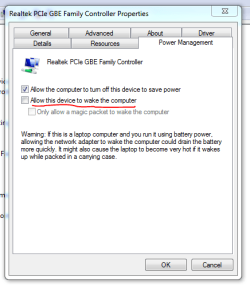
Or in a more graphical explanation, open device manager and make sure the underlined setting is un-ticked:

Capture94.PNG

Note that you may not have a Realtek LAN device. It may be called something else. Locate your Ethernet device in Device Manager and open "Properties" That will get you to a similar screen to what I've shown here.
 

My Computer

Computer type
PC/Desktop
Computer Manufacturer/Model Number
Mellon Labs (custom build)
OS
Win 7 Pro x64/Win 10 Pro x64 dual boot
CPU
AMD FX 8350 Vishera @ 4200
Motherboard
ASUS M5A97 R2.0
Memory
16 GB Mushkin Blackline DDR3-2400 @ 1866 (9-10-10-10-31)
Graphics Card(s)
XFX Radeon R9 280 Double D Black Edition
Sound Card
Realtek HD Audio on MB. Sounds great.
Monitor(s) Displays
Acer 24", Acer 22"
Screen Resolution
3840 x 1080
Hard Drives
1 x Mushkin Chronos 120 GB SSD (Win 10)
1 x Samsung 850 EVO 250 GB SSD (Win 7)
1 x WD 1TB SATA Blue
1 x WD 1TB SATA Green
PSU
Corsair TX-750
Case
CoolerMaster HAF 912+
Cooling
Coolermaster Seidon 240M Liquid AIO. 6 case fans
Keyboard
Logitech G710+
Mouse
Logitech G500s
Internet Speed
Much better since I got fiber, but still way overpriced.
Antivirus
MSE, Malware Bytes for scanning
Browser
Firefox
Other Info
Corsair VOID USB headphones.

A Mellon Labs X-1 - LCD Smartie driven system status display.

Brought to you by the letter E
Changed power options: Disabled 'allow wake timers'
That didn't fix the issue

I just went to advanced power options and found the ethernet device
The power management tab did not look like the one illustrated above
It had a different interface regarding the wake stuff, which was a bit confusing.
However, I did the best I could and unchecked a few items which I thought might be the issue.
I will try now to sleep the computer for the night as I am going to bed
Will report back tomorrow.

Thanks
 

My Computer

Computer type
PC/Desktop
Computer Manufacturer/Model Number
HP HPE-170t built to order // HP Elite 8200 Workstation
OS
Windows 7 Home Premium x64 // Windows 7 Pro x64
CPU
i7 2.8 GHz // i7 3.4GHZ
Memory
8 gb // 16 gb
Graphics Card(s)
geforce gtx 550 ti // unknown
Hard Drives
WD Black 2 TB & Seagate 1TB sshd // 256 gb SSD & WD Black 2 TB
Antivirus
kasperky internet security
Browser
Chrome, FF, IE
I just went to advanced power options and found the ethernet device
The power management tab did not look like the one illustrated above
It had a different interface regarding the wake stuff, which was a bit confusing.
However, I did the best I could and unchecked a few items which I thought might be the issue.

At this point, it looks like the steps above have fixed the problem.
I still wish I knew why this suddenly started happening a few days ago when I've never had the issue previously.

Thanks to everyone for your help!
 

My Computer

Computer type
PC/Desktop
Computer Manufacturer/Model Number
HP HPE-170t built to order // HP Elite 8200 Workstation
OS
Windows 7 Home Premium x64 // Windows 7 Pro x64
CPU
i7 2.8 GHz // i7 3.4GHZ
Memory
8 gb // 16 gb
Graphics Card(s)
geforce gtx 550 ti // unknown
Hard Drives
WD Black 2 TB & Seagate 1TB sshd // 256 gb SSD & WD Black 2 TB
Antivirus
kasperky internet security
Browser
Chrome, FF, IE
Back
Top