Solved PC boots only at black screen most of time

PvPTime

New member
Local time
6:37 PM
Messages
8
1. Computer boots but dosn't show booting. Only black screen and when computer finish loading up desktop shounds works but doesn't show any video.
2. Time from time 1 or 2 times get very shot flash of screen but keeps booting at black screen.
3. From 3 to 6 times most of time computer boots up properly showing everything fine.
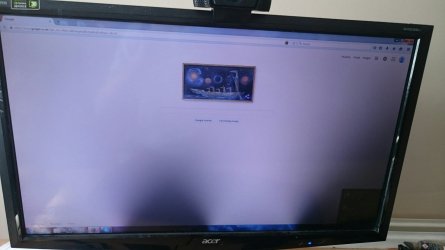
4. Also getting other problem when computer boots up properly. Gives me 2 black marks at middle of screen. (Picture 1 attached) If marks are, normally I have reboot computer once more and they disapear. These marks also shows up during booting up of windows.

5. Having this problem for around 2 weeks but today getting worse. Once computer when was booting up showed me error. Reboot and Select proper Boot device or....
-This happen to me after opening and trying to check components connected to mother board- (Picture 2 attached)

6. Also today for first time when playing video game computer freez up and made me to reboot computer but this doesn't explain booting up problem.

Note: Like I said, most of time computer boots up but shows only black screen. Must keep rebooting until computer boots up properly.


Need help! :/ This getting really bad.
 

Attachments
  • DSC_0018.jpg
    DSC_0018.jpg
    121.6 KB · Views: 1
  • DSC_0019.jpg
    DSC_0019.jpg
    192.9 KB · Views: 0

My Computer My Computer

At a glance

Windows 7 Home Premium 64bitIntel(R) Core(TM) i7-2700K CPU @ 3.50GHz8GBGeForce GTX 560
Computer type
PC/Desktop
Computer Manufacturer/Model Number
Asus
OS
Windows 7 Home Premium 64bit
CPU
Intel(R) Core(TM) i7-2700K CPU @ 3.50GHz
Motherboard
Maximus V Gene
Memory
8GB
Graphics Card(s)
GeForce GTX 560
Antivirus
AVG 2015
It looks like you have a few things going on. They are not necessarily related to each other.

1, 2, 3- No BIOS boot sequence on display: Go into the BIOS Settings > BOOT Tab. There should be settings there for "Quick Boot", and "Full Screen Logo", or similar wording. Set Quick boot to Disabled, Set Full Screen Logo to Enabled. Go to the EXIT Tab > Save Changes and Exit.

4- Black Marks. If you are talking about the two mound shaped dark shadows on the bottom of the display that is most likely due to some of the LED backlights inside the monitor being burned out. If so, this is a failed monitor problem that would require repair (if possible) or replacement.
This problem would have nothing to do with your other problems.

5- No boot device. This is normally due to your hard disk drive going offline. This could be due to a few things.
First, shut down and unplug the PC. Press the power button for about 30 seconds to discharge all power from the motherboard. Be sure to touch the metal case to discharge any static electricity on you before working inside the case!
If the inside of your case is very dusty, blow it out with a can of compressed air.
Now check all of your connections, particularly the cables going from the hard drive to the motherboard. Be sure these are pushed all the way in. Carefully check any PCI cards to be sure they are fully connected in their slots.
Test the PC again to see if this was all it was.

6- Video Freeze while gaming. This could be many things also, some related, some not. This should be tackled after dealing with boot issues.

The one thing that could tie in to all these problems is a failing power supply.
What size is your supply?
How old is it?
Brand and model #?

And as always, listing all of your PCs specs is important so we can have a picture of what we are dealing with.
 

My Computer My Computer

At a glance

Windows 7 64 Bit Home Premium SP1i7-3820GSkill F3-14900CL9Q - 16GBEVGA GeForce GTX660 - Driver 352.86
Computer type
PC/Desktop
Computer Manufacturer/Model Number
Home Built - Jan 2013
OS
Windows 7 64 Bit Home Premium SP1
CPU
i7-3820
Motherboard
Asus P9X79-PRO - Bios 4608
Memory
GSkill F3-14900CL9Q - 16GB
Graphics Card(s)
EVGA GeForce GTX660 - Driver 352.86
Sound Card
On board Realtek ALC898
Monitor(s) Displays
Acer S271HL
Screen Resolution
1920 x 1080
Hard Drives
#1- Samsung 840 Pro Series
#2- Western Digital WD1002FAEX Sata3 Black
#3- Western Digital WD1002FAEX Sata3 Black
PSU
Corsair CMPSU-850TX-V2 - 850 watt (by Seasonic)
Case
Corsair Obsidian 550D
Cooling
Standard 3 120mm case fans, Cooler Master Hyper 212 EVO
Keyboard
MS KC-0405
Mouse
Intellimouse 5-button
Internet Speed
56 Mbits/Sec (on a good day)
Antivirus
Avast & Malwarebytes
Browser
Firefox
Other Info
Asus DVD - DRW-24B1ST 24X
Done some testing today.
1. I swap monitor and other monitor was working fine.
2. When I connect my monitor into other PC, I had black screen but with mouse cursor (on my computer doesn't show mouse cursor). Also when I turn my monitor on other PC, I could see logo of my monitor. After disconnected my monitor and plugged back to my computer.
3. Other monitor works fine on my PC just had reboot to get right resolution.

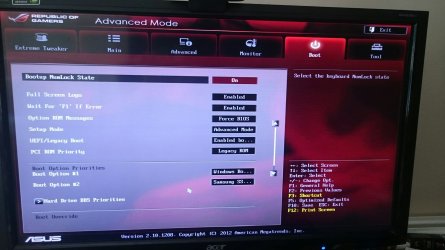
I attached screen shot of my BIOS, everything looked fine. Didn't found 'Quick Boot' or something similar.


Power Supply:
750w
PC Age: Around 3 years.
Brand and model: Asus (I build it from parts)


So far had other problem right now. My mouse keeps disconnecting, especially when I was looking at 'Davice Manager' had many times unplug and pug back to USB to make my mouse work again and again...
After a while, my mouse stopped disconnecting and so far no longer getting mouse disconnects.
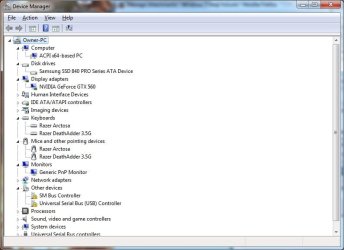
Attached screen shot of 'Device Manager'.


Note: When my computer gives black screen, I don't see logo after turning on monitor but I can see for very short time my desktop and monitor stays black.
In addition, after turning computer on for enough times, I start getting video on monitor but for first time I had these 2 dark shadows. After seeing them, I had 1 more time restart my computer and worked fine.
After turning on, made restart once more but also all worked fine except had mouse problem.
 

Attachments

  • DSC_0020.jpg
    DSC_0020.jpg
    181.3 KB · Views: 0
  • Device Manager.jpg
    Device Manager.jpg
    45.6 KB · Views: 0
Last edited:

My Computer My Computer

At a glance

Windows 7 Home Premium 64bitIntel(R) Core(TM) i7-2700K CPU @ 3.50GHz8GBGeForce GTX 560
Computer type
PC/Desktop
Computer Manufacturer/Model Number
Asus
OS
Windows 7 Home Premium 64bit
CPU
Intel(R) Core(TM) i7-2700K CPU @ 3.50GHz
Motherboard
Maximus V Gene
Memory
8GB
Graphics Card(s)
GeForce GTX 560
Antivirus
AVG 2015
Monitor 1 = Your monitor (problem monitor)
Monitor 2 = Swapped Monitor

If you connected Monitor 2 to your PC and it operates normally, and you connected Monitor 1 to another PC and it showed most of the same problems there, then you are dealing with a bad monitor.
You can attempt a repair, but it is sometimes cheaper to just buy a new one.

In your Device Manager you see the 2 items under "Other Devices"? Those are both for a USB controller. I can't see the rest of the list, but it looks like you have some USB drivers installed. I'll bet that the missing drivers are for your USB 3 controller.
Do you recall installing a USB 3 driver?
 

My Computer My Computer

At a glance

Windows 7 64 Bit Home Premium SP1i7-3820GSkill F3-14900CL9Q - 16GBEVGA GeForce GTX660 - Driver 352.86
Computer type
PC/Desktop
Computer Manufacturer/Model Number
Home Built - Jan 2013
OS
Windows 7 64 Bit Home Premium SP1
CPU
i7-3820
Motherboard
Asus P9X79-PRO - Bios 4608
Memory
GSkill F3-14900CL9Q - 16GB
Graphics Card(s)
EVGA GeForce GTX660 - Driver 352.86
Sound Card
On board Realtek ALC898
Monitor(s) Displays
Acer S271HL
Screen Resolution
1920 x 1080
Hard Drives
#1- Samsung 840 Pro Series
#2- Western Digital WD1002FAEX Sata3 Black
#3- Western Digital WD1002FAEX Sata3 Black
PSU
Corsair CMPSU-850TX-V2 - 850 watt (by Seasonic)
Case
Corsair Obsidian 550D
Cooling
Standard 3 120mm case fans, Cooler Master Hyper 212 EVO
Keyboard
MS KC-0405
Mouse
Intellimouse 5-button
Internet Speed
56 Mbits/Sec (on a good day)
Antivirus
Avast & Malwarebytes
Browser
Firefox
Other Info
Asus DVD - DRW-24B1ST 24X
Now I am sure it's monitor fault. So tomorrow going buy new monitor.
Getting mause problems because of draivers or inside motherboard connection.
Anyway thank you for all help was useful.
 

My Computer My Computer

At a glance

Windows 7 Home Premium 64bitIntel(R) Core(TM) i7-2700K CPU @ 3.50GHz8GBGeForce GTX 560
Computer type
PC/Desktop
Computer Manufacturer/Model Number
Asus
OS
Windows 7 Home Premium 64bit
CPU
Intel(R) Core(TM) i7-2700K CPU @ 3.50GHz
Motherboard
Maximus V Gene
Memory
8GB
Graphics Card(s)
GeForce GTX 560
Antivirus
AVG 2015
Back
Top