PC cleaner

helpful55

New member
Member
VIP
Local time
7:12 PM
Messages
74
Location
Aurora, Oregon, US
What are we using nowadays to do temp files etc cleanup? I had used ccleaner for years before they went nuts with installing junk and other shenanigans. I have been using their slim version for a year or so, but of course it is not really standalone, it connects to their servers and the latest is that it would not move forward without shutting off my browser. No, just clean what you can with my browser active. It is not the most important thing to be perfect. What can I use that will leave me and my pc alone otherwise? Thanks. W7 forever.
 

My Computer

Computer type
PC/Desktop
Computer Manufacturer/Model Number
Custom
OS
W7 Pro 64
CPU
Ryzen 1500X
Motherboard
Gigabyte AX370 - Gaming
Memory
G Skill 2400 - 8GB
Graphics Card(s)
HD 6450
Sound Card
Realtek onboard
Monitor(s) Displays
Dell 19 square, Dell 17 square, Dell 15 square, Element 24
Hard Drives
Samsung 970 nvme 120 GB, WD 1TB 7200
Keyboard
MS ERGO 4000 mostly
Mouse
Dell standard optical
Internet Speed
15 Mbps
Antivirus
AVG, MS firewall
Browser
firefox mostly
I execute a few programs at boot with admin privileges with Task Scheduler:


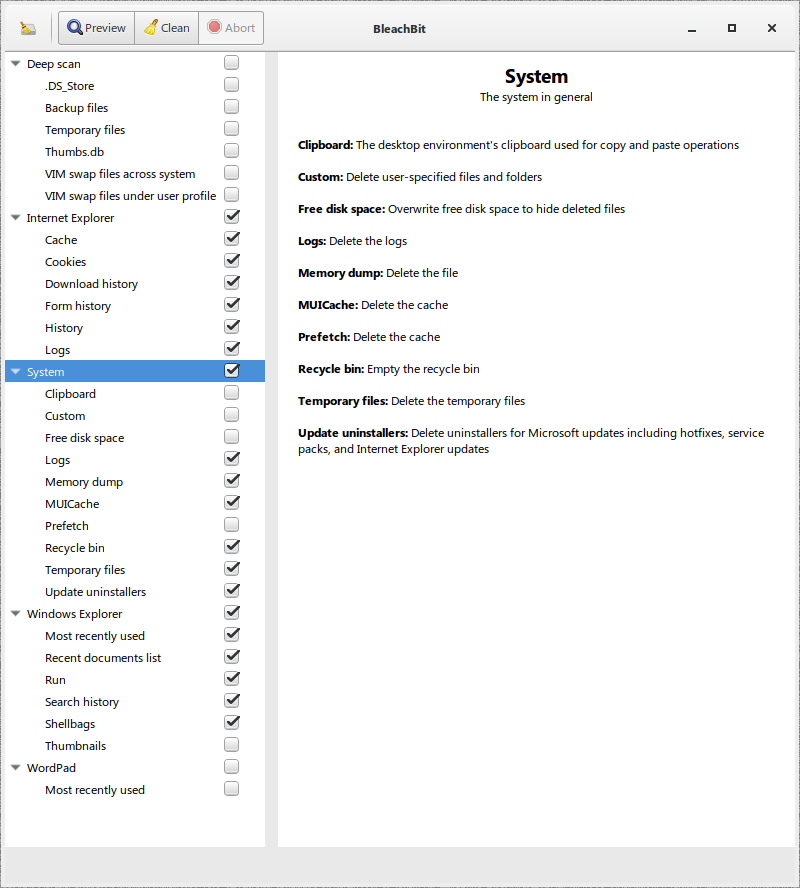
1. BleachBit (Clean Your System and Free Disk Space | BleachBit)

- Automatic execution:
Code:
C:\BleachBit\bleachbit_console.exe -c system.logs system.memory_dump system.muicache system.recycle_bin system.tmp system.updates internet_explorer.cache internet_explorer.cookies internet_explorer.downloads internet_explorer.forms internet_explorer.history internet_explorer.logs windows_explorer.mru windows_explorer.recent_documents windows_explorer.run windows_explorer.search_history windows_explorer.shellbags

*Notes: You can see all possible options with the command: bleachbit_console.exe --list

- Manual Execution:
QkFXVjO.png


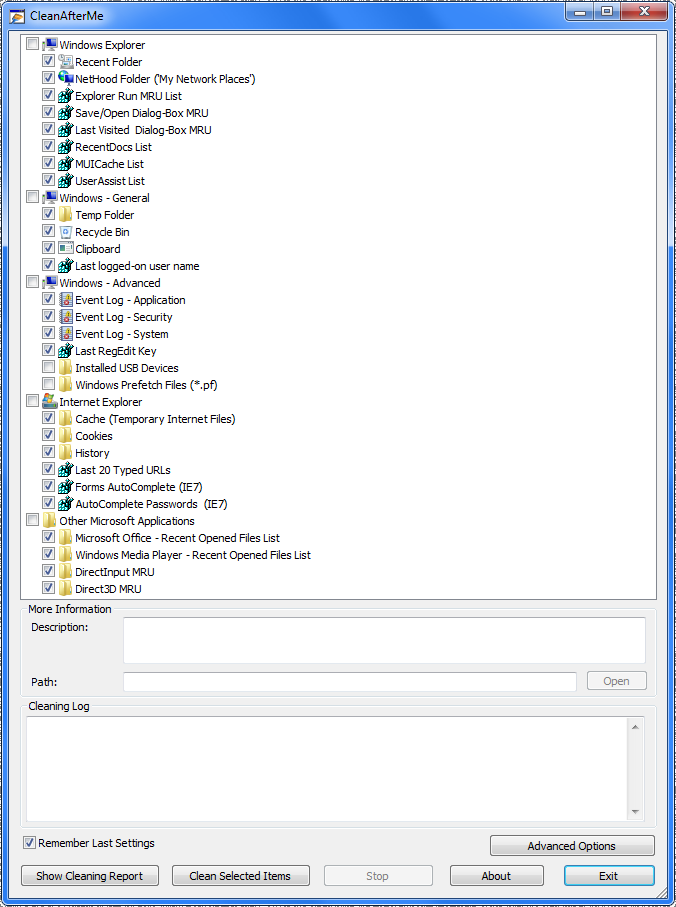
2. CleanAfterMe (CleanAfterMe - Clean Registry entries and files in your system)

- Automatic Execution:
Code:
C:\cleanafterme\CleanAfterMe.exe /clean ""

*Notes: You have to run the gui to select your options, mark "Remember Last Setings" in order to the command line to work.

- Manual Execution:
IuBxfbj.png


3. I also clean all of the Event Logs with a bat file:

Code:

 [USER=353699]echo[/USER] off
FOR /F "tokens=1,2*" %%V IN ('bcdedit') DO SET adminTest=%%V
IF (%adminTest%)==(Access) goto noAdmin
for /F "tokens=*" %%G in ('wevtutil.exe el') DO (call :do_clear "%%G")
echo.
echo Event Logs have been cleared!
goto theEnd
:do_clear
echo clearing %1
wevtutil.exe cl %1
goto :eof
:noAdmin
echo You must run this script as an Administrator!
echo.
:theEnd


4. Cleanmgr:

I also execute 'cleanmgr' once a month (because is somewhat slow), to clean the windows updates leftovers.
Go to the following link to learn how to configure cleanmgr for automatic clean command line usage:

Disk Cleanup Cleanmgr Command Line Arguments in Windows 10


Some of the things above are redundant, but i don't care. Better safe than sorry.
 

My Computers

System One System Two

  • Computer type
    PC/Desktop
    OS
    Windows 7 Ultimate 64-bit SP1
    CPU
    Intel Core 2 Quad Q6700 @ 2.66GHz
    Motherboard
    ECS MCP73PVT-SM
    Memory
    4.00GB Single-Channel DDR2 @ 399MHz
    Graphics Card(s)
    2047MB NVIDIA GeForce GT 710 (ASUStek Computer Inc)
    Sound Card
    Realtek High Definition Audio
    Monitor(s) Displays
    HP 21kd
    Screen Resolution
    1920x1080@60Hz
    Hard Drives
    149GB Western Digital WDC WD1600AABS-61PRA0 ATA Device (SATA )
    4000GB Seagate ST4000DM004-2U9104 ATA Device (SATA )
    931GB TOSHIBA External USB 3.0 USB Device (USB (SATA) )
    Antivirus
    None. Don't Need it.
    Browser
    Librewolf Portable
    Other Info
    It's a very old system.
  • Computer type
    PC/Desktop
Ok, great. I will try some or all of those. Thanks.
 

My Computer

Computer type
PC/Desktop
Computer Manufacturer/Model Number
Custom
OS
W7 Pro 64
CPU
Ryzen 1500X
Motherboard
Gigabyte AX370 - Gaming
Memory
G Skill 2400 - 8GB
Graphics Card(s)
HD 6450
Sound Card
Realtek onboard
Monitor(s) Displays
Dell 19 square, Dell 17 square, Dell 15 square, Element 24
Hard Drives
Samsung 970 nvme 120 GB, WD 1TB 7200
Keyboard
MS ERGO 4000 mostly
Mouse
Dell standard optical
Internet Speed
15 Mbps
Antivirus
AVG, MS firewall
Browser
firefox mostly
Temp File Cleaner By OldTimer 3.1.9.0 has been around for a long time and is what I use for removing temp files in Windows 7.

Restart the computer first so there are no temp files in use, then load and run the tool.
 

My Computer

Computer type
PC/Desktop
Computer Manufacturer/Model Number
Dell OptiPlex 9020
OS
Windows 7 Professional SP1 64-bit
CPU
Intel Core i7-4790 3.60 GHz
Memory
32 GB DDR3-1600 MHz
Graphics Card(s)
Integrated Intel HD Graphics 4600
Monitor(s) Displays
Viewsonic 32" LCD
Hard Drives
Kingston SATA 3 240 GB SSD
Internet Speed
Spectrum Internet 1000 Mbps
Back
Top