
PC-Doctor

Done the Elevated Command Prompt and it didn't find anything wrong. I did have a black screen tho that progrested thru a scan. When my computer would restart there would be a window that wanted me to log on and click OK. It said Program family, jucheck.exe and verified publisher Oracle America. On the third start I put in my password and it opened Java wanting to update. When I clicked on ok the updated failed. Any sujestions? Thanks
Java presents a security risk. There are lots of nasty things that can happen while you surf if you keep Java enabled (even if you only surf to "safe" websites). If you do not need Java, then don't run the risk of having it installed. If you do need it, then at least you are running the risk of having it installed for a reason.

My suggestion would be to use this tool...
JavaRa | SingularLabs
...to uninstall all versions of Java that you might have.

If you never miss Java - then great. If you need it, then install it (but read the screens and opt out of the junk that might install with it).
 

My Computer

Computer type
Laptop
Computer Manufacturer/Model Number
Employer provided Dell Latitude
OS
W7 Pro SP1 64bit
CPU
i7
Memory
8GB
Graphics Card(s)
Intel HD Graphics
Hard Drives
crappy SSD
Antivirus
Employer mandated Symantec Endpoint Protection
Browser
Pale Moon 64bit, IE11 64bit & Chrome 64bit
I don't know if I use java. My grand kids do play games on this computer. How will I know if I need it, and what if I delete it and something fails to work? Thanks
 

My Computer

OS
Windows 7 Home Premium 32 bit
Yep - lots of games use Java or Flash - both of which are a security problem.

If you go to this website...
Bookworm | Play Online - Yahoo! Games
...without Java installed, you should see this:

warning1.JPG


But sadly, not all websites are that clear about needing Java.

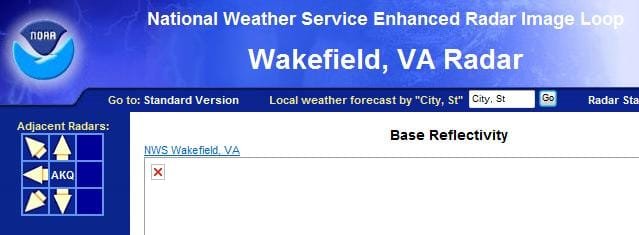
This US government site (NOAA) just silently fails:

warning2.JPG

If you decide to leave Java installed, please keep it up to date. And do not let the grand kids operate the computer with administrator privileges. That way, if the do happen to visit a website that uses Java exploits to install nasties, they will not be able to install most things.
 

My Computer

Computer type
Laptop
Computer Manufacturer/Model Number
Employer provided Dell Latitude
OS
W7 Pro SP1 64bit
CPU
i7
Memory
8GB
Graphics Card(s)
Intel HD Graphics
Hard Drives
crappy SSD
Antivirus
Employer mandated Symantec Endpoint Protection
Browser
Pale Moon 64bit, IE11 64bit & Chrome 64bit
I am having trouble figuring out if I need to and how to up date Java. I can't find an icon or thumbnail to open Java to check for updates. Thanks
 

My Computer

OS
Windows 7 Home Premium 32 bit
I went to Bookworm and it seemed to load a word puzzle just fine. I am having trouble finding a icon or thumbnail for Java so I can open it to check for updates. Thanks
 

My Computer

OS
Windows 7 Home Premium 32 bit
You can use this tool to remove old versions and to update the one that you have:

JavaRa | SingularLabs

Edit:
Or - if you wish to do it manually:
Start > Control Panel
Once the Control Panel window appears...
...look in the upper right corner
...change the "View by:" to large or small icons
Look for the Java icon

Or your setup might have the Control Panel as a menu - in which case:
Start > Control Panel > Java

Click on that icon or shortcut
...once the window appears
...select the tab named Update
...then the button named Update Now

There are some problems with the update steps above:
Updating does not always get rid of old versions.
Updating fails more than it should.

Hence the need for a tool like JavaRa.
 
Last edited:

My Computer

Computer type
Laptop
Computer Manufacturer/Model Number
Employer provided Dell Latitude
OS
W7 Pro SP1 64bit
CPU
i7
Memory
8GB
Graphics Card(s)
Intel HD Graphics
Hard Drives
crappy SSD
Antivirus
Employer mandated Symantec Endpoint Protection
Browser
Pale Moon 64bit, IE11 64bit & Chrome 64bit
Okay, I created another problem. I did what you said about trying to update Java in control panel. During the process I clicked on the update button and it eliminated my desktop picture which was centered on screen. All that was left was a very thin white line, approx. 1/16 " wide, dead center on screen. Was that my original picture? I reinstalled the same desktop picture, but it looks like it pushed the think white line over to the right edge of my desktop picture. What do you think happened there? Can I eliminate that line? Weired Thanks
 

My Computer

OS
Windows 7 Home Premium 32 bit
Wow - sorry that things did not go smoothly.

I don't use a desktop image - so I've not seen the things that might happen to them as various updates take place. I would not think that Java would have anything to do with the desktop image (which is shown to you by the Explorer program)... but for you, there seemed to be a connection.

I'm sorry to have to ask you to do some steps again, but could you please perform the SFC /scannow sets like you did earlier in this thread. If you run it once and things come back clean, then run it a second time just for fun :-)

If one of the runs indicates a problem, then keep running it until you get two clean runs back to back (two runs that do not show a problem).

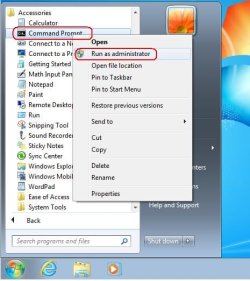
Be sure and start the command prompt windows with admin rights:

cmd-admin.JPG

more info if you need it
http://www.sevenforums.com/tutorials/1538-sfc-scannow-command-system-file-checker.html


After that - please run a scan with WDO:
What is Windows Defender Offline?
 

My Computer

Computer type
Laptop
Computer Manufacturer/Model Number
Employer provided Dell Latitude
OS
W7 Pro SP1 64bit
CPU
i7
Memory
8GB
Graphics Card(s)
Intel HD Graphics
Hard Drives
crappy SSD
Antivirus
Employer mandated Symantec Endpoint Protection
Browser
Pale Moon 64bit, IE11 64bit & Chrome 64bit
I'll do that over the weekend. Thanks
 

My Computer

OS
Windows 7 Home Premium 32 bit
I did the sfc /scannow twice, nothing showed up. Or maybe there is, and I don't know what to look for. In the sfc /scannow window nothing shows up after it completes, and it says something like check found all file integrity. I then click on the red X at the top of the window and then click on start and restart. Wonder if I could go back to the day before (don't know how to pick a particular day) in restore point and maybe get rid of that thin white line? Thanks
 

My Computer

OS
Windows 7 Home Premium 32 bit
Sure - you can try a restore point.

Post back and let us know if that works for you.
 

My Computer

Computer type
Laptop
Computer Manufacturer/Model Number
Employer provided Dell Latitude
OS
W7 Pro SP1 64bit
CPU
i7
Memory
8GB
Graphics Card(s)
Intel HD Graphics
Hard Drives
crappy SSD
Antivirus
Employer mandated Symantec Endpoint Protection
Browser
Pale Moon 64bit, IE11 64bit & Chrome 64bit

My Computer

Computer type
PC/Desktop
OS
Windows 10 Home x64
CPU
INTEL Core i5-750 Quad-Core 3.37GHz
Motherboard
ASUS P7P55D
Memory
HyperX Fury Black Series 8GB (2 x 4GB) 1866Mhz
Graphics Card(s)
EVGA GeForce GTX 750 Superclocked 1GB 128-Bit GDDR5
Monitor(s) Displays
LG 32MA68HY 32" IPS
Screen Resolution
1920 x 1080
Hard Drives
Samsung 840 Evo 120GB, SEAGATE 500GB Barracuda® 7200.12, SATA 3 Gb/s, 7200 RPM, 16MB cache
PSU
ANTEC TruePower New TP-550, 80 PLUS, 550W
Case
ANTEC Three Hundred Illusion
Cooling
COOLER MASTER Hyper 212 Plus, 4 x 120mm 1 x 140mm Noctua's
Internet Speed
85 + Mbps
Antivirus
Avast
Browser
Vivaldi
Well, I put another picture on my desktop and the white mline a thought sled over to the left is gone. I bad, it was a white border I hadn't removed when I scanned the picture. Sorry!

I would like to ask again about my windows opening minamized. When I close a IE window with a maximized window as a icon on my desktop and reopen them they will open minamized. Hen I open IE down in the left lower corner it will open my home page maximized. A few months ago all my icons on my desktop would open maximized when I opened them. Thanks
 

My Computer

OS
Windows 7 Home Premium 32 bit
You are the 3rd person today (that I've seen) that is asking about this IE problem. I'm thinking that the latest patch changed something for some users. I don't actually use W7 from day to day. I only have it in a Virtual Machine and I'm on this forum to learn about W7 - so, I'll ask the people that do use W7 and IE if they see this issue after the patch that came out this week.

Are you using IE9?

Also - let's be sure that we have our terms correct:

when you click on the pinned shortcut on the task bar (by the start button) then IE maximizes

when you click in a shortcut on your desktop - then IE is windowed (not minimized - right?)

minimized would be where no window appears, just a change to the taskbar showing that the window is minimized
 

My Computer

Computer type
Laptop
Computer Manufacturer/Model Number
Employer provided Dell Latitude
OS
W7 Pro SP1 64bit
CPU
i7
Memory
8GB
Graphics Card(s)
Intel HD Graphics
Hard Drives
crappy SSD
Antivirus
Employer mandated Symantec Endpoint Protection
Browser
Pale Moon 64bit, IE11 64bit & Chrome 64bit

My Computer

Computer type
PC/Desktop
OS
Windows 10 Home x64
CPU
INTEL Core i5-750 Quad-Core 3.37GHz
Motherboard
ASUS P7P55D
Memory
HyperX Fury Black Series 8GB (2 x 4GB) 1866Mhz
Graphics Card(s)
EVGA GeForce GTX 750 Superclocked 1GB 128-Bit GDDR5
Monitor(s) Displays
LG 32MA68HY 32" IPS
Screen Resolution
1920 x 1080
Hard Drives
Samsung 840 Evo 120GB, SEAGATE 500GB Barracuda® 7200.12, SATA 3 Gb/s, 7200 RPM, 16MB cache
PSU
ANTEC TruePower New TP-550, 80 PLUS, 550W
Case
ANTEC Three Hundred Illusion
Cooling
COOLER MASTER Hyper 212 Plus, 4 x 120mm 1 x 140mm Noctua's
Internet Speed
85 + Mbps
Antivirus
Avast
Browser
Vivaldi
Thanks usernameissues and A Guy. I followed A Guy's link in the above message about opening the second window and dragging it to full screen, worked.
 

My Computer

OS
Windows 7 Home Premium 32 bit
You are the 3rd person today (that I've seen) that is asking about this IE problem. I'm thinking that the latest patch changed something for some users. I don't actually use W7 from day to day. I only have it in a Virtual Machine and I'm on this forum to learn about W7 - so, I'll ask the people that do use W7 and IE if they see this issue after the patch that came out this week.

Are you using IE9?

Also - let's be sure that we have our terms correct:

when you click on the pinned shortcut on the task bar (by the start button) then IE maximizes

when you click in a shortcut on your desktop - then IE is windowed (not minimized - right?)

minimized would be where no window appears, just a change to the taskbar showing that the window is minimized
No, I think I'm still using IE 7. Yes when I clicked on the pinned shortcut on the task bar it opened maximized, I right clicked on it and then on properties and it gave me the run opsion to set it to open maximized. No, when I clicked on the shortcuts on the desktop - then IE would open a window with the webpage but it was about 1/4 th screen. I could click on the little square figure in the upper right corner and maximize it to full screen but when I would close it and then click on the same desktop shortcut it would open minimized 1/4 screen again. If I would right click on the shortcut on the desktop iwouldn't give me the opsion to click properties. I did the two windows open suggestion and all seems well now. Thanks again for the help.
 

My Computer

OS
Windows 7 Home Premium 32 bit
Having spent the better part of the last 8 hours playing with IE9 inside a W7 VM - I've seen IE do several inconstant things.

Two things to try no matter which IE it is:
Thing 1)
open IE using a desktop shortcut that makes it 1/4 screened
minimize all other windows
right click on an empty spot on the task bar
select show windows side by side
(yes - even with only one IE window showing)
(that should make IE full screened, but not maximized)
(that should also help you avoid Aero snap)
close IE
check that IE does not show on the process tab within task manager
open IE using any shortcut

If that fails to open IE full screened:
Thing 2)
do a partial reset of IE from the control panel while IE is closed
open the internet options in the control panel
(you might select large/small icons in the upper right)
select the advanced tab
select the bottom most reset button
(in the next window -
do not place a check mark by delete personal settings)
now repeat Thing 1 :-)
 

My Computer

Computer type
Laptop
Computer Manufacturer/Model Number
Employer provided Dell Latitude
OS
W7 Pro SP1 64bit
CPU
i7
Memory
8GB
Graphics Card(s)
Intel HD Graphics
Hard Drives
crappy SSD
Antivirus
Employer mandated Symantec Endpoint Protection
Browser
Pale Moon 64bit, IE11 64bit & Chrome 64bit
Back
Top