[PC] Fallout 3 won't run game saves!

ppezpez

New member
Local time
12:51 AM
Messages
2
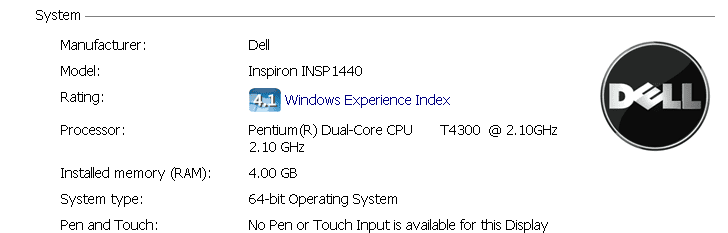
I am trying to play my fallout 3 on my PC and whenever I try to load a new game or continue a game, as well as load, it will load for a little bit then crash. (My PC Specs are below and this was left out, my hard disk memory is 500GB)
 

Attachments

  • Capture.PNG
    Capture.PNG
    6.3 KB · Views: 20

My Computer My Computer

At a glance

Windows 7 Home Premium x64
OS
Windows 7 Home Premium x64
Hello ppezpez

1. Try this:
1. Click Start
2. Click “All Programs”.
3. Go to the ffdshow folder.
4. Click “Audio decoder configuration.”
5. In the left hand pane, click “Info & debug.” or "DirectShow control".This is the second entry in the list.
6. In the right hand pane, near the bottom, find a check box labelled “Don’t use ffdshow in:”
7. Check that box, and in the text box underneath (it lights up when you check the check box), add “fallout3.exe” (don’t include the quotes). If there is already something in that box, put a semi-colon ( ; ) after what’s already there, and fallout3.exe after that. Do NOT use spaces, since ffdshow will think that’s part of the filename. A valid entry would be “explorer.exe;fallout3.exe” (without quotes).
8. Finally, click “Ok” and start Fallout 3.

Let me know what happened
 

My Computer My Computer

At a glance

Windows 7 Professional X64 SP1, Windows 7 Ult...Intel Core i7 3.2 GHz Processor8 GBATI Radeon HD 5770
Computer Manufacturer/Model Number
ASUS
OS
Windows 7 Professional X64 SP1, Windows 7 Ultimate X64 SP1
CPU
Intel Core i7 3.2 GHz Processor
Motherboard
ASUS LGA 1366 Intel X58 Republic of Gamers ATX Motherboard R
Memory
8 GB
Graphics Card(s)
ATI Radeon HD 5770
Monitor(s) Displays
HP 2009m
Hard Drives
OCZ Vertex Series 60 GB Internal hard drive - 300 MBps
PSU
Kingwin Lazer Power Supply 1000 Watts w/ 3 Ways Universal Mo
Cooling
Fan
Keyboard
Logitech Wireless Keyboard
Mouse
Logitech Wireless Mouse
If this doesnt work try this:


-Open the folder My documents / My Games / Fallout3
-Edit the file FALLOUT.ini.
-Inside FALLOUT.ini look for a group called [general].
-Inside the general group, after all the configuration parameters, just copy and paste the following 2 lines:

bUseThreadedAI=1
iNumHWThreads=2

Now close and save the Fallout 3 configuration file.
 

My Computer My Computer

At a glance

Windows 7 Professional X64 SP1, Windows 7 Ult...Intel Core i7 3.2 GHz Processor8 GBATI Radeon HD 5770
Computer Manufacturer/Model Number
ASUS
OS
Windows 7 Professional X64 SP1, Windows 7 Ultimate X64 SP1
CPU
Intel Core i7 3.2 GHz Processor
Motherboard
ASUS LGA 1366 Intel X58 Republic of Gamers ATX Motherboard R
Memory
8 GB
Graphics Card(s)
ATI Radeon HD 5770
Monitor(s) Displays
HP 2009m
Hard Drives
OCZ Vertex Series 60 GB Internal hard drive - 300 MBps
PSU
Kingwin Lazer Power Supply 1000 Watts w/ 3 Ways Universal Mo
Cooling
Fan
Keyboard
Logitech Wireless Keyboard
Mouse
Logitech Wireless Mouse
Hello ppezpez

1. Try this:
1. Click Start
2. Click “All Programs”.
3. Go to the ffdshow folder.
4. Click “Audio decoder configuration.”
5. In the left hand pane, click “Info & debug.” or "DirectShow control".This is the second entry in the list.
6. In the right hand pane, near the bottom, find a check box labelled “Don’t use ffdshow in:”
7. Check that box, and in the text box underneath (it lights up when you check the check box), add “fallout3.exe” (don’t include the quotes). If there is already something in that box, put a semi-colon ( ; ) after what’s already there, and fallout3.exe after that. Do NOT use spaces, since ffdshow will think that’s part of the filename. A valid entry would be “explorer.exe;fallout3.exe” (without quotes).
8. Finally, click “Ok” and start Fallout 3.

Let me know what happened
I can't find a "ffdshow" folder, sadly enough, and I tried putting in these:

bUseThreadedAI=1
iNumHWThreads=2

but they didn't seem to effect it.
 

My Computer My Computer

At a glance

Windows 7 Home Premium x64
OS
Windows 7 Home Premium x64

My Computer My Computer

At a glance

Windows 7 Professional X64 SP1, Windows 7 Ult...Intel Core i7 3.2 GHz Processor8 GBATI Radeon HD 5770
Computer Manufacturer/Model Number
ASUS
OS
Windows 7 Professional X64 SP1, Windows 7 Ultimate X64 SP1
CPU
Intel Core i7 3.2 GHz Processor
Motherboard
ASUS LGA 1366 Intel X58 Republic of Gamers ATX Motherboard R
Memory
8 GB
Graphics Card(s)
ATI Radeon HD 5770
Monitor(s) Displays
HP 2009m
Hard Drives
OCZ Vertex Series 60 GB Internal hard drive - 300 MBps
PSU
Kingwin Lazer Power Supply 1000 Watts w/ 3 Ways Universal Mo
Cooling
Fan
Keyboard
Logitech Wireless Keyboard
Mouse
Logitech Wireless Mouse
Couple Questions:
What Video Card do you have?
Are you using any mods or is this just the Vanilla Fallout 3 game?
Is Windows Live already working properly with a registered key?

Make sure your game is patched to the latest version.


You may also try deleting the following .ini files:
Go to- My Documents/ My Games / Fallout3

Delete: Fallout.ini , FalloutPrefs.ini , and Render Info

Start Fallout out again and it will Auto Configure the video settings.
After its done, for now ...
Set your native resolution, set Detal Settings to Low, Turn OFF Anti Alaising and Antistropic Filtering, and screen effects as NONE.


You can adjust & tweak these later. Just try to get the game to start.
 

My Computer My Computer

At a glance

Windows 7 Home Premium 64bitIntel Core i7 2700k8GB Mushkin Redline Ridgebacks @1866EVGA GTX570 SC
Computer Manufacturer/Model Number
Custom (Self Build)
OS
Windows 7 Home Premium 64bit
CPU
Intel Core i7 2700k
Motherboard
eVGA P67 SLI
Memory
8GB Mushkin Redline Ridgebacks @1866
Graphics Card(s)
EVGA GTX570 SC
Sound Card
XiFi Titanium HD
Monitor(s) Displays
LG W2453V
Screen Resolution
1920x1080
Hard Drives
Intel 320 80GB -- Intel X25-V 40GB --WD Black 1TB x2 -- WD Blue 640GB
PSU
Seasonic x750
Case
Corsair 600T SE White
Cooling
eVGA Superclocked CPU Cooler
Keyboard
Saitek Cyborg
Antivirus
Kaspersky
Browser
IE
Other Info
LG BD/DVD
Back
Top
