PC Freezing while Gaming

lordad

New member
Local time
7:43 PM
Messages
13
Hello,
I would like to explain in details my problem,
When i play Medal of honor Warfighter and Dota2 My pc freezes while playing i can only move my mouse but i can do alt+tab, alt+f4, ctrl+alt+del, so i got to restart my pc and when i restart the pc freezes on the mother board screen so am forced to press on the power button to shut the pc down and open it again, that problem happens with me only with that 2 games, but pc is working well with NFSMW 2012, Sniper Elite V2, Red Alert 3, NFS The Run, Far Cry 3, Fifa 13, Generals ZH, Nail'd, Stronghold 3.

My PC info:
8GB Ram HyperX
ATI Radeon HD 5450 1024 MB
AMD Phenom(tm) II X4 955 Processor 3.20 GHz
Mother Board: GigaByte 880GM
Win7 x64


Any suggestions ?
Thanks in Advance
 
Last edited:

My Computer

Computer type
PC/Desktop
OS
Windows 7 x64
Motherboard
GigaByte 880GM
Memory
12 GB Rams
Graphics Card(s)
GeForce 650
Hard Drives
1 Tera
Antivirus
None
Browser
Firefox
Are your graphics drivers up to date? Secondly what are your temperatures like? Download HWMonitor from the link below to monitor the temps.

:ar: HWMonitor
 

My Computer

Computer type
PC/Desktop
Computer Manufacturer/Model Number
Custom Build
OS
W7 Pro x64 SP1 | W10 Pro IP x64 | W8.1 Pro x64 VM | Linux Mint VM
CPU
i7-4790k @ 4GHz (4.4GHz Boost)
Motherboard
ASUS Sabertooth Z87 (BIOS Rev 2004)
Memory
16GB DDR3 Kingston HyperX Fury @ 1600MHz CL 9-9-9-27
Graphics Card(s)
EVGA GTX 980 Classified
Sound Card
Realtek Onboard
Monitor(s) Displays
Samsung S27D390
Screen Resolution
1920 x 1080
Hard Drives
240GB Intel 520 Series SSD |
Samsung 850 EVO 120GB SSD |
2TB WD Caviar Black |
2TB WD Caviar Green
PSU
Corsair HX850-80 Gold Modular
Case
Cooler Master Silencio 650
Cooling
Corsair H80i w/2 x Corsair SP120 | 2 x 120mm Noctua NF-S12B
Keyboard
Microsoft Sidewinder X4
Mouse
Gigabyte M6900 optical
Internet Speed
152mb
Antivirus
F-Secure
Browser
Firefox 38.0
Other Info
Backup Rig: Win 7 Pro 64-bit | AMD A10-5800k | ASUS F2A85-V Pro | 8GB Samsung DDR3 @1600MHz | 120GB Toshiba SDD | 2TB Seagate HDD | Cooler Master Silencio 550
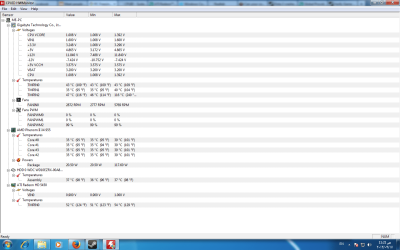
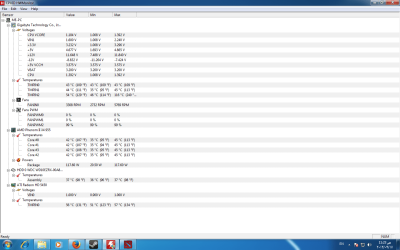
My Graphic card is up to date, and about temp, you want an example while running a game of them or before running them ?
 

My Computer

Computer type
PC/Desktop
OS
Windows 7 x64
Motherboard
GigaByte 880GM
Memory
12 GB Rams
Graphics Card(s)
GeForce 650
Hard Drives
1 Tera
Antivirus
None
Browser
Firefox
anyway this is the 2 pictures before running and while running:
 

Attachments

  • Temp1.png
    Temp1.png
    48.1 KB · Views: 3
  • Temp2.png
    Temp2.png
    47.1 KB · Views: 5

My Computer

Computer type
PC/Desktop
OS
Windows 7 x64
Motherboard
GigaByte 880GM
Memory
12 GB Rams
Graphics Card(s)
GeForce 650
Hard Drives
1 Tera
Antivirus
None
Browser
Firefox
I can tell you it's not a powerful card to even play games with

it could be the fact you are stressing it beyond it's limits
 

My Computer

Computer type
PC/Desktop
Computer Manufacturer/Model Number
CoreI7-6700K MrFingerIII Special Builds
OS
Windows 10 Home Premium 64bit sp1
CPU
Intel I7-6700K @ 4.6 Ghz 1.344 volts everyday OC
Motherboard
Asrock Fatality K6 Z170 Socket 1151
Memory
32GB G-Skill TridentZ 3200mhz 16-18-18-38 DDR4
Graphics Card(s)
Sli Gigabyte Windforce GTX 980 G1
Sound Card
AC97 Creative Rage Tactic 3D Headphones Bluetooth
Monitor(s) Displays
27" Asus ROG Swift PG278Q G-Sync 48" Vizio Smart HD TV
Screen Resolution
2560x1440p 27"- 48" Currently Gaming at 2560x1440p Res 2K
Hard Drives
250GB Samsung Evo840SSD Seagate baracuda 500 GB WD Mybook 500Gb 1TB Seagate Barracuda
PSU
HX1050w Corsair Silver 80plus certified crosfire/sli
Case
Enthod Pro Full Tower
Cooling
Corsair H110i GT 280 mm High Performance WaterBlock
Keyboard
Logitech wireless keyboard
Mouse
Logitech wireless mouse
Internet Speed
Cox Cable 100+ mb
Antivirus
WebRoot Spysweeper with Antivirus
Browser
IE-10, Chrome, Opera
Other Info
My Other Rig is a AMD FX8320E @4.6Ghz 16GB Ballistic Sport Ram
Mobo Asrock Fatality 990FX 120GB OCZ SSD 1TB Seagate Barracuda Corsair H75 Cooling PSU Corsair CX750
GPU GTX Gigabyte 970G1
i disagree with you, because everything was going well specially that 2 games and no problems, but currently i dunno what happened ..
 

My Computer

Computer type
PC/Desktop
OS
Windows 7 x64
Motherboard
GigaByte 880GM
Memory
12 GB Rams
Graphics Card(s)
GeForce 650
Hard Drives
1 Tera
Antivirus
None
Browser
Firefox
The screenshots you posted of your temperatures look way off, there is only a 3°C difference on your GPU between idle and stressed? I'm inclined to agree with Solar, that GPU is not really a high end gaming GPU.
 

My Computer

Computer type
PC/Desktop
Computer Manufacturer/Model Number
Custom Build
OS
W7 Pro x64 SP1 | W10 Pro IP x64 | W8.1 Pro x64 VM | Linux Mint VM
CPU
i7-4790k @ 4GHz (4.4GHz Boost)
Motherboard
ASUS Sabertooth Z87 (BIOS Rev 2004)
Memory
16GB DDR3 Kingston HyperX Fury @ 1600MHz CL 9-9-9-27
Graphics Card(s)
EVGA GTX 980 Classified
Sound Card
Realtek Onboard
Monitor(s) Displays
Samsung S27D390
Screen Resolution
1920 x 1080
Hard Drives
240GB Intel 520 Series SSD |
Samsung 850 EVO 120GB SSD |
2TB WD Caviar Black |
2TB WD Caviar Green
PSU
Corsair HX850-80 Gold Modular
Case
Cooler Master Silencio 650
Cooling
Corsair H80i w/2 x Corsair SP120 | 2 x 120mm Noctua NF-S12B
Keyboard
Microsoft Sidewinder X4
Mouse
Gigabyte M6900 optical
Internet Speed
152mb
Antivirus
F-Secure
Browser
Firefox 38.0
Other Info
Backup Rig: Win 7 Pro 64-bit | AMD A10-5800k | ASUS F2A85-V Pro | 8GB Samsung DDR3 @1600MHz | 120GB Toshiba SDD | 2TB Seagate HDD | Cooler Master Silencio 550
so any suggestions for any solution for that ? its really boring problem
 

My Computer

Computer type
PC/Desktop
OS
Windows 7 x64
Motherboard
GigaByte 880GM
Memory
12 GB Rams
Graphics Card(s)
GeForce 650
Hard Drives
1 Tera
Antivirus
None
Browser
Firefox
so any suggestions for any solution for that ? its really boring problem

I agree with the others here, your card isn't good enough.

You need to buy a better GPU. That is pretty much your only option if you want to play those games. There's no program or software fix that's going to let you play games on hardware that isn't good enough to run them. It's either replace your GPU or be happy playing games with lower system requirements instead.

Your GPU is fine for web browsing and watching videos, but is pretty underpowered for gaming. If you keep trying to run games that stress your card to that point you're going to burn it out and you'll be forced to replace it anyway.

You can easily replace your card with something that will be plenty for gaming for quite a while for around $100 give or take $10 or so.

This Radeon HD 7770 card would be more than enough and it's $105. http://www.amazon.com/Sapphire-Rade...qid=1379424333&sr=8-1&keywords=radeon+hd+7770

Here is another slightly less powerful 7750 card that would also be more than enough to run those games at decent settings for $90. http://www.amazon.com/Sapphire-Rade...qid=1379424291&sr=8-1&keywords=radeon+hd+7750

Either one of these cards will not only let you play the games that aren't running, but they'll also run the games that do run at much higher settings, high to maxed out settings in fact.

Shop around a little and you might find an even better deal, but either of these would be plenty for gaming at decent settings for a couple of years.
 
Last edited:

My Computer

Computer type
PC/Desktop
Computer Manufacturer/Model Number
Home built
OS
Windows 7 Home premium
CPU
I7 3770 3.4
Motherboard
Republic of Gamers Maximus V
Memory
Corsair Vengance ddr3 8gb x2 1600 [@ 2400]
Graphics Card(s)
AMD 7970 6GB x3 [currently x2 until x3 is actually useful]
Sound Card
N/A
Monitor(s) Displays
Visio 47" 3D/Acer 27" 3D
Screen Resolution
1920x1080 120mhz Passive 3D
Hard Drives
Samsung 830 series SSD 512gb x2
Seagate 2tb x2
Segate 750 Gb
PSU
1500w
Case
Coolermaster
Cooling
Noctua D14
Keyboard
Logitech g10
Mouse
Naga Razer
Internet Speed
30mb Cable
Antivirus
Like I'd tell.
Browser
Waterfox mostly.
okay thanks alot for help, i got a new one and i wanna take your opinion about it.. GeForce GTX 650 2068MB DDR5
 

My Computer

Computer type
PC/Desktop
OS
Windows 7 x64
Motherboard
GigaByte 880GM
Memory
12 GB Rams
Graphics Card(s)
GeForce 650
Hard Drives
1 Tera
Antivirus
None
Browser
Firefox
Make sure that you download the latest drivers direct from Nvidia, save those drivers on a Temporary Folder. Uninstall the current video drivers, then go to safe Mode and run Ccleaner to clean the remnants from your registry. Restart again, let windows install the generic drivers and restart again whether it asks you or not... then go to the Temp Folder, Right Click on the .exe and Run as Administrator so you can install the newest Nvidia drivers of that card.

I assume that you you have a good Power Supply as well? hopefully a 500w or better?
 

My Computer

Computer type
PC/Desktop
Computer Manufacturer/Model Number
Custom Built... Intel/Nvidia/ASRock
OS
Windows 7 x64 (Ultimate)
CPU
Intel i5-4670K
Motherboard
ASRock Z87 Extreme 6
Memory
8GBs Ripjaws 2133Mhz
Graphics Card(s)
Asus GTX660 (2GBs)
Sound Card
Onboard Realtek HD
Monitor(s) Displays
Acer AL2216W
Screen Resolution
1680 x 1050
Hard Drives
Samsung 840 SSD 120GBs
Samsung 750GB 32MB cache
1.5 TB
PSU
PC Cooling 750w Silencer
Case
Thermaltake Spedo Advance
Cooling
Std Cooler
Keyboard
Logitech G15
Mouse
Logitech G9
Internet Speed
Comcast 20Mbit
Antivirus
Avast
Browser
Firefox
500w would be best, but he could get away with a 400w as well. If what he has is 400w or better he's fine and doesn't need to get a new PSU, but if it's less than 400w I'd recommend getting a 500w supply.

He probably has a 400w supply as his current card needs at least 350w, but I'd check just to make sure.

Yes, it's plenty of GPU to run the games you want at decent settings. You won't be maxing out Farcry 3 or anything, but you can easily do medium/high settings for that game with that card and it will run the games that have been giving you trouble at decent settings as well.

Don't worry if you need to upgrade your PSU, you shouldn't need to buy anything else as the rest of your specs are fine. That would be the only other thing you'd need to replace if your current PSU is below 400w.
 

My Computer

Computer type
PC/Desktop
Computer Manufacturer/Model Number
Home built
OS
Windows 7 Home premium
CPU
I7 3770 3.4
Motherboard
Republic of Gamers Maximus V
Memory
Corsair Vengance ddr3 8gb x2 1600 [@ 2400]
Graphics Card(s)
AMD 7970 6GB x3 [currently x2 until x3 is actually useful]
Sound Card
N/A
Monitor(s) Displays
Visio 47" 3D/Acer 27" 3D
Screen Resolution
1920x1080 120mhz Passive 3D
Hard Drives
Samsung 830 series SSD 512gb x2
Seagate 2tb x2
Segate 750 Gb
PSU
1500w
Case
Coolermaster
Cooling
Noctua D14
Keyboard
Logitech g10
Mouse
Naga Razer
Internet Speed
30mb Cable
Antivirus
Like I'd tell.
Browser
Waterfox mostly.
yeah, i bought also a new power supply that can handle my new card and got a better smart fan for my processor i think am doing good till now or am wrong ?
 

My Computer

Computer type
PC/Desktop
OS
Windows 7 x64
Motherboard
GigaByte 880GM
Memory
12 GB Rams
Graphics Card(s)
GeForce 650
Hard Drives
1 Tera
Antivirus
None
Browser
Firefox
That should be all you need. Good call on that fan BTW. It wasn't a necessity, but better cooling is always a plus.

Unplug everything and ground yourself before messing with any components. You probably know that, but just to be sure. All you really need to do is put a piece of metal that is touching the floor against your skin. A thin metal chain wrapped around your wrist will do fine. You can even use a length of metal lying across your leg. It's not to protect you from any danger of electric shock, but rather to keep you from damaging the components due to static electricity. Circuitry is kind of sensitive to that sort of thing.

Just make sure you hook power to everything you need once you hook up the power supply. Take note of everything you unplug and be sure that whatever components are currently getting power continue to do so. It can be easy to forget what needs to be plugged in if you're not paying attention and you might not think about that until after you've unplugged everything. It's a common first time mistake.

All you should really need to do is swap out your power supply, pop your old card off the motherboard's PCIe slot, and put the new card in. There's a latch you have to push in on one end of the slot to get the card off, don't try and just pull it off. It should lock back into place when you put the new card on. After that, you should be able to install your fan and hook up the power connections and you're good to go. You shouldn't have to remove your heat sink [the metal thing under the fan over the CPU] to install the new fan BTW. The old one should pop right off and you should be able to just put the new one on in it's place.

Nothing you need to do to install the new PSU, Fan, or GPU is particularly difficult. It will probably only take about ten minutes or less to do all three.

Good luck and enjoy. That GPU should be a huge improvement and you'll be able to turn the graphics settings up on the games you're playing quite a bit.
 

My Computer

Computer type
PC/Desktop
Computer Manufacturer/Model Number
Home built
OS
Windows 7 Home premium
CPU
I7 3770 3.4
Motherboard
Republic of Gamers Maximus V
Memory
Corsair Vengance ddr3 8gb x2 1600 [@ 2400]
Graphics Card(s)
AMD 7970 6GB x3 [currently x2 until x3 is actually useful]
Sound Card
N/A
Monitor(s) Displays
Visio 47" 3D/Acer 27" 3D
Screen Resolution
1920x1080 120mhz Passive 3D
Hard Drives
Samsung 830 series SSD 512gb x2
Seagate 2tb x2
Segate 750 Gb
PSU
1500w
Case
Coolermaster
Cooling
Noctua D14
Keyboard
Logitech g10
Mouse
Naga Razer
Internet Speed
30mb Cable
Antivirus
Like I'd tell.
Browser
Waterfox mostly.
That should be all you need. Good call on that fan BTW. It wasn't a necessity, but better cooling is always a plus.

Unplug everything and ground yourself before messing with any components. You probably know that, but just to be sure. All you really need to do is put a piece of metal that is touching the floor against your skin. A thin metal chain wrapped around your wrist will do fine. You can even use a length of metal lying across your leg. It's not to protect you from any danger of electric shock, but rather to keep you from damaging the components due to static electricity. Circuitry is kind of sensitive to that sort of thing.

Just make sure you hook power to everything you need once you hook up the power supply. Take note of everything you unplug and be sure that whatever components are currently getting power continue to do so. It can be easy to forget what needs to be plugged in if you're not paying attention and you might not think about that until after you've unplugged everything. It's a common first time mistake.

All you should really need to do is swap out your power supply, pop your old card off the motherboard's PCIe slot, and put the new card in. There's a latch you have to push in on one end of the slot to get the card off, don't try and just pull it off. It should lock back into place when you put the new card on. After that, you should be able to install your fan and hook up the power connections and you're good to go. You shouldn't have to remove your heat sink [the metal thing under the fan over the CPU] to install the new fan BTW. The old one should pop right off and you should be able to just put the new one on in it's place.

Nothing you need to do to install the new PSU, Fan, or GPU is particularly difficult. It will probably only take about ten minutes or less to do all three.

Good luck and enjoy. That GPU should be a huge improvement and you'll be able to turn the graphics settings up on the games you're playing quite a bit.


i followed the steps and everything is working fine i tested the fan its working as it should be also for the new graphic driver its working and i updated it and the games are running well and the problem i got in medal of honor warfighter and dota2 totally fixed and the gaming quality really improved too much and the pc stopped freezing, also i removed the dust on the mother board and cleaned the processor and the rams and hardware, last thing i would like to say thanks for this support it really helped me too much and i earned experience in the computer world by it,

My Regards
 

My Computer

Computer type
PC/Desktop
OS
Windows 7 x64
Motherboard
GigaByte 880GM
Memory
12 GB Rams
Graphics Card(s)
GeForce 650
Hard Drives
1 Tera
Antivirus
None
Browser
Firefox
You are welcome and great job guys you went above and beyond :geek:
 

My Computer

Computer type
PC/Desktop
Computer Manufacturer/Model Number
CoreI7-6700K MrFingerIII Special Builds
OS
Windows 10 Home Premium 64bit sp1
CPU
Intel I7-6700K @ 4.6 Ghz 1.344 volts everyday OC
Motherboard
Asrock Fatality K6 Z170 Socket 1151
Memory
32GB G-Skill TridentZ 3200mhz 16-18-18-38 DDR4
Graphics Card(s)
Sli Gigabyte Windforce GTX 980 G1
Sound Card
AC97 Creative Rage Tactic 3D Headphones Bluetooth
Monitor(s) Displays
27" Asus ROG Swift PG278Q G-Sync 48" Vizio Smart HD TV
Screen Resolution
2560x1440p 27"- 48" Currently Gaming at 2560x1440p Res 2K
Hard Drives
250GB Samsung Evo840SSD Seagate baracuda 500 GB WD Mybook 500Gb 1TB Seagate Barracuda
PSU
HX1050w Corsair Silver 80plus certified crosfire/sli
Case
Enthod Pro Full Tower
Cooling
Corsair H110i GT 280 mm High Performance WaterBlock
Keyboard
Logitech wireless keyboard
Mouse
Logitech wireless mouse
Internet Speed
Cox Cable 100+ mb
Antivirus
WebRoot Spysweeper with Antivirus
Browser
IE-10, Chrome, Opera
Other Info
My Other Rig is a AMD FX8320E @4.6Ghz 16GB Ballistic Sport Ram
Mobo Asrock Fatality 990FX 120GB OCZ SSD 1TB Seagate Barracuda Corsair H75 Cooling PSU Corsair CX750
GPU GTX Gigabyte 970G1
am sorry i have another question, do i need to remove my old VGA driver files installed? i mean its setup etc..
 

My Computer

Computer type
PC/Desktop
OS
Windows 7 x64
Motherboard
GigaByte 880GM
Memory
12 GB Rams
Graphics Card(s)
GeForce 650
Hard Drives
1 Tera
Antivirus
None
Browser
Firefox
Yes you should remove all traces of the previous drivers before installing the new card, then perform a clean install of the latest drivers after installing the new card.
 

My Computer

Computer type
PC/Desktop
Computer Manufacturer/Model Number
Custom Build
OS
W7 Pro x64 SP1 | W10 Pro IP x64 | W8.1 Pro x64 VM | Linux Mint VM
CPU
i7-4790k @ 4GHz (4.4GHz Boost)
Motherboard
ASUS Sabertooth Z87 (BIOS Rev 2004)
Memory
16GB DDR3 Kingston HyperX Fury @ 1600MHz CL 9-9-9-27
Graphics Card(s)
EVGA GTX 980 Classified
Sound Card
Realtek Onboard
Monitor(s) Displays
Samsung S27D390
Screen Resolution
1920 x 1080
Hard Drives
240GB Intel 520 Series SSD |
Samsung 850 EVO 120GB SSD |
2TB WD Caviar Black |
2TB WD Caviar Green
PSU
Corsair HX850-80 Gold Modular
Case
Cooler Master Silencio 650
Cooling
Corsair H80i w/2 x Corsair SP120 | 2 x 120mm Noctua NF-S12B
Keyboard
Microsoft Sidewinder X4
Mouse
Gigabyte M6900 optical
Internet Speed
152mb
Antivirus
F-Secure
Browser
Firefox 38.0
Other Info
Backup Rig: Win 7 Pro 64-bit | AMD A10-5800k | ASUS F2A85-V Pro | 8GB Samsung DDR3 @1600MHz | 120GB Toshiba SDD | 2TB Seagate HDD | Cooler Master Silencio 550
I thought I had mention to uninstall your old drivers but no problems, as long as you did it now... glad I could help but contrabardus deserves a gold medal as his explanations are always long and well written.
 

My Computer

Computer type
PC/Desktop
Computer Manufacturer/Model Number
Custom Built... Intel/Nvidia/ASRock
OS
Windows 7 x64 (Ultimate)
CPU
Intel i5-4670K
Motherboard
ASRock Z87 Extreme 6
Memory
8GBs Ripjaws 2133Mhz
Graphics Card(s)
Asus GTX660 (2GBs)
Sound Card
Onboard Realtek HD
Monitor(s) Displays
Acer AL2216W
Screen Resolution
1680 x 1050
Hard Drives
Samsung 840 SSD 120GBs
Samsung 750GB 32MB cache
1.5 TB
PSU
PC Cooling 750w Silencer
Case
Thermaltake Spedo Advance
Cooling
Std Cooler
Keyboard
Logitech G15
Mouse
Logitech G9
Internet Speed
Comcast 20Mbit
Antivirus
Avast
Browser
Firefox
Back
Top