
Solved PC Hangs/Stops responding driver(s) failed to load: ESProtectionDrive

JackedUp

New member
Local time
6:04 PM
Messages
5
I'm not sure where to post this to get help on my PC hanging or freezing up and nothing responds except the mouse seems to be able to move around.

I found this when I checked the windows event log. It shows several errors but only one Critical error .

Event 7026, Service Control Manager
The following boot-start or system-start driver(s) failed to load:
ESProtectionDriver

Now to give some background on the issue. My PC was freezing up for no apparent reason when I checked the system I found old drivers for my Network card and updated them, that seemed to work for a short while but it still had the same problem.

When I say Freeze nothing responds and *if* I get into Task Mgr the System Services Tab.....shows NOTHING....like a web page hanging it only partly shows the menu....very strange and I don't know or can't figure out what Service is hanging the system.

I updated the video drivers and the same thing happened, worked better for a short while but then froze up again. (short while meaning a few hours)

So I thought to run system restore and use a restore date about 30 days in the past in order to be sure I got an image prior to my freezing issue.....It would not restore to ANY of the selected dates. Tried system restore using the Win 7 Disk I have but it said no problems were found. Tried to reinstall windows on top and that failed as well. Sooo I did a fresh install of windows from scratch from the Disk. Things seemed to be good until I installed Avast and then Malwarebytes, After that a few hrs later the system froze up like before.. System Services hangs and will not show anything on Task Mgr.

So that's where I'm at...still still trying to figure this thing out, that's driving me nuts.

ANY real help would be appreciated....Searching MS Tech Net all they say is to run windows defrag....Duh.....:mad:
 

My Computer My Computer

At a glance

Windows 7 Professional 64 bitAMD FX-835032.0GB Dual-Channel DDR3 @ 801MHzATI Radeon RX 550 Series
Computer type
PC/Desktop
Computer Manufacturer/Model Number
Micro Magic
OS
Windows 7 Professional 64 bit
CPU
AMD FX-8350
Motherboard
MSI 970A-G46 (MS-7693)
Memory
32.0GB Dual-Channel DDR3 @ 801MHz
Graphics Card(s)
ATI Radeon RX 550 Series
Sound Card
High Definition Audio Device Sound Blaster X-Fi Xtreme Audio
Monitor(s) Displays
Asus
Screen Resolution
1920 by 1080
Hard Drives
ST2000DM006-2DM164 ATA Device
WDC WD30EZRX-00MMMB0 ATA Device
WDC WD60EZRX-00MVLB1 ATA Device
ST6000DM003-2CY186 ATA Device
Cooling
Water cooled - Cool Master system
Mouse
Logitech G700s
Internet Speed
Fios but under 100Mb
Antivirus
Avast
Browser
Firefox 61.0.2 (32 Bit)
Clearly there is a misbehaving driver in the system, and that could become a serious issue, including hangs, BSODs and even security vulnerabilities.

Searching a little I found this page in the MalwareBytes forum:
[SOLVED] "the Malwarebytes Anti-Exploit process will be terminated", v0.9.4.2000 windows 7 - Anti-Exploit Beta - Malwarebytes Forums

Aparently the faulty driver belongs to MalwareBytes, (not) coincidentally your problems began when you installed it together with Avast. So that's my first recommendation: uninstall MalwareBytes, reboot, and see how stable it stays.
 

My Computer My Computer

At a glance

Windows 7 Ultimate x64Intel Core i7-740QM8 GB DDR3NVIDIA GeForce 330GT
Computer type
Laptop
Computer Manufacturer/Model Number
Toshiba Sattelite A665-S6092
OS
Windows 7 Ultimate x64
CPU
Intel Core i7-740QM
Memory
8 GB DDR3
Graphics Card(s)
NVIDIA GeForce 330GT
Screen Resolution
1366x768
Hard Drives
Samsung 840 SSD 500GB
1TB USB3 external HD
Cooling
Coolermaster Notepal U3 notebook cooling pad
Internet Speed
3mbps ASDL
Antivirus
ClamWin 0.98.7
Browser
Opera 12.17 x86 (main), Firefox 38 (sec), IE11 (last resort)
Sorry I forgot to mention that once I found that Malwarebytes caused a problem I Uninstalled it from windows safe mode.


It could be that there is some of it left though, How can I search for any remaining parts of a software you thought you uninstalled?
 

My Computer My Computer

At a glance

Windows 7 Professional 64 bitAMD FX-835032.0GB Dual-Channel DDR3 @ 801MHzATI Radeon RX 550 Series
Computer type
PC/Desktop
Computer Manufacturer/Model Number
Micro Magic
OS
Windows 7 Professional 64 bit
CPU
AMD FX-8350
Motherboard
MSI 970A-G46 (MS-7693)
Memory
32.0GB Dual-Channel DDR3 @ 801MHz
Graphics Card(s)
ATI Radeon RX 550 Series
Sound Card
High Definition Audio Device Sound Blaster X-Fi Xtreme Audio
Monitor(s) Displays
Asus
Screen Resolution
1920 by 1080
Hard Drives
ST2000DM006-2DM164 ATA Device
WDC WD30EZRX-00MMMB0 ATA Device
WDC WD60EZRX-00MVLB1 ATA Device
ST6000DM003-2CY186 ATA Device
Cooling
Water cooled - Cool Master system
Mouse
Logitech G700s
Internet Speed
Fios but under 100Mb
Antivirus
Avast
Browser
Firefox 61.0.2 (32 Bit)
I did read the post from the link you provided (Thank You)


Looking at the posts I saw this one


1- Uninstall from Control Panel, Add/Remove
2- Reboot.
3- Delete C:\Program Files\Malwarebytes Anti-Exploit
(I couldn't find it on mine)

4- Reboot
5- From the registry (regedt32.exe), delete the key HKLM\SYSTEM\CurrentControlSet\Services\ESProtectionDriver


(I did find this but have not remove it for fear of screwing up the system reg file)


6- Reboot
7- Try installing again.
 

My Computer My Computer

At a glance

Windows 7 Professional 64 bitAMD FX-835032.0GB Dual-Channel DDR3 @ 801MHzATI Radeon RX 550 Series
Computer type
PC/Desktop
Computer Manufacturer/Model Number
Micro Magic
OS
Windows 7 Professional 64 bit
CPU
AMD FX-8350
Motherboard
MSI 970A-G46 (MS-7693)
Memory
32.0GB Dual-Channel DDR3 @ 801MHz
Graphics Card(s)
ATI Radeon RX 550 Series
Sound Card
High Definition Audio Device Sound Blaster X-Fi Xtreme Audio
Monitor(s) Displays
Asus
Screen Resolution
1920 by 1080
Hard Drives
ST2000DM006-2DM164 ATA Device
WDC WD30EZRX-00MMMB0 ATA Device
WDC WD60EZRX-00MVLB1 ATA Device
ST6000DM003-2CY186 ATA Device
Cooling
Water cooled - Cool Master system
Mouse
Logitech G700s
Internet Speed
Fios but under 100Mb
Antivirus
Avast
Browser
Firefox 61.0.2 (32 Bit)
Since you have the faulty driver name (ESProtectionDrive), look for it in the registry and see if you can find the path to the driver. Delete both the entry and the file.
However I find unlikely that it's a left over. I could be wrong and the thing really belongs to Avast :p Uninstalling both antiviruses is possibly the best course of action if problems persist.
 

My Computer My Computer

At a glance

Windows 7 Ultimate x64Intel Core i7-740QM8 GB DDR3NVIDIA GeForce 330GT
Computer type
Laptop
Computer Manufacturer/Model Number
Toshiba Sattelite A665-S6092
OS
Windows 7 Ultimate x64
CPU
Intel Core i7-740QM
Memory
8 GB DDR3
Graphics Card(s)
NVIDIA GeForce 330GT
Screen Resolution
1366x768
Hard Drives
Samsung 840 SSD 500GB
1TB USB3 external HD
Cooling
Coolermaster Notepal U3 notebook cooling pad
Internet Speed
3mbps ASDL
Antivirus
ClamWin 0.98.7
Browser
Opera 12.17 x86 (main), Firefox 38 (sec), IE11 (last resort)
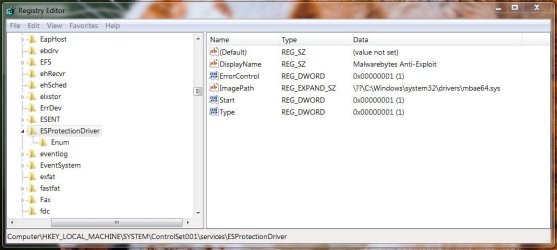
I did a scan with CCleaner as well as just looking directly in with RegEdit and removed any files dealing with Malwarebytes and ESProtectionDriver


regedit MBts 01.JPG


So far so good. My system has not froze up since I removed them so *Fingers Crossed* hopefully this fixed my issue and I hope this helps someone else.
 

My Computer My Computer

At a glance

Windows 7 Professional 64 bitAMD FX-835032.0GB Dual-Channel DDR3 @ 801MHzATI Radeon RX 550 Series
Computer type
PC/Desktop
Computer Manufacturer/Model Number
Micro Magic
OS
Windows 7 Professional 64 bit
CPU
AMD FX-8350
Motherboard
MSI 970A-G46 (MS-7693)
Memory
32.0GB Dual-Channel DDR3 @ 801MHz
Graphics Card(s)
ATI Radeon RX 550 Series
Sound Card
High Definition Audio Device Sound Blaster X-Fi Xtreme Audio
Monitor(s) Displays
Asus
Screen Resolution
1920 by 1080
Hard Drives
ST2000DM006-2DM164 ATA Device
WDC WD30EZRX-00MMMB0 ATA Device
WDC WD60EZRX-00MVLB1 ATA Device
ST6000DM003-2CY186 ATA Device
Cooling
Water cooled - Cool Master system
Mouse
Logitech G700s
Internet Speed
Fios but under 100Mb
Antivirus
Avast
Browser
Firefox 61.0.2 (32 Bit)
The above picture is crystal clear. The faulty driver comes from the Malwarebytes Anti-Exploit antivirus. Uninstalling it should stop the concrete problem, and the found key points to the problematic file, so you can delete it yourself if the installer has failed to.
 

My Computer My Computer

At a glance

Windows 7 Ultimate x64Intel Core i7-740QM8 GB DDR3NVIDIA GeForce 330GT
Computer type
Laptop
Computer Manufacturer/Model Number
Toshiba Sattelite A665-S6092
OS
Windows 7 Ultimate x64
CPU
Intel Core i7-740QM
Memory
8 GB DDR3
Graphics Card(s)
NVIDIA GeForce 330GT
Screen Resolution
1366x768
Hard Drives
Samsung 840 SSD 500GB
1TB USB3 external HD
Cooling
Coolermaster Notepal U3 notebook cooling pad
Internet Speed
3mbps ASDL
Antivirus
ClamWin 0.98.7
Browser
Opera 12.17 x86 (main), Firefox 38 (sec), IE11 (last resort)
Thanks for help, the problem seems to be resolved. MY PC has not locked up or froze in the last 48 hrs.

I just wish I didn't reinstall windows to fix it.
 

My Computer My Computer

At a glance

Windows 7 Professional 64 bitAMD FX-835032.0GB Dual-Channel DDR3 @ 801MHzATI Radeon RX 550 Series
Computer type
PC/Desktop
Computer Manufacturer/Model Number
Micro Magic
OS
Windows 7 Professional 64 bit
CPU
AMD FX-8350
Motherboard
MSI 970A-G46 (MS-7693)
Memory
32.0GB Dual-Channel DDR3 @ 801MHz
Graphics Card(s)
ATI Radeon RX 550 Series
Sound Card
High Definition Audio Device Sound Blaster X-Fi Xtreme Audio
Monitor(s) Displays
Asus
Screen Resolution
1920 by 1080
Hard Drives
ST2000DM006-2DM164 ATA Device
WDC WD30EZRX-00MMMB0 ATA Device
WDC WD60EZRX-00MVLB1 ATA Device
ST6000DM003-2CY186 ATA Device
Cooling
Water cooled - Cool Master system
Mouse
Logitech G700s
Internet Speed
Fios but under 100Mb
Antivirus
Avast
Browser
Firefox 61.0.2 (32 Bit)
Back
Top