Failed to boot Windows 7. PC hangs on repair/setup from CD.

Mormy

New member
Local time
1:06 PM
Messages
3
A friend of mine brought me her laptop because it would not boot into Windows.

I tried resetting the bios to default and changed it to boot from the disk.

When trying to run Windows repair from the disk it just hangs on the blue splash screen.
When trying to run Windows install it gets stuck on "Setup is starting".

I have waited for about 30 minutes or more in both cases just in case it was just taking a really long time but the laptop showed no

activity. I have tried several times and gotten the same results.

I ran Puppy Linux from a live CD and was able to access the hard drive to back up the user folder so the hard drive is readable. I ran

ntfsfix and it was processed successfully but it didn't actually fix anything.

So I booted from the Windows disk again and used shift-F10 to get the command prompt, then ran diskpart, but I never got the command prompt. It just shows

X:\Sources>diskpart

Microsoft Diskpart version 6.1.7601
Copyright <C> 1999-2008 Microsoft Corporation.
On computer: MINWINPC

But the DISKPART> prompt never shows up, just a blinking cursor.

I tried chkdsk C: and get "The type of the file system is NTFS." and nothing but a blinking cursor below it.

Anyway any info or ideas of where I can go from here would be appreciated.
 

My Computer My Computer

At a glance

Windows 7 Ultimate x64
Computer type
PC/Desktop
OS
Windows 7 Ultimate x64

My Computer My Computer

At a glance

Desk1 7 Home Prem / Desk2 10 Pro / Main lap A...Desk1 i5 3750K / Laptop i7 GTX 860M / Desk2 i...Desk1 8GB (1866) / Desk2 16GB (1333) / Laptop...Desk 1& 2NVidia GTX 650 & Laptops on board Intel
Computer type
PC/Desktop
Computer Manufacturer/Model Number
Own build (new) Desk1 / Asus ROG Win 7 / Desk2 1st build
OS
Desk1 7 Home Prem / Desk2 10 Pro / Main lap Asus ROG 10 Pro 2 laptop Toshiba 7 Pro Asus P2520 7 & 10
CPU
Desk1 i5 3750K / Laptop i7 GTX 860M / Desk2 i5 2500
Motherboard
Desk1 Asus P877-V / Desk2 Gigabyte H67 UD3H / Laptop ?
Memory
Desk1 8GB (1866) / Desk2 16GB (1333) / Laptop 8Gb DDR3
Graphics Card(s)
Desk 1& 2NVidia GTX 650 & Laptops on board Intel
Sound Card
Desk 1 & 2 -XONAR DG Realtek High Def audio Laptop
Monitor(s) Displays
Desk 1 Benq HD 2450 / Desk2 Philips 24" / Laptop 17.5"
Screen Resolution
1920x1080 D1 & D2 & Laptop 1
Hard Drives
Desk1 Samsung 120GB 830 SSD
Asus ROG 256GB 850 Pro SSD
Desk2 Samsung 840 256 SSD
Toshiba 120GB EVO
PSU
Desk 1 Corsair HX 1050/ Laptop ? / Desk 2 Corsair HX 650
Case
Desk 1 Cooler HAF XM ? Toshiba laptop / Desk2 Coolermaster
Cooling
Fans on all Desk1 -2 Desk2 - all Coolermasters 5 Laptop ?
Keyboard
Desk 1 MS Sidewinder X6 Desk 2 MS Sidewinder X 4
Mouse
Desk 1&2 - Gigabyte MS 900 gamer - laptop - Logitec wireless
Internet Speed
ADSL2+
Other Info
One other Desktop (tester) and spare Toshba laptop both with SSD's
Running Kaspersky 2016 ISS on all machines config'd identically
Logitec audio stereo systems on each machine (x3)
Canon MG5250MFC
Router/modem TP-Link running WPA2SK
Hi

The symptoms you described are usually associated with a failing hard drive. I would recommend testing the hard drive health before looking in to possible software issues.

If the BIOS has an option to change SATA mode to IDE/ATA instead of AHCI, run a "Long Test" with "Seagate Seatools for DOS".

http://www.sevenforums.com/tutorials/313457-seatools-dos-windows-how-use.html

Also please post the exact model number of the laptop with next reply.
 

My Computer My Computer

At a glance

Windows 7 Ultimate x64
Computer type
PC/Desktop
OS
Windows 7 Ultimate x64
It is an Acer Aspire 5534-1121 with an Hitachi hard drive.

I ran a drive fitness test that I downloaded from Hitachi and it came back with an error code "0x73 device damaged by shock" so I think that pretty much sums up the problem. While I was running the longer advanced test the laptop over-heated and shut down so I think it likely someone dropped it and damaged more then the hard drive.

Thanks for the response. I have browsed this forum many times in the past looking for answers (usually directed here by google) but this was the first time I decided to create an account to post something.
 

My Computer My Computer

At a glance

Windows 7 Ultimate x64
Computer type
PC/Desktop
OS
Windows 7 Ultimate x64
Ok well if you are going to reinstall then I would recommend a SSD if you can afford to go that way and the use this to retrieve data form the "gone south" drive
BOOTABLE UBUNTU
Make a bootable Ubuntu disk http://www.ubuntu.com/download
Set the BIOS to boot from the optical when the machine boots it will show you a screen with TRY or INSTALL > select TRY not INSTALL
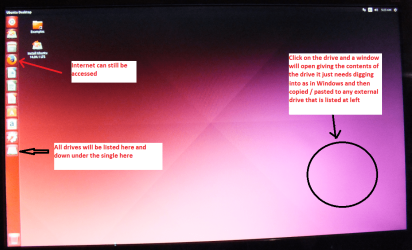
When it is finished - it takes very little time you will get a screen like in the pic .
Open the drive you want > User and dig down until you get to the data / settings you may be able to copy / paste the material you want to an external source or other installed drive doing this.
I am not sure if it will but I have recovered tons of data etc using this method both on "dead" or just drives that you cannot get data from using Windows. Use the old drive plugged in as an external drive using a USB to SATA (or if very old IDE) adaptor.

There is a Linux Mint option but I find this method suits whatever I want.
 

Attachments

  • UBUNTU SCREEN X2.PNG
    UBUNTU SCREEN X2.PNG
    272.7 KB · Views: 0
  • SATA ADAPTOR.PNG
    SATA ADAPTOR.PNG
    118.1 KB · Views: 0

My Computer My Computer

At a glance

Desk1 7 Home Prem / Desk2 10 Pro / Main lap A...Desk1 i5 3750K / Laptop i7 GTX 860M / Desk2 i...Desk1 8GB (1866) / Desk2 16GB (1333) / Laptop...Desk 1& 2NVidia GTX 650 & Laptops on board Intel
Computer type
PC/Desktop
Computer Manufacturer/Model Number
Own build (new) Desk1 / Asus ROG Win 7 / Desk2 1st build
OS
Desk1 7 Home Prem / Desk2 10 Pro / Main lap Asus ROG 10 Pro 2 laptop Toshiba 7 Pro Asus P2520 7 & 10
CPU
Desk1 i5 3750K / Laptop i7 GTX 860M / Desk2 i5 2500
Motherboard
Desk1 Asus P877-V / Desk2 Gigabyte H67 UD3H / Laptop ?
Memory
Desk1 8GB (1866) / Desk2 16GB (1333) / Laptop 8Gb DDR3
Graphics Card(s)
Desk 1& 2NVidia GTX 650 & Laptops on board Intel
Sound Card
Desk 1 & 2 -XONAR DG Realtek High Def audio Laptop
Monitor(s) Displays
Desk 1 Benq HD 2450 / Desk2 Philips 24" / Laptop 17.5"
Screen Resolution
1920x1080 D1 & D2 & Laptop 1
Hard Drives
Desk1 Samsung 120GB 830 SSD
Asus ROG 256GB 850 Pro SSD
Desk2 Samsung 840 256 SSD
Toshiba 120GB EVO
PSU
Desk 1 Corsair HX 1050/ Laptop ? / Desk 2 Corsair HX 650
Case
Desk 1 Cooler HAF XM ? Toshiba laptop / Desk2 Coolermaster
Cooling
Fans on all Desk1 -2 Desk2 - all Coolermasters 5 Laptop ?
Keyboard
Desk 1 MS Sidewinder X6 Desk 2 MS Sidewinder X 4
Mouse
Desk 1&2 - Gigabyte MS 900 gamer - laptop - Logitec wireless
Internet Speed
ADSL2+
Other Info
One other Desktop (tester) and spare Toshba laptop both with SSD's
Running Kaspersky 2016 ISS on all machines config'd identically
Logitec audio stereo systems on each machine (x3)
Canon MG5250MFC
Router/modem TP-Link running WPA2SK
I ran Puppy Linux on the laptop running off the DVD drive and was able to access and back up most of the user files that way before I even posted here. I will look into a bootable Ubuntu for the future though as a better alternative. I also have external drive enclosures I could have used if I had to pull the hard drive but luckily I did not have to.

I do love SSD drives, I use one on my main computer. Unfortunately the laptop hard drive is PATA and I have not seen many PATA SSD drives for a decent size and price that would be worth spending money on for an old laptop.
 

My Computer My Computer

At a glance

Windows 7 Ultimate x64
Computer type
PC/Desktop
OS
Windows 7 Ultimate x64
Hmm Mormy mate looks like maybe if the funds will run to it a new laptop is in order, because a PATA set up is to me reading there are a few more parts ready to go south. You are right the drives can be found but usually used ones and then you are left with something that possibly may go the same way.

Just out of curiosity what is the make and model of the laptop?

I suppose the machine as is could be kept as a Ubuntu or Linux boot up set up and would be very handy for back ups incase your other machines are on the blink.

Now as for a new one what I do is get one that has Windows 7 as an option and clone the drive to a SSD or just swap out the SSD and slip in a 7 OEM but again that is my way of doing things and all well and good but it is down to your fund situation.
 

My Computer My Computer

At a glance

Desk1 7 Home Prem / Desk2 10 Pro / Main lap A...Desk1 i5 3750K / Laptop i7 GTX 860M / Desk2 i...Desk1 8GB (1866) / Desk2 16GB (1333) / Laptop...Desk 1& 2NVidia GTX 650 & Laptops on board Intel
Computer type
PC/Desktop
Computer Manufacturer/Model Number
Own build (new) Desk1 / Asus ROG Win 7 / Desk2 1st build
OS
Desk1 7 Home Prem / Desk2 10 Pro / Main lap Asus ROG 10 Pro 2 laptop Toshiba 7 Pro Asus P2520 7 & 10
CPU
Desk1 i5 3750K / Laptop i7 GTX 860M / Desk2 i5 2500
Motherboard
Desk1 Asus P877-V / Desk2 Gigabyte H67 UD3H / Laptop ?
Memory
Desk1 8GB (1866) / Desk2 16GB (1333) / Laptop 8Gb DDR3
Graphics Card(s)
Desk 1& 2NVidia GTX 650 & Laptops on board Intel
Sound Card
Desk 1 & 2 -XONAR DG Realtek High Def audio Laptop
Monitor(s) Displays
Desk 1 Benq HD 2450 / Desk2 Philips 24" / Laptop 17.5"
Screen Resolution
1920x1080 D1 & D2 & Laptop 1
Hard Drives
Desk1 Samsung 120GB 830 SSD
Asus ROG 256GB 850 Pro SSD
Desk2 Samsung 840 256 SSD
Toshiba 120GB EVO
PSU
Desk 1 Corsair HX 1050/ Laptop ? / Desk 2 Corsair HX 650
Case
Desk 1 Cooler HAF XM ? Toshiba laptop / Desk2 Coolermaster
Cooling
Fans on all Desk1 -2 Desk2 - all Coolermasters 5 Laptop ?
Keyboard
Desk 1 MS Sidewinder X6 Desk 2 MS Sidewinder X 4
Mouse
Desk 1&2 - Gigabyte MS 900 gamer - laptop - Logitec wireless
Internet Speed
ADSL2+
Other Info
One other Desktop (tester) and spare Toshba laptop both with SSD's
Running Kaspersky 2016 ISS on all machines config'd identically
Logitec audio stereo systems on each machine (x3)
Canon MG5250MFC
Router/modem TP-Link running WPA2SK
Back
Top