PC locking up

huffman

New member
Pro User
Local time
6:45 PM
Messages
715
I am not sure anyone is paying attention to this forum or not. I like Windows 7 and plan to keep using it until this old PC dies.

First let me say that I have four (4) browsers installed and basically only use two (2) of them.

In the last month or so when I open two or more browsers, the PC tends to lockup. I then have use the power button to shut down. I can then restart.

The only thing I think helps is to every now and then, delete the cookies. Also about once a month I run Ccleaner and then do a virus scan. It has been a year or maybe longer since I last saw a virus of any kind on this pc.

Off hand I can not think of anything that would cause the PC to lockup. I am hoping someone else may have some insight.

Thanks
 

My Computer

OS
Windows 7 Pro
CPU
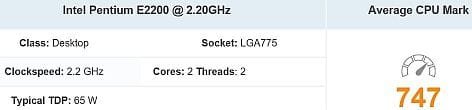
Intel(R) Pentium(R) Duel CPU E2200 2.20 Ghz
Motherboard
GA-G41M-ES2L
Memory
4 gb 2.96 Usable
Graphics Card(s)
Onboard
Sound Card
Onboard
Hard Drives
2 - 1TB WD Sata Drives
When you launch two browsers, are you able to start Task Manager, Processes and determine if one of them is using a significant amount of memory. I find lately that Firefox is using a lot of memory and, if I let it run long enough, it will slow things to a crawl. Like you, I only have 4 GB RAM.
 

My Computer

Computer type
Laptop
Computer Manufacturer/Model Number
Dell M6500 Precision Work Station
OS
Windows 7 Pro SP1 64 bit
Memory
8 GB
Screen Resolution
1920x
Internet Speed
30 Mbps
Antivirus
Norton Security
Browser
IE 11
huffman:

We don't know how you use your computer and how well it's maintained and what's installed in it, so there could be multiple reasons why it's slow.

However, the main reason for its slowness (per your listed system specs) appears to be its very weak Intel processor and it having only 2.96 GB of usable RAM.
 

Attachments

  • Capture.JPG
    Capture.JPG
    15.8 KB · Views: 21

My Computer

Computer type
PC/Desktop
Computer Manufacturer/Model Number
Dell OptiPlex 9020
OS
Windows 7 Professional SP1 64-bit
CPU
Intel Core i7-4790 3.60 GHz
Memory
32 GB DDR3-1600 MHz
Graphics Card(s)
Integrated Intel HD Graphics 4600
Monitor(s) Displays
Viewsonic 32" LCD
Hard Drives
Kingston SATA 3 240 GB SSD
Internet Speed
Spectrum Internet 1000 Mbps
flavallee is spot on, is it possible to purchase and install more RAM? Whatever maximum the motherboard can handle, that would be best.
 

My Computer

Computer type
PC/Desktop
Computer Manufacturer/Model Number
Antec desktop; Acer Aspire laptops
OS
Windows 7 Professional 64-bit
CPU
Desktop i5; Acers i5 & i7
Memory
desktop 16GB; 1 Acer 8GB & 1 Acer 16GB
Hard Drives
1TB split into 2 equal partitions [OS and data] usable by RJS
Internet Speed
AT&T DSL
Browser
FF, GChrome, msIE
Other Info
Windows 7 Firewall, Emsisoft AM/AV, MSE [scan-only], SpywareBlaster, Ruiware/BillP combine
It is still doing it. The PC is not used for any heavy lifting. I delete cookies often and run the antivirus monthly. I also run Ccleaner monthly.

This is how I feel about Windows 7. It was and probably still is a fantastic software. I have noticed that since Microsoft stopped supporting it, it seems have gone downhill a little.

I guess I could switch over to Windows 10, but I am NOT willing to pay to have Windows 10 installed.
I really do like Windows 7.

N0 I can NOT add more ram. I am maxed out at 4gb.

At time the PC runs like a well oiled clock, but then there are days like today, it hangs up every 5 minutes.

I guess I will have to learn to live with it until the PC finally dies.

Take care and have a great day.
 

My Computer

OS
Windows 7 Pro
CPU
Intel(R) Pentium(R) Duel CPU E2200 2.20 Ghz
Motherboard
GA-G41M-ES2L
Memory
4 gb 2.96 Usable
Graphics Card(s)
Onboard
Sound Card
Onboard
Hard Drives
2 - 1TB WD Sata Drives
Some things that have helped me with my two Windows 7 laptops was to:
-- "thin out" the background-running utilities and programs
-- clean out browser cache, clean out "tmp, temp" files once a week
-- uninstall software that has not been used for years -- uninstall only if you have the EXE or MSI install files
-- Windows Repair (All in One) in Safe Mode with Networking, with a few clicks, some if not most if not all slowness can be dealt with
If the above sounds good to you, we can proceed from there.
 

My Computer

Computer type
PC/Desktop
Computer Manufacturer/Model Number
Antec desktop; Acer Aspire laptops
OS
Windows 7 Professional 64-bit
CPU
Desktop i5; Acers i5 & i7
Memory
desktop 16GB; 1 Acer 8GB & 1 Acer 16GB
Hard Drives
1TB split into 2 equal partitions [OS and data] usable by RJS
Internet Speed
AT&T DSL
Browser
FF, GChrome, msIE
Other Info
Windows 7 Firewall, Emsisoft AM/AV, MSE [scan-only], SpywareBlaster, Ruiware/BillP combine

My Computer

Computer type
Laptop
Computer Manufacturer/Model Number
Dell M6500 Precision Work Station
OS
Windows 7 Pro SP1 64 bit
Memory
8 GB
Screen Resolution
1920x
Internet Speed
30 Mbps
Antivirus
Norton Security
Browser
IE 11
wither 2 -- Routinely clean out browsers' cache. That will help some.
 

My Computer

Computer type
PC/Desktop
Computer Manufacturer/Model Number
Antec desktop; Acer Aspire laptops
OS
Windows 7 Professional 64-bit
CPU
Desktop i5; Acers i5 & i7
Memory
desktop 16GB; 1 Acer 8GB & 1 Acer 16GB
Hard Drives
1TB split into 2 equal partitions [OS and data] usable by RJS
Internet Speed
AT&T DSL
Browser
FF, GChrome, msIE
Other Info
Windows 7 Firewall, Emsisoft AM/AV, MSE [scan-only], SpywareBlaster, Ruiware/BillP combine
Thanks. Good advice. However, it doesn't work for me. I'd go into more details but I don't want to infringe on the author's thread.
 

My Computer

Computer type
Laptop
Computer Manufacturer/Model Number
Dell M6500 Precision Work Station
OS
Windows 7 Pro SP1 64 bit
Memory
8 GB
Screen Resolution
1920x
Internet Speed
30 Mbps
Antivirus
Norton Security
Browser
IE 11
wither 2 -- go ahead and start a separate thread, we can go there and continue. You might have to PM me with the URL.
 

My Computer

Computer type
PC/Desktop
Computer Manufacturer/Model Number
Antec desktop; Acer Aspire laptops
OS
Windows 7 Professional 64-bit
CPU
Desktop i5; Acers i5 & i7
Memory
desktop 16GB; 1 Acer 8GB & 1 Acer 16GB
Hard Drives
1TB split into 2 equal partitions [OS and data] usable by RJS
Internet Speed
AT&T DSL
Browser
FF, GChrome, msIE
Other Info
Windows 7 Firewall, Emsisoft AM/AV, MSE [scan-only], SpywareBlaster, Ruiware/BillP combine
Are you touching the registry with Ccleaner? Don't. And System Ninja would probably be better than everyone's favorite Ccleaner. Though, you can add an ini file to Ccleaner to help mimic System Ninja I guess.
 

My Computer

Computer type
PC/Desktop
OS
Windows 7 Ultimate x64
I don't know if you're talking to me or huffman. My problem is with Firefox 52.9 and other browsers in Vista when it's running for four or five hours. I suspect it's related to the fact that I'm listening to Accuradio all that time but haven't pursued it. Normally, I just reboot to clear memory. The only registry cleaner I use is the Norton one touch cleanup. I don't expect any of you to address my problem in this forum.
 

My Computer

Computer type
Laptop
Computer Manufacturer/Model Number
Dell M6500 Precision Work Station
OS
Windows 7 Pro SP1 64 bit
Memory
8 GB
Screen Resolution
1920x
Internet Speed
30 Mbps
Antivirus
Norton Security
Browser
IE 11
Back
Top