Pc not working after intense gaming

crazykilla

New member
Member
VIP
Local time
8:15 PM
Messages
143
Hello, i'm CrazyKilla

I was playing far cry 3 which my pc found hard to play until i enabled SLI which then boosted fps and i turned graphics up to verry high and started playing, it ran really smoothly until a few minutes later my pc turned off, straight away i unplugged power cables and turned off power supply, the power cable was pritey hot, i unplugged everything and opened pc up and getting burn smells, mostly coming from power supply, i immedietly pulled out many parts such as graphics cards, processor, and power supply which all were verry hot (but not the processor) the power supply was giving off a burning smell so i opened it up and didn't find any damage (probably because i didn't check well), i left all parts to cool off and put everything back as it was, my pc is getting power (LED lights, reset buttons, speakers) but when i turn it on nothing happens at all, im really worried... My rig is pritey expensive (about £1000) and i don't want to get damaged parts ): Also my power supply (i think) was given to me by some foreign pc technitians when i had problems but it could be my friend that gave it to me,


I have many fans (1 large at the front, 2 medium fans on the side and back, 1 small on processor and 3 mini ones on gpus and MB) What caused this problem and how can i fix this?
 

My Computer

Computer type
PC/Desktop
Computer Manufacturer/Model Number
Custom Build
OS
Windows 7 Ultimate 64-bit
CPU
Intel i7-3820 @ 3.60GHz
Motherboard
MSI X79A-GD45 8D
Memory
24GB
Graphics Card(s)
2xNvidea GTS 450 SLI
Monitor(s) Displays
HP w2408h 24" monitor
Screen Resolution
1920x1200
Hard Drives
2 Terrabyte 6GB/s HDD
Case
Cooler Master 912 HAF
Cooling
Intel Water Cooling for CPU, 6 Fans.
Internet Speed
100MB/s
Antivirus
None - Like a Boss
I can only assume that you are looking for confirmation on what you know is the problem:
The power supply is dead.

Everything you describe points to this. Burnt smells coming from any component is never a good thing, but a power supply is the worst.

Do not connect or use that power supply in your system. It could damage your other components. Get a new supply, one with sufficient power (and overhead) to run 2 video cards and the rest of your system.
http://www.sevenforums.com/hardware-devices/197720-how-pick-right-power-supply.html

My advice is always to not skimp on the power supply. It is the most important component in the system.
 

My Computer

Computer type
PC/Desktop
Computer Manufacturer/Model Number
Home Built - Jan 2013
OS
Windows 7 64 Bit Home Premium SP1
CPU
i7-3820
Motherboard
Asus P9X79-PRO - Bios 4608
Memory
GSkill F3-14900CL9Q - 16GB
Graphics Card(s)
EVGA GeForce GTX660 - Driver 352.86
Sound Card
On board Realtek ALC898
Monitor(s) Displays
Acer S271HL
Screen Resolution
1920 x 1080
Hard Drives
#1- Samsung 840 Pro Series
#2- Western Digital WD1002FAEX Sata3 Black
#3- Western Digital WD1002FAEX Sata3 Black
PSU
Corsair CMPSU-850TX-V2 - 850 watt (by Seasonic)
Case
Corsair Obsidian 550D
Cooling
Standard 3 120mm case fans, Cooler Master Hyper 212 EVO
Keyboard
MS KC-0405
Mouse
Intellimouse 5-button
Internet Speed
56 Mbits/Sec (on a good day)
Antivirus
Avast & Malwarebytes
Browser
Firefox
Other Info
Asus DVD - DRW-24B1ST 24X
Can you recommend a power supply for my system?:
Rampage IV Extreme (MB)
2 Gts 450's (Gpu)
I7 3820 3.60Ghz (Prcssr)
2 HDDs

External
Hp w2408h monitor
Logitec Z506 speakers
And some sort of LG tv
 

My Computer

Computer type
PC/Desktop
Computer Manufacturer/Model Number
Custom Build
OS
Windows 7 Ultimate 64-bit
CPU
Intel i7-3820 @ 3.60GHz
Motherboard
MSI X79A-GD45 8D
Memory
24GB
Graphics Card(s)
2xNvidea GTS 450 SLI
Monitor(s) Displays
HP w2408h 24" monitor
Screen Resolution
1920x1200
Hard Drives
2 Terrabyte 6GB/s HDD
Case
Cooler Master 912 HAF
Cooling
Intel Water Cooling for CPU, 6 Fans.
Internet Speed
100MB/s
Antivirus
None - Like a Boss
I'm not sure that the brands and models available here in the US are available in Lithuania, so it is best to do your own shopping.

Personally I recommend Seasonic and Corsair power supplies. Some Corsairs are made by Seasonic, but not all. There is a link "who makes your power supply" in that thread I posted above where you can find that stuff out.

You will use a ATX 12v/EPS 12v supply for your machine. Make sure it has an 8-pin connector for your processor.

As to size of supply (watts) I use this calculator:
eXtreme Power Supply Calculator
Fill in ALL of your specs.

Most important is that last box: "Capacitor Aging". I always use 50%. That is because a power supply's output drops over time due to capacitor aging. It is common to reach 50% aging in 4 to 5 years. Heavy users can do half that. Buying a larger supply compensates for this known aging and extends the life of the supply.

If you are buying online look at the reviews. They will tell the tale.

This is a good supply to start with:
Newegg.com - CORSAIR Enthusiast Series TX850 V2 850W ATX12V v2.31/ EPS12V v2.92 80 PLUS BRONZE Certified Active PFC High Performance Power Supply
Make note of the specs and compare them to anything else you are looking at.

I can assure you that more opinions and advice from other knowledgeable folks will follow. Everyone's needs and wants are different. It is all good.
 

My Computer

Computer type
PC/Desktop
Computer Manufacturer/Model Number
Home Built - Jan 2013
OS
Windows 7 64 Bit Home Premium SP1
CPU
i7-3820
Motherboard
Asus P9X79-PRO - Bios 4608
Memory
GSkill F3-14900CL9Q - 16GB
Graphics Card(s)
EVGA GeForce GTX660 - Driver 352.86
Sound Card
On board Realtek ALC898
Monitor(s) Displays
Acer S271HL
Screen Resolution
1920 x 1080
Hard Drives
#1- Samsung 840 Pro Series
#2- Western Digital WD1002FAEX Sata3 Black
#3- Western Digital WD1002FAEX Sata3 Black
PSU
Corsair CMPSU-850TX-V2 - 850 watt (by Seasonic)
Case
Corsair Obsidian 550D
Cooling
Standard 3 120mm case fans, Cooler Master Hyper 212 EVO
Keyboard
MS KC-0405
Mouse
Intellimouse 5-button
Internet Speed
56 Mbits/Sec (on a good day)
Antivirus
Avast & Malwarebytes
Browser
Firefox
Other Info
Asus DVD - DRW-24B1ST 24X

My Computer

Computer type
PC/Desktop
Computer Manufacturer/Model Number
Custom Build
OS
Windows 7 Ultimate 64-bit
CPU
Intel i7-3820 @ 3.60GHz
Motherboard
MSI X79A-GD45 8D
Memory
24GB
Graphics Card(s)
2xNvidea GTS 450 SLI
Monitor(s) Displays
HP w2408h 24" monitor
Screen Resolution
1920x1200
Hard Drives
2 Terrabyte 6GB/s HDD
Case
Cooler Master 912 HAF
Cooling
Intel Water Cooling for CPU, 6 Fans.
Internet Speed
100MB/s
Antivirus
None - Like a Boss
...the power supply was giving off a burning smell so i opened it up and didn't find any damage (probably because i didn't check well), i left all parts to cool off and put everything back as it was....
Never open a power supply unless you discharge the capacitors first. Or just never anyway if you don't absolutely know what you are doing.

Electrocution by power supply.
 

My Computer

Computer type
PC/Desktop
Computer Manufacturer/Model Number
Wordsworth 5000
OS
Windows 10 Pro 64 bit
CPU
Core i7 6700K Skylake 4.0GHz
Motherboard
Asus Z170 Pro
Memory
Corsair Vengeance LPX DDR4 32GB 3000MHz
Graphics Card(s)
Asus Radeon RX480 Strix 8GB
Sound Card
Asus Xonar DSX
Monitor(s) Displays
HP 2709m
Screen Resolution
1920x1080
Hard Drives
Intel 600p M.2 PCIe NVMe SSD 512GB; Intel 335 SSD 240GB ;Western Digital Caviar Black 1TB
PSU
Thermaltake Toughpower Grand Platinum 850W
Case
Lian Li PC-B70
Cooling
CPU-Noctua NH D15, GPU-Stock, Case-Noctua 2x140, 2x120
Keyboard
Microsoft Natural Ergo 4000
Mouse
Microsoft Wireless Optical 1000
Internet Speed
Cable
Other Info
HP bd 340,
HP bd 240,
Klipsch Promedia 5.1 THX
"Stuff Happens"!
When power supplies get old the components in it can dry out, overheat, and fail in slow motion. It is a buildup to total failure. How old was that supply?

External sources could be poor power (dirty power) going into the supply from the wall (power supplies compensate for this but not forever). And it could be just running it hard. The longer a power supply has to put out near full power the faster it will age just due to cooking in the heat.

Use that calculator to determine your total draw at high load and tell us what you get.
 

My Computer

Computer type
PC/Desktop
Computer Manufacturer/Model Number
Home Built - Jan 2013
OS
Windows 7 64 Bit Home Premium SP1
CPU
i7-3820
Motherboard
Asus P9X79-PRO - Bios 4608
Memory
GSkill F3-14900CL9Q - 16GB
Graphics Card(s)
EVGA GeForce GTX660 - Driver 352.86
Sound Card
On board Realtek ALC898
Monitor(s) Displays
Acer S271HL
Screen Resolution
1920 x 1080
Hard Drives
#1- Samsung 840 Pro Series
#2- Western Digital WD1002FAEX Sata3 Black
#3- Western Digital WD1002FAEX Sata3 Black
PSU
Corsair CMPSU-850TX-V2 - 850 watt (by Seasonic)
Case
Corsair Obsidian 550D
Cooling
Standard 3 120mm case fans, Cooler Master Hyper 212 EVO
Keyboard
MS KC-0405
Mouse
Intellimouse 5-button
Internet Speed
56 Mbits/Sec (on a good day)
Antivirus
Avast & Malwarebytes
Browser
Firefox
Other Info
Asus DVD - DRW-24B1ST 24X
My PSU was slightly over 6 - 8 months old, i have my pc on 6+ hours on work days and 12+ on weekends,

Should i clean my PSU out every month or so? (If i do discharge those capacitors of yours)

Life is so boring without pcs and internet! Is it not?
 

My Computer

Computer type
PC/Desktop
Computer Manufacturer/Model Number
Custom Build
OS
Windows 7 Ultimate 64-bit
CPU
Intel i7-3820 @ 3.60GHz
Motherboard
MSI X79A-GD45 8D
Memory
24GB
Graphics Card(s)
2xNvidea GTS 450 SLI
Monitor(s) Displays
HP w2408h 24" monitor
Screen Resolution
1920x1200
Hard Drives
2 Terrabyte 6GB/s HDD
Case
Cooler Master 912 HAF
Cooling
Intel Water Cooling for CPU, 6 Fans.
Internet Speed
100MB/s
Antivirus
None - Like a Boss
Much too young to die. I might suspect a defective or cheaply made unit.

Yes, you should clean everything in the case, including the power supply, relatively often. Once a month may be good if you have dusty conditions. Use compressed air to blow the dust and hair out. There is no need to disassemble, remove, or take apart anything, just blow it out. They sell cans of compressed air just for this purpose.
 

My Computer

Computer type
PC/Desktop
Computer Manufacturer/Model Number
Home Built - Jan 2013
OS
Windows 7 64 Bit Home Premium SP1
CPU
i7-3820
Motherboard
Asus P9X79-PRO - Bios 4608
Memory
GSkill F3-14900CL9Q - 16GB
Graphics Card(s)
EVGA GeForce GTX660 - Driver 352.86
Sound Card
On board Realtek ALC898
Monitor(s) Displays
Acer S271HL
Screen Resolution
1920 x 1080
Hard Drives
#1- Samsung 840 Pro Series
#2- Western Digital WD1002FAEX Sata3 Black
#3- Western Digital WD1002FAEX Sata3 Black
PSU
Corsair CMPSU-850TX-V2 - 850 watt (by Seasonic)
Case
Corsair Obsidian 550D
Cooling
Standard 3 120mm case fans, Cooler Master Hyper 212 EVO
Keyboard
MS KC-0405
Mouse
Intellimouse 5-button
Internet Speed
56 Mbits/Sec (on a good day)
Antivirus
Avast & Malwarebytes
Browser
Firefox
Other Info
Asus DVD - DRW-24B1ST 24X
My PSU was slightly over 6 - 8 months old, i have my pc on 6+ hours on work days and 12+ on weekends,

Should i clean my PSU out every month or so? (If i do discharge those capacitors of yours)

Life is so boring without pcs and internet! Is it not?
As TVeblen says don't open or take apart the PSU; just use compressed air in the entire inside of your computer to blow away dust, etc. Your computer will thank you with lower temps.
 

My Computer

Computer type
PC/Desktop
Computer Manufacturer/Model Number
Wordsworth 5000
OS
Windows 10 Pro 64 bit
CPU
Core i7 6700K Skylake 4.0GHz
Motherboard
Asus Z170 Pro
Memory
Corsair Vengeance LPX DDR4 32GB 3000MHz
Graphics Card(s)
Asus Radeon RX480 Strix 8GB
Sound Card
Asus Xonar DSX
Monitor(s) Displays
HP 2709m
Screen Resolution
1920x1080
Hard Drives
Intel 600p M.2 PCIe NVMe SSD 512GB; Intel 335 SSD 240GB ;Western Digital Caviar Black 1TB
PSU
Thermaltake Toughpower Grand Platinum 850W
Case
Lian Li PC-B70
Cooling
CPU-Noctua NH D15, GPU-Stock, Case-Noctua 2x140, 2x120
Keyboard
Microsoft Natural Ergo 4000
Mouse
Microsoft Wireless Optical 1000
Internet Speed
Cable
Other Info
HP bd 340,
HP bd 240,
Klipsch Promedia 5.1 THX
when shopping for deals, just make sure the PSU has the 80 plus certification. It means the product has been tested and is able to keep efficiency above 80% even at full load.
Crappy PSUs die when asked more than half their "stated" output, and very rarely can survive at "full load" for any amount of time.

And as others said, opening a PSU is a good way to die.

In case the power from the wall socket is jumpy (or dirty as others said), investing in a good UPS is a good idea.
It's entire point is ironing out such power weirdness AND keeping your stuff powered for a few minutes after power went down (and this is useful because it gives you time to save your work/game).
 

My Computer

Computer type
PC/Desktop
Computer Manufacturer/Model Number
custom built
OS
Win 7 Pro 64-bit 7601
CPU
AMD Phenom 9650 QuadCore, revision DR-B3
Motherboard
ASUS M4A78
Memory
5 GB yes I run 2x 2GB and 1x 1GB, different brand, spank me.
Graphics Card(s)
NVIDIA GeForce 9800 GT 512 Mb, unknown manufacturer.
Sound Card
Crappy Realtek Integrated Audio
Monitor(s) Displays
Fujitsu Siemens P19-3P
Screen Resolution
1280 x 1024 x 32 bits @ 60 Hz Oh yeah, 4:3 rocks!
Hard Drives
(1) MAXTOR S TM3320613AS SATA Disk Device (2) STM35004 18AS SATA Disk Device (3) TOSHIBA USB 2.5"-HDD
PSU
whatever, around 450w
Case
Scavenged from old company PC, 10+ years old
Cooling
CPU fan, GPU fan, case fan, nothing fancy
Keyboard
Microsoft, PS/2, white.
Mouse
Optical, logitec.
Internet Speed
effective max speeds: 70-ish kB/s down 30-ish kB/s up
Antivirus
Avira, free edition.
Browser
Firefox with FXChrome to make it look like Google Chrome :P
Other Info
Was discarded by previous owner due to "horrible performance".
Was running Win Xp from a IDE drive. Yeah. Was a pain.
SATA II drive and Win7 and it zips away! Yay!
HELP!! A psu arrived and i plugged it in and the pc still didn't work, i press the power button but pc doesn't responde other than with speakers making a sound, what could be the problem now?!
 

My Computer

Computer type
PC/Desktop
Computer Manufacturer/Model Number
Custom Build
OS
Windows 7 Ultimate 64-bit
CPU
Intel i7-3820 @ 3.60GHz
Motherboard
MSI X79A-GD45 8D
Memory
24GB
Graphics Card(s)
2xNvidea GTS 450 SLI
Monitor(s) Displays
HP w2408h 24" monitor
Screen Resolution
1920x1200
Hard Drives
2 Terrabyte 6GB/s HDD
Case
Cooler Master 912 HAF
Cooling
Intel Water Cooling for CPU, 6 Fans.
Internet Speed
100MB/s
Antivirus
None - Like a Boss
Is it any different than it was with the old power supply, or is it the same thing?
 

My Computer

Computer type
PC/Desktop
Computer Manufacturer/Model Number
Home Built - Jan 2013
OS
Windows 7 64 Bit Home Premium SP1
CPU
i7-3820
Motherboard
Asus P9X79-PRO - Bios 4608
Memory
GSkill F3-14900CL9Q - 16GB
Graphics Card(s)
EVGA GeForce GTX660 - Driver 352.86
Sound Card
On board Realtek ALC898
Monitor(s) Displays
Acer S271HL
Screen Resolution
1920 x 1080
Hard Drives
#1- Samsung 840 Pro Series
#2- Western Digital WD1002FAEX Sata3 Black
#3- Western Digital WD1002FAEX Sata3 Black
PSU
Corsair CMPSU-850TX-V2 - 850 watt (by Seasonic)
Case
Corsair Obsidian 550D
Cooling
Standard 3 120mm case fans, Cooler Master Hyper 212 EVO
Keyboard
MS KC-0405
Mouse
Intellimouse 5-button
Internet Speed
56 Mbits/Sec (on a good day)
Antivirus
Avast & Malwarebytes
Browser
Firefox
Other Info
Asus DVD - DRW-24B1ST 24X
Ok i removed my water cooler and noticed that i did a shitty job at placing the cpu in it's place, the pc turned on, along with another problem which i think is ram realted, i get the error codes 63 - 67 which is "CPU DXE Initialization is started" and if i move ram about i end up getting 34 which is "CPU post-memory initialization", over at my monitors nothing is happening...

EDIT: From reviews and forums i noticed that i have s verry good motherboard but a fussy one, people saying they got 4 of these and were all not functioning well, my
Mb also has a problem which is all black ram slots don't work


btw: its a new psu


Wait, can i phone up asus and ask for a motherboard replacement?
 

My Computer

Computer type
PC/Desktop
Computer Manufacturer/Model Number
Custom Build
OS
Windows 7 Ultimate 64-bit
CPU
Intel i7-3820 @ 3.60GHz
Motherboard
MSI X79A-GD45 8D
Memory
24GB
Graphics Card(s)
2xNvidea GTS 450 SLI
Monitor(s) Displays
HP w2408h 24" monitor
Screen Resolution
1920x1200
Hard Drives
2 Terrabyte 6GB/s HDD
Case
Cooler Master 912 HAF
Cooling
Intel Water Cooling for CPU, 6 Fans.
Internet Speed
100MB/s
Antivirus
None - Like a Boss
You should first go through the entire build and double check everything. Remove and reseat all parts, and look for dust, hair, corrosion, anything that may interfere with good contact.

Then I would perform a CLRTC. Those errors relate to component recognition and could be a checksum error of some sort.

CLRTC Procedure

  • Note all your current BIOS settings
  • Shut down the computer > remove the power cord.
  • Remove the 3v battery.
  • Move the CLRTC jumper from pins 1-2 to 2-3.
  • Touch a metal part of the case and Press and Hold the reset button for approx. 30 seconds to discharge all power from the board.
  • Put the CLRTC jumper back on pins 1-2.
  • Replace the 3v battery > replace the power cord > boot.
  • Immediately go back into BIOS and reset all your preferred settings. If the CLRTC worked you will need to reset the date and time.
And you could go for the replacement, particularly if the power supply was not the problem. The only problem you may have is that if the old supply did fail and damaged the motherboard in the process (which is very common) you may not be eligible. I cannot say whether they will check anything that close though.

You could try and test the motherboard for damage, or try and identify another damaged component, this way:


The Test (power off, power cord unplugged):

  • Disconnect everything externally connected except the mouse and keyboard (printers, USB devices, etc). If you are not using a wired mouse and keyboard see if you can borrow one. The wireless device is just another component you have to deal with.
  • Disconnect the power and data cables from all the drives inside the computer (Hard drives, DVD/CD drives, etc).
  • Remove all the cards installed in the expansion slots (PCI/PCI-e) including the video card. (Be careful handling them and place them on a non conductive surface while testing).
  • Remove all the RAM sticks (same rules as above).
Now connect the power cord and turn the PC on.

  • The motherboard should start beeping. You should get a beep code that tells you there is no memory. This is good, it means the processor is functioning and the motherboard is good so far.
  • Now add one stick of memory in Slot A1 and power on. More beeping: "no video card" beep code. This is good.
  • Then add the video card and connect it to the monitor. You should get no beeping and you should see the BIOS start screens, ending with the message that there is no boot device.
  • If you get no video then switch the one memory stick installed for another one and test.
  • If you do get video then start adding components back, one at a time, until the system fails to boot. The last component you added is then the problem component.
 

My Computer

Computer type
PC/Desktop
Computer Manufacturer/Model Number
Home Built - Jan 2013
OS
Windows 7 64 Bit Home Premium SP1
CPU
i7-3820
Motherboard
Asus P9X79-PRO - Bios 4608
Memory
GSkill F3-14900CL9Q - 16GB
Graphics Card(s)
EVGA GeForce GTX660 - Driver 352.86
Sound Card
On board Realtek ALC898
Monitor(s) Displays
Acer S271HL
Screen Resolution
1920 x 1080
Hard Drives
#1- Samsung 840 Pro Series
#2- Western Digital WD1002FAEX Sata3 Black
#3- Western Digital WD1002FAEX Sata3 Black
PSU
Corsair CMPSU-850TX-V2 - 850 watt (by Seasonic)
Case
Corsair Obsidian 550D
Cooling
Standard 3 120mm case fans, Cooler Master Hyper 212 EVO
Keyboard
MS KC-0405
Mouse
Intellimouse 5-button
Internet Speed
56 Mbits/Sec (on a good day)
Antivirus
Avast & Malwarebytes
Browser
Firefox
Other Info
Asus DVD - DRW-24B1ST 24X
Where did you get this CLRTC procedure? I cant find the clrtc jumper on the mb, no pictures or in forums... I have rampage iv btw, i only found clrtc jumpers on blue asus boards..,
 

My Computer

Computer type
PC/Desktop
Computer Manufacturer/Model Number
Custom Build
OS
Windows 7 Ultimate 64-bit
CPU
Intel i7-3820 @ 3.60GHz
Motherboard
MSI X79A-GD45 8D
Memory
24GB
Graphics Card(s)
2xNvidea GTS 450 SLI
Monitor(s) Displays
HP w2408h 24" monitor
Screen Resolution
1920x1200
Hard Drives
2 Terrabyte 6GB/s HDD
Case
Cooler Master 912 HAF
Cooling
Intel Water Cooling for CPU, 6 Fans.
Internet Speed
100MB/s
Antivirus
None - Like a Boss
That is an X79 board?
 

My Computer

Computer type
PC/Desktop
Computer Manufacturer/Model Number
Home Built - Jan 2013
OS
Windows 7 64 Bit Home Premium SP1
CPU
i7-3820
Motherboard
Asus P9X79-PRO - Bios 4608
Memory
GSkill F3-14900CL9Q - 16GB
Graphics Card(s)
EVGA GeForce GTX660 - Driver 352.86
Sound Card
On board Realtek ALC898
Monitor(s) Displays
Acer S271HL
Screen Resolution
1920 x 1080
Hard Drives
#1- Samsung 840 Pro Series
#2- Western Digital WD1002FAEX Sata3 Black
#3- Western Digital WD1002FAEX Sata3 Black
PSU
Corsair CMPSU-850TX-V2 - 850 watt (by Seasonic)
Case
Corsair Obsidian 550D
Cooling
Standard 3 120mm case fans, Cooler Master Hyper 212 EVO
Keyboard
MS KC-0405
Mouse
Intellimouse 5-button
Internet Speed
56 Mbits/Sec (on a good day)
Antivirus
Avast & Malwarebytes
Browser
Firefox
Other Info
Asus DVD - DRW-24B1ST 24X
Yes, but its red and black, unlike the more frequently bought one which is blue and white, both of these cards have different designs.
 

My Computer

Computer type
PC/Desktop
Computer Manufacturer/Model Number
Custom Build
OS
Windows 7 Ultimate 64-bit
CPU
Intel i7-3820 @ 3.60GHz
Motherboard
MSI X79A-GD45 8D
Memory
24GB
Graphics Card(s)
2xNvidea GTS 450 SLI
Monitor(s) Displays
HP w2408h 24" monitor
Screen Resolution
1920x1200
Hard Drives
2 Terrabyte 6GB/s HDD
Case
Cooler Master 912 HAF
Cooling
Intel Water Cooling for CPU, 6 Fans.
Internet Speed
100MB/s
Antivirus
None - Like a Boss
They changed the world and nobody told me....

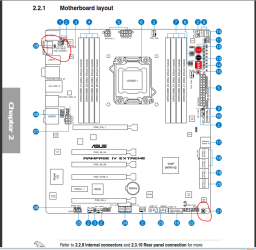
Fortunately I have just recently watched a video on that board. You have a CLRTC switch on the back of the case in the I/O panel! The procedure would be exactly the same, just you get to push a button and I still have to move a jumper.

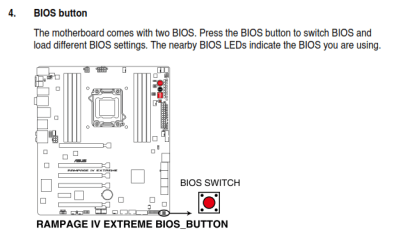
Looking at your manual you also have a dual BIOS. You can switch between 2 different BIOS settings by using the BIOS button on the board. I'm not sure that will help in this case, but if the CLRTC doesn't do anything you might give that a shot too.
 

Attachments

  • Capture.PNG
    Capture.PNG
    49.2 KB · Views: 6
  • Capture3.PNG
    Capture3.PNG
    16 KB · Views: 1

My Computer

Computer type
PC/Desktop
Computer Manufacturer/Model Number
Home Built - Jan 2013
OS
Windows 7 64 Bit Home Premium SP1
CPU
i7-3820
Motherboard
Asus P9X79-PRO - Bios 4608
Memory
GSkill F3-14900CL9Q - 16GB
Graphics Card(s)
EVGA GeForce GTX660 - Driver 352.86
Sound Card
On board Realtek ALC898
Monitor(s) Displays
Acer S271HL
Screen Resolution
1920 x 1080
Hard Drives
#1- Samsung 840 Pro Series
#2- Western Digital WD1002FAEX Sata3 Black
#3- Western Digital WD1002FAEX Sata3 Black
PSU
Corsair CMPSU-850TX-V2 - 850 watt (by Seasonic)
Case
Corsair Obsidian 550D
Cooling
Standard 3 120mm case fans, Cooler Master Hyper 212 EVO
Keyboard
MS KC-0405
Mouse
Intellimouse 5-button
Internet Speed
56 Mbits/Sec (on a good day)
Antivirus
Avast & Malwarebytes
Browser
Firefox
Other Info
Asus DVD - DRW-24B1ST 24X
Further complicating things: looks like Asus is calling the procedure ClearCMOS just like everyone else now.

Clear CMOS and CLRTC are the same thing. "Clear the Real Time Clock"
 

My Computer

Computer type
PC/Desktop
Computer Manufacturer/Model Number
Home Built - Jan 2013
OS
Windows 7 64 Bit Home Premium SP1
CPU
i7-3820
Motherboard
Asus P9X79-PRO - Bios 4608
Memory
GSkill F3-14900CL9Q - 16GB
Graphics Card(s)
EVGA GeForce GTX660 - Driver 352.86
Sound Card
On board Realtek ALC898
Monitor(s) Displays
Acer S271HL
Screen Resolution
1920 x 1080
Hard Drives
#1- Samsung 840 Pro Series
#2- Western Digital WD1002FAEX Sata3 Black
#3- Western Digital WD1002FAEX Sata3 Black
PSU
Corsair CMPSU-850TX-V2 - 850 watt (by Seasonic)
Case
Corsair Obsidian 550D
Cooling
Standard 3 120mm case fans, Cooler Master Hyper 212 EVO
Keyboard
MS KC-0405
Mouse
Intellimouse 5-button
Internet Speed
56 Mbits/Sec (on a good day)
Antivirus
Avast & Malwarebytes
Browser
Firefox
Other Info
Asus DVD - DRW-24B1ST 24X
Back
Top