Solved PC powers back on a few seconds after I "Shut down"

Rave79x

New member
Member
Local time
4:36 PM
Messages
53
Hi,

Just finishing a new install of Windows 7 on an SSD, with a secondary standard hard drive.

A strange problem is occurring....when I press "Shut down" in Windows, after about 3-4 seconds, the PC powers back on again.

I can only prevent it doing this by cutting the power in that 3-4 second window.

This started happening just before I began the re-installation of Windows. I had been fiddling with overclock settings in the BIOS but then I cleared the CMOS by shorting the battery terminals. I assume this completed given that it prompted me to enter the date and time again.

Note that there are many threads on the Google relating to random power-downs and power up, but this occurs only after I click "Shut down".

I can only think this is a BIOS issue but I don't know which setting it could be. Apart from the boot priority I don't think I have changed any BIOS settings.

Should I try clearing the CMOS?

Anyone got any ideas here?

PC specs shown below...

Thanks in advance for any help.
 

My Computer My Computer

At a glance

Windows 7 Professional x64AMD FX-8350 4GHz Socket AM3+Crucial 8GB (2x4GB) DDR3 1866Mhz BallistixKFA2 GeForce GTX 970 OC Silent "Infin8 Black ...
OS
Windows 7 Professional x64
CPU
AMD FX-8350 4GHz Socket AM3+
Motherboard
Asus M5a99fx PRO R2.0 Socket AM3+
Memory
Crucial 8GB (2x4GB) DDR3 1866Mhz Ballistix
Graphics Card(s)
KFA2 GeForce GTX 970 OC Silent "Infin8 Black Edition" 4096MB
Sound Card
Realtek onboard
Monitor(s) Displays
Samsung SyncMaster 206BW
Screen Resolution
1680x1050
Hard Drives
System: OCZ Agility 4 SSD 120GB | Users:
Hitachi HDT721010SLA360 1TB
PSU
EVGA SuperNOVA 750 G2
Case
Corsair Carbide Series 200R Compact
Cooling
x2 standard Corsair fans (front pull in & back push out)
Keyboard
Saitek Cyborg V1
Mouse
Logitech MX518
Internet Speed
Fibre
Antivirus
MS Security Essentials
Browser
Chrome (latest stable)
When you cold boot does it power on by itself or do you have to press the button on your case?
 

My Computer My Computer

At a glance

7 ultimate x64i7 920 @ 3.5ghz6gb corsair dominatorGigabyte Geforce GTX 460 1GB SLI
Computer Manufacturer/Model Number
Custom
OS
7 ultimate x64
CPU
i7 920 @ 3.5ghz
Motherboard
P6t Deluxe
Memory
6gb corsair dominator
Graphics Card(s)
Gigabyte Geforce GTX 460 1GB SLI
Sound Card
onboard
Monitor(s) Displays
samsung BX2450
Screen Resolution
1920x1080
Hard Drives
Seagate 7200.11 1Tb; WD green EADS 1TB
PSU
corsair tx750
Case
CM HAF 922
Cooling
coolermaster V8 + standard case fans
Keyboard
Logitech Classic Keyboard
Mouse
Logitech G500
Internet Speed
256k :P
When you cold boot does it power on by itself or do you have to press the button on your case?

Thanks for replying.

The mornings after its happened, I turn the power back on at the wall socket, then power on the PC using the button on the front.
 

My Computer My Computer

At a glance

Windows 7 Professional x64AMD FX-8350 4GHz Socket AM3+Crucial 8GB (2x4GB) DDR3 1866Mhz BallistixKFA2 GeForce GTX 970 OC Silent "Infin8 Black ...
OS
Windows 7 Professional x64
CPU
AMD FX-8350 4GHz Socket AM3+
Motherboard
Asus M5a99fx PRO R2.0 Socket AM3+
Memory
Crucial 8GB (2x4GB) DDR3 1866Mhz Ballistix
Graphics Card(s)
KFA2 GeForce GTX 970 OC Silent "Infin8 Black Edition" 4096MB
Sound Card
Realtek onboard
Monitor(s) Displays
Samsung SyncMaster 206BW
Screen Resolution
1680x1050
Hard Drives
System: OCZ Agility 4 SSD 120GB | Users:
Hitachi HDT721010SLA360 1TB
PSU
EVGA SuperNOVA 750 G2
Case
Corsair Carbide Series 200R Compact
Cooling
x2 standard Corsair fans (front pull in & back push out)
Keyboard
Saitek Cyborg V1
Mouse
Logitech MX518
Internet Speed
Fibre
Antivirus
MS Security Essentials
Browser
Chrome (latest stable)
There are usually settings like move mouse to power on computer etc, in the BIOS make sure they're disabled.

BTW just try leaving the computer alone for a minute at the time of cold boot before pressing the power button.

Also make sure the wiring in your PC is proper ... maybe something became a bit loose after SSD installation.
 

My Computer My Computer

At a glance

7 ultimate x64i7 920 @ 3.5ghz6gb corsair dominatorGigabyte Geforce GTX 460 1GB SLI
Computer Manufacturer/Model Number
Custom
OS
7 ultimate x64
CPU
i7 920 @ 3.5ghz
Motherboard
P6t Deluxe
Memory
6gb corsair dominator
Graphics Card(s)
Gigabyte Geforce GTX 460 1GB SLI
Sound Card
onboard
Monitor(s) Displays
samsung BX2450
Screen Resolution
1920x1080
Hard Drives
Seagate 7200.11 1Tb; WD green EADS 1TB
PSU
corsair tx750
Case
CM HAF 922
Cooling
coolermaster V8 + standard case fans
Keyboard
Logitech Classic Keyboard
Mouse
Logitech G500
Internet Speed
256k :P
Check PSU

Hi,

Hi,
....when I press "Shut down" in Windows, after about 3-4 seconds, the PC powers back on again.

Question: after you choose "shut down", does complete PC actually shuts down (drives, vents,etc)?
If answer is yes: After very short periode (say, less than 3sec), PC just starts running again, as if you pressed power button?
If answer is yes: I don't know what else you have done (except connecting SSD), but there's a big chance, that your power supply unit causes this (more precise, it is +5VSB line from PSU). It doesn't necessary mean, +5VSB line it's totaly broken... can be, this line doesn't conform specification 100%, which is quite common with "no-name" units (at least, it happened to me). Btw. the problem (with +5VSB) is usually not voltage, but current!
See: http://www.formfactors.org/developer/specs/PSU_DG_rev_1_1.pdf

Bogdan
 

My Computer My Computer

At a glance

Windows 7 HomePremium 64biti5-660016GBRadeon RX470 4GB
Computer type
PC/Desktop
Computer Manufacturer/Model Number
custom build
OS
Windows 7 HomePremium 64bit
CPU
i5-6600
Motherboard
Asus H170-PRO
Memory
16GB
Graphics Card(s)
Radeon RX470 4GB
Monitor(s) Displays
Dell U2415
Screen Resolution
1920x1200
Hard Drives
Samsung SSD-850PRO 256GB
WD Green 1TB
PSU
Corsair CX-600
Case
CoolerMaster Silencio-550
Browser
Firefox
Check to see if any "Wake on" settings are enabled in the BIOS. If they are, disable them. On Intel boards, these are in the Power section of the BIOS. The name and option may be similar to the following.

After Power Failure - Stay Off
Wake on LAN - Stay Off
Wake from S5 - Disable
 

My Computer My Computer

At a glance

Windows 7 Pro-x64i7-2600 3.4GHz - 3.8GHz Turbo8Gb - 2x4GB, Muskin 991770 PC3-1333Integrated Intel HD 2000
Computer type
PC/Desktop
Computer Manufacturer/Model Number
Built 2/11/2011
OS
Windows 7 Pro-x64
CPU
i7-2600 3.4GHz - 3.8GHz Turbo
Motherboard
Intel DH67BL-B3
Memory
8Gb - 2x4GB, Muskin 991770 PC3-1333
Graphics Card(s)
Integrated Intel HD 2000
Sound Card
Integrated Intel 10.1 HD, RealTek ALC892
Monitor(s) Displays
Asus LCD VH222H, Haier HL24XSL2a
Screen Resolution
1920x1080, 1920x1080
Hard Drives
Crucial SSD C300-128Gb,
Western Digital WD5002AALX - 500Gb,
Western Digital WD7501AALS - 750Gb
PSU
Seasonic 650W 80+ Gold Modular
Case
Rosewill Defender
Cooling
Stock CPU, Four 120mm case fans, PCH fan added
Keyboard
Logitech EX100 Y-RBH94 Wireless
Mouse
Logitech EX100 M-RCE95 Wireless
Internet Speed
3.0/1.5 Mbs
Antivirus
Microsoft Security Essentials
Browser
Microsoft Internet Explorer 11
Other Info
Antec Veris Premier-Multimedia IR Station,
Cyber Accoustics-3602 Speakers,
AFT XM-5U Card Reader,
Hauppauge TV-HVR-2250,
Sony LX300 USB Turntable
Next time you shut Down, turn your mouse upside down and see if it remains off. It sounds, at least, like you enter Sleep mode and mouse "creep" is waking it right away.
 

My Computer My Computer

At a glance

Windows 7 Ultimate X64 SP1Intel i5-2550K, Differing ~4.4-4.8GHz No buil...16GB G.Skill Sniper 1866MHz @ 2133MHz 2x8GBASUS GTX650TIB-DC2OC-2GD5, (650TI Boost)
Computer type
PC/Desktop
Computer Manufacturer/Model Number
Home Built Desktop By DataTech
OS
Windows 7 Ultimate X64 SP1
CPU
Intel i5-2550K, Differing ~4.4-4.8GHz No built in GPU
Motherboard
ASUS P8Z68-V PRO/GEN3
Memory
16GB G.Skill Sniper 1866MHz @ 2133MHz 2x8GB
Graphics Card(s)
ASUS GTX650TIB-DC2OC-2GD5, (650TI Boost)
Sound Card
Onboard Realtek 5-1
Monitor(s) Displays
Samsung P2570HD
Screen Resolution
1920x1080
Hard Drives
Samsung 840 Pro 256GB SSD for OS, 500GB Seagate Constellation (Enterprise drive) for Data
PSU
Corsair HX650W
Case
Inwin Dragon Rider
Cooling
Hyper 212 EVO w/two Noctua fans, push-pull, @1300 RPM
Keyboard
E-Z Eyes, bright yellow keys with large characters
Mouse
steelseries SENSEI Laser Pro Gaming
Internet Speed
48-51Mbs Mbs down, 11 Mbs up Xfinity Cable
Antivirus
Norton Internet Security 2013
Browser
IE 10, Opera, Pale Moon if needed
Other Info
4 case fans, LG BluRay-RE, ASUS DVD-RW, Mr. Fusion power supply, 1.21 gigawatts.
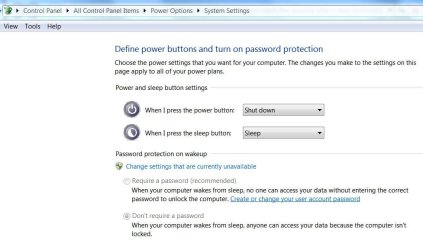
Here's another place to check. It sets the function of the Power Button.
 

Attachments

  • Power Switch Setting.JPG
    Power Switch Setting.JPG
    61.1 KB · Views: 82

My Computer My Computer

At a glance

Windows 7 Pro-x64i7-2600 3.4GHz - 3.8GHz Turbo8Gb - 2x4GB, Muskin 991770 PC3-1333Integrated Intel HD 2000
Computer type
PC/Desktop
Computer Manufacturer/Model Number
Built 2/11/2011
OS
Windows 7 Pro-x64
CPU
i7-2600 3.4GHz - 3.8GHz Turbo
Motherboard
Intel DH67BL-B3
Memory
8Gb - 2x4GB, Muskin 991770 PC3-1333
Graphics Card(s)
Integrated Intel HD 2000
Sound Card
Integrated Intel 10.1 HD, RealTek ALC892
Monitor(s) Displays
Asus LCD VH222H, Haier HL24XSL2a
Screen Resolution
1920x1080, 1920x1080
Hard Drives
Crucial SSD C300-128Gb,
Western Digital WD5002AALX - 500Gb,
Western Digital WD7501AALS - 750Gb
PSU
Seasonic 650W 80+ Gold Modular
Case
Rosewill Defender
Cooling
Stock CPU, Four 120mm case fans, PCH fan added
Keyboard
Logitech EX100 Y-RBH94 Wireless
Mouse
Logitech EX100 M-RCE95 Wireless
Internet Speed
3.0/1.5 Mbs
Antivirus
Microsoft Security Essentials
Browser
Microsoft Internet Explorer 11
Other Info
Antec Veris Premier-Multimedia IR Station,
Cyber Accoustics-3602 Speakers,
AFT XM-5U Card Reader,
Hauppauge TV-HVR-2250,
Sony LX300 USB Turntable
Lots of replies - thanks so much for your help. Will update soon.
 

My Computer My Computer

At a glance

Windows 7 Professional x64AMD FX-8350 4GHz Socket AM3+Crucial 8GB (2x4GB) DDR3 1866Mhz BallistixKFA2 GeForce GTX 970 OC Silent "Infin8 Black ...
OS
Windows 7 Professional x64
CPU
AMD FX-8350 4GHz Socket AM3+
Motherboard
Asus M5a99fx PRO R2.0 Socket AM3+
Memory
Crucial 8GB (2x4GB) DDR3 1866Mhz Ballistix
Graphics Card(s)
KFA2 GeForce GTX 970 OC Silent "Infin8 Black Edition" 4096MB
Sound Card
Realtek onboard
Monitor(s) Displays
Samsung SyncMaster 206BW
Screen Resolution
1680x1050
Hard Drives
System: OCZ Agility 4 SSD 120GB | Users:
Hitachi HDT721010SLA360 1TB
PSU
EVGA SuperNOVA 750 G2
Case
Corsair Carbide Series 200R Compact
Cooling
x2 standard Corsair fans (front pull in & back push out)
Keyboard
Saitek Cyborg V1
Mouse
Logitech MX518
Internet Speed
Fibre
Antivirus
MS Security Essentials
Browser
Chrome (latest stable)
Firstly, thanks again to everyone who replied.

BTW just try leaving the computer alone for a minute at the time of cold boot before pressing the power button.

Also make sure the wiring in your PC is proper ... maybe something became a bit loose after SSD installation.
I left it for 15 minutes with power connected and then turned it on but it made no difference.

I will check the wiring again.

There are usually settings like move mouse to power on computer etc, in the BIOS make sure they're disabled.

BTW just try leaving the computer alone for a minute at the time of cold boot before pressing the power button.

Also make sure the wiring in your PC is proper ... maybe something became a bit loose after SSD installation.
and...

Check to see if any "Wake on" settings are enabled in the BIOS. If they are, disable them. On Intel boards, these are in the Power section of the BIOS. The name and option may be similar to the following.

After Power Failure - Stay Off
Wake on LAN - Stay Off
Wake from S5 - Disable

BIOS settings as follows:

  • Suspend mode: Set to "Auto" ("s1" and "s3" are available)
  • Restore on AC power loss: Set to "Power off" ("Power on" and "Last state" are available
  • Power on by: There are 5 different devices listed and each one is set to "Disabled".
Next time you shut Down, turn your mouse upside down and see if it remains off. It sounds, at least, like you enter Sleep mode and mouse "creep" is waking it right away.
I tried this also, but the PC still powered back on.

Question: after you choose "shut down", does complete PC actually shuts down (drives, vents,etc)?
All the fans do yes. It sounds just like it does when it powers off properly.

If answer is yes: After very short periode (say, less than 3sec), PC just starts running again, as if you pressed power button?
Yes.

If answer is yes: I don't know what else you have done (except connecting SSD), but there's a big chance, that your power supply unit causes this (more precise, it is +5VSB line from PSU). It doesn't necessary mean, +5VSB line it's totally broken... can be, this line doesn't conform specification 100%, which is quite common with "no-name" units (at least, it happened to me). Btw. the problem (with +5VSB) is usually not voltage, but current!
See: http://www.formfactors.org/developer/specs/PSU_DG_rev_1_1.pdf
Whilst Nesteq are not a well known brand, I think they make high quality PSUs. I bought it from quietpc.com/uk who I know test products carefully before supplying. I cost £90+VAT in 2007 and is silent, which I think is a good sign.

However, I'm running out of ideas here so I guess it could be the PSU. Unfortunately, I don't have a spare I can try.

Here's another place to check. It sets the function of the Power Button.
These are the power options I have set:
Guide Power Options and Diagnosis

So of the ideas suggested, its only the PSU (and perhaps checking internal cables again) that it could be I think.

Unless anyone can think of something else?
 

My Computer My Computer

At a glance

Windows 7 Professional x64AMD FX-8350 4GHz Socket AM3+Crucial 8GB (2x4GB) DDR3 1866Mhz BallistixKFA2 GeForce GTX 970 OC Silent "Infin8 Black ...
OS
Windows 7 Professional x64
CPU
AMD FX-8350 4GHz Socket AM3+
Motherboard
Asus M5a99fx PRO R2.0 Socket AM3+
Memory
Crucial 8GB (2x4GB) DDR3 1866Mhz Ballistix
Graphics Card(s)
KFA2 GeForce GTX 970 OC Silent "Infin8 Black Edition" 4096MB
Sound Card
Realtek onboard
Monitor(s) Displays
Samsung SyncMaster 206BW
Screen Resolution
1680x1050
Hard Drives
System: OCZ Agility 4 SSD 120GB | Users:
Hitachi HDT721010SLA360 1TB
PSU
EVGA SuperNOVA 750 G2
Case
Corsair Carbide Series 200R Compact
Cooling
x2 standard Corsair fans (front pull in & back push out)
Keyboard
Saitek Cyborg V1
Mouse
Logitech MX518
Internet Speed
Fibre
Antivirus
MS Security Essentials
Browser
Chrome (latest stable)
Might be just a bad power switch or you have the Reset and Power switches reversed. Disconnet the front panel power switch and swap the reset switch (if you have one) to the Power on/off pins.
 

My Computer My Computer

At a glance

Windows 7 Pro-x64i7-2600 3.4GHz - 3.8GHz Turbo8Gb - 2x4GB, Muskin 991770 PC3-1333Integrated Intel HD 2000
Computer type
PC/Desktop
Computer Manufacturer/Model Number
Built 2/11/2011
OS
Windows 7 Pro-x64
CPU
i7-2600 3.4GHz - 3.8GHz Turbo
Motherboard
Intel DH67BL-B3
Memory
8Gb - 2x4GB, Muskin 991770 PC3-1333
Graphics Card(s)
Integrated Intel HD 2000
Sound Card
Integrated Intel 10.1 HD, RealTek ALC892
Monitor(s) Displays
Asus LCD VH222H, Haier HL24XSL2a
Screen Resolution
1920x1080, 1920x1080
Hard Drives
Crucial SSD C300-128Gb,
Western Digital WD5002AALX - 500Gb,
Western Digital WD7501AALS - 750Gb
PSU
Seasonic 650W 80+ Gold Modular
Case
Rosewill Defender
Cooling
Stock CPU, Four 120mm case fans, PCH fan added
Keyboard
Logitech EX100 Y-RBH94 Wireless
Mouse
Logitech EX100 M-RCE95 Wireless
Internet Speed
3.0/1.5 Mbs
Antivirus
Microsoft Security Essentials
Browser
Microsoft Internet Explorer 11
Other Info
Antec Veris Premier-Multimedia IR Station,
Cyber Accoustics-3602 Speakers,
AFT XM-5U Card Reader,
Hauppauge TV-HVR-2250,
Sony LX300 USB Turntable
Good idea Ken. That happened to me once and I did the switcheroo. In my case I accidently broke the power switch.

@Rave, you may also try putting the power switch leads on the reset header on the motherboard as well. Using reset is not a good idea anyway.
 

My Computer My Computer

At a glance

Windows 7 Ultimate X64 SP1Intel i5-2550K, Differing ~4.4-4.8GHz No buil...16GB G.Skill Sniper 1866MHz @ 2133MHz 2x8GBASUS GTX650TIB-DC2OC-2GD5, (650TI Boost)
Computer type
PC/Desktop
Computer Manufacturer/Model Number
Home Built Desktop By DataTech
OS
Windows 7 Ultimate X64 SP1
CPU
Intel i5-2550K, Differing ~4.4-4.8GHz No built in GPU
Motherboard
ASUS P8Z68-V PRO/GEN3
Memory
16GB G.Skill Sniper 1866MHz @ 2133MHz 2x8GB
Graphics Card(s)
ASUS GTX650TIB-DC2OC-2GD5, (650TI Boost)
Sound Card
Onboard Realtek 5-1
Monitor(s) Displays
Samsung P2570HD
Screen Resolution
1920x1080
Hard Drives
Samsung 840 Pro 256GB SSD for OS, 500GB Seagate Constellation (Enterprise drive) for Data
PSU
Corsair HX650W
Case
Inwin Dragon Rider
Cooling
Hyper 212 EVO w/two Noctua fans, push-pull, @1300 RPM
Keyboard
E-Z Eyes, bright yellow keys with large characters
Mouse
steelseries SENSEI Laser Pro Gaming
Internet Speed
48-51Mbs Mbs down, 11 Mbs up Xfinity Cable
Antivirus
Norton Internet Security 2013
Browser
IE 10, Opera, Pale Moon if needed
Other Info
4 case fans, LG BluRay-RE, ASUS DVD-RW, Mr. Fusion power supply, 1.21 gigawatts.
Thanks, but it's only good if it works. I'm about tapped-out as far as any other ideas. I've heard of bad power switches before and it's easy to swap the switch leads by accident during a build or repair. :) Of course, I've never done that. :zip:
 

My Computer My Computer

At a glance

Windows 7 Pro-x64i7-2600 3.4GHz - 3.8GHz Turbo8Gb - 2x4GB, Muskin 991770 PC3-1333Integrated Intel HD 2000
Computer type
PC/Desktop
Computer Manufacturer/Model Number
Built 2/11/2011
OS
Windows 7 Pro-x64
CPU
i7-2600 3.4GHz - 3.8GHz Turbo
Motherboard
Intel DH67BL-B3
Memory
8Gb - 2x4GB, Muskin 991770 PC3-1333
Graphics Card(s)
Integrated Intel HD 2000
Sound Card
Integrated Intel 10.1 HD, RealTek ALC892
Monitor(s) Displays
Asus LCD VH222H, Haier HL24XSL2a
Screen Resolution
1920x1080, 1920x1080
Hard Drives
Crucial SSD C300-128Gb,
Western Digital WD5002AALX - 500Gb,
Western Digital WD7501AALS - 750Gb
PSU
Seasonic 650W 80+ Gold Modular
Case
Rosewill Defender
Cooling
Stock CPU, Four 120mm case fans, PCH fan added
Keyboard
Logitech EX100 Y-RBH94 Wireless
Mouse
Logitech EX100 M-RCE95 Wireless
Internet Speed
3.0/1.5 Mbs
Antivirus
Microsoft Security Essentials
Browser
Microsoft Internet Explorer 11
Other Info
Antec Veris Premier-Multimedia IR Station,
Cyber Accoustics-3602 Speakers,
AFT XM-5U Card Reader,
Hauppauge TV-HVR-2250,
Sony LX300 USB Turntable
Whilst Nesteq are not a well known brand, I think they make high quality PSUs... However, I'm running out of ideas here so I guess it could be the PSU.
This is the PSU that caused the same problem on a system I worked on a while ago. It does run very quietly, but it has its quirks. One thing is to check you have the switch (the brass dial thingy) at the back of the PSU on the correct setting (I can't remember exactly what the options are, but it might be that simple to change settings - well, you can hope!)
It hurts to change a component you spent a lot of money on, but if it fixes a major annoyance, it's worth it in the end. A better silent PSU I would recommend - 400W Seasonic X-400FL Fanless Modular - brilliant.
 

My Computer My Computer

At a glance

Windows 7
OS
Windows 7
First, make your self a bootable floppy, if your PC has one. If not, boot to any bootable CD, DVD or USB you may have and then shut down. See if this will still give you problem
And if you still can find the cause, unplug everything from the PC, including the video, keyboard and mouse.
Do all the unplugging with the system running and use Power Button on the case to shut down. If this help, start plugging in one device at a time.
Lastly, since you were installing new SSD drives...try to boot with out this drive - unplug it, try to boot - errors are OK at this time and now shot down.
Other things that can cause this are loose cables inside PC, which sometimes can happen while you working inside the case.
 

My Computer My Computer

At a glance

Windows 7
OS
Windows 7
Thanks again to everyone for the suggestions.

I've checked all the cables and they seem fine. I had already been using the SSD for a month when it happened and haven't been in case again, so I couldn't believe it was the reset/power leads being mixed up, or loose connections, but anyway, I checked them.

@debugged: I've contacted quietpc.com regarding the PSU as it seems far too much of a coincidence that you had the same problem with the PSU. I have an earlier model because mine does not have the brass dial on the back.

@Atin90: I'll try that soon. Thanks.

Thanks again all. Will update again.
 

My Computer My Computer

At a glance

Windows 7 Professional x64AMD FX-8350 4GHz Socket AM3+Crucial 8GB (2x4GB) DDR3 1866Mhz BallistixKFA2 GeForce GTX 970 OC Silent "Infin8 Black ...
OS
Windows 7 Professional x64
CPU
AMD FX-8350 4GHz Socket AM3+
Motherboard
Asus M5a99fx PRO R2.0 Socket AM3+
Memory
Crucial 8GB (2x4GB) DDR3 1866Mhz Ballistix
Graphics Card(s)
KFA2 GeForce GTX 970 OC Silent "Infin8 Black Edition" 4096MB
Sound Card
Realtek onboard
Monitor(s) Displays
Samsung SyncMaster 206BW
Screen Resolution
1680x1050
Hard Drives
System: OCZ Agility 4 SSD 120GB | Users:
Hitachi HDT721010SLA360 1TB
PSU
EVGA SuperNOVA 750 G2
Case
Corsair Carbide Series 200R Compact
Cooling
x2 standard Corsair fans (front pull in & back push out)
Keyboard
Saitek Cyborg V1
Mouse
Logitech MX518
Internet Speed
Fibre
Antivirus
MS Security Essentials
Browser
Chrome (latest stable)
Rave,
Now don't you ever clear/reset the bios the way that you did. That is not exactly the best way and in case you are wondering I'm an elec. eng. with design experience.

Boot into your bios.

Choose to restore to the default settings.

Use the default settings and the default setting only.
 
Last edited:

My Computer My Computer

At a glance

MS Windows 7 Ultimate SP1 64-bitAMD A10-4600M6.00 GB Dual-Channel DDR3 @ 798MHz (11-11-12-28)AMD Radeon HD 7660G
Computer Manufacturer/Model Number
Toshiba Satellite S875D-S7239 laptop
OS
MS Windows 7 Ultimate SP1 64-bit
CPU
AMD A10-4600M
Motherboard
AMD Pumori (Socket FT1)
Memory
6.00 GB Dual-Channel DDR3 @ 798MHz (11-11-12-28)
Graphics Card(s)
AMD Radeon HD 7660G
Sound Card
High Definition Audio Device
Monitor(s) Displays
Generic PnP Monitor (1600x900@60Hz)
Screen Resolution
1600x900@60Hz
Hard Drives
SSD 119GB Corsair CSSD-V128GB2 ATA Device
Keyboard
Standard PS/2 Keyboard
Mouse
HP Wireless Optical Mobile Mouse Model FHA-3410
Internet Speed
What the local pub, local coffee shop offers.
Other Info
Optical Drive:MATSHITA BD-CMB UJ160B ATA Device


Also have an Asus ha1002xp netbook with Win 7 Ultimate installed.
Rave,
When you get ready to shutdown, then:
WIN | type SHUTDOWN /S /T 10 | ENTER

WIN is the key with the wavy microsoft flag on top.
 

My Computer My Computer

At a glance

MS Windows 7 Ultimate SP1 64-bitAMD A10-4600M6.00 GB Dual-Channel DDR3 @ 798MHz (11-11-12-28)AMD Radeon HD 7660G
Computer Manufacturer/Model Number
Toshiba Satellite S875D-S7239 laptop
OS
MS Windows 7 Ultimate SP1 64-bit
CPU
AMD A10-4600M
Motherboard
AMD Pumori (Socket FT1)
Memory
6.00 GB Dual-Channel DDR3 @ 798MHz (11-11-12-28)
Graphics Card(s)
AMD Radeon HD 7660G
Sound Card
High Definition Audio Device
Monitor(s) Displays
Generic PnP Monitor (1600x900@60Hz)
Screen Resolution
1600x900@60Hz
Hard Drives
SSD 119GB Corsair CSSD-V128GB2 ATA Device
Keyboard
Standard PS/2 Keyboard
Mouse
HP Wireless Optical Mobile Mouse Model FHA-3410
Internet Speed
What the local pub, local coffee shop offers.
Other Info
Optical Drive:MATSHITA BD-CMB UJ160B ATA Device


Also have an Asus ha1002xp netbook with Win 7 Ultimate installed.
Rave,
Now don't you ever clear/reset the bios the way that you did. That is not exactly the best way and in case you are wondering I'm an elec. eng. with design experience.

Boot into your bios.

Choose to restore to the default settings.

Use the default settings and the default setting only.

Well, OK, I'll do it your way in future. Thanks.

(I just followed the instructions on:
Guide THE BASIC GUIDE & FAQ - ABC for OCZ SSD)

I'm not doubting you in anyway, but I've read the same method in a number of places. Its the first (and hopefully last) time I've cleared the CMOS.

This is the PSU that caused the same problem on a system I worked on a while ago. It does run very quietly, but it has its quirks. One thing is to check you have the switch (the brass dial thingy) at the back of the PSU on the correct setting (I can't remember exactly what the options are, but it might be that simple to change settings - well, you can hope!)

and

...but there's a big chance, that your power supply unit causes this (more precise, it is +5VSB line from PSU). It doesn't necessary mean, +5VSB line it's totaly broken... can be, this line doesn't conform specification 100%, which is quite common with "no-name" units (at least, it happened to me). Btw. the problem (with +5VSB) is usually not voltage, but current!
See: http://www.formfactors.org/developer/specs/PSU_DG_rev_1_1.pdf
The supplier has indeed confirmed its likely to be the PSU. What a shame. I don't think 4 years is a very good innings at all.
 
Last edited:

My Computer My Computer

At a glance

Windows 7 Professional x64AMD FX-8350 4GHz Socket AM3+Crucial 8GB (2x4GB) DDR3 1866Mhz BallistixKFA2 GeForce GTX 970 OC Silent "Infin8 Black ...
OS
Windows 7 Professional x64
CPU
AMD FX-8350 4GHz Socket AM3+
Motherboard
Asus M5a99fx PRO R2.0 Socket AM3+
Memory
Crucial 8GB (2x4GB) DDR3 1866Mhz Ballistix
Graphics Card(s)
KFA2 GeForce GTX 970 OC Silent "Infin8 Black Edition" 4096MB
Sound Card
Realtek onboard
Monitor(s) Displays
Samsung SyncMaster 206BW
Screen Resolution
1680x1050
Hard Drives
System: OCZ Agility 4 SSD 120GB | Users:
Hitachi HDT721010SLA360 1TB
PSU
EVGA SuperNOVA 750 G2
Case
Corsair Carbide Series 200R Compact
Cooling
x2 standard Corsair fans (front pull in & back push out)
Keyboard
Saitek Cyborg V1
Mouse
Logitech MX518
Internet Speed
Fibre
Antivirus
MS Security Essentials
Browser
Chrome (latest stable)
There are many factors influencing the life of a power supply.

Mine have always outlasted the usefulness of the computer, but I do not overload them, I do not short anything, I make sure that they are kept well within their operating temp limits.

They are rather much like an automobile motor. With careful, gentle treatment and regular, frequent servicing they will outlast the usefulness of the auto.
 

My Computer My Computer

At a glance

MS Windows 7 Ultimate SP1 64-bitAMD A10-4600M6.00 GB Dual-Channel DDR3 @ 798MHz (11-11-12-28)AMD Radeon HD 7660G
Computer Manufacturer/Model Number
Toshiba Satellite S875D-S7239 laptop
OS
MS Windows 7 Ultimate SP1 64-bit
CPU
AMD A10-4600M
Motherboard
AMD Pumori (Socket FT1)
Memory
6.00 GB Dual-Channel DDR3 @ 798MHz (11-11-12-28)
Graphics Card(s)
AMD Radeon HD 7660G
Sound Card
High Definition Audio Device
Monitor(s) Displays
Generic PnP Monitor (1600x900@60Hz)
Screen Resolution
1600x900@60Hz
Hard Drives
SSD 119GB Corsair CSSD-V128GB2 ATA Device
Keyboard
Standard PS/2 Keyboard
Mouse
HP Wireless Optical Mobile Mouse Model FHA-3410
Internet Speed
What the local pub, local coffee shop offers.
Other Info
Optical Drive:MATSHITA BD-CMB UJ160B ATA Device


Also have an Asus ha1002xp netbook with Win 7 Ultimate installed.
Back
Top