PC reboots while gaming

amitej27

New member
Local time
11:38 PM
Messages
10
Hi Guys,

I have recently assembled a new PC and it has been rebooting while playing games. Tested with Assassin's Creed Unity and Dragon Age Inquisition.
It runs for a couple of hours of gaming before rebooting. I have disabled Automatic Restart under Startup and Recovery but haven't seen a Blue Screen. The system simply reboots.
Attached are the dumps per BSOD posting instructions.

Hardware:
Processor: Intel Core i5 4440
Motherboard: MSI Gaming 3
PSU: Corsair VX450W
RAM: Corsair Vengeance 8GB
HDD: Seagate Barracuda 200GB
SSD: Samsung 840 Evo 120GB
GPU: Zotac GeForce GTX 750Ti


Initially I was set up with two 8GB sticks. I ran memtest and saw errors on one of the sticks so I'm currently running a single 8Gb stick in the DIMM 2 slot
I've tried running FurMark and the GPU temp goes upto 75C and stays constant

If someone can take a look and help me figure out what could be causing the reboot I would really appreciate it.
Do let me know if there are any other logs I can provide to help with troubleshooting.

Thank you
 

Attachments

My Computer

Computer type
PC/Desktop
Computer Manufacturer/Model Number
Custom
OS
Windows 7 Ultimate x64
CPU
Intel Core i5 4440
Motherboard
MSI Gaming 3
Memory
Corsair Vengeance 8GB DDR3
Graphics Card(s)
Zotac GeForce GTX 750Ti
Monitor(s) Displays
Benq G2222HDL
Screen Resolution
1920x1080
Hard Drives
Samsung 840 Evo
Seagate ST3200827AS
PSU
Corsair VX450W
Case
CoolerMaster N300
OK, let me start by saying that this is a UBI game, or in other words... the worse console ports ever to be launched to the public and as such, full of bugs and glitches, unoptimized code, etc, etc, etc.

Being said that... are you running their latest patch?

Have you tried updating your Video and Audio Drivers?

Sorry, I don't look at zip files, not so much for potential viruses but, more importantly, because I am not going to understand them so why bother LOL.

About the best tip I can give you is... Go to UBI Dedicate forum for that game and see what the others are saying about it and perhaps there will be an easy solution to your problem.

Good Luck
 

My Computer

Computer type
PC/Desktop
Computer Manufacturer/Model Number
Custom Built... Intel/Nvidia/ASRock
OS
Windows 7 x64 (Ultimate)
CPU
Intel i5-4670K
Motherboard
ASRock Z87 Extreme 6
Memory
8GBs Ripjaws 2133Mhz
Graphics Card(s)
Asus GTX660 (2GBs)
Sound Card
Onboard Realtek HD
Monitor(s) Displays
Acer AL2216W
Screen Resolution
1680 x 1050
Hard Drives
Samsung 840 SSD 120GBs
Samsung 750GB 32MB cache
1.5 TB
PSU
PC Cooling 750w Silencer
Case
Thermaltake Spedo Advance
Cooling
Std Cooler
Keyboard
Logitech G15
Mouse
Logitech G9
Internet Speed
Comcast 20Mbit
Antivirus
Avast
Browser
Firefox
Thanks for the tip, agreed on the UBI title but I'm facing the same problem with Dragon Age Inquisition
Both games run very smoothly but after a couple hours the system reboots

Audio, video, bios, chip set, almost all drivers have been updated.

I hope someone looks into the zip file. I'm just following thread rules

Please ignore any typos, I'm on my phone.
 

My Computer

Computer type
PC/Desktop
Computer Manufacturer/Model Number
Custom
OS
Windows 7 Ultimate x64
CPU
Intel Core i5 4440
Motherboard
MSI Gaming 3
Memory
Corsair Vengeance 8GB DDR3
Graphics Card(s)
Zotac GeForce GTX 750Ti
Monitor(s) Displays
Benq G2222HDL
Screen Resolution
1920x1080
Hard Drives
Samsung 840 Evo
Seagate ST3200827AS
PSU
Corsair VX450W
Case
CoolerMaster N300
Usually with a hardware issue, such as RAM, you'll get a BSOD. Or errors in a test.

If it just shuts down without any error or warning at all, it could be a heat issue.
But most likely a power supply issue.

It looks like you may have a bad stick of RAM if its failing a test. But that shouldn't cause a shut down. Or at least I don't think so.
It would cause errors, a game to crash or a shutdown via BSOD though.
 

My Computer

Computer Manufacturer/Model Number
Custom (Self Build)
OS
Windows 7 Home Premium 64bit
CPU
Intel Core i7 2700k
Motherboard
eVGA P67 SLI
Memory
8GB Mushkin Redline Ridgebacks @1866
Graphics Card(s)
EVGA GTX570 SC
Sound Card
XiFi Titanium HD
Monitor(s) Displays
LG W2453V
Screen Resolution
1920x1080
Hard Drives
Intel 320 80GB -- Intel X25-V 40GB --WD Black 1TB x2 -- WD Blue 640GB
PSU
Seasonic x750
Case
Corsair 600T SE White
Cooling
eVGA Superclocked CPU Cooler
Keyboard
Saitek Cyborg
Antivirus
Kaspersky
Browser
IE
Other Info
LG BD/DVD
I agree the PSU looks a Bit weak for what your running i would go 550 watt 450 looks like you are really taxing it
 

My Computer

Computer type
PC/Desktop
Computer Manufacturer/Model Number
CoreI7-6700K MrFingerIII Special Builds
OS
Windows 10 Home Premium 64bit sp1
CPU
Intel I7-6700K @ 4.6 Ghz 1.344 volts everyday OC
Motherboard
Asrock Fatality K6 Z170 Socket 1151
Memory
32GB G-Skill TridentZ 3200mhz 16-18-18-38 DDR4
Graphics Card(s)
Sli Gigabyte Windforce GTX 980 G1
Sound Card
AC97 Creative Rage Tactic 3D Headphones Bluetooth
Monitor(s) Displays
27" Asus ROG Swift PG278Q G-Sync 48" Vizio Smart HD TV
Screen Resolution
2560x1440p 27"- 48" Currently Gaming at 2560x1440p Res 2K
Hard Drives
250GB Samsung Evo840SSD Seagate baracuda 500 GB WD Mybook 500Gb 1TB Seagate Barracuda
PSU
HX1050w Corsair Silver 80plus certified crosfire/sli
Case
Enthod Pro Full Tower
Cooling
Corsair H110i GT 280 mm High Performance WaterBlock
Keyboard
Logitech wireless keyboard
Mouse
Logitech wireless mouse
Internet Speed
Cox Cable 100+ mb
Antivirus
WebRoot Spysweeper with Antivirus
Browser
IE-10, Chrome, Opera
Other Info
My Other Rig is a AMD FX8320E @4.6Ghz 16GB Ballistic Sport Ram
Mobo Asrock Fatality 990FX 120GB OCZ SSD 1TB Seagate Barracuda Corsair H75 Cooling PSU Corsair CX750
GPU GTX Gigabyte 970G1
Thanks guys. Is there a way to narrow down that my PSU is the issue? Maybe some diagnostic tools.

Also, I'm not using the bad RAM stick. Only the one that passed memtest

My max temps from speedfan are below
GPU : 72
Core 1: 58-60
Core 2: 58-60
Core 3: 58-59
Core 4: 57-59


I see the thread was moved from BSOD subforum to gaming so I guess the zip file I provided won't be checked.

Let me know if there's anything else that could help
 

My Computer

Computer type
PC/Desktop
Computer Manufacturer/Model Number
Custom
OS
Windows 7 Ultimate x64
CPU
Intel Core i5 4440
Motherboard
MSI Gaming 3
Memory
Corsair Vengeance 8GB DDR3
Graphics Card(s)
Zotac GeForce GTX 750Ti
Monitor(s) Displays
Benq G2222HDL
Screen Resolution
1920x1080
Hard Drives
Samsung 840 Evo
Seagate ST3200827AS
PSU
Corsair VX450W
Case
CoolerMaster N300
In regards to testing, without needing special equipment, you are quite limited.

Technically I think you have enough power. As A 750ti needs a 300W system but .... and a PSu calculator says a 300W is enough with the equipment listed in the first post but... those numbers are kinda generic.
It all depends on how good of power the PSU puts out. And though Corsair is typically good, I don't really know anything about the one you have. I would think you're probably pretty close though.

But those symptoms scream PSU failure to me.

You have a couple options:

1) Try a bit beefier PSU as a test. Do know anyone who may have an extra laying around? a 500-550W one perhaps? Swap it out and test.


2) Run a CPU/RAM stress test to make sure everything is stable there. It seems you ran a memory test, but thats a bit different from a stress test.
Next a GPU stress test to know its stable

When these components get under stress could be the cause of the shut down.

I would try the stress tests first, and make sure everything is stable, and set properly. if its shutting down mid test with no errors, dowble check all connections then move to testing a different PSU.
 

My Computer

Computer Manufacturer/Model Number
Custom (Self Build)
OS
Windows 7 Home Premium 64bit
CPU
Intel Core i7 2700k
Motherboard
eVGA P67 SLI
Memory
8GB Mushkin Redline Ridgebacks @1866
Graphics Card(s)
EVGA GTX570 SC
Sound Card
XiFi Titanium HD
Monitor(s) Displays
LG W2453V
Screen Resolution
1920x1080
Hard Drives
Intel 320 80GB -- Intel X25-V 40GB --WD Black 1TB x2 -- WD Blue 640GB
PSU
Seasonic x750
Case
Corsair 600T SE White
Cooling
eVGA Superclocked CPU Cooler
Keyboard
Saitek Cyborg
Antivirus
Kaspersky
Browser
IE
Other Info
LG BD/DVD
Appreciate the response Wishmaster!

I will try a prime95 run to see if it restarts. Any idea how long I should run this? I'm thinking overnight might be overkill
I have run FurMark for an hour with no reboots but I'm not sure if that is long enough to stress test the GPU

The PSU is old, 5 years I think, not sure how much the power output might have degraded. I do not have a higher Watt PSU available, might go ahead and buy one anyway.
 

My Computer

Computer type
PC/Desktop
Computer Manufacturer/Model Number
Custom
OS
Windows 7 Ultimate x64
CPU
Intel Core i5 4440
Motherboard
MSI Gaming 3
Memory
Corsair Vengeance 8GB DDR3
Graphics Card(s)
Zotac GeForce GTX 750Ti
Monitor(s) Displays
Benq G2222HDL
Screen Resolution
1920x1080
Hard Drives
Samsung 840 Evo
Seagate ST3200827AS
PSU
Corsair VX450W
Case
CoolerMaster N300
They do degrade overtime.

I would say if you survive 45minutes - 1hour of Prime you should be fine. Sure, there are instances when some issues wont show up until a few hours in (Ive seen them show at 8hrs in),
but if its a major stability issue or a insufficient power issue, I would think that would show up in an hour or less. Most major issues show themselves pretty fast.

Remember too, keep a close eye on the temps. Heat may be a cause as well and just overlooked so far.
 

My Computer

Computer Manufacturer/Model Number
Custom (Self Build)
OS
Windows 7 Home Premium 64bit
CPU
Intel Core i7 2700k
Motherboard
eVGA P67 SLI
Memory
8GB Mushkin Redline Ridgebacks @1866
Graphics Card(s)
EVGA GTX570 SC
Sound Card
XiFi Titanium HD
Monitor(s) Displays
LG W2453V
Screen Resolution
1920x1080
Hard Drives
Intel 320 80GB -- Intel X25-V 40GB --WD Black 1TB x2 -- WD Blue 640GB
PSU
Seasonic x750
Case
Corsair 600T SE White
Cooling
eVGA Superclocked CPU Cooler
Keyboard
Saitek Cyborg
Antivirus
Kaspersky
Browser
IE
Other Info
LG BD/DVD
This might sound strange but is the north bridge properly ventilated?
If you don,t have another psu maybe disconnect an unused optical. Ihad a psu with a bad molex connector while back it caused a short of sorts.
 

My Computer

Computer type
PC/Desktop
Computer Manufacturer/Model Number
Self - Build | Asus K53e Laptop
OS
10 x64 | 7 x64
CPU
AMD FX-9590 Vishera 4.7 | i5 Sandy Bridge
Motherboard
MSI 990 FXA | K53e
Memory
16 gigs Crucial Ballistix | 8 gigs Adata ddr3 1600
Graphics Card(s)
RX-570 4gd5 | Intel HD 3000
Sound Card
Realtek HD OnBoard Audio
Monitor(s) Displays
Samsung 22" & 37" Toshiba | 15.6
Hard Drives
ADATA 240 ssd & 750 Caviar Black 7200 sata | 250 840 EVO ssd & samsung ssd
PSU
Thermaltake 700 | 65w
Case
CoolMaster Centurion 534+
Cooling
Corsair H60
Keyboard
Rosewill RK-800G PS/2 Gaming Keyboard | Asus Chiclet
Mouse
Ventus | MS w/side buttons
Internet Speed
RoadRunner
Other Info
I hate the smell of friggin corn chip butt breath snacks.
Not to take anything away from Wishmaster as she is more than capable of diagnosing game/PC issues but...

Honestly I wouldn't run Prime 95 on that system as we all know Prime 95 is a very heavy handed stress test program. Heck a lot of desktop PC's with better cooling couldn't do 45 minutes with Prime without pushing temps too high. That said, If you do decide to run Prime 95, keep a darn good eye on your temps.

As for you PS, it's a little low, but should be fine for what you're running. And I agree with Wishmaser in that it could be a PS issue, but without proper tools to test, it's just guess work.

What you might do is take you dump files and post them in the BSOD Help and Support forum and have those guys look at them, then go from there. In fact I would do that first before purchasing any new hardware or making any drastic changes.

The other thing that can cause your issue is an overheating or failing GPU. Especially is the issue only happens during gaming sessions. If you're a handy person you could take the GPU apart and re-apply some new thermo past. If not, leave well enough alone and just apply a can of compressed air to it, and the system.

However, if you notice video artifacts and other strange video anomalies, it's probably time to replace the GPU.

Good luck and let us know.
 

My Computer

Computer type
PC/Desktop
Computer Manufacturer/Model Number
Custom built by me.
OS
Windows 10 Pro
CPU
Intel Core i7-4770K (3.5Ghz)
Motherboard
Gigabyte G1 Sniper 5 (F10 Bios)
Memory
32 gig Corsair Dominator Platinum (4x8Gig)
Graphics Card(s)
Sapphire Tri-X R9 Fury
Sound Card
Soundblaster ZXR
Monitor(s) Displays
NEC PA242W 24" LCD Monitor
Screen Resolution
1920 x 1200
Hard Drives
Primary - Samsung 850 Pro (512gig), Samsung 840 Pro (256gig), 2TB WD Caviar Black.
PSU
EVGA Supernova 1000 G2
Case
Cooler Master HAF X
Cooling
Corsair H100i with Corsair Air Series SP120 Quiet Fans
Keyboard
Logitech Wireless Wave
Mouse
Logitech Performance MX
Internet Speed
High Speed Cable
Antivirus
Norton Security
Browser
IE11
Other Info
Memory Timings - 1866MHz @ 9-9-9-27-1T @ 1.5 volts
I agree with sygnus21.
Not knowing what is used for cpu cooling I would be very careful with Prime/95. It can cause temps to shoot high in a few minutes.

With a system with lots of cpu cooling, running Prime 95 over 30 minutes is a wast of time. If it doesn't overheat in 30 minutes it's not going to overheat.

Seldom if ever will one work a cpu as hard as Prime 95.

A quality higher wattage power supply has it's advantages.
To do the needed work the higher wattage power supply doesn't have to work as hard, therefore it creates less heat and will last longer. Normally it will also put out cleaner volts and amps.
 

My Computer

Computer type
PC/Desktop
Computer Manufacturer/Model Number
Home made Desktop
OS
Windows 10 Pro. 64/ version 1709 Windows 7 Pro/64
CPU
Intel i7-6800K @ 4.3
Motherboard
ASUS X-99 Deluxe II
Memory
Corsair Platinum 16 gig @2400
Graphics Card(s)
EVGA GTX 1070 OC
Monitor(s) Displays
Asus 27" LED LCD/VE278Q
Screen Resolution
1920-1080 or 1280-720 HDMI
Hard Drives
INTEL SSD 730-240 Gb Sata 3.0/
PSU
EVGA Platium 1200W
Case
Phanteks Luxe Tempered Glass 8 fans/ one radiator
Cooling
XSPC/ Water Cooled CPU
Keyboard
Das 4 Professional
Mouse
Logitech M705/MX Anywhere 2-S
Internet Speed
100 mbits
Antivirus
Microsoft Security Essentials/ Malwarebytes Premium 3.0/ SAS
Browser
I.E. 11 default/Firefox/ ISP Time Warner Cable/Spectrum
Other Info
LG BluRay Burner/
Sound system-KLipsch-THX/
Icy Dock ssd Hot Swap bays.
Thank you syngus21 and Layback Bear

I am using the stock heatsink and cooler. I have the corsair n300 mid tower case with 4 fans, 1 front 1 right side front, 1 rear, 1 upper rear. 3 of these fans are connected to the 3 SysFan ports on the motherboard and one is connected to a molex of the PSU, I might try changing that to check what Fantail mentioned.

Here are my temps from SpeedFan, they hit these numbers and remain consistent while gaming
GPU : 71-72
Core 1: 58-60
Core 2: 58-60
Core 3: 58-59
Core 4: 57-59

No artifacts or video anomalies yet.
And I actually posted this in the BSOD forum but I guess it got moved here, not sure if they would accept the thread again :(

I'll run Prime95 over the weekend and report back.

Your help is much appreciated!
 

My Computer

Computer type
PC/Desktop
Computer Manufacturer/Model Number
Custom
OS
Windows 7 Ultimate x64
CPU
Intel Core i5 4440
Motherboard
MSI Gaming 3
Memory
Corsair Vengeance 8GB DDR3
Graphics Card(s)
Zotac GeForce GTX 750Ti
Monitor(s) Displays
Benq G2222HDL
Screen Resolution
1920x1080
Hard Drives
Samsung 840 Evo
Seagate ST3200827AS
PSU
Corsair VX450W
Case
CoolerMaster N300
Sygnus21 and Layback Bear are correct. I mentioned Keep a close eye on the temps but didn't really go into detail and failed to ask about cooling. I should have. Sorry.


I would say that those temps look OK for a gaming load on a stock heat sink.
Being that its a stock heat sink though may make a Prime stress a bit risky. So if you do it, stay with it and watch closely.
 

My Computer

Computer Manufacturer/Model Number
Custom (Self Build)
OS
Windows 7 Home Premium 64bit
CPU
Intel Core i7 2700k
Motherboard
eVGA P67 SLI
Memory
8GB Mushkin Redline Ridgebacks @1866
Graphics Card(s)
EVGA GTX570 SC
Sound Card
XiFi Titanium HD
Monitor(s) Displays
LG W2453V
Screen Resolution
1920x1080
Hard Drives
Intel 320 80GB -- Intel X25-V 40GB --WD Black 1TB x2 -- WD Blue 640GB
PSU
Seasonic x750
Case
Corsair 600T SE White
Cooling
eVGA Superclocked CPU Cooler
Keyboard
Saitek Cyborg
Antivirus
Kaspersky
Browser
IE
Other Info
LG BD/DVD
Thank you syngus21 and Layback Bear

And I actually posted this in the BSOD forum but I guess it got moved here, not sure if they would accept the thread again :(

More than likely because you listed it as a game issue. If you're getting BSOD's, you need to state that and post the dump file there. If your issue is strictly game related than stay here.

As for running Prime95, a very close eye on those temps and be prepared to quit the program if things get too heated. No need in frying your CPU.

As for those SpeedFan temps, even though you say those are what's shown during gaming, bear in mind that just because you're gaming doesn't mean all the cores are under full load. In contrast a stress test program like Prime95 will run those cores under full load, and being that you have a stock cooler, I'm willing to bet you'll see temps in the high 60's if not 70's after 10 minutes. However if you stay below 70 on that stock cooler, not only is that impressive, but heat ain't your problem (with regard to the CPU).

And did you say you ran FurMark? This i'll test that your GPU isn't faulting.

Personally unless you're overclocking I see no need for these stress test programs; but on the other hand, if your system is faulty, they will fail/error out quickly... indicating there is an issue with your system.

Good luck.
 

My Computer

Computer type
PC/Desktop
Computer Manufacturer/Model Number
Custom built by me.
OS
Windows 10 Pro
CPU
Intel Core i7-4770K (3.5Ghz)
Motherboard
Gigabyte G1 Sniper 5 (F10 Bios)
Memory
32 gig Corsair Dominator Platinum (4x8Gig)
Graphics Card(s)
Sapphire Tri-X R9 Fury
Sound Card
Soundblaster ZXR
Monitor(s) Displays
NEC PA242W 24" LCD Monitor
Screen Resolution
1920 x 1200
Hard Drives
Primary - Samsung 850 Pro (512gig), Samsung 840 Pro (256gig), 2TB WD Caviar Black.
PSU
EVGA Supernova 1000 G2
Case
Cooler Master HAF X
Cooling
Corsair H100i with Corsair Air Series SP120 Quiet Fans
Keyboard
Logitech Wireless Wave
Mouse
Logitech Performance MX
Internet Speed
High Speed Cable
Antivirus
Norton Security
Browser
IE11
Other Info
Memory Timings - 1866MHz @ 9-9-9-27-1T @ 1.5 volts
Ran Prime95 for around 30mins and temps slowly climbed to a maximum of 72C. No reboots during the run.
Strangely, my PC has not rebooted since running Prime.

No idea if this has solved the problem but no reboots yet after hours of gaming.
 

My Computer

Computer type
PC/Desktop
Computer Manufacturer/Model Number
Custom
OS
Windows 7 Ultimate x64
CPU
Intel Core i5 4440
Motherboard
MSI Gaming 3
Memory
Corsair Vengeance 8GB DDR3
Graphics Card(s)
Zotac GeForce GTX 750Ti
Monitor(s) Displays
Benq G2222HDL
Screen Resolution
1920x1080
Hard Drives
Samsung 840 Evo
Seagate ST3200827AS
PSU
Corsair VX450W
Case
CoolerMaster N300
Well glad to hear that. Hopefully things has sorted themselves out.

Good luck.

Peace.
 

My Computer

Computer type
PC/Desktop
Computer Manufacturer/Model Number
Custom built by me.
OS
Windows 10 Pro
CPU
Intel Core i7-4770K (3.5Ghz)
Motherboard
Gigabyte G1 Sniper 5 (F10 Bios)
Memory
32 gig Corsair Dominator Platinum (4x8Gig)
Graphics Card(s)
Sapphire Tri-X R9 Fury
Sound Card
Soundblaster ZXR
Monitor(s) Displays
NEC PA242W 24" LCD Monitor
Screen Resolution
1920 x 1200
Hard Drives
Primary - Samsung 850 Pro (512gig), Samsung 840 Pro (256gig), 2TB WD Caviar Black.
PSU
EVGA Supernova 1000 G2
Case
Cooler Master HAF X
Cooling
Corsair H100i with Corsair Air Series SP120 Quiet Fans
Keyboard
Logitech Wireless Wave
Mouse
Logitech Performance MX
Internet Speed
High Speed Cable
Antivirus
Norton Security
Browser
IE11
Other Info
Memory Timings - 1866MHz @ 9-9-9-27-1T @ 1.5 volts
I don't recommend doing any more Prime 95 with stock cooling.

Your cpu specs.
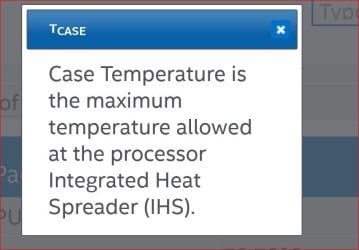
TCASE 72.72°C

Tcase Today only.JPG


ARK | Intel® Coreâ

The only thing I can think of and it is a stretch is Prime 95 and the high temps did what they use to call a burn in test. This allow your thermal past to heat up and then cool to allow better contact. It can be worth a couple of degrees better cooling sometimes.
 

My Computer

Computer type
PC/Desktop
Computer Manufacturer/Model Number
Home made Desktop
OS
Windows 10 Pro. 64/ version 1709 Windows 7 Pro/64
CPU
Intel i7-6800K @ 4.3
Motherboard
ASUS X-99 Deluxe II
Memory
Corsair Platinum 16 gig @2400
Graphics Card(s)
EVGA GTX 1070 OC
Monitor(s) Displays
Asus 27" LED LCD/VE278Q
Screen Resolution
1920-1080 or 1280-720 HDMI
Hard Drives
INTEL SSD 730-240 Gb Sata 3.0/
PSU
EVGA Platium 1200W
Case
Phanteks Luxe Tempered Glass 8 fans/ one radiator
Cooling
XSPC/ Water Cooled CPU
Keyboard
Das 4 Professional
Mouse
Logitech M705/MX Anywhere 2-S
Internet Speed
100 mbits
Antivirus
Microsoft Security Essentials/ Malwarebytes Premium 3.0/ SAS
Browser
I.E. 11 default/Firefox/ ISP Time Warner Cable/Spectrum
Other Info
LG BluRay Burner/
Sound system-KLipsch-THX/
Icy Dock ssd Hot Swap bays.
Reboots are back and I'm not sure where to go from here other than a new PSU.

What's strange is that it sometimes runs for hours with no reboots and sometimes only minutes. (while gaming)
Anyone has an idea what could cause this variation?
 
Last edited:

My Computer

Computer type
PC/Desktop
Computer Manufacturer/Model Number
Custom
OS
Windows 7 Ultimate x64
CPU
Intel Core i5 4440
Motherboard
MSI Gaming 3
Memory
Corsair Vengeance 8GB DDR3
Graphics Card(s)
Zotac GeForce GTX 750Ti
Monitor(s) Displays
Benq G2222HDL
Screen Resolution
1920x1080
Hard Drives
Samsung 840 Evo
Seagate ST3200827AS
PSU
Corsair VX450W
Case
CoolerMaster N300
At this point I would double check for any hardware/software issues.

First, Double check all connection on the Motherboard are connected well.
Personally, I would go into the motherboard bios and reset them to "Optimized Default" too.

next, Update all drivers to the latest. GPU etc. Allow windows update to find drivers as well. make sure all is up to date.

Run MEM test for a good 8 passes on your memory.


Have you run a spyware/virus scan? Just to be sure. I do doubt this but may be a good idea to rule it out. Malwarebytes would be a good free option.

Just try to rule out everything you can. if all that comes out OK, Im not sure what else to suggest. Id be looking at the PSU myself at that point.


I do agree, I wouldn't run Prime again with a stock cooler. Core temps typically run a bit hotter than the Tcase temp, so you should be safe. But your pushing it quite close since the difference between the two will be less with less efficient cooling (stock). Better cooling will widen the Gap between Core and Tcase a little bit. But this isnt needed unless you are overclocking.

But 72c under Prime isnt bad.
We can gather from that test that the CPU doesn't have a heat issue under normal conditions and doesn't have a major stability issue. So thats a good thing.
 

My Computer

Computer Manufacturer/Model Number
Custom (Self Build)
OS
Windows 7 Home Premium 64bit
CPU
Intel Core i7 2700k
Motherboard
eVGA P67 SLI
Memory
8GB Mushkin Redline Ridgebacks @1866
Graphics Card(s)
EVGA GTX570 SC
Sound Card
XiFi Titanium HD
Monitor(s) Displays
LG W2453V
Screen Resolution
1920x1080
Hard Drives
Intel 320 80GB -- Intel X25-V 40GB --WD Black 1TB x2 -- WD Blue 640GB
PSU
Seasonic x750
Case
Corsair 600T SE White
Cooling
eVGA Superclocked CPU Cooler
Keyboard
Saitek Cyborg
Antivirus
Kaspersky
Browser
IE
Other Info
LG BD/DVD
Back
Top