PC slows down affter alittle use -any ideas ?

trinaz

New member
Member
VIP
Local time
3:14 PM
Messages
477
Location
Phoenix
Having a weird issue with my Win 7 Pro 64bit system. About 3 days ago the system starts up normally and at first everything is normal. But after a few minutes use the PC begins to lag way behind the cursor actions. I can click on a tab/icon/etc and nothing happens...multiple clicks don't seam to matter...the system just "freezes" until what ever it is releases it. Then a few moments later the same issue repeats?

I have task manager obviously but also have Process Explorer... current version for 64 bits.

However...I don't know what to look for or if these apps can help me isolate what is causing these slowdowns ?

I suspect my AV software (Bitdefender Internet Security 2011) but my system has been running fine and disabling the AV part doesn't seem to make any difference ?

Anyone have an idea on what's causing this ands where to start to try and correct this ?

Thanks...TRinAZ
 

My Computer My Computer

At a glance

Windows 7 Pro 64bit SP1AMD FX-6100 Six-Core Processor2ea Corsair-1333MHz-PC3-10666-240-pin-CMX4GX3...NVIDIA GeForce GT 630 - 1023MB (EVGA)
Computer type
PC/Desktop
Computer Manufacturer/Model Number
Self built
OS
Windows 7 Pro 64bit SP1
CPU
AMD FX-6100 Six-Core Processor
Motherboard
M5A78L-M LX PLUS
Memory
2ea Corsair-1333MHz-PC3-10666-240-pin-CMX4GX3M1A1333C9
Graphics Card(s)
NVIDIA GeForce GT 630 - 1023MB (EVGA)
Sound Card
OnBoard Via High Def Audio
Monitor(s) Displays
Samsung 204B main - ASUS VS228 secondary
Screen Resolution
1920x1080 main - 1920x1080 secondary
Hard Drives
Samsung SSD 840 128GB Win7 Pro 64bit - Western Digital WDC 465GB - Seagate 640GB Sata B/U - Maxtor 500GB Sata B/U - Maxtor 200GB Sata
PSU
Antec 650 watt
Cooling
Multiple case fans
Keyboard
MS USB dual Wireless Keyboard - IntelliType Pro
Mouse
MS USB dual Wireless Mouse - IntelliPoint
Internet Speed
Cox Cable
Antivirus
Bitdefender IS 2014
Browser
FireFox Primary - IE 11
Other Info
Hauppaguge Win TV HVR-1250 (Model 22xxx, Hybrid ATSC/QAM)
Samsung HD103SI USB 1TB Desktop Drive - Backup & Disk Image storage
Run an online scan to help rule out malware. First disable Bitdefender so as to not interfere with the online scan.


ESET Online Scanner

Note: You can use either Internet Explorer or Mozilla FireFox for this scan. You will however need to disable your current installed Anti-Virus, how to do so can be read here.

Vista/Windows 7 users: You will need to to right-click on the either the IE or FF icon in the Start Menu or Quick Launch Bar on the Taskbar and select Run as Administrator from the context menu.


  • Please go here to run the scan.
    Note: If using Mozilla Firefox you will need to download esetsmartinstaller_enu.exe when prompted then double click on it to install.
    All of the below instructions are compatible with either Internet Explorer or Mozilla FireFox.
  • Select the option YES, I accept the Terms of Use then click on:
    EOLS2.gif
  • When prompted allow the Add-On/Active X to install.
  • Make sure that the option Remove found threats is NOT checked, and the option Scan archives is checked.
  • Now click on Advanced Settings and select the following:


    • Scan for potentially unwanted applications
    • Scan for potentially unsafe applications
    • Enable Anti-Stealth Technology
  • Now click on:
    EOLS3.gif
  • The virus signature database... will begin to download. Be patient this make take some time depending on the speed of your Internet Connection.
  • When completed the Online Scan will begin automatically.
  • Do not touch either the Mouse or keyboard during the scan otherwise it may stall.
  • When completed select Uninstall application on close if you so wish, make sure you copy the logfile first!
  • Now click on:
    EOLS4.gif
  • Use notepad to open the logfile located at C:\Program Files\ESET\EsetOnlineScanner\log.txt.
  • Copy and paste that log as a reply to this topic.


Note: Do not forget to re-enable your Anti-Virus application after running the above scan!
 

My Computer My Computer

At a glance

Windows 7 Ultimate 64 bit
Computer Manufacturer/Model Number
Dell Studio 15
OS
Windows 7 Ultimate 64 bit
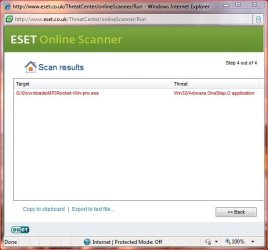
Ok...ran ESET and came up with 1 infection on my G; drive which is used only for downloaded program setup/install files.

Attached is the log file also...will BitDefender clean this out or is there another procedure to follow ?

Thanks....Tim
 

Attachments

  • malware2,jpg.JPG
    malware2,jpg.JPG
    39 KB · Views: 13
  • eset.txt
    eset.txt
    898 bytes · Views: 4

My Computer My Computer

At a glance

Windows 7 Pro 64bit SP1AMD FX-6100 Six-Core Processor2ea Corsair-1333MHz-PC3-10666-240-pin-CMX4GX3...NVIDIA GeForce GT 630 - 1023MB (EVGA)
Computer type
PC/Desktop
Computer Manufacturer/Model Number
Self built
OS
Windows 7 Pro 64bit SP1
CPU
AMD FX-6100 Six-Core Processor
Motherboard
M5A78L-M LX PLUS
Memory
2ea Corsair-1333MHz-PC3-10666-240-pin-CMX4GX3M1A1333C9
Graphics Card(s)
NVIDIA GeForce GT 630 - 1023MB (EVGA)
Sound Card
OnBoard Via High Def Audio
Monitor(s) Displays
Samsung 204B main - ASUS VS228 secondary
Screen Resolution
1920x1080 main - 1920x1080 secondary
Hard Drives
Samsung SSD 840 128GB Win7 Pro 64bit - Western Digital WDC 465GB - Seagate 640GB Sata B/U - Maxtor 500GB Sata B/U - Maxtor 200GB Sata
PSU
Antec 650 watt
Cooling
Multiple case fans
Keyboard
MS USB dual Wireless Keyboard - IntelliType Pro
Mouse
MS USB dual Wireless Mouse - IntelliPoint
Internet Speed
Cox Cable
Antivirus
Bitdefender IS 2014
Browser
FireFox Primary - IE 11
Other Info
Hauppaguge Win TV HVR-1250 (Model 22xxx, Hybrid ATSC/QAM)
Samsung HD103SI USB 1TB Desktop Drive - Backup & Disk Image storage
You can manually delete that file:
Start ===> Computer
Double click to open the G: drive
Double click Downloads to open the folder
Scroll down to the file (in red below)
G:\Downloads\MP3Rocket-Win-pro.exe
Right click on MP3Rocket-Win-pro.exe and select delete

===================

Please go to the Security Center and confirm that you have only one firewall enabled.

===================

Since you know that this started 3 or 4 days ago, I think you should try System Restore. Just select Restore Point with an earlier date.
 

My Computer My Computer

At a glance

Windows 7 Ultimate 64 bit
Computer Manufacturer/Model Number
Dell Studio 15
OS
Windows 7 Ultimate 64 bit
Back
Top