Solved PC to TV resolution

123newbie

New member
Local time
8:35 AM
Messages
19
ok, sorry if there is a similar post already buy i could not see any, and im sorry if it is posted in the wrong section.

so, i found i wanted to use my computer through my 32" samsung TV i have in my room, so i plugged it in with, well im not a huge geek when it comes to electronics so i don't really know what cable it is, all i know is that it is not a HDMI cable or those color "white, red and yellow" ones, actually, i think this cable was used in a blue slot, if that means anything.

i can't get higher resolution on the TV than 1360x768, while the computer says that my TV can do 1920x1080. i don't have any HDMI outputs on my computer's graphic card, only 2 white slots that looks completely different from a HDMI, but i do have some extra outputs that came with my motherboard which looks like 2 HDMI slots, only, it doesn't seem to fit right, theres some metal in the way on the HDMI cable for it to fit.

any ideas?
 
Last edited:

My Computer

Computer Manufacturer/Model Number
System Manufacturer Gigabyte Technology Co., Ltd.
OS
windows 7 ultimate 32 bit
CPU
Processor AMD Phenom(tm) II X4 810 Processor, 2600 Mhz, 4 Co
Motherboard
GIGABYTE, MA790FXT-UD5P
Memory
Installed Physical Memory (RAM) 4,00 GB
Graphics Card(s)
Adapter Description ATI Radeon HD 2900 PRO
Sound Card
Name ATI High Definition Audio Device
Monitor(s) Displays
SyncMaster930BF
Hard Drives
Description Disk drive
Model Maxtor 6V300F0 ATA Device
Size 279,48 GB (300*089*180*160 bytes)
Partition Size 100,00 MB (104*857*600 bytes)
Partition Size 97,56 GB (104*752*742*400 bytes)
PSU
Cheiftech, CFT-750-14CS
Cooling
air, loads of fans
ok, sorry if there is a similar post already buy i could not see any, and im sorry if it is posted in the wrong section.

so, i found i wanted to use my computer through my 32" samsung TV i have in my room, so i plugged it in with, well im not a huge geek when it comes to electronics so i don't really know what cable it is, all i know is that it is not a HDMI cable or those color "white, red and yellow" ones, actually, i think this cable was used in a blue slot, if that means anything.

i can't get higher resolution on the TV than 1360x768, while the computer says that my TV can do 1920x1080. i don't have any HDMI outputs on my computer's graphic card, only 2 white slots that looks completely different from a HDMI, but i do have some extra outputs that came with my motherboard which looks like 2 HDMI slots, only, it doesn't seem to fit right, theres some metal in the way on the HDMI cable for it to fit.

any ideas?

These are the ports on the back of your motherboard.

1 x PS/2 keyboard port
1 x PS/2 mouse port
1 x optical S/PDIF Out connector
1 x coaxial S/PDIF out connector
2 x IEEE 1394a port
8 x USB 2.0/1.1 ports
2 x RJ-45 port
6 x audio jacks (Center/Subwoofer Speaker Out/Rear Speaker Out/Side Speaker Out/Line In/Line Out/Microphone)

The ports that may look a bit like HDMI, i expect are the firewire ports, highlighted in bold above.
The 2 on the back of your graphics card are DVI ports.

Once you know what ports you have available on your tv, you then can look for an appropriate cable to suit.
 

My Computer

Computer Manufacturer/Model Number
Home build
OS
Win7 Ultimate x64
CPU
3820
Motherboard
Rampage IV formula
Memory
12 GB kit
Graphics Card(s)
XFX nVidia GeForce GTX 560
Sound Card
On board card
Monitor(s) Displays
LG 27" x 2
Screen Resolution
1920 x 1080
Hard Drives
1 x OCZ Vertex 4 , 256Gb
PSU
875W Thermal Take
Case
Antec P160W
Cooling
Noctua
Keyboard
Logitech Wave Pro
Mouse
Logitech
Internet Speed
1.5 Mb
Other Info
Logitech G25 steering wheel, Logitech Extreme 3D Pro joystick.
Logitech surround sound speaker system.
ok, sorry if there is a similar post already buy i could not see any, and im sorry if it is posted in the wrong section.

so, i found i wanted to use my computer through my 32" samsung TV i have in my room, so i plugged it in with, well im not a huge geek when it comes to electronics so i don't really know what cable it is, all i know is that it is not a HDMI cable or those color "white, red and yellow" ones, actually, i think this cable was used in a blue slot, if that means anything.

i can't get higher resolution on the TV than 1360x768, while the computer says that my TV can do 1920x1080. i don't have any HDMI outputs on my computer's graphic card, only 2 white slots that looks completely different from a HDMI, but i do have some extra outputs that came with my motherboard which looks like 2 HDMI slots, only, it doesn't seem to fit right, theres some metal in the way on the HDMI cable for it to fit.

any ideas?

These are the ports on the back of your motherboard.

1 x PS/2 keyboard port
1 x PS/2 mouse port
1 x optical S/PDIF Out connector
1 x coaxial S/PDIF out connector
2 x IEEE 1394a port
8 x USB 2.0/1.1 ports
2 x RJ-45 port
6 x audio jacks (Center/Subwoofer Speaker Out/Rear Speaker Out/Side Speaker Out/Line In/Line Out/Microphone)
The ports that may look a bit like HDMI, i expect are the firewire ports, highlighted in bold above.
The 2 on the back of your graphics card are DVI ports.

Once you know what ports you have available on your tv, you then can look for an appropriate cable to suit.

just did some research and apparently i have VGA, HDMI and SCART in the back of my TV, atm im using a VGA cable in the TV, and some sort of adapter on the other end, to convert the VGA into DVI.
i have an additional VGA for my computer, but its not built in, and im not sure how im going to do that, if i have to.

i just don't get why i can't get higher than 1360x768 on the computer, i've tried to go to the options that i know of and put it to a higher resolution, i.e i went to Cataclyst(TM) Control Center and put the resolution to 1920x1080, but it still says on the desktop display option that its only 1360x768 :/ it just wont go higher, so i have no idea what to do.
 

My Computer

Computer Manufacturer/Model Number
System Manufacturer Gigabyte Technology Co., Ltd.
OS
windows 7 ultimate 32 bit
CPU
Processor AMD Phenom(tm) II X4 810 Processor, 2600 Mhz, 4 Co
Motherboard
GIGABYTE, MA790FXT-UD5P
Memory
Installed Physical Memory (RAM) 4,00 GB
Graphics Card(s)
Adapter Description ATI Radeon HD 2900 PRO
Sound Card
Name ATI High Definition Audio Device
Monitor(s) Displays
SyncMaster930BF
Hard Drives
Description Disk drive
Model Maxtor 6V300F0 ATA Device
Size 279,48 GB (300*089*180*160 bytes)
Partition Size 100,00 MB (104*857*600 bytes)
Partition Size 97,56 GB (104*752*742*400 bytes)
PSU
Cheiftech, CFT-750-14CS
Cooling
air, loads of fans
Your video card does not work with the higher resolution with VGA.
VGA is an Analog signal and is maxed out with the 1360x768 resolution.
VGA even on the best video cards will max out at 1600x or so.

If your video card has a DVI or HDMI output this is a digital signal and will produce the higher resolution for the TV to use.

If we were comparing TV only.
VGA is similar to getting your TV reception on a VHF over the air antenna.

Digital TV such as cable and satellite you have digital HD 720 and 1040 now.

Big difference in quality and resolution capabilities.
Mike
 

My Computer

Computer Manufacturer/Model Number
Hopalong/ Godzilla
OS
Windows7 Pro 64bit SP-1; Windows XP Pro 32bit
CPU
Intel Core i7-870 Lynnfield 2.93GHz LGA 1156 95W Quad-Core
Motherboard
ASUS P7P55D-E PRO
Memory
8GB@1400MHz Crucial Ballistix DDR3-1600 4x2GB
Graphics Card(s)
ASUS ENGTX460 DirectCU/2DI/1GD5 1GB 256-bit GDDR5
Sound Card
VIA Onboard
Monitor(s) Displays
Asus VS248H-P 24"; Samsung SyncMaster 941BW 19"ws
Screen Resolution
1920x1080; 1440x900
Hard Drives
Samsung 830 120GB SSD
Intel 320 120GB SSD
Western Digital Caviar Black WD7501AALS 750GB 7200 RPM SATA 3.0Gb/s
Western Digital Caviar Black WD6401AALS 640GB 7200 RPM SATA 3.0Gb/s
PSU
COOLER MASTER Silent Pro RS850-AMBAJ3-US 850W Modular
Case
COOLER MASTER HAF 932 RC-932-KKN5-GP Black
Cooling
Scythe "Mugen-2 Rev.B" (2 ScytheKaze-Jyuni PWM fans)
Keyboard
Logitech K-320
Mouse
Kensington
Antivirus
Avast Inernet Suite
Browser
IE 9 ; Chrome
Your video card does not work with the higher resolution with VGA.
VGA is an Analog signal and is maxed out with the 1360x768 resolution.

If your video card has a DVI or HDMI output this is a digital signal and will produce the higher resolution for the TV to use.

Mike

ok, so i cannot use this kind of cable for that resolution, guess it makes sense.

but, what do i do when my TV does not have a DVI port and my PC does not have HDMI port :S i've seen some adapter that converts the HDMI into DVI, so i can use HDMI from the TV to the PC, but it is plugged into a DVI port?
 

My Computer

Computer Manufacturer/Model Number
System Manufacturer Gigabyte Technology Co., Ltd.
OS
windows 7 ultimate 32 bit
CPU
Processor AMD Phenom(tm) II X4 810 Processor, 2600 Mhz, 4 Co
Motherboard
GIGABYTE, MA790FXT-UD5P
Memory
Installed Physical Memory (RAM) 4,00 GB
Graphics Card(s)
Adapter Description ATI Radeon HD 2900 PRO
Sound Card
Name ATI High Definition Audio Device
Monitor(s) Displays
SyncMaster930BF
Hard Drives
Description Disk drive
Model Maxtor 6V300F0 ATA Device
Size 279,48 GB (300*089*180*160 bytes)
Partition Size 100,00 MB (104*857*600 bytes)
Partition Size 97,56 GB (104*752*742*400 bytes)
PSU
Cheiftech, CFT-750-14CS
Cooling
air, loads of fans
Do you have DVI on your video card?

They look similar to the VGA but are white instead of blue.
Like below.

dvi_connector.jpg


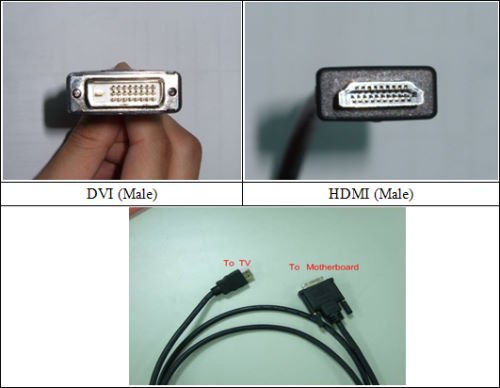
If you have the above connector on your video card then you need a DVI to HDMI cable.
Looks like below two pictures.

20070625-01.jpg

OR THIS!

hdmi%20to%20dvi.jpg


Big end connects to DVI on video card and the small to TV HDMI. ;):D
Mike
 

My Computer

Computer Manufacturer/Model Number
Hopalong/ Godzilla
OS
Windows7 Pro 64bit SP-1; Windows XP Pro 32bit
CPU
Intel Core i7-870 Lynnfield 2.93GHz LGA 1156 95W Quad-Core
Motherboard
ASUS P7P55D-E PRO
Memory
8GB@1400MHz Crucial Ballistix DDR3-1600 4x2GB
Graphics Card(s)
ASUS ENGTX460 DirectCU/2DI/1GD5 1GB 256-bit GDDR5
Sound Card
VIA Onboard
Monitor(s) Displays
Asus VS248H-P 24"; Samsung SyncMaster 941BW 19"ws
Screen Resolution
1920x1080; 1440x900
Hard Drives
Samsung 830 120GB SSD
Intel 320 120GB SSD
Western Digital Caviar Black WD7501AALS 750GB 7200 RPM SATA 3.0Gb/s
Western Digital Caviar Black WD6401AALS 640GB 7200 RPM SATA 3.0Gb/s
PSU
COOLER MASTER Silent Pro RS850-AMBAJ3-US 850W Modular
Case
COOLER MASTER HAF 932 RC-932-KKN5-GP Black
Cooling
Scythe "Mugen-2 Rev.B" (2 ScytheKaze-Jyuni PWM fans)
Keyboard
Logitech K-320
Mouse
Kensington
Antivirus
Avast Inernet Suite
Browser
IE 9 ; Chrome
ok thanks, ill see if i can't get hold on one of those :P too bad the stores are closed atm ^^
 

My Computer

Computer Manufacturer/Model Number
System Manufacturer Gigabyte Technology Co., Ltd.
OS
windows 7 ultimate 32 bit
CPU
Processor AMD Phenom(tm) II X4 810 Processor, 2600 Mhz, 4 Co
Motherboard
GIGABYTE, MA790FXT-UD5P
Memory
Installed Physical Memory (RAM) 4,00 GB
Graphics Card(s)
Adapter Description ATI Radeon HD 2900 PRO
Sound Card
Name ATI High Definition Audio Device
Monitor(s) Displays
SyncMaster930BF
Hard Drives
Description Disk drive
Model Maxtor 6V300F0 ATA Device
Size 279,48 GB (300*089*180*160 bytes)
Partition Size 100,00 MB (104*857*600 bytes)
Partition Size 97,56 GB (104*752*742*400 bytes)
PSU
Cheiftech, CFT-750-14CS
Cooling
air, loads of fans
ok so i got hold of a HDMI to DVI adapter, and i use that at the moment.
i get the resolution settings i want, and i have selected 1920x1080, in both the windows and graphic card options.
yet, the picture is very unclear, and the text is hard to read.
any ideas?
 

My Computer

Computer Manufacturer/Model Number
System Manufacturer Gigabyte Technology Co., Ltd.
OS
windows 7 ultimate 32 bit
CPU
Processor AMD Phenom(tm) II X4 810 Processor, 2600 Mhz, 4 Co
Motherboard
GIGABYTE, MA790FXT-UD5P
Memory
Installed Physical Memory (RAM) 4,00 GB
Graphics Card(s)
Adapter Description ATI Radeon HD 2900 PRO
Sound Card
Name ATI High Definition Audio Device
Monitor(s) Displays
SyncMaster930BF
Hard Drives
Description Disk drive
Model Maxtor 6V300F0 ATA Device
Size 279,48 GB (300*089*180*160 bytes)
Partition Size 100,00 MB (104*857*600 bytes)
Partition Size 97,56 GB (104*752*742*400 bytes)
PSU
Cheiftech, CFT-750-14CS
Cooling
air, loads of fans
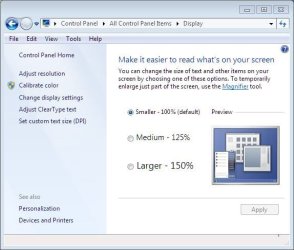
Have you used the Windows 7 calibrator
control panel....appearance and personalization....display
 

My Computer

Computer type
PC/Desktop
Computer Manufacturer/Model Number
Custom
OS
windows 10 pro 64 bit
CPU
i5 4690K@4500 COOLER MASTER Seidon 120M water cooler
Motherboard
ASUS SABERTOOTH Z87 LGA 1150 Intel
Memory
16gb Kingston HyperX DDR3 1600
Graphics Card(s)
EVGA GTX 1070 sc
Monitor(s) Displays
BenQ GL2760H Black 27" 2ms HDMI Widescreen LED 1920X1080
Screen Resolution
DSR 2103X1183
Hard Drives
ADATA 256 gig SSD + 4 junk
PSU
EVGA supernova 750
Case
coolermaster
Cooling
many...
Keyboard
z merc
Mouse
Logitech wireless G602
Internet Speed
2.5mbs cable
ok so i got hold of a HDMI to DVI adapter, and i use that at the moment.
i get the resolution settings i want, and i have selected 1920x1080, in both the windows and graphic card options.
yet, the picture is very unclear, and the text is hard to read.
any ideas?

If your TV is a 720p then that is why the text is hard to read at 1920 x 1080, you could bump up your text size (DPI) thru the control panel
 

Attachments

  • DPI.JPG
    DPI.JPG
    42.7 KB · Views: 33

My Computer

Computer type
PC/Desktop
Computer Manufacturer/Model Number
Me, as in myself
OS
Win 7 32bit HP
CPU
Intel Core 2 Duo 6600
Motherboard
Gigabyte 965P-DQ6
Memory
2 GB DDR2
Graphics Card(s)
Zotac GeForce GTX 550 Ti
Sound Card
Realtek on board
Monitor(s) Displays
Philips 32" LED-LCD 1080p
Screen Resolution
1920 x 1080
Internet Speed
cable 15mbs
ye my tv is 720, so had to scale down alot, it was not the result i wanted so i bought a BENQ 24" monitor, :) now i can run 1920x1080 without any issues.
 

My Computer

Computer Manufacturer/Model Number
System Manufacturer Gigabyte Technology Co., Ltd.
OS
windows 7 ultimate 32 bit
CPU
Processor AMD Phenom(tm) II X4 810 Processor, 2600 Mhz, 4 Co
Motherboard
GIGABYTE, MA790FXT-UD5P
Memory
Installed Physical Memory (RAM) 4,00 GB
Graphics Card(s)
Adapter Description ATI Radeon HD 2900 PRO
Sound Card
Name ATI High Definition Audio Device
Monitor(s) Displays
SyncMaster930BF
Hard Drives
Description Disk drive
Model Maxtor 6V300F0 ATA Device
Size 279,48 GB (300*089*180*160 bytes)
Partition Size 100,00 MB (104*857*600 bytes)
Partition Size 97,56 GB (104*752*742*400 bytes)
PSU
Cheiftech, CFT-750-14CS
Cooling
air, loads of fans
Back
Top