
Solved PC wakes immediately from sleep...

You'll need to scroll down further in the "General" box to see the "Wake Source" details like below.

168711d1312572747-wake-source-read-event-viewer-log-step-3.jpg
 

My Computer My Computer

At a glance

64-bit Windows 11 Pro for WorkstationsIntel i7-8700K OC'd to 5 GHz64 GB (4x16GB) G.SKILL TridentZ RGB DDR4 3600...ASUS ROG-STRIX-GTX1080TI-O11G-GAMING
Computer type
PC/Desktop
Computer Manufacturer/Model Number
Self built custom
OS
64-bit Windows 11 Pro for Workstations
CPU
Intel i7-8700K OC'd to 5 GHz
Motherboard
ASUS ROG Maximus XI Formula Z390
Memory
64 GB (4x16GB) G.SKILL TridentZ RGB DDR4 3600 MHz
Graphics Card(s)
ASUS ROG-STRIX-GTX1080TI-O11G-GAMING
Sound Card
Integrated
Monitor(s) Displays
2 x Samsung Odyssey G7 27"
Screen Resolution
2560x1440
Hard Drives
1TB Samsung 990 PRO M.2,
4TB Samsung 990 PRO PRO M.2,
TerraMaster F8 SSD Plus NAS
PSU
Seasonic Prime Titanium 850W
Case
Thermaltake Core P3
Cooling
Corsair Hydro H115i
Keyboard
Logitech wireless K800
Mouse
Logitech MX Master 4
Internet Speed
2 Gb/s Download and 100 Mb/s Upload
Antivirus
Malwarebyte Anti-Malware Premium
Browser
Google Chrome
Other Info
Logitech Z625 speaker system,
Logitech BRIO 4K Pro webcam,
HP Color LaserJet Pro MFP M477fdn,
APC SMART-UPS RT 1000 XL - SURT1000XLI,
Galaxy S23 Plus phone
2nd follow up

Hi:

Here are the log details (if I'm reading it right, it's my Comcast XFinity router. I've tried unplugging the Ethernet cable, and it says it can't detect wireless networks. Could the constant wake/sleep have killed my wireless network card?)
Log Name: System
Source: Microsoft-Windows-Power-Troubleshooter
Date: 4/3/2015 2:54:05 PM
Event ID: 1
Task Category: None
Level: Information
Keywords:
User: LOCAL SERVICE
Computer: BigPimp-PC
Description:
The system has resumed from sleep.
Sleep Time: ‎2015‎-‎04‎-‎03T19:53:17.649826500Z
Wake Time: ‎2015‎-‎04‎-‎03T19:53:55.876078700Z
Wake Source: Device -Intel(R) Ethernet Connection I217-V
Event Xml:
<Event xmlns="http://schemas.microsoft.com/win/2004/08/events/event">
<System>
<Provider Name="Microsoft-Windows-Power-Troubleshooter" Guid="{CDC05E28-C449-49C6-B9D2-88CF761644DF}" />
<EventID>1</EventID>
<Version>1</Version>
<Level>4</Level>
<Task>0</Task>
<Opcode>0</Opcode>
<Keywords>0x8000000000000000</Keywords>
<TimeCreated SystemTime="2015-04-03T19:54:05.039602900Z" />
<EventRecordID>148929</EventRecordID>
<Correlation ActivityID="{04B13D1A-B2A3-4EB2-A9A7-8D2E0174F28F}" />
<Execution ProcessID="1656" ThreadID="2724" />
<Channel>System</Channel>
<Computer>BigPimp-PC</Computer>
<Security UserID="S-1-5-19" />
</System>
<EventData>
<Data Name="SleepTime">2015-04-03T19:53:17.649826500Z</Data>
<Data Name="WakeTime">2015-04-03T19:53:55.876078700Z</Data>
<Data Name="SleepDuration">10685</Data>
<Data Name="WakeDuration">1376</Data>
<Data Name="DriverInitDuration">266</Data>
<Data Name="BiosInitDuration">1397</Data>
<Data Name="HiberWriteDuration">9104</Data>
<Data Name="HiberReadDuration">0</Data>
<Data Name="HiberPagesWritten">178090</Data>
<Data Name="Attributes">21505</Data>
<Data Name="TargetState">4</Data>
<Data Name="EffectiveState">5</Data>
<Data Name="WakeSourceType">4</Data>
<Data Name="WakeSourceTextLength">35</Data>
<Data Name="WakeSourceText">Intel(R) Ethernet Connection I217-V</Data>
<Data Name="WakeTimerOwnerLength">0</Data>
<Data Name="WakeTimerContextLength">0</Data>
<Data Name="WakeTimerOwner">
</Data>
<Data Name="WakeTimerContext">
</Data>
</EventData>
</Event>
 

My Computer My Computer

At a glance

Windows 7 64 bit
Computer type
PC/Desktop
Computer Manufacturer/Model Number
Asus
OS
Windows 7 64 bit

My Computer My Computer

At a glance

64-bit Windows 11 Pro for WorkstationsIntel i7-8700K OC'd to 5 GHz64 GB (4x16GB) G.SKILL TridentZ RGB DDR4 3600...ASUS ROG-STRIX-GTX1080TI-O11G-GAMING
Computer type
PC/Desktop
Computer Manufacturer/Model Number
Self built custom
OS
64-bit Windows 11 Pro for Workstations
CPU
Intel i7-8700K OC'd to 5 GHz
Motherboard
ASUS ROG Maximus XI Formula Z390
Memory
64 GB (4x16GB) G.SKILL TridentZ RGB DDR4 3600 MHz
Graphics Card(s)
ASUS ROG-STRIX-GTX1080TI-O11G-GAMING
Sound Card
Integrated
Monitor(s) Displays
2 x Samsung Odyssey G7 27"
Screen Resolution
2560x1440
Hard Drives
1TB Samsung 990 PRO M.2,
4TB Samsung 990 PRO PRO M.2,
TerraMaster F8 SSD Plus NAS
PSU
Seasonic Prime Titanium 850W
Case
Thermaltake Core P3
Cooling
Corsair Hydro H115i
Keyboard
Logitech wireless K800
Mouse
Logitech MX Master 4
Internet Speed
2 Gb/s Download and 100 Mb/s Upload
Antivirus
Malwarebyte Anti-Malware Premium
Browser
Google Chrome
Other Info
Logitech Z625 speaker system,
Logitech BRIO 4K Pro webcam,
HP Color LaserJet Pro MFP M477fdn,
APC SMART-UPS RT 1000 XL - SURT1000XLI,
Galaxy S23 Plus phone
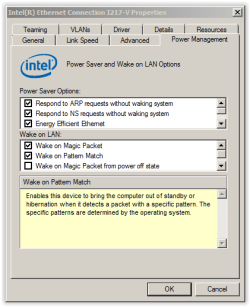
ethernet follow up

Hi-

I tried to follow prompt one, but this is the screen I have (attached):
 

Attachments

  • Screen Shot 04-13-15 at 07.11 PM.PNG
    Screen Shot 04-13-15 at 07.11 PM.PNG
    10.2 KB · Views: 22

My Computer My Computer

At a glance

Windows 7 64 bit
Computer type
PC/Desktop
Computer Manufacturer/Model Number
Asus
OS
Windows 7 64 bit
Uncheck the two "Wake on..." options at the bottom, and click on OK. Afterwards, see if you still have the same issue. :)
 

My Computer My Computer

At a glance

64-bit Windows 11 Pro for WorkstationsIntel i7-8700K OC'd to 5 GHz64 GB (4x16GB) G.SKILL TridentZ RGB DDR4 3600...ASUS ROG-STRIX-GTX1080TI-O11G-GAMING
Computer type
PC/Desktop
Computer Manufacturer/Model Number
Self built custom
OS
64-bit Windows 11 Pro for Workstations
CPU
Intel i7-8700K OC'd to 5 GHz
Motherboard
ASUS ROG Maximus XI Formula Z390
Memory
64 GB (4x16GB) G.SKILL TridentZ RGB DDR4 3600 MHz
Graphics Card(s)
ASUS ROG-STRIX-GTX1080TI-O11G-GAMING
Sound Card
Integrated
Monitor(s) Displays
2 x Samsung Odyssey G7 27"
Screen Resolution
2560x1440
Hard Drives
1TB Samsung 990 PRO M.2,
4TB Samsung 990 PRO PRO M.2,
TerraMaster F8 SSD Plus NAS
PSU
Seasonic Prime Titanium 850W
Case
Thermaltake Core P3
Cooling
Corsair Hydro H115i
Keyboard
Logitech wireless K800
Mouse
Logitech MX Master 4
Internet Speed
2 Gb/s Download and 100 Mb/s Upload
Antivirus
Malwarebyte Anti-Malware Premium
Browser
Google Chrome
Other Info
Logitech Z625 speaker system,
Logitech BRIO 4K Pro webcam,
HP Color LaserJet Pro MFP M477fdn,
APC SMART-UPS RT 1000 XL - SURT1000XLI,
Galaxy S23 Plus phone
PC wake immediately after Sleep

I had the same problem. Simple fix here. Went into Device Manager and edited Power Management for the KEYBOARD and the MOUSE, unchecked Allow the device to wake the computer. Fixed.
 

My Computer My Computer

At a glance

Windows 10 Pro 32-bitIntel Core 2 Duo E8400 3.00GHz4GbYes, not sure of brand & spec
Computer type
PC/Desktop
Computer Manufacturer/Model Number
Custom Built
OS
Windows 10 Pro 32-bit
CPU
Intel Core 2 Duo E8400 3.00GHz
Motherboard
ASUS P5KPL-VM
Memory
4Gb
Graphics Card(s)
Yes, not sure of brand & spec
Hard Drives
WD 500Gb
Antivirus
Avast
Browser
IE, Chrome, Edge
It did. Thank you! It was the network card causing the problem. I recently add a WIFI extender (for a Blu-ray player) to the system so I suspected that was somehow related to the issue since sleep mode previously worked.

I believe this was also the cause of intermittent sleep failures before the extender was added. I never nailed it down but I believe sleep would fail when the blu-ray device was powered up. With the extender powered on 24-7 it became much more noticeable. I just didn't make the connection before - no pun intended. :D
 

My Computer My Computer

At a glance

w7 pro 64-bitcore 2 duo
Computer type
PC/Desktop
Computer Manufacturer/Model Number
hp
OS
w7 pro 64-bit
CPU
core 2 duo
Antivirus
eset nod32
:thumbsup:
 

My Computer My Computer

At a glance

64-bit Windows 11 Pro for WorkstationsIntel i7-8700K OC'd to 5 GHz64 GB (4x16GB) G.SKILL TridentZ RGB DDR4 3600...ASUS ROG-STRIX-GTX1080TI-O11G-GAMING
Computer type
PC/Desktop
Computer Manufacturer/Model Number
Self built custom
OS
64-bit Windows 11 Pro for Workstations
CPU
Intel i7-8700K OC'd to 5 GHz
Motherboard
ASUS ROG Maximus XI Formula Z390
Memory
64 GB (4x16GB) G.SKILL TridentZ RGB DDR4 3600 MHz
Graphics Card(s)
ASUS ROG-STRIX-GTX1080TI-O11G-GAMING
Sound Card
Integrated
Monitor(s) Displays
2 x Samsung Odyssey G7 27"
Screen Resolution
2560x1440
Hard Drives
1TB Samsung 990 PRO M.2,
4TB Samsung 990 PRO PRO M.2,
TerraMaster F8 SSD Plus NAS
PSU
Seasonic Prime Titanium 850W
Case
Thermaltake Core P3
Cooling
Corsair Hydro H115i
Keyboard
Logitech wireless K800
Mouse
Logitech MX Master 4
Internet Speed
2 Gb/s Download and 100 Mb/s Upload
Antivirus
Malwarebyte Anti-Malware Premium
Browser
Google Chrome
Other Info
Logitech Z625 speaker system,
Logitech BRIO 4K Pro webcam,
HP Color LaserJet Pro MFP M477fdn,
APC SMART-UPS RT 1000 XL - SURT1000XLI,
Galaxy S23 Plus phone
Back
Top