PC won't boot, safe start repair, restore from disk & install windows

Lemon Tree

New member
Member
Local time
10:08 AM
Messages
52
PC won't boot, safe start, repair, restore from disc & install windows

Hello everyone

In the last past few days I've encounter a serious problem with my desktop, it all started with laggy performance when opening a window/folder with lots of downloaded files, then when I left the comp for a few hours and came back the screen was black with nothing showing. Then I turned off the PC and turned back on it won't boot past the windows logo screen, tried running in safe mode won't work either, neither does repair, restore from the windows 7 OS disc or installing windows work. Tried disconnecting the SATA cable between my OS SSD drive and the mobo but windows still won't install, freezing at the set up is starting page. Was wondering have any here experience a issue similar to this or would happen to know the culprit behind it all, currently I'm stump on how to fix my PC. Any advice, opinions or reply will be greatly appreciated and many thanks in advance.
 
Last edited:

My Computer My Computer

At a glance

Windows 7 Home Premium 64biti7 3.40GHz Quad Core8GB Cosair 1866MHzEVGA 760 GTX 2GB RAM
Computer type
PC/Desktop
OS
Windows 7 Home Premium 64bit
CPU
i7 3.40GHz Quad Core
Motherboard
Asus Maximus V Gene
Memory
8GB Cosair 1866MHz
Graphics Card(s)
EVGA 760 GTX 2GB RAM
Sound Card
Supreme FX III
Monitor(s) Displays
Samsung XL2370
Screen Resolution
1920x1080
Hard Drives
Seagate SSD 480GB
Seagate HDD 4TB
Seagate HDD 4TB
PSU
Antec 650W
Case
Thermaltake Lanbox Lite
Cooling
Intel Stock Fan
Antivirus
MSE
Browser
IE 11
Are you saying it won't boot the install disc at all now or will boot but wont let you install windows on the ssd?
 

My Computer My Computer

At a glance

10 Pro x64Ryzen 9 3900X64GB(4x16GB) DDR4EVGA 1080ti FTW3
Computer type
PC/Desktop
Computer Manufacturer/Model Number
Custom
OS
10 Pro x64
CPU
Ryzen 9 3900X
Motherboard
Asrock x370 Tachi
Memory
64GB(4x16GB) DDR4
Graphics Card(s)
EVGA 1080ti FTW3
Sound Card
ASUS Xonar Essence STX (V4 Bursons), ODAC rev B, NFB-11, O2
Monitor(s) Displays
3xASUS PB278Q/R, Optoma HD142X
Screen Resolution
3x1440p, 1080p
Hard Drives
512GB 850 EVO(OS, Programs)
4TB (Movies)
3TB (Downloads)
3TB (Programs)
1TB HDD (Games)
2x6TB R1 (videos)
PSU
AX760
Case
Fractal Define R5
Cooling
NH-D15S
Keyboard
Massdrop Ctrl with Box Navy's
Mouse
G903, Alioth XXL Mat
Internet Speed
280/40
Antivirus
MBAM, ESET
Browser
Canary 64 Bit
Other Info
I also own a Thinkpad P50 Xeon 4K, X220T, X1C5
Are you saying it won't boot the install disc at all now or will boot but wont let you install windows on the ssd?

It lets me boot the OS disc but freezes every time at the "Set up is starting" screen.

Update: Yesterday I've manage to transfer/back up my the files from my windows based SSD drive to my laptop using this little "StarTech.com USB3SSATAIDE USB 3.0 To SATA/IDE Hard Drive Adapter Converter", I reused the same sata cable that connects between my SSD and mobo for the data backup/transfer just to make sure the cable is working.

https://www.amazon.ca/gp/product/B00D76J1KO/ref=oh_aui_detailpage_o03_s00?ie=UTF8&psc=1
 

My Computer My Computer

At a glance

Windows 7 Home Premium 64biti7 3.40GHz Quad Core8GB Cosair 1866MHzEVGA 760 GTX 2GB RAM
Computer type
PC/Desktop
OS
Windows 7 Home Premium 64bit
CPU
i7 3.40GHz Quad Core
Motherboard
Asus Maximus V Gene
Memory
8GB Cosair 1866MHz
Graphics Card(s)
EVGA 760 GTX 2GB RAM
Sound Card
Supreme FX III
Monitor(s) Displays
Samsung XL2370
Screen Resolution
1920x1080
Hard Drives
Seagate SSD 480GB
Seagate HDD 4TB
Seagate HDD 4TB
PSU
Antec 650W
Case
Thermaltake Lanbox Lite
Cooling
Intel Stock Fan
Antivirus
MSE
Browser
IE 11

My Computer My Computer

At a glance

10 Pro x64Ryzen 9 3900X64GB(4x16GB) DDR4EVGA 1080ti FTW3
Computer type
PC/Desktop
Computer Manufacturer/Model Number
Custom
OS
10 Pro x64
CPU
Ryzen 9 3900X
Motherboard
Asrock x370 Tachi
Memory
64GB(4x16GB) DDR4
Graphics Card(s)
EVGA 1080ti FTW3
Sound Card
ASUS Xonar Essence STX (V4 Bursons), ODAC rev B, NFB-11, O2
Monitor(s) Displays
3xASUS PB278Q/R, Optoma HD142X
Screen Resolution
3x1440p, 1080p
Hard Drives
512GB 850 EVO(OS, Programs)
4TB (Movies)
3TB (Downloads)
3TB (Programs)
1TB HDD (Games)
2x6TB R1 (videos)
PSU
AX760
Case
Fractal Define R5
Cooling
NH-D15S
Keyboard
Massdrop Ctrl with Box Navy's
Mouse
G903, Alioth XXL Mat
Internet Speed
280/40
Antivirus
MBAM, ESET
Browser
Canary 64 Bit
Other Info
I also own a Thinkpad P50 Xeon 4K, X220T, X1C5
For some reason when I installed the RAM test exe file into the USB drive I get a msg saying an error occurred during the installation and the USB drive wont' be bootable.


But after clicking the OK button it says "Installation is done, your drive is ready to boot"


Afterwards I still plugged in the USB drive into my desktop and the boot from the USB flash, the first thing that shows up on the monitor is the windows logo screen with black background and saying Starting Windows, it just freezes there and nothing happens.
 

My Computer My Computer

At a glance

Windows 7 Home Premium 64biti7 3.40GHz Quad Core8GB Cosair 1866MHzEVGA 760 GTX 2GB RAM
Computer type
PC/Desktop
OS
Windows 7 Home Premium 64bit
CPU
i7 3.40GHz Quad Core
Motherboard
Asus Maximus V Gene
Memory
8GB Cosair 1866MHz
Graphics Card(s)
EVGA 760 GTX 2GB RAM
Sound Card
Supreme FX III
Monitor(s) Displays
Samsung XL2370
Screen Resolution
1920x1080
Hard Drives
Seagate SSD 480GB
Seagate HDD 4TB
Seagate HDD 4TB
PSU
Antec 650W
Case
Thermaltake Lanbox Lite
Cooling
Intel Stock Fan
Antivirus
MSE
Browser
IE 11

My Computer My Computer

At a glance

10 Pro x64Ryzen 9 3900X64GB(4x16GB) DDR4EVGA 1080ti FTW3
Computer type
PC/Desktop
Computer Manufacturer/Model Number
Custom
OS
10 Pro x64
CPU
Ryzen 9 3900X
Motherboard
Asrock x370 Tachi
Memory
64GB(4x16GB) DDR4
Graphics Card(s)
EVGA 1080ti FTW3
Sound Card
ASUS Xonar Essence STX (V4 Bursons), ODAC rev B, NFB-11, O2
Monitor(s) Displays
3xASUS PB278Q/R, Optoma HD142X
Screen Resolution
3x1440p, 1080p
Hard Drives
512GB 850 EVO(OS, Programs)
4TB (Movies)
3TB (Downloads)
3TB (Programs)
1TB HDD (Games)
2x6TB R1 (videos)
PSU
AX760
Case
Fractal Define R5
Cooling
NH-D15S
Keyboard
Massdrop Ctrl with Box Navy's
Mouse
G903, Alioth XXL Mat
Internet Speed
280/40
Antivirus
MBAM, ESET
Browser
Canary 64 Bit
Other Info
I also own a Thinkpad P50 Xeon 4K, X220T, X1C5
It's 128GB USB. Somehow when I tried to delete the volume in step #5, for some reason the option's greyed out.


My Computer My Computer

At a glance

Windows 7 Home Premium 64biti7 3.40GHz Quad Core8GB Cosair 1866MHzEVGA 760 GTX 2GB RAM
Computer type
PC/Desktop
OS
Windows 7 Home Premium 64bit
CPU
i7 3.40GHz Quad Core
Motherboard
Asus Maximus V Gene
Memory
8GB Cosair 1866MHz
Graphics Card(s)
EVGA 760 GTX 2GB RAM
Sound Card
Supreme FX III
Monitor(s) Displays
Samsung XL2370
Screen Resolution
1920x1080
Hard Drives
Seagate SSD 480GB
Seagate HDD 4TB
Seagate HDD 4TB
PSU
Antec 650W
Case
Thermaltake Lanbox Lite
Cooling
Intel Stock Fan
Antivirus
MSE
Browser
IE 11
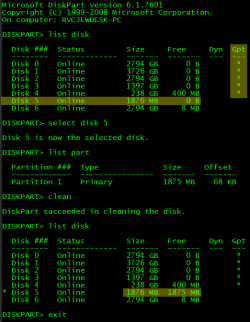
You need to use diskpart to erase that disk then, MAKE SURE TO ONLY SELECT THE CORRECT DISK IN DISKPART.

Open an elevated command prompt window. (win key then type cmd and then right click and run as administrator)
Type "diskpart" (without the " then hit enter)
Type "list disk" then enter
Look for the disk with the right size (yours looks like it will be disk 1) then type "select disk #" (# being the disk # on the list)
Then type "list part" enter
Look at the partitions and again make sure it is the correct disk
Now type"clean" (ONLY IF YOUR SURE IT'S THE RIGHT DISK # SELECTED) then enter
Then type "exit" enter and "exit" again
Now look in device management to change it to MBR then try it again with the installer.

The right area shows drives that are marked as GPT, and after cleaning the drive should have the same free space as capacity.
 

Attachments

  • diskpart.PNG
    diskpart.PNG
    25.1 KB · Views: 9

My Computer My Computer

At a glance

10 Pro x64Ryzen 9 3900X64GB(4x16GB) DDR4EVGA 1080ti FTW3
Computer type
PC/Desktop
Computer Manufacturer/Model Number
Custom
OS
10 Pro x64
CPU
Ryzen 9 3900X
Motherboard
Asrock x370 Tachi
Memory
64GB(4x16GB) DDR4
Graphics Card(s)
EVGA 1080ti FTW3
Sound Card
ASUS Xonar Essence STX (V4 Bursons), ODAC rev B, NFB-11, O2
Monitor(s) Displays
3xASUS PB278Q/R, Optoma HD142X
Screen Resolution
3x1440p, 1080p
Hard Drives
512GB 850 EVO(OS, Programs)
4TB (Movies)
3TB (Downloads)
3TB (Programs)
1TB HDD (Games)
2x6TB R1 (videos)
PSU
AX760
Case
Fractal Define R5
Cooling
NH-D15S
Keyboard
Massdrop Ctrl with Box Navy's
Mouse
G903, Alioth XXL Mat
Internet Speed
280/40
Antivirus
MBAM, ESET
Browser
Canary 64 Bit
Other Info
I also own a Thinkpad P50 Xeon 4K, X220T, X1C5
Back
Top