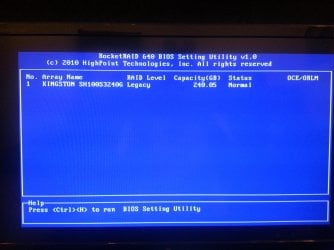
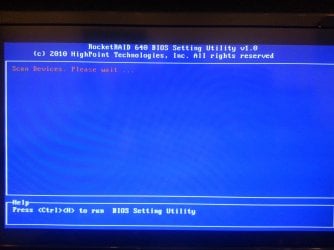
PCI Express Page when i start the PC!

DaYiM

New member
Member
VIP
Local time
1:59 PM
Messages
130
Hello,
I have installed PCI-Express to my Rampage IV MotherBoard,
Right know i have only connected one SSD to it, but the issue
here that when i start my pc these two pictures appear to me,
the first picture "Scanning" takes more than a minute then the
connected SSD appears on the list!
Is there a way to Bypass this process every time i start my PC?
there is option to enter the BIOS Utility, but i don't want to miss
things up before asking the professionals!
PS: i specified this SSD for GAMES,
Is it O.K? or well it effect my GAMING Experience?
Thanks & Best REGARDS.
 

Attachments
  • 20120822_003527.jpg
    20120822_003527.jpg
    650.7 KB · Views: 6
  • 20120822_003548.jpg
    20120822_003548.jpg
    606.2 KB · Views: 5

My Computer My Computer

At a glance

Windows 7, 64BitIntel Mobile Core 2 Duo T9600 @ 2.80GHz8.0GB Dual-Channel DDR3 @ 531MHz1024MB GeForce 9800M GTX (Toshiba)
Computer Manufacturer/Model Number
Qosmio X300-13O
OS
Windows 7, 64Bit
CPU
Intel Mobile Core 2 Duo T9600 @ 2.80GHz
Motherboard
TOSHIBA KSRAA (U2E1)
Memory
8.0GB Dual-Channel DDR3 @ 531MHz
Graphics Card(s)
1024MB GeForce 9800M GTX (Toshiba)
Sound Card
Realtek High Definition Audio
Monitor(s) Displays
Generic PnP Monitor on NVIDIA GeForce 9800M GTX
Screen Resolution
Generic PnP Monitor @ 1440x900
Hard Drives
125GB KINGSTON SV100S2128G ATA Device (SATA)
488GB Seagate ST95005620AS ATA Device (SATA)
I am confused about: "I have installed PCI-Express to my Rampage IV MotherBoard".

Is this the nVidia graphics accelerator software?

It's confusing because PCI Express is a system bus spec, so unless you used a solder iron and a box of electronics parts I don't see how you could "Install" that onto your motherboard!

More info please.
 

My Computer My Computer

At a glance

Windows 7 64 Bit Home Premium SP1i7-3820GSkill F3-14900CL9Q - 16GBEVGA GeForce GTX660 - Driver 352.86
Computer type
PC/Desktop
Computer Manufacturer/Model Number
Home Built - Jan 2013
OS
Windows 7 64 Bit Home Premium SP1
CPU
i7-3820
Motherboard
Asus P9X79-PRO - Bios 4608
Memory
GSkill F3-14900CL9Q - 16GB
Graphics Card(s)
EVGA GeForce GTX660 - Driver 352.86
Sound Card
On board Realtek ALC898
Monitor(s) Displays
Acer S271HL
Screen Resolution
1920 x 1080
Hard Drives
#1- Samsung 840 Pro Series
#2- Western Digital WD1002FAEX Sata3 Black
#3- Western Digital WD1002FAEX Sata3 Black
PSU
Corsair CMPSU-850TX-V2 - 850 watt (by Seasonic)
Case
Corsair Obsidian 550D
Cooling
Standard 3 120mm case fans, Cooler Master Hyper 212 EVO
Keyboard
MS KC-0405
Mouse
Intellimouse 5-button
Internet Speed
56 Mbits/Sec (on a good day)
Antivirus
Avast & Malwarebytes
Browser
Firefox
Other Info
Asus DVD - DRW-24B1ST 24X
Sorry about that; i have installed "SATA Port PCI-Express 2.0" on my MotherBoard
 

My Computer My Computer

At a glance

Windows 7, 64BitIntel Mobile Core 2 Duo T9600 @ 2.80GHz8.0GB Dual-Channel DDR3 @ 531MHz1024MB GeForce 9800M GTX (Toshiba)
Computer Manufacturer/Model Number
Qosmio X300-13O
OS
Windows 7, 64Bit
CPU
Intel Mobile Core 2 Duo T9600 @ 2.80GHz
Motherboard
TOSHIBA KSRAA (U2E1)
Memory
8.0GB Dual-Channel DDR3 @ 531MHz
Graphics Card(s)
1024MB GeForce 9800M GTX (Toshiba)
Sound Card
Realtek High Definition Audio
Monitor(s) Displays
Generic PnP Monitor on NVIDIA GeForce 9800M GTX
Screen Resolution
Generic PnP Monitor @ 1440x900
Hard Drives
125GB KINGSTON SV100S2128G ATA Device (SATA)
488GB Seagate ST95005620AS ATA Device (SATA)
I see. You installed a SATA Port PCI-Express 2.0 add on card in your computer.

And you are trying to run your SSD on the PCI-Express card?

EDIT: from your system specs it looks like you have a laptop. Is this a different computer you are working on?
 

My Computer My Computer

At a glance

Windows 7 64 Bit Home Premium SP1i7-3820GSkill F3-14900CL9Q - 16GBEVGA GeForce GTX660 - Driver 352.86
Computer type
PC/Desktop
Computer Manufacturer/Model Number
Home Built - Jan 2013
OS
Windows 7 64 Bit Home Premium SP1
CPU
i7-3820
Motherboard
Asus P9X79-PRO - Bios 4608
Memory
GSkill F3-14900CL9Q - 16GB
Graphics Card(s)
EVGA GeForce GTX660 - Driver 352.86
Sound Card
On board Realtek ALC898
Monitor(s) Displays
Acer S271HL
Screen Resolution
1920 x 1080
Hard Drives
#1- Samsung 840 Pro Series
#2- Western Digital WD1002FAEX Sata3 Black
#3- Western Digital WD1002FAEX Sata3 Black
PSU
Corsair CMPSU-850TX-V2 - 850 watt (by Seasonic)
Case
Corsair Obsidian 550D
Cooling
Standard 3 120mm case fans, Cooler Master Hyper 212 EVO
Keyboard
MS KC-0405
Mouse
Intellimouse 5-button
Internet Speed
56 Mbits/Sec (on a good day)
Antivirus
Avast & Malwarebytes
Browser
Firefox
Other Info
Asus DVD - DRW-24B1ST 24X
Actually i bought this one for internal use for Laptop,
but know after 6 months of use i decided to erase the windows
on it and make it specified for games on my Costomized PC!
Is this Wrong? How to make it Right? and how to bypass this Screen?
 

My Computer My Computer

At a glance

Windows 7, 64BitIntel Mobile Core 2 Duo T9600 @ 2.80GHz8.0GB Dual-Channel DDR3 @ 531MHz1024MB GeForce 9800M GTX (Toshiba)
Computer Manufacturer/Model Number
Qosmio X300-13O
OS
Windows 7, 64Bit
CPU
Intel Mobile Core 2 Duo T9600 @ 2.80GHz
Motherboard
TOSHIBA KSRAA (U2E1)
Memory
8.0GB Dual-Channel DDR3 @ 531MHz
Graphics Card(s)
1024MB GeForce 9800M GTX (Toshiba)
Sound Card
Realtek High Definition Audio
Monitor(s) Displays
Generic PnP Monitor on NVIDIA GeForce 9800M GTX
Screen Resolution
Generic PnP Monitor @ 1440x900
Hard Drives
125GB KINGSTON SV100S2128G ATA Device (SATA)
488GB Seagate ST95005620AS ATA Device (SATA)
Back
Top