PCI Simple Communications Controller is not installed

Joyce795

New member
Local time
4:44 AM
Messages
4
I have Windows 7 Home Premium 64 bit SP1 it shows the explanation point in the yellow triangle but when I try and trouble shoot it says the drivers for the device are not installed. Windows says it cant find the drivers and to check with the manufacturer but I don't know what that means, are they talking about Intel, Wolfdale or what. This may not be clear but I am not computer literate and have been fussing with this for some time trying to make windows recognize my TD 1010 Tablet either with the usb cable or over wi fi
 

My Computer

Computer type
PC/Desktop
Computer Manufacturer/Model Number
Custom
OS
Windows 7 Home Premium 64 bit SPI
CPU
Intel Core 2 duo [email protected] 36 C Wolfdale 45nm Technology
Motherboard
Intel Corporation DG45ID (LGA775)
Memory
4.0GB Dual Channel DDR2 @ 400MHz (6-6-6-18)
Graphics Card(s)
Intel(R) G45/G43 Express chipsetIntel(R) G45/G43 Express chi
Monitor(s) Displays
Acer @1024x768
Hard Drives
488GB Western Digital WDC WD5000AADS-OOS9B0 ATA Device (IDE)
Browser
google chrome
Other Info
Also DOPO Tablet Model TD 1010 Android version4.0.4
Kernel Version 3.0.8+
Try updating the Chipset Driver for your PC .
 

My Computer

Computer Manufacturer/Model Number
Custom Built
OS
Windows 7 Ultimate 32-Bit & Windows 7 Ultimate 64-Bit
CPU
Intel Core i7 CPU 950 @ 3.07GHz
Motherboard
ASUS P6T DELUXE V2
Memory
OCZ 6GB (3 x 2GB) 240-Pin DDR3 SDRAM DDR3 1600 OCZ3X1600R2
Graphics Card(s)
ATI Radeon HD 5700 Series
Sound Card
OnBoard
Hard Drives
WD6400AACS-00M3B0 (640GB SATA )
PSU
CORSAIR 850w
Case
NZXT LEXA
Cooling
Intel Stock Heatsink Fan
Keyboard
Microsoft Wireless Laser Keyboard 7000
Mouse
Microsoft Wireless Laser Mouse 7000
I have Windows 7 Home Premium 64 bit SP1 it shows the explanation point in the yellow triangle but when I try and trouble shoot it says the drivers for the device are not installed. Windows says it cant find the drivers and to check with the manufacturer but I don't know what that means, are they talking about Intel, Wolfdale or what. This may not be clear but I am not computer literate and have been fussing with this for some time trying to make windows recognize my TD 1010 Tablet either with the usb cable or over wi fi

Hi Joyce795,

Welcome to Seven forums.

Please let us know the exact model number of your system. Also, right click on the device and select properties. Go to details and select hardware id and let us know the numbers written in the box so we can try and locate the drivers.

Also, let us know what happens when you connect the TAB through a USB port.

Kindly update your system specs here by following this.

Keep us posted with the results so we can advise you further.
 

My Computer

Computer type
PC/Desktop
OS
Winndows 7 32 bit
If I turn on the tablet, load the camera program and then plug into the USB, I get a small window that allows me to load my pictures to the computer. However it has only one option which is to name the pictures, but since there is no way to stop it from loading all of the pictures every time, that is a bit redundant. The main problem is that when it is done loading it locks the computer forcing a reboot. Also the tablet does not appear in devices, I am not doing something correctly I expect, but these devices come with practically no directions. I updated my info as requested. Thank you.
 

My Computer

Computer type
PC/Desktop
Computer Manufacturer/Model Number
Custom
OS
Windows 7 Home Premium 64 bit SPI
CPU
Intel Core 2 duo [email protected] 36 C Wolfdale 45nm Technology
Motherboard
Intel Corporation DG45ID (LGA775)
Memory
4.0GB Dual Channel DDR2 @ 400MHz (6-6-6-18)
Graphics Card(s)
Intel(R) G45/G43 Express chipsetIntel(R) G45/G43 Express chi
Monitor(s) Displays
Acer @1024x768
Hard Drives
488GB Western Digital WDC WD5000AADS-OOS9B0 ATA Device (IDE)
Browser
google chrome
Other Info
Also DOPO Tablet Model TD 1010 Android version4.0.4
Kernel Version 3.0.8+
If I turn on the tablet, load the camera program and then plug into the USB, I get a small window that allows me to load my pictures to the computer. However it has only one option which is to name the pictures, but since there is no way to stop it from loading all of the pictures every time, that is a bit redundant. The main problem is that when it is done loading it locks the computer forcing a reboot. Also the tablet does not appear in devices, I am not doing something correctly I expect, but these devices come with practically no directions. I updated my info as requested. Thank you.

Hi Joyce795,

Thanks for your reply. First of all let me know if query regarding driver for PCI simple communication device has been resolved and if yes then kindly share with us on how you managed to resolve the same.

I also see that you have issues connecting this Android ICS based tablet to the system. Once you connect this table with the USB cable do you get a message in notification tray that it is connected as USB storage.

It should give you 3 options 1.) USB storage 2.) Media 3.) Camera. Select USB storage and then turn on USB storage.


Then go to MY computer and you would be able to see your phone memory and memory card reader as drives and you should be able to transfer pictures.

Please check the same and let us know the results of the same. Keep us posted with the results so we can advise you further.
 

My Computer

Computer type
PC/Desktop
OS
Winndows 7 32 bit
Hi SandeepP, I have not resolved the problem with the PCI. When I right click on PC under Devices it says PCI Simple Communications Controller doesn't have driver. Device function summary Manufacturer unknown. Location PCI bus 0 Device 3 function 0. The drivers for this device are not installed (code 28) Says to check update driver but window for update is greyed out. According to Speccy my driver version for Intel(R) G45/G43 Express Chipset is memory type 2 Driver Version 8.15.10.2202. I tried to find driver updates on line but everything came with so many threats and warnings they scared me off. After I connect the tablet with usb cable the PC puts up an import pictures and videos window, it does not recognize the tablet as anything but a camera, I can now download pictures from the tablet but nothing else, I thought that it should be possible to download files etc from the computer to the tablet etc. I will understand if you have to give up on me, it would be really nice if equipment were to come with some directions. Thank you so much.
 

My Computer

Computer type
PC/Desktop
Computer Manufacturer/Model Number
Custom
OS
Windows 7 Home Premium 64 bit SPI
CPU
Intel Core 2 duo [email protected] 36 C Wolfdale 45nm Technology
Motherboard
Intel Corporation DG45ID (LGA775)
Memory
4.0GB Dual Channel DDR2 @ 400MHz (6-6-6-18)
Graphics Card(s)
Intel(R) G45/G43 Express chipsetIntel(R) G45/G43 Express chi
Monitor(s) Displays
Acer @1024x768
Hard Drives
488GB Western Digital WDC WD5000AADS-OOS9B0 ATA Device (IDE)
Browser
google chrome
Other Info
Also DOPO Tablet Model TD 1010 Android version4.0.4
Kernel Version 3.0.8+

My Computer

Computer type
PC/Desktop
Computer Manufacturer/Model Number
self build
OS
win 7 ultimate32bit, Win8.1pro wmc 32bit
CPU
amd phenom x4 9600
Motherboard
asus m2n32-sli deluxe
Memory
corsair twinxs 2x2gb
Graphics Card(s)
2x nvidia 1gb 8500gt
Sound Card
onboard
Monitor(s) Displays
23" PB Viseo 233d
Screen Resolution
1920x1080
Hard Drives
maxtor sata 500gb
maxtor sata 320gb
fujitsu sata200gb
PSU
oryxx tornado 750w
Case
thermaltake xaser lll
Cooling
artic freezer64 pro + 7 case fans
Hi SandeepP, I have not resolved the problem with the PCI. When I right click on PC under Devices it says PCI Simple Communications Controller doesn't have driver. Device function summary Manufacturer unknown. Location PCI bus 0 Device 3 function 0. The drivers for this device are not installed (code 28) Says to check update driver but window for update is greyed out. According to Speccy my driver version for Intel(R) G45/G43 Express Chipset is memory type 2 Driver Version 8.15.10.2202. I tried to find driver updates on line but everything came with so many threats and warnings they scared me off. After I connect the tablet with usb cable the PC puts up an import pictures and videos window, it does not recognize the tablet as anything but a camera, I can now download pictures from the tablet but nothing else, I thought that it should be possible to download files etc from the computer to the tablet etc. I will understand if you have to give up on me, it would be really nice if equipment were to come with some directions. Thank you so much.

Hi Joyce795,

Please download the drivers suggested by pebbly and let us know how it goes. Also, if the issue persists right click on PCI simple communication device. Then select properties. On the new page click on details.

There you can select Hardware Device id and then provide us with the numbers written in box below. If you face any issues then please post a screenshot explaining details of the issue. Check this for posting the screenshot:

http://www.sevenforums.com/tutorials/9733-screenshots-files-upload-post-seven-forums.html

Also, most of the Android devices once connected to the system would given you option on how you want it to interact with the system.

Please connect this tab to a different system and let me know the results. Keep us posted with the results so we can advise you further.
 

My Computer

Computer type
PC/Desktop
OS
Winndows 7 32 bit
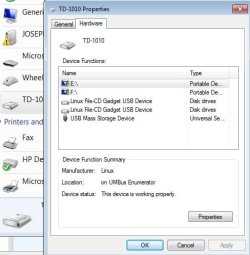
Thanks pebbly, I have downloaded the drivers you suggested which seem to have helped windows 7 to recognize the tablet, when it is plugged in with the usb it shows the PCI and I can make it safe to remove the TD 1010 etc. However the troubleshooter on the computer still does not recognize the PCI and shows the error mark. As far as the tablet goes it appears I have usb mass storage, and camera. I still have not figured out how to download particular files. The computer system does not show a PCI communications device when I search so I was unable to select properties and details. I appreciate all the time everyone has spent trying to help me.
 

Attachments

  • TD-1010 Hardware.jpg
    TD-1010 Hardware.jpg
    33.9 KB · Views: 12

My Computer

Computer type
PC/Desktop
Computer Manufacturer/Model Number
Custom
OS
Windows 7 Home Premium 64 bit SPI
CPU
Intel Core 2 duo [email protected] 36 C Wolfdale 45nm Technology
Motherboard
Intel Corporation DG45ID (LGA775)
Memory
4.0GB Dual Channel DDR2 @ 400MHz (6-6-6-18)
Graphics Card(s)
Intel(R) G45/G43 Express chipsetIntel(R) G45/G43 Express chi
Monitor(s) Displays
Acer @1024x768
Hard Drives
488GB Western Digital WDC WD5000AADS-OOS9B0 ATA Device (IDE)
Browser
google chrome
Other Info
Also DOPO Tablet Model TD 1010 Android version4.0.4
Kernel Version 3.0.8+
The PCI Simple Comm Device (PCI-SCD) has nothing to do with USB devices. PCI-SCD is used by Intel Management Engine Interface or AMT for short. This is special hardware built into all recent Intel chipsets that allows remote control of your PC. (Total control, I might add.) This is separate from Remote Diagnostics offered by many OEMs. If your PC is not part of a business network, it's not required and it's better to disable the device and remove the drivers. It consumes resources even if not used. The warning will still be displayed in Device Manager but it is of no concern.

As far as your USB connected tablet, it appears to show as a removable drive and should be accessible through Windows Explorer. Does that show any files located on the tablet?


Added: I should mention that if you disable PCI-SCD, you should go to the Windows Update link and "Hide" the Intel Management Engine drivers or they will attempt to install on updates.
 
Last edited:

My Computer

Computer type
PC/Desktop
Computer Manufacturer/Model Number
Built 2/11/2011
OS
Windows 7 Pro-x64
CPU
i7-2600 3.4GHz - 3.8GHz Turbo
Motherboard
Intel DH67BL-B3
Memory
8Gb - 2x4GB, Muskin 991770 PC3-1333
Graphics Card(s)
Integrated Intel HD 2000
Sound Card
Integrated Intel 10.1 HD, RealTek ALC892
Monitor(s) Displays
Asus LCD VH222H, Haier HL24XSL2a
Screen Resolution
1920x1080, 1920x1080
Hard Drives
Crucial SSD C300-128Gb,
Western Digital WD5002AALX - 500Gb,
Western Digital WD7501AALS - 750Gb
PSU
Seasonic 650W 80+ Gold Modular
Case
Rosewill Defender
Cooling
Stock CPU, Four 120mm case fans, PCH fan added
Keyboard
Logitech EX100 Y-RBH94 Wireless
Mouse
Logitech EX100 M-RCE95 Wireless
Internet Speed
3.0/1.5 Mbs
Antivirus
Microsoft Security Essentials
Browser
Microsoft Internet Explorer 11
Other Info
Antec Veris Premier-Multimedia IR Station,
Cyber Accoustics-3602 Speakers,
AFT XM-5U Card Reader,
Hauppauge TV-HVR-2250,
Sony LX300 USB Turntable
Thanks pebbly, I have downloaded the drivers you suggested which seem to have helped windows 7 to recognize the tablet, when it is plugged in with the usb it shows the PCI and I can make it safe to remove the TD 1010 etc. However the troubleshooter on the computer still does not recognize the PCI and shows the error mark. As far as the tablet goes it appears I have usb mass storage, and camera. I still have not figured out how to download particular files. The computer system does not show a PCI communications device when I search so I was unable to select properties and details. I appreciate all the time everyone has spent trying to help me.

Hi Joyce795,

Thanks for your reply. Please let us know once you connect the tablet to the system does the tab provides various options.

As you need to bring down the notification bar on the tab. Then you need to turn on the USB storage on the TAB, so you can access the storage of the TAB on the system.

If possible please try to connect this TAB to a different system so you can isolate the point of failure.

Keep us posted with the results so we can advise you further.
 

My Computer

Computer type
PC/Desktop
OS
Winndows 7 32 bit
Back
Top