PDF File

RonBin79

New member
Member
VIP
Local time
10:04 AM
Messages
311
Location
West Sussex
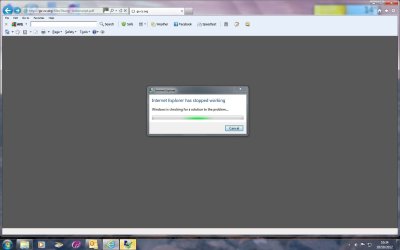
When I try to open a PDF from the internet, I get a black screen and a message saying Internet Explorer is closing down, see screen shot. How do I overcome this please??
RonBin79
 

Attachments

  • PDF .jpg
    PDF .jpg
    54.3 KB · Views: 18

My Computer

Computer Manufacturer/Model Number
Dell XP8300
OS
Windows Seven Premium
CPU
Intel Core i5-2300
Motherboard
Unknown
Memory
8GB
Graphics Card(s)
1GB ATI Raedon HD 5450
Sound Card
Integrated 7.1 with THX TrueStudio
Monitor(s) Displays
Dell 17"
Hard Drives
1 Terrabyte Serial ATA
Case
Dell (Metal)
Cooling
None
Keyboard
Dell
Mouse
Dell Laser
Internet Speed
2.8Gb
It sounds like you may not have a PDF reader installed on your computer. There are several free readers available.

Adobe

Foxit

Nitro

Sumatra

Adobe has been having a lot of security issues lately and it's a fairy large download. I don't personally recommend it. But whichever product you decide to use, make sure to read all the fine print. Since these are all free, they try to install other unnecessary "stuff" in the download. "Stuff" like extra toolbars, other programs, etc. Each free product lets you choose a "custom" install so you can uncheck all those unnecessary add-ons.

If you have questions it's better to post back before installing anything. :)
 

My Computer

Computer type
Laptop
Computer Manufacturer/Model Number
Sony Vaio VPCEB47GM Laptop
OS
Win 7 Pro 64-bit
CPU
Intel i5 2.4 Ghz
Memory
8GB DDR3
Graphics Card(s)
Intel HD 3000
Sound Card
IDT High Definition
Monitor(s) Displays
15.6 WGXA Anti-Glare LED
Screen Resolution
1280x800
Hard Drives
640Gb 7200rpm
Antivirus
MSE
Browser
Opera (primary) with IE9 backup
I downloaded the lastest Adobe Reader and tried both Internet Explorer and Google all to no avail, I still get the black screen. I still have Adobe Acrobat5 installed, is that a reader and can I uninstall it please?

I uninstalled the latest adobe Reader and at present have no reader at all. Can anyone tell me please, what my next best course of action is apart from putting the computer on the tip??

RonBin79 (now 80!)
 

My Computer

Computer Manufacturer/Model Number
Dell XP8300
OS
Windows Seven Premium
CPU
Intel Core i5-2300
Motherboard
Unknown
Memory
8GB
Graphics Card(s)
1GB ATI Raedon HD 5450
Sound Card
Integrated 7.1 with THX TrueStudio
Monitor(s) Displays
Dell 17"
Hard Drives
1 Terrabyte Serial ATA
Case
Dell (Metal)
Cooling
None
Keyboard
Dell
Mouse
Dell Laser
Internet Speed
2.8Gb
Hi,

I can see you have an AVG toolbar, can you please disable it and try opening a PDF then.

Disable the toolbar:
In Internet Explorer, Click Tools >> Manage add-ons >> Click on the AVG toolbar and click 'Disable' on the bottom right.


See if that helps.


Regards,
Jamie
 

My Computer

Computer type
PC/Desktop
Computer Manufacturer/Model Number
Self Built
OS
Windows 8.1 Pro x64
CPU
Intel Core i5-2500K @ 3.30GHz - S1155
Motherboard
Asus P8P67 LE Rev3, Intel P67, S115
Memory
8GB Corsair DDR3 XMS3, PC3-12800
Graphics Card(s)
NVIDIA GeForce GTX 650
Sound Card
On-Board
Monitor(s) Displays
3 x 24" {Extended Display}
Screen Resolution
1920 x 1080
Hard Drives
300GB Seagate Barracuda 7200
PSU
550W Coolermaster GX550
Case
Silverstone Precision PS04B
Cooling
Stock
Keyboard
Logitech K120
Mouse
World of Warcraft Cataclysm MMO Gaming Mouse
Internet Speed
80 MB
Antivirus
MSE / Windows Defender
Browser
Chrome
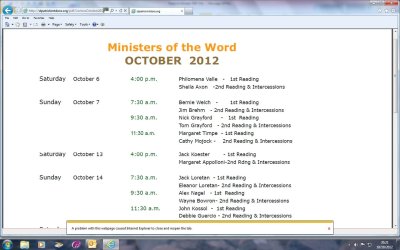
I did as requested and managed to open a PDF file via Google however, Internet Explorer jumped in and said it was closing down but at the same time, the page I had selected appeared on my screen, please see screen shot.

Shall I now enable my AVG toolbar and uninstall Acrobat5 please??

Regards,

RonBin79
 

Attachments

  • PDF2.jpg
    PDF2.jpg
    111.9 KB · Views: 5

My Computer

Computer Manufacturer/Model Number
Dell XP8300
OS
Windows Seven Premium
CPU
Intel Core i5-2300
Motherboard
Unknown
Memory
8GB
Graphics Card(s)
1GB ATI Raedon HD 5450
Sound Card
Integrated 7.1 with THX TrueStudio
Monitor(s) Displays
Dell 17"
Hard Drives
1 Terrabyte Serial ATA
Case
Dell (Metal)
Cooling
None
Keyboard
Dell
Mouse
Dell Laser
Internet Speed
2.8Gb
Adobe Reader - I would update to the latest version of adobe reader which is now Xl - Adobe - Adobe Reader download - All versions

AVG Toolbar - I would keep it disabled or remove it completely (Toolbars have a tendency to cause issues)

Regards,
Jamie
 

My Computer

Computer type
PC/Desktop
Computer Manufacturer/Model Number
Self Built
OS
Windows 8.1 Pro x64
CPU
Intel Core i5-2500K @ 3.30GHz - S1155
Motherboard
Asus P8P67 LE Rev3, Intel P67, S115
Memory
8GB Corsair DDR3 XMS3, PC3-12800
Graphics Card(s)
NVIDIA GeForce GTX 650
Sound Card
On-Board
Monitor(s) Displays
3 x 24" {Extended Display}
Screen Resolution
1920 x 1080
Hard Drives
300GB Seagate Barracuda 7200
PSU
550W Coolermaster GX550
Case
Silverstone Precision PS04B
Cooling
Stock
Keyboard
Logitech K120
Mouse
World of Warcraft Cataclysm MMO Gaming Mouse
Internet Speed
80 MB
Antivirus
MSE / Windows Defender
Browser
Chrome
Just another little point to add, please do not install the McAfee program which is a optional program with the Adobe Reader XI package, as McAfee is known to cause problems within Windows 7.
 

My Computer

Computer type
Laptop

My Computer

Computer type
PC/Desktop
Computer Manufacturer/Model Number
Self Built
OS
Windows 8.1 Pro x64
CPU
Intel Core i5-2500K @ 3.30GHz - S1155
Motherboard
Asus P8P67 LE Rev3, Intel P67, S115
Memory
8GB Corsair DDR3 XMS3, PC3-12800
Graphics Card(s)
NVIDIA GeForce GTX 650
Sound Card
On-Board
Monitor(s) Displays
3 x 24" {Extended Display}
Screen Resolution
1920 x 1080
Hard Drives
300GB Seagate Barracuda 7200
PSU
550W Coolermaster GX550
Case
Silverstone Precision PS04B
Cooling
Stock
Keyboard
Logitech K120
Mouse
World of Warcraft Cataclysm MMO Gaming Mouse
Internet Speed
80 MB
Antivirus
MSE / Windows Defender
Browser
Chrome
PDF File problem still exists

I am running Windows7 Home Premium with IE9. I have disabled my anti virus programme and tried to download Acrobat Reader X1 four or five times, restarting my machine on each ocassion!! Subsequently, when I try to download a PDF file from the internet, as soon as the Adobe black screen appears on my machine IE9 decides there is a fault with the page and tries to find a solution, which it can't. After a while it tries to close the programme but cannot do that either.

Once or twice I have got as far as being presented with the Adobe licence page but as soon as I try to click the accept button, up comes IE9 again to tell me it is closing the programe because of the page causing a fault. Windows is still looking for a solution and keeps repeatedly telling me it is closing the programme:huh:

Is Adobe Reader X1 not compatible with IE9 and if not is there a different Reader I can use please? Is it safe for me to uninstall Acrobat Reader5 please, presumabley it is redundant now??

Regards,

RonBin79

 
Last edited by a moderator:

My Computer

Computer Manufacturer/Model Number
Dell XP8300
OS
Windows Seven Premium
CPU
Intel Core i5-2300
Motherboard
Unknown
Memory
8GB
Graphics Card(s)
1GB ATI Raedon HD 5450
Sound Card
Integrated 7.1 with THX TrueStudio
Monitor(s) Displays
Dell 17"
Hard Drives
1 Terrabyte Serial ATA
Case
Dell (Metal)
Cooling
None
Keyboard
Dell
Mouse
Dell Laser
Internet Speed
2.8Gb
I am running Windows7 Home Premium with IE9. I have disabled my anti virus programme and tried to download Acrobat Reader X1 four or five times, restarting my machine on each ocassion!! Subsequently, when I try to download a PDF file from the internet, as soon as the Adobe black screen appears on my machine IE9 decides there is a fault with the page and tries to find a solution, which it can't. After a while it tries to close the programme but cannot do that either.

Once or twice I have got as far as being presented with the Adobe licence page but as soon as I try to click the accept button, up comes IE9 again to tell me it is closing the programe because of the page causing a fault. Windows is still looking for a solution and keeps repeatedly telling me it is closing the programme:huh:

Is Adobe Reader X1 not compatible with IE9 and if not is there a different Reader I can use please? Is it safe for me to uninstall Acrobat Reader5 please, presumabley it is redundant now??

Regards,

RonBin79

PROBLEMS opening PDF in IE 9 or X

You may want to read this thread for any solutions, there is a reason stated within the thread too, and it seems the Adobe Reader plugin has not been made compatible with IE9, a update was said to going/has been released which may resolve the issue.
 

My Computer

Computer type
Laptop
PDF Link File

Thanks for your reply. I am not too sure about using the PDF Fix It link shown at the bottom of your reply. Out of pure frustration, I downloaded Adobe Reader 9.4, I have not had time to see if that works yet but when I did click on the Fix It link I was not sure what option to use??

Regards,

RonBin79
 

My Computer

Computer Manufacturer/Model Number
Dell XP8300
OS
Windows Seven Premium
CPU
Intel Core i5-2300
Motherboard
Unknown
Memory
8GB
Graphics Card(s)
1GB ATI Raedon HD 5450
Sound Card
Integrated 7.1 with THX TrueStudio
Monitor(s) Displays
Dell 17"
Hard Drives
1 Terrabyte Serial ATA
Case
Dell (Metal)
Cooling
None
Keyboard
Dell
Mouse
Dell Laser
Internet Speed
2.8Gb
Tell us if Adobe Reader 9.4 works, and if it doesn't have you tried using Google Chrome or a different browser?

I'm using Google Chrome with Adobe Reader X (need to get the newer version soon) and have had no problems with .PDF files.
 

My Computer

Computer type
Laptop
Blue Robot,

Yes, Acrobat REader 9.5 works fine after I used the MicroSoft Fix It link. I can now save a PDF file from the internet to my desck toop then open Acrobat Reader 9.5 and then the file. It all works well.

Regards
RonBin79
 

My Computer

Computer Manufacturer/Model Number
Dell XP8300
OS
Windows Seven Premium
CPU
Intel Core i5-2300
Motherboard
Unknown
Memory
8GB
Graphics Card(s)
1GB ATI Raedon HD 5450
Sound Card
Integrated 7.1 with THX TrueStudio
Monitor(s) Displays
Dell 17"
Hard Drives
1 Terrabyte Serial ATA
Case
Dell (Metal)
Cooling
None
Keyboard
Dell
Mouse
Dell Laser
Internet Speed
2.8Gb
Blue Robot,

Yes, Acrobat REader 9.5 works fine after I used the MicroSoft Fix It link. I can now save a PDF file from the internet to my desck toop then open Acrobat Reader 9.5 and then the file. It all works well.

Regards
RonBin79

That's good to know, hopefully Adobe bring out a patch for the IE9 compatibility issues with the later versions.
 

My Computer

Computer type
Laptop
Back
Top